
The mismatch is more than a cosmetic metadata problem. Microsoft’s own roadmap defines “In development” as work still being developed and tested, while “Launched” is the status for features fully released to applicable customers. The June date therefore reads as an earlier release target, not reliable evidence that the capability has completed rollout. M365 Admin and Cloudscout, which mirror the original roadmap record, repeat the same June target and in-development status; they do not provide an independent confirmation of a completed launch.
For IT teams, the practical conclusion is straightforward: do not build a production process around folder-level PowerPoint Agent Mode grounding until the feature appears in the tenant and Microsoft changes the roadmap item to Rolling out or Launched.
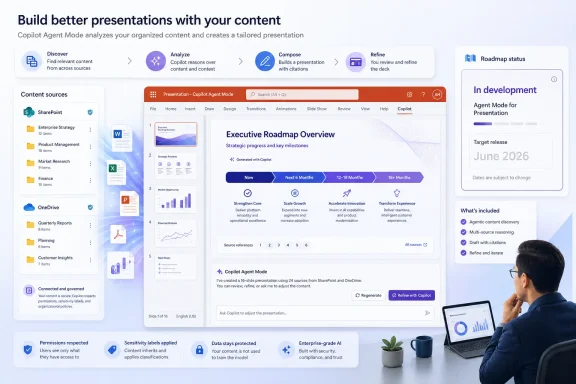 What PowerPoint’s planned folder references change
The roadmap description is brief: users will be able to reference files stored in SharePoint libraries and OneDrive folders while creating a presentation with Copilot using Agent Mode in PowerPoint. The important new unit is the folder or library, rather than an individually selected document.
That could make a material difference for teams assembling recurring presentations from distributed work. A sales operations group might point PowerPoint at a folder containing current account briefs; a project office might use a SharePoint library holding status reports, milestones, and risks; an IT team could work from an approved set of service-review documents. Instead of uploading local copies or attaching a small selection of files for each run, the presentation agent could be given a defined content location.
Microsoft has already documented comparable knowledge-source behavior for agents built in Microsoft 365 Copilot. Its Microsoft Learn guidance says SharePoint and OneDrive sources respect the user’s existing permissions and sensitivity labels, and that administrators using Restricted SharePoint Search cannot use SharePoint as an agent knowledge source. Those rules are useful context, but Microsoft has not published corresponding PowerPoint-specific documentation for Roadmap ID 555895 that spells out the limits, indexing behavior, file support, or compliance exceptions for this particular experience.
That gap matters. “Reference a folder” is not the same as promising that every file in that folder will be read in full, included in every response, or usable for every slide. In enterprise content stores, folders can contain stale drafts, duplicate reports, unsupported formats, records subject to retention policies, and items to which the presentation author has only partial access. A successful rollout will depend as much on content hygiene and permissions as on the PowerPoint interface.
The roadmap’s June date is not a launch notice
The item was created on March 2, 2026, lists Desktop as its platform, Worldwide (Standard Multi-Tenant) as its cloud scope, and General Availability as its release ring. It was updated on August 21, 2026. Yet it retains the In development status.
Microsoft’s roadmap routinely describes future plans, and its dates are explicitly estimates subject to change. That is why the status field should carry more weight than an old target month when the two conflict. A card that remains in development after its listed general-availability month may reflect a delayed rollout, a staged implementation, incomplete availability, or simply a record that has not been reconciled. Microsoft has not explained which of those applies to Roadmap ID 555895.
No separate Microsoft 365 Message Center post, PowerPoint support article, or Microsoft Learn deployment guide surfaced in the available record to clarify whether the feature is live, which update channel carries it, or whether it requires a particular Copilot entitlement. The lack of those details prevents a responsible claim that the capability is broadly available today.
This is particularly important because Agent Mode and the newer Word, Excel, and PowerPoint agents have been described through several overlapping Microsoft product names. Microsoft Learn says the Word, Excel, and PowerPoint Agents can retrieve organizational content that a user is permitted to access and that generated files are stored in OneDrive. Those broader platform statements do not establish that PowerPoint Agent Mode supports choosing a SharePoint library or OneDrive folder as an explicit reference source.
Permissions are likely to define the real rollout experience
If Microsoft follows the permissions model it documents for other Microsoft 365 Copilot knowledge sources, a folder reference should not become a shortcut around SharePoint, OneDrive, Purview sensitivity labels, or existing sharing controls. Users should expect Copilot to work only with content they can already access, rather than exposing a department library merely because someone references its location in a prompt.
That limits one obvious security concern, but it does not eliminate governance work. A presentation can synthesize information from many documents into a new artifact, and that artifact may be saved, shared, exported, or presented to a wider audience than the source material. Teams that use Agent Mode for business reviews, board materials, customer presentations, or incident reporting should verify how their sensitivity labels, data-loss prevention policies, retention settings, and sharing defaults apply to generated PowerPoint files.
Microsoft’s general agent documentation also notes that source readiness can take several minutes after files are uploaded to SharePoint or OneDrive. Whether the PowerPoint implementation has the same delay is unconfirmed, but it is a sensible operational assumption until Microsoft publishes feature-specific guidance. A folder that has just received an updated quarterly report may not immediately produce a deck that reflects it.
Folder-level grounding also increases the importance of curating authoritative source locations. A broad project folder can produce a more comprehensive presentation, but it can also give the model conflicting versions of a metric, an obsolete narrative, or internal notes that were never intended for a customer-facing deck. Organizations should designate clean, narrowly scoped libraries for presentation generation rather than treating a general-purpose team folder as a trusted knowledge base.
What administrators should do before enabling it
Administrators do not need to make a tenant-wide change on the strength of this roadmap entry. They should instead use the intervening period to identify a small set of controlled pilot locations and establish who owns the source material.
A useful readiness checklist is short:
- Confirm that pilot SharePoint libraries and OneDrive folders have current permissions, sensible membership, and no unnecessary broad sharing links.
- Separate approved, current source documents from drafts and historical material before asking a presentation agent to use a folder.
- Test whether sensitivity labels and sharing restrictions applied to source files also govern the generated PowerPoint presentation as expected.
- Require a human review of claims, numbers, citations, branding, and confidential material before a generated deck is distributed.
- Watch the Microsoft 365 admin center and the roadmap entry for a status change and any supporting documentation that identifies builds, licensing, or rollout controls.
Roadmap ID 555895 points to a useful improvement for organizations whose presentation inputs already live in SharePoint and OneDrive. On August 21, however, Microsoft’s own record still classifies it as in development despite its passed June target. The feature may arrive as planned in some environments or may have slipped, but the public documentation does not yet establish which; until it does, folder-based PowerPoint Agent Mode should be treated as a rollout to verify, not a capability to assume.