
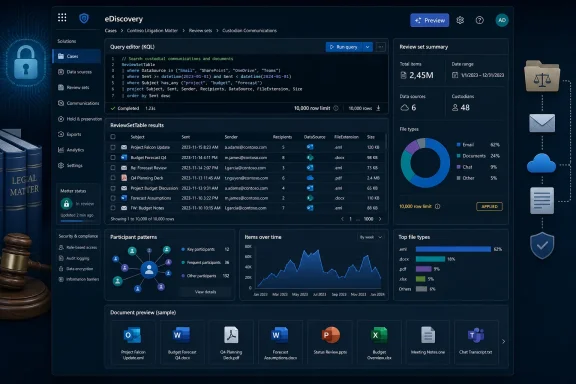
The new tool puts a Kusto Query Language, or KQL, editor directly inside a Purview eDiscovery review set. Instead of relying only on the existing condition builder and KeyQL-style filtering, reviewers can query review-set metadata, aggregate results, extract patterns, and render charts without moving the case data into Azure Data Explorer, Power BI, or an external review platform.
Microsoft’s roadmap description says the Explorer will support complex filtering, pattern-based text extraction, data-format parsing, and flexible visualizations. Microsoft Learn’s eDiscovery documentation goes further: it describes the Advanced Review Set Explorer as a preview feature available from the Review sets tab of a case, with sample queries and a defined, limited subset of KQL operators.
That documentation is important because it changes this from a distant roadmap promise into something eDiscovery administrators should evaluate in their current Purview environment.
 The roadmap status does not match Microsoft’s product documentation
Roadmap ID 484086 was last updated on August 14, 2026, and still lists both General Availability and Preview release rings. It says preview availability was scheduled for February 2026 and general availability for December 2026, while retaining the broad “In development” status.
Microsoft’s own Learn documentation, last updated in April 2026, calls the feature “Advanced review set explorer (preview)” and provides step-by-step instructions for opening it in the Purview portal. The eDiscovery workflow documentation likewise lists KQL queries through the Explorer as a preview capability during review-set analysis. Microsoft’s review-set management documentation also names an “Advanced review set explorer (preview)” tab.
In other words, the evidence points to a preview that is available or rolling out, not a feature that remains wholly unreleased. The roadmap’s “In development” label appears to describe the product’s path to general availability rather than the absence of the preview feature.
Microsoft has not publicly explained the mismatch or provided rollout percentages, tenant eligibility criteria, or a target date for feature parity between preview and general availability. Administrators should therefore use the portal, rather than the roadmap status alone, as the practical test: open an eDiscovery case, select a review set, and check for the Advanced review set explorer preview tab.
The distinction is more than bookkeeping. In legal, regulatory, HR, and insider-risk investigations, a team may need to validate a process before relying on it in an active matter. A roadmap entry is planning information. A feature that appears in a production tenant is an operational capability—but it remains a preview capability subject to limitations and possible changes before GA.
This is a query and analysis layer, not a new collection engine
The Advanced Review Set Explorer works against the indexed contents of the current review set. It does not create a new search source, alter the original Microsoft 365 data, or modify documents in the review set. Microsoft explicitly describes the queries as read-only.
That makes the feature most useful after a team has already collected responsive data and committed it to a review set. Review sets are Purview’s controlled workspace for case data: they can contain copied items from Exchange, SharePoint, OneDrive, Teams, and other supported sources, and they support tagging, analytics, review, and export. The Explorer adds a more expressive analytical layer to that stage.
Microsoft says the tool queries a table called ReviewSetTable, although the portal automatically supplies that starting point. Reviewers build pipeline-style KQL statements after it, using operators such as where, project, extend, summarize, sort, top, take, and render.
A straightforward use would be to identify the dominant file classes in a collection before assigning work to reviewers. Another could group documents by source, sensitivity label, participant, item class, or file type. Pattern matching and data parsing are potentially more consequential: they allow teams to identify structured identifiers, unusual keyword formats, or correspondence involving particular combinations of custodians without exporting data merely to perform an initial assessment elsewhere.
Microsoft’s examples include identifying communications exclusively between two participants, listing external email recipients, counting file classifications, and rendering a pie chart from the results. Those examples demonstrate a shift in the kind of question a reviewer can ask. The traditional review-set filtering interface helps narrow a population; the KQL Explorer can also summarize and inspect the shape of that population.
For Windows and enterprise administrators, the practical benefit is reduced handoff friction. Compliance staff who already understand KQL from Microsoft Sentinel, Defender, Log Analytics, or Azure Data Explorer will recognize its basic pipeline model. But Purview is not exposing unrestricted Kusto. Microsoft describes the Explorer as supporting a defined subset of KQL, not a full Azure Data Explorer environment.
The 10,000-row ceiling limits how teams should use it
The most important implementation detail is also the easiest to miss: Microsoft says a query that returns more than 10,000 results returns only the first 10,000. The documentation instructs users to narrow the query when that happens.
That means the Explorer should not be used as if it were a complete bulk-export mechanism or a final accounting tool for every matching document in a very large review set. A broad query that produces a truncated item list can be misleading if its user assumes the list represents every hit.
Aggregations can still be useful, but teams should distinguish between questions about counts and distributions and questions requiring a complete defensible list of every responsive item. Where the latter is required, use restrictive filters early, validate the returned population, and retain the established review-set query and export workflow.
Microsoft’s own guidance points in the same direction:
- Start with
whereclauses to reduce the data set before runningsummarizeorrender. - Use
takewhile developing a query to confirm that fields and conditions behave as expected. - Avoid overly broad regular expressions on large review sets.
- Exclude empty properties where needed so blank values do not distort results.
The preview also reflects the current indexed state of a review set. If the team adds data later, a previously run query can yield different results. That is ordinary behavior for a live review workspace, but it needs to be handled deliberately in a matter that requires repeatability. Teams should record the query text, the review-set state, the execution date, and the result or exported report used to inform a decision.
This is especially relevant when a review set is being updated during a fast-moving internal investigation. A chart showing the top participants or file classes may be useful for triage on Monday and no longer represent the complete set after new custodians, mailbox content, or cloud documents are added on Tuesday.
Access depends on the eDiscovery case and licensing configuration
The Explorer is nested under review sets, which are an eDiscovery Premium capability. Microsoft’s eDiscovery feature documentation says users working with eDiscovery cases need the appropriate Purview permissions and that both administrators and case users require Microsoft 365 Enterprise E3 or E5 licenses, while premium capabilities and data-use scenarios can carry additional licensing requirements.
The preview may therefore be absent for reasons unrelated to rollout. The likely blockers include an organization using a non-premium eDiscovery case, premium features not being enabled for new cases, insufficient role assignments, or the reviewer lacking access to the relevant case and review set.
Microsoft’s current eDiscovery settings documentation adds a potentially disruptive detail: enabling premium eDiscovery features affects new cases only and does not change the license state of existing cases. An administrator who turns on Premium expecting an older investigation to gain the Explorer may find that nothing changes. The case configuration must be checked before assuming the preview failed to deploy.
The operational path is:
- Confirm that the user has Purview eDiscovery permissions appropriate to the case.
- Confirm that the matter uses eDiscovery Premium capabilities and that licensing is appropriate for the users whose data is being analyzed.
- Open the case, select Review sets, and choose the relevant review set.
- Look for the Advanced review set explorer (preview) tab.
- Begin with a narrow, non-destructive query and compare the result against familiar review-set filters before making it part of an investigation workflow.
The final comparison step matters. Existing review-set filters use KeyQL and keyword-oriented querying, while the new Explorer is a KQL-based analytical experience. They solve overlapping but different problems, and an organization should not assume equivalent syntax, field handling, or results without validation.
December is the GA milestone, not a reason to wait
Microsoft still places general availability for Roadmap ID 484086 in December 2026. That leaves several months in which preview tenants can establish guardrails, create approved sample queries, train reviewers, and determine which use cases are safe for active matters.
The feature’s strongest immediate role is investigative triage: finding concentrations, anomalies, participant patterns, and item-type trends inside a review set before an expensive manual review expands. Its weakest role is any task that assumes full Kusto compatibility, immutable results, or an unrestricted result set.
For Purview administrators, the decision is not whether to replace the review workflow with a query editor. It is whether to give legal and compliance teams a controlled way to use KQL where the data already resides—while documenting the preview’s 10,000-result cap, indexed-state behavior, limited operator support, and current absence of a confirmed GA rollout status.
