

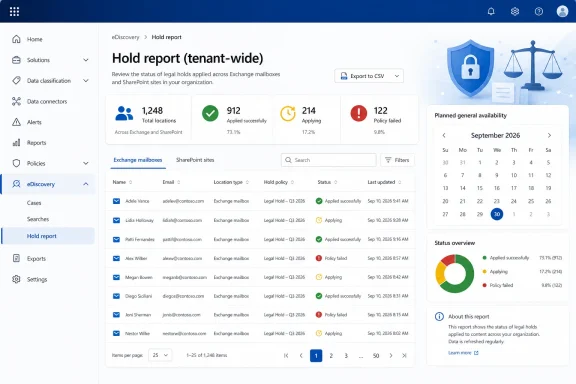
The distinction matters for compliance teams because the report is designed to answer a question that can otherwise require case-by-case inspection or PowerShell work: which eDiscovery holds exist across the tenant, which Exchange mailboxes and SharePoint sites they cover, and whether a location was actually placed on hold. Microsoft’s roadmap describes a sortable, filterable report that can be downloaded for further analysis; the live documentation places it at eDiscovery > Dashboards > Hold report (preview).
The practical news is therefore narrower than the roadmap entry makes it appear. Organizations with premium eDiscovery entitlement and the necessary roles can assess the preview now. They should use the period before September to validate access controls, export handling, and—most importantly—the report’s data freshness limits before treating it as an audit control.
Roadmap ID 93268 has spent years in preview
Microsoft created Roadmap ID 93268 on June 2, 2022, originally listed preview availability for December 2023, and on August 11, 2026 changed its status to In development with general availability scheduled for September 2026. The accompanying note says Microsoft updated the status and release month “to reflect the current state,” an unusually explicit acknowledgement that the prior roadmap status was no longer accurate.
The record also retains the older “eDiscovery (Premium)” branding, while current Microsoft Learn guidance calls the area simply Microsoft Purview eDiscovery and differentiates individual cases by whether premium features are enabled. That is more than a cosmetic mismatch for administrators: it means a tenant can have the current eDiscovery portal experience without necessarily having the premium capability and licensing needed to use this report.
Microsoft has not published a detailed change log explaining what will change between the existing public preview and September general availability. The roadmap entry does not identify a new report schema, expanded data sources, revised licensing, Government cloud availability, or behavior changes for existing preview users. It lists Worldwide Standard Multi-Tenant as the target cloud instance; organizations in GCC, GCC High, DoD, or other sovereign environments should not assume inclusion from this entry.
This leaves September as a service-status milestone rather than a clearly defined feature expansion. Until Microsoft says otherwise, the safest reading is that the current report is being stabilized for general availability, not that a separate reporting product will suddenly appear.
The report provides inventory, not live proof of preservation
Microsoft Learn describes the Hold report as a tenant-wide view of hold policies associated with all eDiscovery cases. It can expose the case name, hold-policy name, Exchange mailbox or SharePoint site location, location type, policy status, last modification data, case and hold identifiers, the rule query used for query-based holds, and location-specific errors.
That is valuable because a location can be covered by several legal holds, and the report lists a row for each applicable case and hold policy. The count at the top of the screen is therefore a count of hold-policy locations, not a count of unique people, mailboxes, OneDrive accounts, or SharePoint sites. A mailbox under three different case holds will appear three times. Compliance teams exporting this report into Excel, Power BI, or a GRC system will need to deduplicate by location deliberately if they want an asset-level coverage count.
Microsoft also documents a second limitation that should shape operational use: the dashboard report syncs policy and location status no more frequently than once every seven days. Its documentation gives a three-to-seven-day full-sync window for several fields. A hold changed this morning may not be reflected in the aggregate report in time for an afternoon litigation-status meeting.
The Hold report is a governance inventory, not a real-time attestation. For the current state of a hold or an individual location, Microsoft directs users back to the hold-policy details in the relevant eDiscovery case. This is particularly important during employee offboarding, preservation escalations, or remediation of a partially applied hold, when the difference between “report says applied last week” and “service has enforced it now” has legal consequences.
The documented status values are useful but need to be read precisely. “Applied successfully” means the location is on hold; “Applying” and “Releasing” mean asynchronous work is still underway; “Applied partially” and “Released partially” demand review of the Location error field. A “Policy failed” entry can be more severe than a generic error because Microsoft says policies without an enabled rule are not enforced, even if another status display looks successful.
CSV exports can include more than the filtered screen suggests
Microsoft says users can sort, filter, group, and customize columns in the dashboard, then download the report as a CSV. But the documentation also states that the CSV download contains the entire report regardless of filtering or grouping applied in the portal.
That behavior is easy to overlook. An analyst may filter the screen to a single matter, a small set of custodians, or a particular region, then assume the exported file contains the same narrowed view. It does not. The downloaded CSV can include case names, location data, hold identifiers, queries, policy creators, and status information from across the tenant.
For eDiscovery administrators, that means the downloaded file should be treated as sensitive case-administration material from the moment it is generated. It should be stored only in an approved restricted location, handled under the organization’s matter-access policy, and not casually attached to tickets or shared channels because a screen-level filter appeared to limit its scope.
The search behavior is narrower than many administrators would expect, too. Microsoft says the dashboard’s search box searches only the Case name and Location columns. It does not perform a general search across hold IDs, policy authors, rule queries, errors, or all visible metadata. Teams looking for a failed policy or a specific query-based hold should filter or export based on the appropriate columns rather than relying on the main search box.
Access is intentionally broader for administrators and narrower for managers
The Hold report is restricted to eDiscovery Administrators and eDiscovery Managers with the preview role, according to Microsoft’s product documentation. An eDiscovery Administrator can view information across the organization’s cases. An eDiscovery Manager sees report material only for cases to which that person belongs.
Microsoft’s permissions documentation confirms why that split exists. eDiscovery Administrators can access all cases and organization-wide process and hold reports, while ordinary eDiscovery Managers are normally limited to the cases they create or where they are members. The role design prevents a matter owner from browsing unrelated investigations through a tenant-wide operational report, but it also creates a potential blind spot if each legal team is expected to perform its own hold reconciliation.
Administrators should decide in advance who owns tenant-wide review. Giving broad eDiscovery Administrator rights merely to make a dashboard visible is a poor trade-off: those administrators can access potentially sensitive case data across the organization. A defensible approach is to keep the administrator population small, establish a recurring central review of the Hold report, and send scoped exceptions to the relevant matter owners.
Licensing needs a similarly careful read. Microsoft’s current eDiscovery guidance says administrators and users working with cases require Microsoft 365 Enterprise E3 or E5 licenses, while premium data analysis requires E5 or specific Purview Suite or eDiscovery and Audit add-ons for the users whose data is being analyzed. The Hold report documentation does not publish a separate SKU table; it says only that the organization needs a subscription supporting premium eDiscovery features. Tenants should confirm their own entitlement rather than infer that an E3 base license alone unlocks the dashboard.
Existing PowerShell reporting remains useful for automation
The new dashboard does not eliminate the existing PowerShell path. Microsoft continues to publish a CaseHoldsReport.ps1 sample that generates a CSV report of eDiscovery case holds and separately produces a list of cases with no holds. The script can include the case and hold names, case state, enabled status, members, held mailboxes and SharePoint sites, query-based hold syntax, and creation and modification information.
There is one important operational difference: Microsoft describes the PowerShell code as a sample with minimal error handling and says it is not covered by standard support. It is suitable as a starting point for internal automation, but it should not be dropped into a production compliance workflow without code review, secure credential handling, logging, error checks, and output controls.
The dashboard is better suited to interactive review and first-line triage. A carefully maintained internal script may remain better for scheduled evidence collection, data normalization, checking for cases with no holds, or feeding a controlled reporting pipeline. Organizations do not have to choose one or the other, but they should avoid comparing the two outputs as if they were always synchronized at the same moment.
Microsoft’s broader eDiscovery documentation still recommends PowerShell cmdlets when an organization needs to view lists larger than 1,000 cases, holds, searches, or exports. That is a reminder that the dashboard is intended to improve visibility, not replace the administrative interfaces needed by large tenants.
September 2026 is now the stated general-availability target. Before then, the prudent task is to test the preview against known cases, confirm that report counts are interpreted as hold-location rows rather than unique assets, restrict CSV handling, and preserve a case-level verification process for any hold that must be current today.