

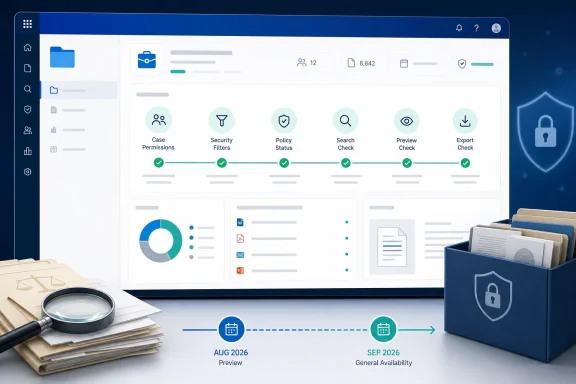
For eDiscovery teams, the practical value is less about a new troubleshooting category than moving checks that currently span role-group settings, case membership, PowerShell configuration, and Help-pane tests closer to the workload where failures occur. A search that returns too little data, an export action a case member cannot start, or a case that appears inaccessible can delay a legal response even when the underlying configuration error is straightforward.
Microsoft lists the item as in development for worldwide commercial tenants as well as GCC, GCC High, and Department of Defense environments. The roadmap does not say whether preview will begin simultaneously in every listed cloud, whether government-cloud rollout will lag commercial availability, or whether the capability will require a particular eDiscovery licensing tier.
The diagnostic work already exists — but it is fragmented
Microsoft’s own eDiscovery documentation shows that the company has already exposed at least one targeted diagnostic: Diag:edisRBACdiag. An administrator can invoke it through the Help control in the Microsoft Purview portal, provide the UPN or email address of the affected user, and check whether the Search, Export, or Preview roles are assigned.
That existing test matters because it changes how Roadmap 565222 should be read. Microsoft is not introducing automated eDiscovery checks from zero; it is expanding or consolidating a troubleshooting model already present in Purview. The stated addition of case permissions, security filters, and policy status points toward a broader workflow-level diagnostic experience, rather than a replacement for every manual permission and configuration check.
The current RBAC check also has a narrow scope. It can establish whether selected eDiscovery roles are assigned, but a person can hold the right role and still fail to access a particular case. Microsoft’s eDiscovery permission model separates organization-level role assignment from case membership: ordinary eDiscovery managers see only cases to which they belong, while eDiscovery Administrators can access all listed cases and add themselves or other managers to a case.
That distinction produces one of the most common and confusing support scenarios in Purview. An administrator may confirm that a user is in the eDiscovery Manager role group, yet the user still cannot find or work in a specific case because that user or their assigned role group is not a member of it. A useful in-product diagnostic should be able to identify both conditions distinctly. The roadmap says it will cover “case permissions,” but it does not specify whether it will report the exact missing role, the absent case membership, or both.
Security filters can make correct searches look broken
The most consequential area named in the roadmap may be security-filter diagnostics. Microsoft Purview’s compliance security filters can deliberately restrict the mailboxes, OneDrive accounts, SharePoint sites, or content that an eDiscovery user is allowed to search. They are powerful controls for delegated investigations, geographic boundaries, business-unit segregation, and highly restricted matters.
They can also produce results that look like an eDiscovery failure. Microsoft documents that a security filter is combined with the investigator’s search query using an AND operator. A broad search can therefore return no material because the permissions filter excludes the relevant custodians, sites, or content — even when the query itself is valid and the user has been assigned the expected eDiscovery roles.
There is a second configuration trap that is much harder to infer from an empty result set. Microsoft says multiple security filters are joined with OR, and the resulting group is then joined to the search query. In practice, an administrator can attempt to exclude a mailbox with one filter while another filter independently permits access to it. The permissive condition wins for that mailbox because it satisfies one of the filters.
That is the kind of logic error that deserves an in-product warning. A diagnostic that merely says a security filter exists will not save much time; one that identifies the filters evaluated for the current user, the content locations they include or exclude, and conflicting rules would. Microsoft has not described that level of detail. Administrators should therefore avoid treating the September target as confirmation of a filter simulator, query trace, or automatic policy repair tool.
“Policy status” remains the least defined part of the announcement
Microsoft’s wording around policy status is broad enough to cover several different failure modes, and the roadmap does not define which one will ship. In Purview, eDiscovery work intersects with legal holds, retention policies, retention labels, data sources, searches, review sets, exports, and role-based access control. Any of those can create a condition that an investigator experiences as a case problem.
Microsoft already offers separate Purview diagnostics outside the eDiscovery case workflow. Its self-help diagnostics documentation lists checks for mailbox holds and for grace eDiscovery holds or invalid retention policies that can prevent a SharePoint site from being deleted. Those tools can identify active holds, retention labels, and invalid policies, and in some circumstances offer a remediation action after administrator approval.
The overlap is important. Roadmap 565222 does not say that eDiscovery’s forthcoming diagnostics will expose every existing hold or retention test inside a case, nor does it say that they will modify settings automatically. Microsoft’s broader Purview diagnostics guidance says diagnostics can identify known issues and may fix certain configuration issues, but they do not make tenant changes without consent. Until the feature reaches preview, the safest assumption is that the eDiscovery experience will guide admins toward a configuration issue rather than silently correct permissions, filters, or policies.
For organizations with formal legal-hold procedures, that is the right default. A tool that automatically broadened case access, removed a security filter, or changed a retention-related control would introduce governance risk precisely when an investigation requires the clearest audit trail. Diagnostics should accelerate identification and handoff; they should not become an unreviewed control plane for privileged eDiscovery settings.
The rollout date has already moved once
There is a small but revealing timing discrepancy in the public record. Microsoft’s Roadmap entry, last updated on August 11, 2026, gives August 2026 for preview and September 2026 for general availability. However, the Microsoft 365 Message Center Archive’s earlier capture of the same Roadmap ID lists a July 2026 preview target and the same September general-availability target.
The change indicates that preview slipped by at least one month after the roadmap item was first published on June 5. That does not mean September general availability will necessarily move; Microsoft often updates roadmap timing as deployment work evolves. But it does mean administrators should not build an August incident-response or eDiscovery rollout plan around an assumption that the preview is already broadly available.
The status remains “in development,” not “rolling out.” Microsoft has also omitted the operational details that would let customers prepare precisely: no enablement path, no screenshots, no named Purview portal location, no role requirement to run the new checks, no list of policy types covered, and no statement on whether diagnostics will be logged in the audit trail.
What eDiscovery administrators should do before preview arrives
The upcoming capability is best treated as a faster first-pass triage tool. It does not eliminate the need to understand the configurations it is expected to examine.
- Review which users are eDiscovery Managers, eDiscovery Administrators, case members, and members of role groups added to cases; these are separate access layers with different effects.
- Run the existing eDiscovery RBAC diagnostic for recurring Preview, Search, or Export failures, and record which missing role caused the result before changing permissions.
- Inventory existing compliance security filters with PowerShell, especially where a user has more than one filter or where filters cover both mailbox and SharePoint or OneDrive locations.
- Test expected search scope with controlled accounts before a live matter requires it, since security filters can turn an apparently valid query into an empty result.
- Document every hold, retention policy, and retention-label condition that could affect a case or preservation decision, rather than relying on a future diagnostic to reconstruct intent.
Microsoft’s September target could make this workflow substantially less tedious, especially for administrators who do not routinely work in Security & Compliance PowerShell. The immediate consequence is more modest: Purview eDiscovery is preparing to put its first layer of configuration troubleshooting where case administrators can use it, but the company has not yet promised the depth of diagnostics that complex investigations will require.