
For an existing X370 owner considering AMD’s newly reissued $349 Ryzen 7 5800X3D 10th Anniversary Edition, that is encouraging news: a motherboard replacement alone is unlikely to transform frame rates with a PCIe 4.0 x16 graphics card. But this was a controlled, single-GPU, CPU-focused comparison—not a blanket endorsement of every 2017 AM4 board, every BIOS revision, or every current expansion card.
The important catch is compatibility. AMD’s own current Ryzen 7 5800X3D product page lists X570, X470, B550, B450, and A520 among its supporting chipsets; X370 is not on that list. That does not mean no X370 motherboard can run the chip—LTT’s test proves that some can—but it means the upgrade lives or dies on the exact board maker’s CPU-support list and required firmware.
 The benchmark result is real, but it measures a specific bottleneck
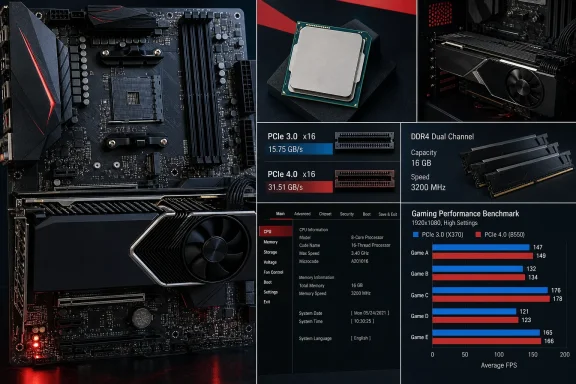
LTT’s premise was sound: keep the processor and graphics card the same, swap the platform generation, and see whether the old chipset is quietly holding modern gaming back. In the resulting test, the X370 system’s PCIe 3.0 limitations did not create a dramatic gaming deficit versus X570 with the RTX 4070 Ti.
That outcome fits the hardware. The GeForce RTX 4070 Ti uses a PCIe 4.0 x16 connection, and PCIe generations are backward-compatible. In an X370 slot, the card falls back to PCIe 3.0 x16, cutting available interface bandwidth roughly in half compared with PCIe 4.0 x16, but retaining a still-substantial link of about 16GB/s in each direction.
Most game rendering does not continuously saturate that connection. Once game assets are in VRAM, frame production leans much more heavily on the GPU, CPU, memory subsystem, and local graphics memory than on repeated transfers over PCIe. That is why a flagship-ish PCIe 4.0 graphics card can often look comfortable on an old PCIe 3.0 x16 board.
The test also benefits from the processor chosen. The 5800X3D is an eight-core, 16-thread Zen 3 CPU with 96MB of L3 cache. That unusually large cache is exactly what makes it a durable gaming upgrade: it reduces how frequently the CPU has to wait on system memory during many game workloads. AMD still describes it as the top gaming processor for DDR4 platforms, and the anniversary edition keeps the original 3.4GHz base clock, 4.5GHz boost clock, 105W TDP, and AM4 socket.
Memory was not equal, which makes the close result more notable
LTT reportedly could not run memory at the same speed on the X370 and X570 systems. That is a meaningful imperfection in a motherboard comparison, because Ryzen performance can be sensitive to DDR4 speed and memory latency.
Yet it also explains why the result favors a practical reading rather than a simplistic “chipsets do not matter” headline. If the old board used a less aggressive or less stable memory setting and still produced closely matched gaming numbers with a 5800X3D, the processor’s 3D V-Cache was doing what buyers pay for: insulating gaming performance from some of the platform’s weaker points.
Do not assume the same result with a Ryzen 5 5600, Ryzen 7 5700X, or another Zen 3 chip without 3D V-Cache. Those processors have far less L3 cache and can show more visible gains from fast, well-tuned DDR4. A board that cannot hold a stable XMP or EXPO-equivalent profile at its rated speed may be a greater concern for those CPUs than it was in LTT’s 5800X3D test.
This is also why the result should not be used to justify running whatever four-DIMM kit happens to be installed at whatever settings the board chooses after a BIOS update. Verify the operating speed in firmware or Windows, test stability, and compare it with the board vendor’s memory support guidance. An old platform can be cost-effective without being maintenance-free.
PCIe 3.0 remains a feature limit, not automatically a frame-rate limit
The larger difference between X370 and X570 is I/O capability. X370 dates to the first Ryzen launch in 2017 and exposes PCIe 3.0 connectivity; X570 brought PCIe 4.0 support. With the 5800X3D, AMD specifies PCIe 4.0 capability at the processor, but the motherboard determines what the installed components can actually use.
A PCIe 4.0 NVMe SSD in an X370 board will operate at PCIe 3.0 speeds. LTT demonstrated the obvious result in sequential storage testing: a modern Gen 4 drive’s headline throughput is substantially reduced when it is connected through a Gen 3 path. That matters for large file transfers, media scratch workloads, software development projects involving large local repositories, and some workstation tasks.
For ordinary Windows use and current game loading, a fast PCIe 3.0 NVMe SSD is still far from slow. The difference between roughly 3.5GB/s and 7GB/s sequential performance is measurable, but it does not translate linearly into boot times, game loading screens, or desktop responsiveness. Buyers should not replace an X370 board solely to make a Gen 4 SSD’s box rating appear in a benchmark.
Graphics is less settled. AMD’s Radeon RX 9000 series uses PCIe 5.0, as do Nvidia’s desktop GeForce RTX 50-series cards. Running a PCIe 5.0 x16 GPU in a PCIe 3.0 x16 slot creates a four-generation mismatch, even though compatibility remains part of the PCIe standard. Whether that causes a meaningful penalty depends on the card, game, resolution, VRAM capacity, and how much the workload has to move assets across the bus.
The bigger warning applies to cards wired for fewer lanes. A GPU using eight lanes can fall back to PCIe 3.0 x8 on X370, providing about 8GB/s of bandwidth. That is the configuration where an old platform is more likely to become visible in performance testing, especially if the card is under VRAM pressure and needs to pull data from system memory. LTT’s RTX 4070 Ti test does not establish how every PCIe 5.0 GPU—or every x8 model—will behave on X370.
AMD’s own support list makes BIOS research mandatory
The test video demonstrates hardware functionality; it does not change the support status of an individual retail motherboard. AMD’s 5800X3D specifications omit X370 from the listed supporting chipsets, while AMD’s BIOS guidance states plainly that a system may fail to boot if its installed firmware does not support the processor.
That creates an awkward but manageable upgrade process. An X370 owner should find the exact model and revision printed on the motherboard, then inspect the manufacturer’s CPU-support page before ordering the CPU. The relevant entry must name the Ryzen 7 5800X3D and specify a minimum BIOS version.
Do not rely on a generic claim that “300-series boards support Ryzen 5000.” Support varies by vendor, model, revision, and sometimes region. Several early AM4 boards shipped with small BIOS ROMs, and manufacturers have previously had to remove or reduce support for older processors and graphical firmware features to make room for newer AGESA code.
AMD’s current BIOS-update instructions offer the practical choices: update using an already-supported processor, use USB BIOS Flashback if the specific board includes it, seek a retailer update service, or contact the motherboard manufacturer. Crucially, BIOS Flashback is not universal on X370. A used X370 board sold with an unknown BIOS version is therefore a poor foundation for a fresh 5800X3D build unless the seller can verify firmware support or the board has documented processor-less flashing.
Existing owners have a strong upgrade path; new builders have fewer reasons
AMD reintroduced the 5800X3D 10th Anniversary Edition on June 25 with a $349 suggested price and a bundled Carbice Ice Pad. It remains a compelling CPU for someone who already owns a stable X370 system, compatible DDR4, a decent cooler, and a PCIe 4.0-era graphics card. In that situation, the upgrade can add years to an otherwise capable Windows 11 gaming PC without buying a motherboard and memory kit.
The same recommendation does not cleanly extend to someone shopping for an old board today. The apparent savings can disappear after accounting for a BIOS update service, uncertainty around used-board condition, limited PCIe storage performance, less mature USB connectivity, weaker power delivery on lower-end designs, and the possibility of needing an older Ryzen CPU simply to prepare the firmware.
LTT’s result is best read as a validation of the hardware people already own. If an X370 board’s manufacturer explicitly supports the Ryzen 7 5800X3D, its BIOS is already current, memory is stable, and the graphics card is not starved by a narrow PCIe connection, replacing the board will probably not buy many more frames. The money is better reserved for the next component that actually limits the PC—or for the eventual move beyond AM4 when the platform’s I/O constraints become the problem rather than its gaming performance.
