

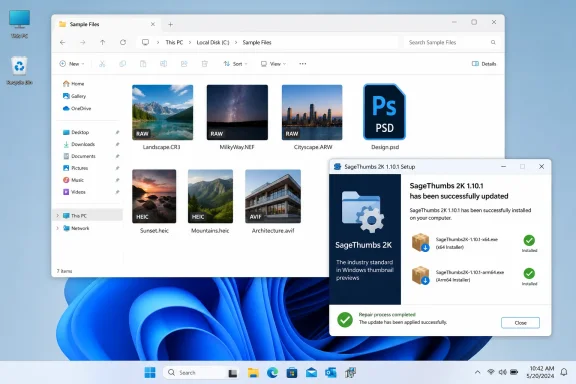
The project’s GitHub release record dates version 1.10.1 to August 11, 2026, while Neowin published its software listing on August 13. Both describe the same fix: the updater successfully downloaded and verified a newer installer, then displayed an erroneous administrator-rights message instead of launching it. According to LunarWerx, the failure was caused by SageThumbs 2K still holding a handle to its downloaded installer, leaving Windows unable to start that file.
For a Windows shell extension, that is more consequential than an ordinary utility’s failed updater. SageThumbs 2K installs components that File Explorer loads to generate thumbnails and right-click menu commands, so a user who relies on it for RAW photos, PSD files, HEIC, AVIF, video, comics, or other unsupported formats could remain stuck on an older build without realizing the updater itself had failed. The error message also sent people in the wrong direction: changing account permissions would not solve a file-locking bug.
The manual update is required for affected installs
The affected range is unusually broad: every release from 1.3.3 through 1.10.0. LunarWerx says version 1.10.1 is the first build in that sequence whose updater can complete the handoff to its replacement installer.
The appropriate response is to treat the in-app updater as unavailable until 1.10.1 has been installed manually. Download the correct installer for the PC’s architecture, close File Explorer windows and any SageThumbs 2K settings or preview windows, then run the installer. A reboot should not be assumed to be necessary, but it is sensible to restart Explorer or Windows if thumbnails and context-menu entries do not reappear immediately after the upgrade.
The project says it has changed its release testing so that installation and in-place self-updating are exercised on every code change and before every published release. That is a welcome claim, but it is not independent evidence that the process will remain reliable; this is the first release meant to repair a regression that lasted across seven minor versions.
Portable mode is not a replacement for the shell extension
Version 1.10.1 also has x64 and Arm64 portable ZIP packages. They are useful for people who need image conversion, resizing, QuickLook-style previews, OCR, screenshots, a color picker, folder utilities, or the st2k command-line tool without making system-wide changes.
But the portable build does not provide SageThumbs 2K’s headline capability: Explorer thumbnails for additional file types. It also omits the Explorer right-click menu. That is not an arbitrary feature restriction. Windows loads thumbnail providers and context-menu handlers through registered COM classes, and the portable edition deliberately makes no registry changes. Extracting the ZIP and running the executable therefore cannot make File Explorer render previews for PSD, CR3, HEIC, AVIF, JXL, MKV, EPUB, or the rest of its claimed format list.
That distinction is easy to miss because “portable” is often read as “the same application without an installer.” Here it means a separate operating mode with the least invasive tools retained and the shell-integration features left out. For a technician using the command line on a locked-down workstation, that may be exactly right. For a photographer or designer trying to eliminate blank icons in Explorer, it is the wrong package.
The trust decision still belongs to the administrator
SageThumbs 2K is a clean-room Rust rewrite of the older SageThumbs project and targets 64-bit Windows 10 and Windows 11. Its repository says it processes hundreds of file formats, including files that may be malformed or untrusted, and that heavy decoding is isolated from Explorer. Those design choices are relevant because thumbnail handlers operate close to the Explorer process; a crash or hang in one can turn normal folder browsing into a support problem.
They are still vendor assertions, not a substitute for organizational software approval. The project is source-available under the PolyForm Noncommercial License 1.0.0, rather than an OSI-approved open-source license. Personal and other noncommercial use is permitted under that license, but LunarWerx says commercial use requires a separate agreement. Businesses should not mistake the availability of source code for unrestricted deployment rights.
There is a second operational wrinkle: the project acknowledges that its installer is not code-signed. Windows SmartScreen may therefore warn when the installer is run, particularly for a relatively new publisher. The release page provides SHA-256 hashes for the x64 installer, Arm64 installer, and both portable archives, which gives administrators a means to compare a downloaded file against the publisher’s stated value. It does not provide the identity assurance that a trusted Authenticode signature would.
For managed fleets, the safer route is to validate the installer hash from the project’s release record, assess the noncommercial licensing terms, test it on representative Windows 10 and Windows 11 systems, and deploy the normal installer only where Explorer thumbnail integration is actually needed. The portable package may be easier to approve for narrowly scoped tool use, but it cannot deliver the functionality that most SageThumbs users install the product to obtain.
What changes after 1.10.1
This is a maintenance release, not a new format-support announcement. The relevant change is that SageThumbs 2K installations caught in the 1.3.3-to-1.10.0 updater failure can get back onto a supported upgrade path—but only after a manual install of 1.10.1.
Users who already depend on its Explorer integration should make that one manual update rather than waiting for the old Update button to recover. Users considering the portable edition should decide based on its real boundary: it is a standalone media utility and automation tool, not an Explorer thumbnail provider.