
The announcement, published by IT Voice and attributed to ProMobi Technologies, is significant for Windows administrators because it confirms Scalefusion’s move beyond its traditional device-management role. But the release record also makes the practical boundary clear: these remain separate products and feature sets with different agents, dependencies, licenses, and platform support. The “unified” part is chiefly the administration and policy narrative, not evidence of a newly consolidated technical control plane.
For organizations already using Scalefusion, the update is a useful inventory of what changed during the first half of 2026. For organizations evaluating it against Microsoft Intune, Jamf, Workspace ONE, or another UEM stack, the important question is whether the new capabilities close an operational gap without creating a second compliance authority or another endpoint agent to maintain.
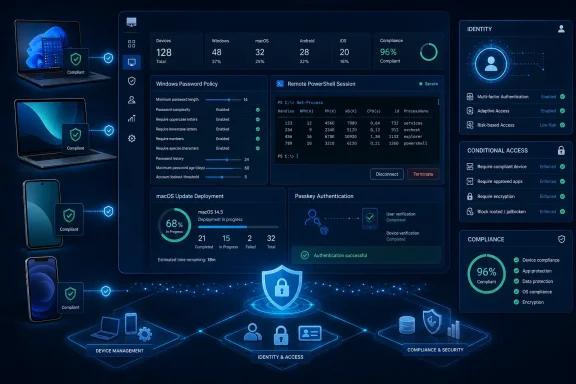 Windows password policy moves beyond the older CSP constraint
The most concrete Windows-side change arrived in Scalefusion Dashboard version 66.2.0, published June 26, with Windows MDM Agent version 16.13.0. Scalefusion added an agent-driven password policy option alongside its existing Modern Management method, which relies on the Windows Configuration Service Provider framework.
That distinction is more important than the announcement lets on. Microsoft’s DeviceLock CSP includes a DevicePasswordExpiration policy, but it is tied to the legacy Exchange ActiveSync policy engine, uses device-scoped behavior, and supports a maximum value of 730 days. Microsoft also requires that policy to be sent as part of an Atomic command. In real environments, those limitations can make password-expiration controls difficult to align with local-account workflows and existing domain policy.
Scalefusion’s agent approach adds settings that it says are unavailable through the older model: minimum password age, maximum password age, advance expiration warnings, and a restriction on remote logons using blank-password local accounts. It also allows administrators to unlock local accounts reported as locked by the Scalefusion agent from the device details page.
This is a capability expansion, but it comes with an architectural tradeoff. Administrators must choose either Windows CSP or Scalefusion’s MDM Agent for the password-policy method. The agent route means password enforcement depends on the Scalefusion Windows agent being deployed, current, healthy, and reporting. That may be acceptable for organizations already standardized on Scalefusion’s agent, but it is not equivalent to a native MDM-only configuration.
The company has also moved custom password-policy overrides out of Device Profiles and into Advanced Configurations, automatically migrating existing profile-level custom policies. That migration deserves change-control testing before a broad rollout, particularly in fleets where local-account policies coexist with Active Directory, Microsoft Entra ID, Windows LAPS, or other security baselines. A vendor-managed local password control should not be assumed to replace domain password policy or Windows LAPS protections.
Remote Terminal adds a real support tool, with elevated-access implications
Scalefusion introduced Remote Terminal for Windows in its February 13 release, and the capability is more substantial than a generic “remote troubleshooting” claim. Its documentation says the feature opens a live terminal session from the Scalefusion dashboard using a secure SSH tunnel based on Windows’ native SSH capabilities.
Administrators can select PowerShell or Command Prompt and choose a session context: the System account, an administrator account, or the currently logged-in user. Running as System gives the operator powerful device-level access, including the ability to perform maintenance that an end user could not perform locally.
That makes the feature useful for break/fix work, script testing, user-account remediation, and inspecting machines that are difficult to reach through conventional remote desktop tooling. It also makes remote-support governance essential. Scalefusion offers an option to require user consent before a session starts, but consent is configurable rather than mandatory. Organizations with regulated workloads should decide explicitly which operators may start System-context sessions, whether end-user notice is required, and how those sessions are logged and reviewed.
The feature has operational prerequisites that the Mid-Year announcement does not mention. Scalefusion requires an Enterprise plan or Scalefusion 360 subscription, the current Scalefusion MDM Agent, Remote Support for Windows version 4.12.0.0 or later, and a dashboard setting that enables Remote Terminal. In other words, it is not automatically available to every Windows device already enrolled in Scalefusion.
Microsoft Conditional Access integration has a platform limit
Scalefusion positions Veltar’s integration with Microsoft Intune Partner Compliance as a way to bring Scalefusion device-compliance information into Microsoft Conditional Access decisions. That integration is real: Microsoft lists Scalefusion among generally available third-party compliance partners, and Scalefusion’s February 27 release notes show the Veltar integration was introduced in Dashboard version 64.4.0.
The critical limitation is that Microsoft’s Partner Compliance documentation lists supported platforms as Android, iOS/iPadOS, and macOS—not Windows. Scalefusion’s own setup guidance matches that scope, offering Android, iOS/iPadOS, and macOS as selectable platforms for the integration.
That means a company cannot read the announcement as a general route to making Scalefusion-managed Windows PCs compliant for Microsoft Entra Conditional Access through the Intune Partner Compliance connector. For the supported platforms, the process makes Scalefusion the MDM authority for devices assigned through the relevant Entra user groups. The partner sends device state to Intune, Intune writes the status into Entra ID, and Conditional Access can then permit or block access to protected cloud resources.
There is another practical consequence. Microsoft allows only one compliance partner per platform. An organization already using Intune, Jamf Pro, Kandji, Workspace ONE, or another partner for a given platform cannot simply add Scalefusion’s compliance feed alongside it for the same devices without designing an ownership and migration plan. This is a compliance-authority decision, not a bolt-on telemetry connector.
Scalefusion’s documentation also says administrators must exclude the Scalefusion and Scalefusion Device Attestation apps from the Conditional Access policy used in this flow. As with any Conditional Access rollout, IT teams need emergency access accounts excluded from enforcement, pilot groups, and a clear remediation path for a device marked noncompliant. A misconfigured policy can deny Microsoft 365 access to correctly managed users just as effectively as it blocks unmanaged endpoints.
macOS Operations is a workflow overhaul, not merely better reporting
On the Apple side, the major delivered capability is Scalefusion’s new Operations-based macOS update-management workflow, introduced in the June 15 release alongside Dashboard version 66.0.0 and macOS MDM Agent version 5.14.8.
The redesigned workflow allows administrators to select an update, choose target devices, select Declarative Device Management or legacy MDM where supported, set deadlines, publish an update to a self-service catalog, send reminders, and track installation state. Scalefusion’s Operations view also records status, device events, deployment protocols, and historical results, while allowing CSV exports for reporting.
The catch is that the new model supports only one active update operation per device. During migration from Scalefusion’s legacy macOS OS Update Management workflow, the vendor automatically selects the most appropriate update when a device has multiple existing deployments, prioritizing user-approved updates, then updates already in progress, then the highest available version.
That is a sensible conflict-resolution rule, but it is still a behavior change that could affect staged deployment plans. Scalefusion says the migration cannot be paused or canceled once started. Administrators should export the migration plan, review machines with multiple pending updates, and confirm which macOS agent versions are installed before initiating the transition.
The newer self-service catalog features require macOS Agent version 5.14.8 build 585 or later. Declarative Device Management support begins with macOS 14 Sonoma, while Scalefusion documents legacy MDM support for macOS 10.15 Catalina through macOS 13 Ventura. A mixed Mac fleet will therefore have different update-management behavior even when it is represented in the same dashboard.
OneIdP is expanding, but it remains a separately purchased identity product
The Mid-Year update also marks two years of OneIdP, Scalefusion’s identity and access product. In the first half of 2026, its additions included passkey support, an API-based Okta identity-provider integration, Active Directory synchronization improvements, user-portal enrollment, and expanded on-premises connector availability.
Passkeys are the most immediately useful change for organizations seeking to reduce password-based sign-ins. Scalefusion’s June 5 release says OneIdP can use device biometrics, external hardware security keys, and mobile-device authentication using QR codes. Administrators enable the feature at the directory level, after which users register a passkey and can use it on supported platforms.
The Okta integration deserves careful scrutiny. Scalefusion says its API-based option validates a user’s Okta username and password on the OneIdP login page, avoiding the redirect used in a SAML-based flow. Its documentation also states that temporary Okta passwords—whether issued to new users or after a reset—cannot be validated through that standard API flow. Users must first activate or reset their Okta account through the appropriate Okta email process.
That is not a reason to reject the integration, but it is a help-desk detail that should be documented before enabling it. More broadly, OneIdP is not bundled into Scalefusion’s base plans; Scalefusion’s own product documentation says it must be purchased separately. The Mid-Year announcement does not disclose pricing, bundle changes, upgrade rights, or whether Veltar’s forthcoming vulnerability management, patch management, data discovery, classification, and data-loss-prevention features will carry additional licensing.
Scalefusion’s update is best read as a portfolio consolidation statement backed by real 2026 releases, rather than a new platform launch. The Windows password-policy agent and Remote Terminal are tangible additions for endpoint teams; the macOS Operations redesign is a meaningful workflow change; and the Intune integration can make Conditional Access useful for Scalefusion-managed Android, iOS, and macOS devices.
But Windows administrators should not infer that Veltar’s Intune Partner Compliance integration covers Windows, and procurement teams should not infer that OneIdP and future Veltar capabilities arrive in existing MDM subscriptions. The next practical step is narrower: inventory the deployed Scalefusion agents and versions, pilot the new Windows and macOS workflows, and decide where Scalefusion—not Intune or another MDM—will be the authoritative source of device compliance.
Update: Additional details (August 5, 2026)
Scalefusion documents a one-to-42-day password-expiry range for its Windows “Modern Management” policy, while its agent-based option supports a maximum password age of up to 999 days. After deployment, the agent also checks every 30 minutes for local accounts configured with Password Never Expires and disables that setting. The initial rollout can require affected local-account users to change their password at their next sign-in.
The release record also identifies Programmable Custom Properties for Windows, macOS, and Linux. Scripts can write calculated device or user values back into dashboard properties for use in groups, reports, and workflows; Scalefusion says these properties can be protected from manual, bulk, and API edits and include type validation, conflict detection, script bindings, and change history.
Update: Additional details (August 5, 2026)
Microsoft’s newer MaximumPasswordAge policy supports values from zero to 999 days on Windows 11 22H2 with KB5053657 or later and Windows 11 24H2 or later, according to Passionate in Marketing. Microsoft limits that policy to Pro, Enterprise, Education, and IoT Enterprise editions.
Scalefusion also distinguishes its 30-minute “Password Never Expires” remediation check from accounts created through its own user-management feature or through Local Users and Groups, which the company says do not require that corrective action.
