

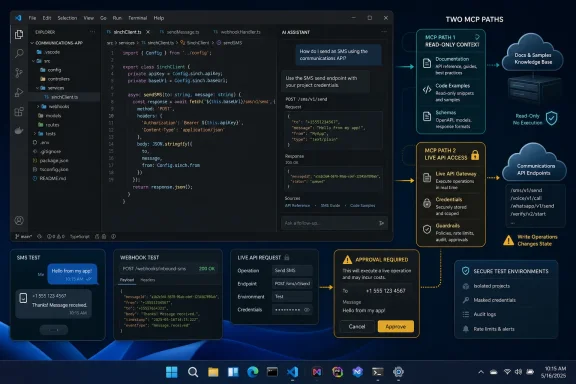
The August 4 announcement, carried by TradeVenue and Telecom Reseller, presents the release as a way to build, test and deploy Sinch integrations without constantly switching between an editor, API documentation and a web dashboard. That is directionally accurate, but the documentation shows a more important operational boundary: Sinch has separate tools for API knowledge and for live API actions. An MCP connection that helps an assistant locate endpoints and generate code is not automatically an MCP connection that can send messages, provision resources, or inspect a customer account.
For Windows developers, that distinction decides whether Agent Tools is an easier evaluation path or a new way to expose production communications credentials to a coding agent.
Simulator Mode lowers the evaluation barrier, not the production barrier
The new Simulator Mode is the clearest practical change in Sinch’s announcement. Sinch says developers can test integrations inside their development environment before creating an account or making a live API call. That removes a familiar early hurdle in CPaaS evaluation: setting up a project, generating access keys, configuring an application ID, selecting a regional endpoint and potentially obtaining a sender before code can be exercised.
Sinch’s current Visual Studio Marketplace listing for its Coding Assistant places Simulator Mode in the extension’s configuration workflow. The extension describes support for composing SMS and RCS messages, managing webhooks, validating phone numbers and validating email addresses from VS Code. It also includes webhook-event simulation and test payloads.
That makes the feature useful for a narrow but common job: checking whether an application’s request construction, webhook handling and basic control flow are plausible before a team turns on a real communications account. For a Windows shop using VS Code and GitHub Copilot, that can eliminate the “first afternoon” of portal setup and credential distribution.
It does not mean an app has been tested against carrier routing, a real WhatsApp or RCS configuration, deliverability rules, regional API behavior, sender registration, rate limits, billing controls or production authentication. Those are the places communications integrations usually become operational work rather than coding work. The announcement does not spell out which API methods Simulator Mode covers, how closely its responses mirror live services, whether it maintains state across requests, or whether its simulated errors cover real-world cases such as a rejected sender or unavailable channel.
Those omissions matter. A sandbox is most useful when a team knows exactly where it stops resembling production. Sinch has announced the availability of Simulator Mode globally, but it has not published a public coverage matrix for the simulated APIs or a stated fidelity guarantee.
The release packages work Sinch already began shipping in April
Agent Tools is being presented as a single new suite, but its key parts were already emerging separately. Sinch launched Sinch Skills on April 14, 2026, as open-source structured knowledge files for AI coding agents. Each SKILL.md file contains setup guidance, API concepts, implementation patterns, warnings and code examples for a Sinch product.
Those Skills are designed to solve a real weakness in generic code generation. A coding model may know how REST APIs usually work, but it cannot safely infer which Sinch APIs use OAuth2 versus access keys, which services have regional requirements, or whether retrying an apparently failed operation could create a second billable action. Sinch’s own April description called out authentication differences, regional endpoint rules, asynchronous flows and retries as recurring failure points.
The practical value of Agent Tools is therefore less about a new communications API and more about packaging vendor-specific context where an agent can use it. The Skills library currently covers areas including Conversation API, Voice, verification, numbers, fax, Elastic SIP Trunking and Mailgun services. It supports agent environments that understand the Agent Skills format, including Claude Code, Cursor, OpenAI Codex, GitHub Copilot and Windsurf.
That is a useful addition for organizations trying to standardize AI-assisted development, but it should be treated as guidance shipped with the agent, not an independent correctness check. Skills can improve the likelihood that generated code follows Sinch’s intended patterns; they do not validate a team’s own business logic, data handling, consent process, regional compliance obligations or deployment controls.
The August 4 launch also combines those existing Skills with extensions, command-line tooling and MCP integrations. In effect, Sinch is turning separate developer-experience components into a more discoverable front door for its platform.
Sinch’s two MCP paths have very different risk profiles
The phrase “support for AI coding assistants” can obscure the fact that Sinch offers two materially different Model Context Protocol paths.
Its documentation MCP server is primarily a read-oriented discovery layer. Sinch’s developer documentation says it can help an AI tool list available APIs, retrieve endpoint descriptions, inspect parameters and security schemes, fetch OpenAPI definitions and search documentation. It can generate better-grounded code samples because the agent can retrieve current API information rather than relying solely on its training data.
Sinch explicitly says that documentation MCP server does not call the identified endpoints. Developers still need to put generated code into their application and configure it with the appropriate account settings. This is the lower-risk option for an organization that wants a coding assistant to understand Sinch APIs without granting it the ability to take actions.
The separate Sinch MCP server is different. Its public configuration instructions require a provisioned Sinch Build account and credentials for the products an agent will use. Depending on the service, that can include project IDs, access-key secrets, application keys and secrets, Mailgun API keys, conversation application IDs, sender values and regional settings. Its own documentation also says its exposed tools can be filtered by product category because too many tools consume more context and make it harder for a model to select the correct one.
That last point is unusually candid and worth taking seriously. The model is not merely reading documentation once live tools are enabled; it can be presented with a set of actions tied to communications infrastructure. An AI assistant that has broad credentials and a broad menu of operations creates a different review problem from an assistant that only retrieves API schemas.
Teams should begin with the documentation MCP server or Skills for code generation and API discovery. If they later enable action-oriented MCP tools, they should use a dedicated non-production Sinch project, least-privilege keys, a restricted tool set and a clearly defined approval path for any billable or externally visible operation. Treat an MCP configuration file with API secrets like any other development secret: keep it out of source control, do not paste it into agent prompts, and do not assume an IDE workspace is a safe shared boundary.
The advertised client list needs more precision
TradeVenue’s release says Agent Tools supports Claude Code, Cursor, GitHub Copilot and ChatGPT Desktop through an MCP server, alongside VS Code, JetBrains IDEs and Open VSX-compatible editors. Sinch’s public developer documentation independently gives configuration examples for Cursor, Claude Code and VS Code, and says its documentation server can work with any MCP-capable client.
However, the detailed public documentation does not establish an identical feature set across every named client. The VS Code Marketplace extension is specifically documented around the Conversation API, number validation and Mailgun email validation. It includes GitHub Copilot setup, local workspace MCP configuration, agent-context generation and Skills installation. That is a much more concrete implementation story than the broad suite announcement.
Sinch’s Skills documentation also names Claude Code, Gemini CLI, Cursor, OpenAI Codex, GitHub Copilot, OpenCode and Windsurf as examples of supported agents. ChatGPT Desktop is named in the August 4 announcement but is not listed in the current Skills documentation’s supported-agent examples. That does not prove it is unsupported; it does show that “Agent Tools supports ChatGPT Desktop” should not be read as proof that every part of the suite—extensions, Skills, documentation MCP and action MCP—behaves the same way there.
The same applies to JetBrains and Open VSX editors. Sinch has announced those integrations, but public materials available at launch provide substantially more detail for VS Code. Administrators planning a standardized rollout should verify installation method, credential storage, telemetry behavior, available tool categories and simulator coverage in the specific client their developers use before treating the launch as a cross-IDE drop-in replacement for the Sinch dashboard.
What Windows developers should do first
For an individual developer, Agent Tools offers a credible way to evaluate Sinch communications APIs without immediately signing up, creating keys or wiring a separate documentation workflow into an editor. For a team, the first decision is whether the AI assistant only needs structured knowledge or will be allowed to make authenticated calls.
A conservative rollout has a straightforward order:
- Install the VS Code extension or relevant IDE integration and use Simulator Mode for initial workflow and webhook experiments.
- Add Sinch Skills when the coding agent needs repeatable API-specific guidance, particularly around authentication, endpoint regions and webhook flows.
- Use the documentation MCP server for endpoint discovery and code generation before considering an MCP server that can act on live services.
- Move action-capable MCP tools into a segregated test project with narrowly scoped credentials, then confirm exactly which calls can create charges or send real customer communications.
Sinch’s Agent Tools release is a sensible developer-experience move in a market where APIs increasingly compete on how easily an AI agent can use them. The meaningful new convenience is the account-free simulation path. The operational reality remains unchanged: once a coding assistant is given real Sinch credentials, it moves from helping write an integration to becoming another client of a communications platform that can incur cost and reach customers.