
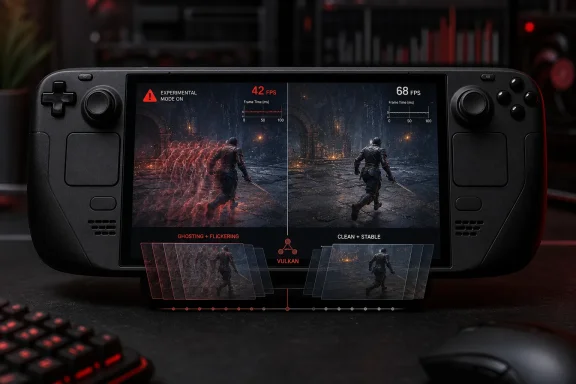
lsfg-vk 2.0.0-dev28-experimental.1, and it can coexist with the established Decky plugin. But the most widely repeated claims around it — a newly improved frame-generation model, newly introduced FP16 acceleration, and smoother presentation from new frame pacing — do not hold up against the upstream project’s own documentation and developer comments.Steam Deck HQ first flagged the mismatch after a Reddit post described the experimental plugin as a major upgrade. The plugin does offer a visible improvement in at least one important scenario: development builds fix a bug in lsfg-vk 1.0 associated with flickering or ghosting on small moving objects. That is a meaningful fix for games where those artifacts are distracting. It is not, however, a replacement frame-generation algorithm or a general quality leap.
 The plugin bundles a newer layer, not a new Lossless Scaling algorithm
The terminology has created much of the confusion. Lossless Scaling is the paid Windows application installed through Steam, while lsfg-vk is a Linux Vulkan layer that intercepts a game’s rendering and uses the installed Lossless.dll to create intermediate frames. Decky LSFG-VK is the SteamOS-friendly frontend and launcher integration around that layer.
The experimental plugin’s own GitHub repository describes itself as an independent fork that packages an experimental lsfg-vk build. It explicitly says the old and new implementations use the ordinary Lossless.dll from the Lossless Scaling Steam application. In plain terms, the plugin changes how the Linux compatibility layer is packaged, configured, and launched; it does not ship a secret next-generation interpolation model.
That distinction is more than semantic. A frame counter can show 80 fps after a game rendering at 40 fps is doubled, but the Steam Deck still has only 40 genuinely rendered input samples per second. The generated frames can improve the apparent smoothness of camera motion, but they cannot reduce the game’s underlying render time or make controls react like a native 80 fps experience. In workloads already limited by CPU performance, shader compilation, traversal stutter, or poor base frame pacing, frame generation often makes the number look better without correcting the source of the problem.
Upstream lsfg-vk developer PancakeTAS said the development build uses “the exact same frame generation” as before, with the small-object flickering fix accounting for certain ghosting improvements. Steam Deck HQ’s own comparison reached essentially the same conclusion: it observed less ghosting in places, but no broad performance or input-lag improvement over the mainstream Decky LSFG-VK release.
FP16 was already enabled — and disabling it is the real option
The claim that the experimental plugin introduced FP16 acceleration is also misleading. Half-precision shader operations can substantially reduce overhead on hardware that supports them, which is particularly relevant for AMD-based handhelds such as the Steam Deck. But upstream lsfg-vk’s configuration documentation lists allow_fp16 as enabled by default, and states directly that FP16 affects performance rather than image quality.
PancakeTAS said the Decky plugin already contained the capability and that the experimental fork had exposed a control that had been hidden. The experimental plugin’s repository now makes the same concession, noting that the public Decky plugin’s older payload already included an early FP16 build and that the feature is not unique to the fork.
For users, the practical implication is straightforward: toggling an FP16 setting does not demonstrate that a plugin has added an accelerator. It can demonstrate that the setting was previously kept out of sight. On the Steam Deck, where the GPU is AMD-based, leaving half-precision support on is generally the sensible baseline. Treating the setting as an on/off benchmark can produce misleading “before and after” comparisons if the original plugin had already been using FP16 under the hood.
The same caution applies to testimonials reporting that a game’s generated fps rose from the 60s to the 80s. Those reports can be sincere, but without identical game settings, base frame caps, refresh settings, power limits, performance mode, and a reproducible capture, they do not establish that the plugin itself created the gain. Frame generation is especially vulnerable to placebo benchmarks because its output is designed to raise the displayed frame count.
The promised backend and pacing work are not in this public build
The strongest discrepancy is in the experimental plugin’s description of its v2 advantages. Its release notes advertise a reworked Vulkan backend covering synchronization, resource reuse, VRAM handling, pipeline caching, and multi-device work, along with frame-pacing improvements. Those are substantial claims. Better resource handling could improve stability or reduce overhead, while proper pacing would address one of the largest weaknesses of generic frame generation on a handheld display.
But upstream’s public configuration documentation says only the legacy none pacing mode is presently supported. It explains that traditional lsfg-vk presents generated frames as quickly as possible, which can cause skipped frames, and that forcing V-Sync to compensate can add input latency. It specifically warns that compositors such as Gamescope may not honor V-Sync in the expected way.
PancakeTAS went further in the Reddit discussion, stating that the reworked backend exists on a separate branch that needs unreleased files and is not usable by the public. The developer also said no public frame-pacing work had made games “magically” smoother, and warned that the development builds had a pacing bug still needing attention. The public record therefore does not support presenting either feature as a benefit Steam Deck users receive by installing the experimental plugin.
This is the key finding obscured by the “2.0” label: the version number is real, but the capabilities associated with it are not all public, shipped, or operational on SteamOS. Calling the plugin “2.0” may be technically accurate because of its upstream lineage; calling it a finished performance upgrade is not.
There are still concrete reasons to test it — carefully
The experimental plugin is not worthless. Its August 5 release adds a specific compatibility fix for certain Switch emulators, including Eden, Ryujinx, and Yuzu-derived projects, when they create a small transient Vulkan swapchain. It also provides separate installation paths and launch wrappers, allowing an owner to keep both the public and experimental Decky implementations installed and choose one per game.
That isolation is useful for testing, but it has a cost. The release notes say games launched through the experimental wrapper cannot use vkBasalt or other globally installed Vulkan layers such as post-processing and overlay layers. HDR is also listed as problematic, with the project recommending that users disable HDR inside affected games. Opening and closing the Steam menu can, in some configurations, leave a game presenting at its base rate until it recovers or is relaunched.
Those are not minor footnotes for a plugin marketed on smoother play. They describe a prerelease build that can alter a game’s Vulkan environment and require a restart after a Gamescope presentation issue. The correct use case is a per-game experiment, especially for a title where the older plugin has obvious small-object artifacting or where emulator startup compatibility matters. It is not a blanket replacement to apply across a Steam library.
What Steam Deck owners should do with the new build
For games that already hold a stable 40 fps or 60 fps and have a good native upscaler or game-integrated frame generation option, use those first. Engine-integrated solutions have motion-vector and UI information that an external Vulkan-layer interceptor does not, giving them a better chance of controlling artifacts and latency.
For lsfg-vk, start from a stable, capped base frame rate. A 30 fps title multiplied to 60 fps may look more fluid in slow-paced games, but it remains a 30 fps input experience and may still show interpolation errors around HUD elements, particles, foliage, and rapid camera motion. Do not use it as a fix for a game that cannot maintain its chosen base frame rate.
The experimental Decky plugin is worth trying where its targeted ghosting fix is visible or where its emulator compatibility patch addresses an actual launch failure. Keep the public plugin installed, use only one LSFG-VK launch wrapper per game, and compare the same scene with the same cap and power profile before deciding which one belongs in that game’s launch options.
The immediate consequence is less dramatic than the Reddit hype suggested: Steam Deck users have a new test build with a genuine artifact fix and some compatibility work, but not a new frame-generation breakthrough. Until lsfg-vk’s upstream project publicly ships working pacing modes and the unreleased Vulkan backend it describes, the limiting factors — generated-frame artifacts, latency, and uneven Gamescope behavior — remain part of the deal.
