
The report, published by Check Point Research on August 18, describes a multi-stage Windows infection chain beginning on hacked WordPress domains. TheNews.com.pk’s summary cites more than 5,000 affected computers, but Check Point’s more detailed technical report puts the number higher: it found logs representing more than 6,000 unique IP addresses as of July 24, 2026. The researcher also cautions that some records may belong to sandboxes and security researchers, so neither figure should be treated as a confirmed count of individual victims.
That distinction changes the headline. This is not evidence that “5,000 computers were infected” in a fully verified, one-device-per-victim sense. It is evidence of a large Windows-focused campaign whose operators kept unusually complete telemetry on machines reached by the malware, and whose own poor operational security exposed part of that record.
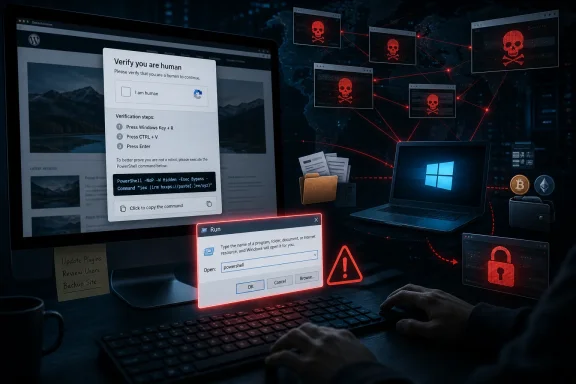 A fake CAPTCHA is the initial compromise
StopAndProtect does not need a browser exploit or a WordPress vulnerability on the visitor’s PC. Its initial-access technique is ClickFix: a social-engineering lure that puts a fake “verify you are human” prompt over a compromised site’s normal content.
The prompt instructs the visitor to copy a command into the Windows Run dialog or a command shell. Check Point found that the page copies a PowerShell command into the clipboard and directs the victim to execute it. The command launches hidden PowerShell with execution-policy bypass enabled, downloads a script from attacker-controlled infrastructure, and starts the rest of the chain.
That requirement for user interaction is important, but it should not be dismissed as a weak defense. The criminals have moved the dangerous action outside the browser deliberately. Browser reputation checks, HTTPS, domain age, and the familiar appearance of a previously trusted site are all less useful when the victim has been persuaded to run PowerShell themselves.
For help desks, this produces a recognizable incident pattern: a user reports a CAPTCHA problem, says they followed a sequence involving Windows key shortcuts and pasting a “verification” command, and then sees unusual behavior. Treat that as a possible endpoint compromise rather than a browser-support issue.
Compromised WordPress sites do more than host the lure
Check Point’s core finding is that the compromised sites served as a distributed criminal platform. The operators used WordPress domains to host malware stages, relay commands to infected devices, store logs, and receive stolen documents and screenshots. Instead of putting all command-and-control traffic on a small set of obvious malicious servers, they spread it across ordinary websites that may have legitimate content and reputations.
The campaign apparently had tooling to manage those sites at scale. Check Point recovered files it believes were accidentally exfiltrated from an operator’s own machine, including source code for a Visual Basic 6-based management utility. That tool could upload and delete files across compromised websites, activate or disable the fake CAPTCHA overlay, and manipulate caching behavior.
The intrusion mechanism for each WordPress site is not fully established in the public report. Check Point says neglected WordPress core installations and plug-ins created the opportunity, and one sampled compromised site was running a 2021 WordPress version with nearly 40 identified weaknesses. But the report does not tie StopAndProtect to one named WordPress zero-day or a single CVE. Website owners should resist reducing this to one patching event: the larger issue is an exposed fleet of outdated core, plug-ins, credentials, and server-side persistence.
One persistence mechanism found in the report deserves special attention. The attackers used a custom WordPress must-use plug-in, installed under wp-content/mu-plugins, to create a hidden REST endpoint capable of uploading files, including PHP files, to the WordPress root. Must-use plug-ins load automatically and are not managed in the normal WordPress Plugins interface, which makes a quick review of active plug-ins insufficient after a suspected compromise.
Ransomware is only one possible outcome
The name StopAndProtect originally referred to a ransomware component Check Point observed in mid-May 2026. Its broader investigation found an operation that does not encrypt every affected machine. In some cases, the attackers inventory files and exfiltrate selected material before choosing whether to deploy the noisier ransomware and lock-screen stages.
This is a meaningful operational difference. An organization that waits for mass file encryption before declaring a ransomware incident could miss the earlier theft phase entirely. Check Point found more than 700 stolen-data archives during its monitoring window from mid-May through the end of July, alongside approximately 31,000 screenshots collected from compromised systems.
The malware toolkit described by Check Point includes:
SilentEncryptor, which receives instructions on whether to encrypt all machines or systems matching particular host names.SilentDataCollector, which inventories drives, collects specified files, steals password and wallet data, and can capture user screenshots.- An SMB and USB propagation component, plus a VBS spreader that can scan shares and use Windows Management Instrumentation for lateral movement.
LockScreen, which blocks input and displays a ransom demand and payment QR code.SimpleChatProxy, a custom chat feature allowing the operator to communicate with a victim after compromise.
Check Point also describes newer data-collection functions that include keystroke logging, WhatsApp contact collection, network-share mapping, and activity screenshots captured at 30-second intervals. Those capabilities indicate a campaign designed for reconnaissance and selective theft, not merely opportunistic file encryption.
There is one unusually consequential detail in the ransomware implementation: Check Point says the per-file password and machine name are embedded in the encrypted file name, making decryption possible. That finding may aid incident response and recovery, but affected organizations should not assume every file can be restored simply from that observation. The report does not publish a general-purpose recovery tool or guarantee that all StopAndProtect samples use identical encryption behavior.
What Windows administrators should check now
Endpoint teams should add the ClickFix behavior to their user-awareness material and escalation playbooks. Staff do not need technical training to recognize the central rule: ordinary CAPTCHAs do not ask visitors to launch PowerShell, open the Run dialog, press Windows key combinations, or paste commands into Terminal.
On Windows devices, review PowerShell telemetry for hidden sessions, execution-policy bypasses, and commands that retrieve remote content through Net.WebClient, DownloadString, or similar download cradles. Check Point’s observed first-stage command used a hidden PowerShell window, -ep bypass, and an in-memory IEX execution pattern. Those indicators alone are not conclusive, but their appearance shortly after a user visited an unfamiliar or compromised web page warrants immediate investigation.
If there is evidence that a user ran such a command, isolate the endpoint before beginning cleanup. Investigators should preserve PowerShell operational logs, Microsoft Defender detections and history, browser history, downloaded-file metadata, scheduled tasks, startup entries, running processes, recent network connections, and access to mapped shares or removable media. Because StopAndProtect includes SMB, USB, and WMI propagation functions, the scope assessment should include neighboring systems, not only the first device.
For WordPress administrators, the response must include the websites themselves. Patch WordPress core, themes, and plug-ins; rotate WordPress, hosting, SFTP, SSH, database, and administrator credentials; and inspect server files for unauthorized PHP scripts, unexpected REST endpoints, modified wp-config.php, and unfamiliar folders under wp-content/mu-plugins. Review web-server access logs for suspicious POST activity and unknown uploads. A clean-looking homepage does not establish that a site is safe: StopAndProtect’s fake CAPTCHA overlay was engineered to preserve the appearance of a legitimate page while targeting Windows visitors.
The exposed records are useful, but not a public takedown
Check Point’s visibility came from exposed directory listings, attacker-managed file utilities, victim logs, and a suspected operator self-infection. That gave researchers a rare look at campaign mechanics, but it does not mean the operation has been dismantled. The report identifies compromised and command-and-control domains and publishes hashes and a YARA rule, yet it does not claim law-enforcement disruption, arrests, or the removal of the roughly 2,000-site infrastructure.
For defenders, the practical consequence is that this threat should be handled as active malicious-web infrastructure, not as a completed ransomware case study. The most reliable break in the chain remains at the first screen: leave any website that asks you to run a command to prove you are human, and investigate any Windows device where that instruction was followed.