
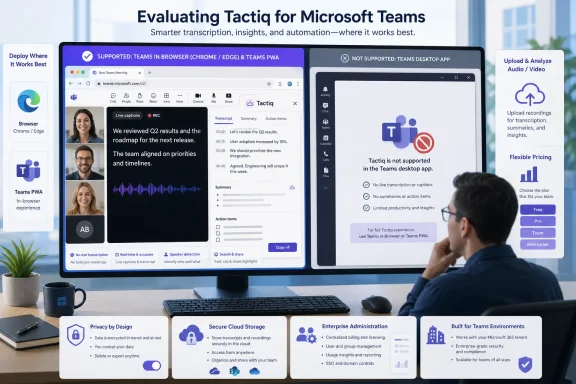
Tactiq can transcribe Microsoft Teams meetings in real time, but Windows users should not mistake it for a native Teams add-in. The browser-based meeting assistant works with Teams on the web and the Teams Progressive Web App in Chrome or Microsoft Edge; Tactiq’s own support documentation says it does not support the Microsoft Teams desktop application. That constraint is the operational detail missing from Analytics Insight’s August 6 review, which otherwise presents Tactiq as broadly available across Edge, the web, macOS, and Linux.
For an individual who already joins calls in a Chromium browser, Tactiq’s model is straightforward: the extension captures live captions and meeting content, generates a transcript, and sends that transcript to its dashboard for searching, summaries, action items, and custom AI prompts. For an organization standardized on the Windows Teams client, however, the product requires a workflow change before it provides any value. Users must either join through Teams for the web or install the browser-hosted Teams PWA, rather than use the regular desktop client they may already have deployed through Microsoft 365.
That is a meaningful distinction for IT administrators. Tactiq is not a client-side recorder that follows users into every Teams meeting regardless of how they join; it depends on a supported browser context. Microsoft describes the Teams PWA as a web application that looks and behaves like a desktop application but remains inside the Chrome or Edge browser environment. The PWA can be a workable compromise, but it does not erase the functional differences between Teams on the web and the full desktop application.
Analytics Insight correctly identifies Google Meet, Zoom, and Microsoft Teams as Tactiq’s primary live-transcription targets. The Chrome Web Store listing also confirms the extension works across those services without placing a visible bot participant in the meeting. That no-bot design is Tactiq’s strongest practical differentiator: no external attendee appears in the roster, and users do not need permission to invite a recording agent into the call.
But the tradeoff is platform dependence. In Teams, Tactiq’s March 2026 setup guidance explicitly directs users to the web version, not the desktop app. Its newer PWA guidance makes the same point: installing Teams as an app from Chrome makes the experience more desktop-like, but it is still a web-based application running through the browser.
Microsoft’s own Teams documentation reinforces why that caveat belongs near the top of any Tactiq evaluation. Teams for the web lacks some desktop-client capabilities, including certain large-meeting, multitasking, presentation, diagnostics, and client-setting functions. A user who switches from the desktop application purely to gain Tactiq transcription may lose features unrelated to note-taking.
For managed Windows environments, this also creates a policy question. Microsoft allows administrators to deploy Teams PWAs through Chrome and Edge policies, and recommends browser policies around sleep behavior, notifications, screen capture, audio capture, video capture, and cookies. Tactiq’s review material does not explain that a successful enterprise rollout may involve browser configuration and a Teams usage decision, not merely asking employees to install an extension.
The result is clear: Tactiq is best treated as a browser workflow tool. It is not a seamless add-on for every existing Microsoft Teams deployment.
Yet “no recording” does not mean the platform is limited to live captions. Tactiq added a file-upload path that accepts audio and video files up to 2 GB, including MP3, M4A, MP4, and MOV. It can transcribe those uploads, identify speakers with generic labels, and run its AI summary and action-item tools against the resulting text. The company even recommends recording an in-person meeting with a voice recorder or mobile app and then uploading the file for analysis.
That creates a more precise description of the product: Tactiq is a transcript and meeting-analysis system, not a live recording system. It will process an existing recording, but it will not create that source recording during the meeting itself.
This distinction affects retention and investigation workflows. Teams recording policies, eDiscovery procedures, and storage locations remain separate from Tactiq’s transcript archive. Uploading a recording to Tactiq creates an additional copy of meeting-derived material in a different service. Teams administrators should account for that before users treat the upload feature as an informal workaround for meeting-recording restrictions.
The same issue applies to speaker identification. Analytics Insight notes that corrections may be necessary during larger meetings, and Tactiq’s Teams documentation confirms that participant-name identification relies in part on Teams caption settings. Where Teams presents generic speakers or captions are not configured correctly, Tactiq cannot turn ambiguous source data into a reliable attendance record by itself.
The important wrinkle is what an AI credit represents. According to Tactiq’s pricing documentation, one credit covers one AI action: generating a summary, drafting action items, or asking Tactiq AI a question about a transcript. Five credits is therefore not five meetings with every AI output enabled. A user who generates a meeting summary, then asks for actions, decisions, and a follow-up email, can consume several credits against one call.
Tactiq says transcription continues after an AI-credit limit is reached, while AI functions pause until the monthly reset or an upgrade. That makes the free plan useful for testing caption quality and transcript search, but less generous for someone expecting automated summaries after every client or project meeting.
The price story also needs closer reading than the review provides. The advertised annual-billing rates in U.S. pricing are $8 per user per month for Pro, $16.67 for Team, and $29.17 for Business; Enterprise is custom-priced. Those figures are annual commitments expressed as monthly rates, not necessarily the price a user pays month-to-month. Tactiq’s checkout may also display localized pricing.
For a small Windows team, Pro can solve the volume problem while preserving a strict limit on AI output. For departments that expect every transcript to produce several structured outputs, the practical entry point is Team rather than Pro. That is a sizeable jump from the headline $8 rate.
The review’s ISO 27001 assertion deserves more scrutiny. Tactiq’s publicly accessible pricing, Privacy Center, Chrome Web Store page, and privacy policy did not provide a certificate, scope statement, or public confirmation of ISO 27001 certification. That does not establish that the company lacks certification; it means the claim should not be treated as verified from the material available to ordinary buyers. Procurement teams should request the current certification evidence, covered entities, scope, expiration date, and any exceptions directly from Tactiq rather than relying on a third-party review.
Tactiq’s privacy policy also puts some responsibility on the user. It says transcripts belong to the creator and can be directed to external storage integrations, but it also says personal information may be disclosed to service providers and may be stored outside Australia, including in the United States. The extension’s Chrome Web Store listing says it uses OpenAI’s API and that data submitted through that API is not used to train OpenAI models.
Those statements address data handling at a high level; they do not settle an enterprise’s specific data-classification requirements. A transcript can contain customer pricing, employee issues, credentials accidentally spoken aloud, legal advice, or regulated information. The absence of a meeting bot may make Tactiq less conspicuous to participants, but it also makes local consent practices more important. Users should not assume that invisibility in a meeting roster removes the need to notify attendees when company policy, contract terms, or local law requires notice.
Tactiq offers more substantial lifecycle controls only at higher tiers. Business and Enterprise administrators can configure transcript retention rules, with selectable periods from six to 60 months, while individual users can archive and delete transcripts. That arrangement is sufficient for many small teams, but it means lower-tier deployments rely more heavily on end-user behavior to manage sensitive meeting records.
The product is less suitable where the Windows Teams desktop client is non-negotiable, where mobile capture is required, or where video replay and advanced conversation analytics are part of the requirement. Analytics Insight correctly flags the lack of a mobile application and live recording, but it understates the practical cost of the Teams desktop limitation and overlooks the newer ability to upload recordings for AI analysis.
For Windows users, the deployment decision comes down to a simple test: if users can attend important Teams meetings through Edge or Chrome without losing needed Teams desktop features, Tactiq can provide a lightweight transcription layer. If they cannot, the product’s apparent Teams support will stop at the browser boundary.
That is a meaningful distinction for IT administrators. Tactiq is not a client-side recorder that follows users into every Teams meeting regardless of how they join; it depends on a supported browser context. Microsoft describes the Teams PWA as a web application that looks and behaves like a desktop application but remains inside the Chrome or Edge browser environment. The PWA can be a workable compromise, but it does not erase the functional differences between Teams on the web and the full desktop application.
 The browser requirement changes the Windows deployment story
Analytics Insight correctly identifies Google Meet, Zoom, and Microsoft Teams as Tactiq’s primary live-transcription targets. The Chrome Web Store listing also confirms the extension works across those services without placing a visible bot participant in the meeting. That no-bot design is Tactiq’s strongest practical differentiator: no external attendee appears in the roster, and users do not need permission to invite a recording agent into the call.But the tradeoff is platform dependence. In Teams, Tactiq’s March 2026 setup guidance explicitly directs users to the web version, not the desktop app. Its newer PWA guidance makes the same point: installing Teams as an app from Chrome makes the experience more desktop-like, but it is still a web-based application running through the browser.
Microsoft’s own Teams documentation reinforces why that caveat belongs near the top of any Tactiq evaluation. Teams for the web lacks some desktop-client capabilities, including certain large-meeting, multitasking, presentation, diagnostics, and client-setting functions. A user who switches from the desktop application purely to gain Tactiq transcription may lose features unrelated to note-taking.
For managed Windows environments, this also creates a policy question. Microsoft allows administrators to deploy Teams PWAs through Chrome and Edge policies, and recommends browser policies around sleep behavior, notifications, screen capture, audio capture, video capture, and cookies. Tactiq’s review material does not explain that a successful enterprise rollout may involve browser configuration and a Teams usage decision, not merely asking employees to install an extension.
The result is clear: Tactiq is best treated as a browser workflow tool. It is not a seamless add-on for every existing Microsoft Teams deployment.
Tactiq does not make recordings — but it now analyzes them
Analytics Insight says Tactiq lacks audio and video recording. That remains substantially true for a live call: Tactiq’s core meeting workflow creates and stores transcripts rather than a replayable audio or video recording. An organization requiring a complete audiovisual record, either for compliance or post-meeting review, will need to use Teams’ own recording controls or another approved recording product.Yet “no recording” does not mean the platform is limited to live captions. Tactiq added a file-upload path that accepts audio and video files up to 2 GB, including MP3, M4A, MP4, and MOV. It can transcribe those uploads, identify speakers with generic labels, and run its AI summary and action-item tools against the resulting text. The company even recommends recording an in-person meeting with a voice recorder or mobile app and then uploading the file for analysis.
That creates a more precise description of the product: Tactiq is a transcript and meeting-analysis system, not a live recording system. It will process an existing recording, but it will not create that source recording during the meeting itself.
This distinction affects retention and investigation workflows. Teams recording policies, eDiscovery procedures, and storage locations remain separate from Tactiq’s transcript archive. Uploading a recording to Tactiq creates an additional copy of meeting-derived material in a different service. Teams administrators should account for that before users treat the upload feature as an informal workaround for meeting-recording restrictions.
The same issue applies to speaker identification. Analytics Insight notes that corrections may be necessary during larger meetings, and Tactiq’s Teams documentation confirms that participant-name identification relies in part on Teams caption settings. Where Teams presents generic speakers or captions are not configured correctly, Tactiq cannot turn ambiguous source data into a reliable attendance record by itself.
The free plan is a trial of workflow, not unlimited AI notes
The submitted review accurately states that Tactiq offers a free tier with 10 meeting transcripts and five AI credits per month. Tactiq’s current pricing page confirms those limits, while the paid Pro plan offers unlimited transcripts but only 10 AI credits monthly. Team, Business, and Enterprise plans provide unlimited AI credits, with Business adding data-retention controls and SAML single sign-on.The important wrinkle is what an AI credit represents. According to Tactiq’s pricing documentation, one credit covers one AI action: generating a summary, drafting action items, or asking Tactiq AI a question about a transcript. Five credits is therefore not five meetings with every AI output enabled. A user who generates a meeting summary, then asks for actions, decisions, and a follow-up email, can consume several credits against one call.
Tactiq says transcription continues after an AI-credit limit is reached, while AI functions pause until the monthly reset or an upgrade. That makes the free plan useful for testing caption quality and transcript search, but less generous for someone expecting automated summaries after every client or project meeting.
The price story also needs closer reading than the review provides. The advertised annual-billing rates in U.S. pricing are $8 per user per month for Pro, $16.67 for Team, and $29.17 for Business; Enterprise is custom-priced. Those figures are annual commitments expressed as monthly rates, not necessarily the price a user pays month-to-month. Tactiq’s checkout may also display localized pricing.
For a small Windows team, Pro can solve the volume problem while preserving a strict limit on AI output. For departments that expect every transcript to produce several structured outputs, the practical entry point is Team rather than Pro. That is a sizeable jump from the headline $8 rate.
Security claims need to be separated from operational control
Analytics Insight describes Tactiq as compliant with SOC 2 Type II, ISO 27001, and GDPR. Tactiq’s Chrome Web Store listing publicly claims SOC 2 Type II and GDPR compliance, and its Privacy Center directs customers to a Trust Center for further framework and certification details. The company’s public privacy policy says data is stored in Google Cloud, transmitted over SSL, and may be processed by listed third parties including Google services, Stripe, Segment, Mailgun, and Google Analytics.The review’s ISO 27001 assertion deserves more scrutiny. Tactiq’s publicly accessible pricing, Privacy Center, Chrome Web Store page, and privacy policy did not provide a certificate, scope statement, or public confirmation of ISO 27001 certification. That does not establish that the company lacks certification; it means the claim should not be treated as verified from the material available to ordinary buyers. Procurement teams should request the current certification evidence, covered entities, scope, expiration date, and any exceptions directly from Tactiq rather than relying on a third-party review.
Tactiq’s privacy policy also puts some responsibility on the user. It says transcripts belong to the creator and can be directed to external storage integrations, but it also says personal information may be disclosed to service providers and may be stored outside Australia, including in the United States. The extension’s Chrome Web Store listing says it uses OpenAI’s API and that data submitted through that API is not used to train OpenAI models.
Those statements address data handling at a high level; they do not settle an enterprise’s specific data-classification requirements. A transcript can contain customer pricing, employee issues, credentials accidentally spoken aloud, legal advice, or regulated information. The absence of a meeting bot may make Tactiq less conspicuous to participants, but it also makes local consent practices more important. Users should not assume that invisibility in a meeting roster removes the need to notify attendees when company policy, contract terms, or local law requires notice.
Tactiq offers more substantial lifecycle controls only at higher tiers. Business and Enterprise administrators can configure transcript retention rules, with selectable periods from six to 60 months, while individual users can archive and delete transcripts. That arrangement is sufficient for many small teams, but it means lower-tier deployments rely more heavily on end-user behavior to manage sensitive meeting records.
Tactiq fits a specific kind of Teams user
Tactiq is a credible option for people who need searchable notes from browser-based Teams, Zoom, or Google Meet calls and prefer not to introduce an automated note-taking bot into every meeting. Its useful features are concrete: live transcription, transcript-wide search, saved AI prompts, meeting screenshots, summaries, action items, and integrations with tools such as Notion, Slack, Google Docs, Asana, Jira, HubSpot, and Google Drive.The product is less suitable where the Windows Teams desktop client is non-negotiable, where mobile capture is required, or where video replay and advanced conversation analytics are part of the requirement. Analytics Insight correctly flags the lack of a mobile application and live recording, but it understates the practical cost of the Teams desktop limitation and overlooks the newer ability to upload recordings for AI analysis.
For Windows users, the deployment decision comes down to a simple test: if users can attend important Teams meetings through Edge or Chrome without losing needed Teams desktop features, Tactiq can provide a lightweight transcription layer. If they cannot, the product’s apparent Teams support will stop at the browser boundary.
References
- Primary source: Analytics Insight
Published: 2026-08-06T17:00:00+00:00
Loading…
www.analyticsinsight.net - Related coverage: tactiq.io
Loading…
tactiq.io - Related coverage: help.tactiq.io
Loading…
help.tactiq.io - Related coverage: help.tactiq.io
Loading…
help.tactiq.io - Related coverage: chromewebstore.google.com
Loading…
chromewebstore.google.com - Related coverage: chromewebstore.google.com
Loading…
chromewebstore.google.com - Related coverage: tactiq.io
Loading…
tactiq.io - Related coverage: thebusinessdive.com
Loading…
thebusinessdive.com - Related coverage: tactiq.co
Loading…
tactiq.co - Related coverage: learn.microsoft.com
Loading…
learn.microsoft.com - Related coverage: learn.microsoft.com
Loading…
learn.microsoft.com