
Tom’s Hardware first reported the all-platform release on August 25, saying Plummer produced the initial version after supplying Anthropic’s Claude Code with a 107-page specification. Plummer’s claim is less interesting as a demonstration that an AI can write a task manager than as a demonstration of what still had to be specified: three operating systems expose processes, services, hardware counters, permissions, and user-interface conventions in very different ways.
TMOG’s own site confirms the platform split rather than a single cross-platform shell. It calls out Swift on macOS, native Win32 on Windows, and C++/Qt 6 on Linux, with a shared C++ metrics core intended to keep the underlying models and metric semantics consistent. That design is the key technical detail behind the launch: this is not a web wrapper wearing a desktop-app costume, and it is also not a literal port of Windows Task Manager.
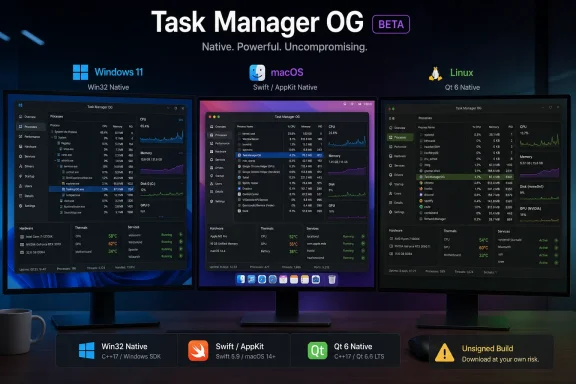 A Windows Task Manager successor that does not use Windows Task Manager code
Plummer is unusually qualified to make a tool carrying this name. TechSpot and VideoCardz previously documented that he wrote the original Task Manager while at Microsoft, before it was incorporated into Windows NT 4.0 in 1996. But the new program is a fresh implementation; VideoCardz reported in July that the Mac version was written in Swift and did not include Microsoft’s Task Manager source code.
That separation matters for users who may read “Task Manager OG” as an unofficial continuation of a Microsoft component. It is neither included with Windows nor supported by Microsoft, and it should not be treated as a replacement for the inbox Task Manager in managed Windows environments. It is third-party system utility software made by the original developer of the well-known Windows tool, which is a meaningful distinction when a program can enumerate processes, display hardware data, and expose service controls.
The official feature list reads like a power-user answer to the current Task Manager’s overview pages: per-logical-processor views, CPU topology, memory pressure and composition, storage and network histories, thermal information, energy metrics, process trees, filtering, and service actions. On Windows, TMOG says it uses native controls and follows Windows conventions; on Linux, it promises metrics obtained from Linux system interfaces; on macOS, it advertises Apple silicon topology, GPU and Neural Engine metrics where the operating system exposes them.
The phrase where the platform exposes them is doing important work. Cross-platform monitoring tools can share a visual model while still showing materially different data on each operating system. A Windows administrator should not assume that a TMOG view on a Mac or Linux workstation represents the same counters, permission model, process ancestry, or service-management behavior as the Windows version.
Claude Code produced a starting point, not a finished operating-system utility
According to Tom’s Hardware’s account of Plummer’s August 23 announcement, the first rough versions were generated in roughly four and a half hours after he supplied Claude Code with the 107-page specification. Plummer said they worked on the first attempt, followed by further tuning and fixes. The public site now describes TMOG as a beta, which is the more relevant status signal for anyone considering an install.
A detailed written spec can impose structure on AI-assisted development: desired screens, data models, update behavior, platform requirements, metric definitions, and error handling can all be expressed before code generation starts. In that sense, the 107 pages explain why this was more disciplined than asking a chatbot to “make Task Manager.” They also underline the part of the work that cannot be hand-waved away. The difficult engineering is deciding precisely what “CPU usage,” “memory,” “disk activity,” or “terminate process” should mean on each platform, then validating that the implementation behaves safely under load and failure.
TMOG’s 60 FPS display cadence is an example. A meter updating 60 times per second can look dramatically more responsive than the once-per-second rhythm familiar from older monitoring tools, and it may reveal short workload bursts that slower sampling conceals. It can also create the impression of precision beyond what every source counter can honestly deliver. The site labels one CPU display an instantaneous VFD meter at display cadence, but it does not publish a methodology explaining sampling intervals, smoothing, counter sources, or the overhead incurred when every graph is active.
For enthusiasts, that ambiguity is a reason to compare TMOG’s readings against Windows Task Manager, Resource Monitor, Performance Monitor, Process Explorer, Activity Monitor, or standard Linux tools before drawing conclusions from a transient spike. For administrators investigating a performance event, the familiar Microsoft and platform-native tools remain the defensible baseline because their behavior, permissions, and data paths are better established within existing support workflows.
The direct download changes the risk calculation
The most practical detail is not the neon “phosphor” themes or the 60 Hz animations. TMOG’s official download page explicitly says the beta is not yet digitally signed, and warns that the operating system may require manual approval before first launch. The Windows download is a standalone TMOG-Task-Manager-Setup.exe installer rather than a Microsoft Store package.
That does not establish that the executable is malicious. The site is openly warning users about the missing signature, and its privacy notice lays out several operational details, including update checks on macOS, optional licensing behavior, and the claim that the Windows application does not make the same background authorization request. Still, unsigned installers remove a major verification signal that Windows users normally rely on when deciding whether an executable came from the stated publisher and has not been altered in transit.
The release page also does not publish visible file hashes or a public signing key alongside the downloads. That is a material omission for a system-monitoring application, particularly one pitched at the people most likely to run it with broad local privileges or deploy it across machines. A direct link to an installer is not equivalent to a reproducible release process, published checksums, code signing, or a source repository that allows independent inspection.
Administrators should therefore keep TMOG out of standard endpoint deployment rings for now. If it is evaluated, use a test machine or disposable virtual machine, retain the installer obtained for testing, inspect its signature status and reputation in the local security tooling, and compare resource readings and process actions with the built-in Windows tools. Do not grant an exception in application-control policy merely because Plummer’s name is historically associated with Windows Task Manager.
macOS distribution remains unresolved beyond the beta
The Mac edition has encountered a platform limitation that helps explain TMOG’s direct-download route. VideoCardz reported that Plummer had planned a Mac App Store beta, but said Apple’s sandbox requirements prevented the type of process access and task termination expected of a task manager. In Plummer’s description, a sandboxed build could not retrieve the system process list and instead reported zero processes.
TMOG’s present privacy notice adds a wrinkle: it refers to a “Mac App Store edition” that would omit the optional iPhone remote-view feature. The public beta page, however, offers a direct DMG download and says the app is unsigned. The available record therefore supports the existence of a direct-download Mac beta, but it does not establish that a Mac App Store edition is currently available. The privacy-policy language suggests one is contemplated or has been designed for, not that Apple has accepted it.
That distinction is worth preserving because sandbox restrictions are not a cosmetic distribution problem. They determine whether a monitoring app can see processes, perform administrative actions, or use protected system interfaces. A Mac edition that reaches the App Store may necessarily have a different capability set from the direct version, and buyers should expect those differences to be specified before treating both editions as interchangeable.
A beta tool with a future paid tier already in view
The landing page calls TMOG a public beta, while the privacy policy describes optional TMOG Pro capabilities and says purchases are handled by Lemon Squeezy. It also promises that the free version will remain a useful supported system monitor, with security and compatibility fixes still available to free users. TechSpot had previously reported that Plummer floated a possible paid Pro version, but the official privacy policy confirms that licensing and activation mechanics are already part of the project.
For Windows users, the immediate result is a visually ambitious alternate task manager from the author of the original, not a new Microsoft utility and not yet a production-ready management standard. The release is significant because its Windows, Mac, and Linux builds are native applications sharing a common monitoring idea. Its unfinished signing, absent published hashes, beta status, and unclear feature boundaries between future free, Pro, and App Store editions are the reasons to evaluate it as a beta rather than install it everywhere.
