

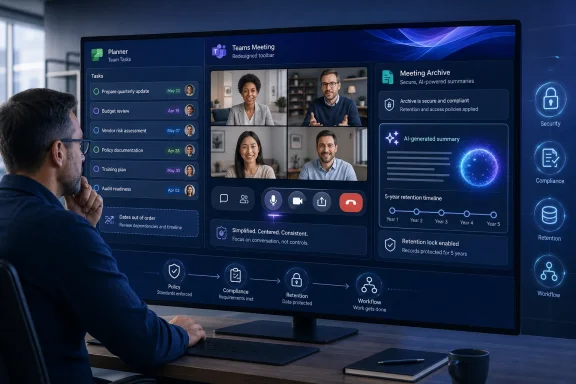
Seton Hall University’s August Microsoft 365 roundup accurately identifies the four changes in motion, but its timing understates how much is already deploying. Microsoft’s current notices show the redesigned Teams meeting interface began rolling out to worldwide tenants in early August, while the AI meeting archive starts in Targeted Release this month and reaches worldwide general availability from late August through late September. The private organizer-and-presenter chat has moved later again: Targeted Release now begins in late September, with worldwide and GCC deployment running from late October into early November.
For Windows admins and Teams power users, the important distinction is between a visual refresh, a behavior change, and a new retained data object. Those require very different preparation.
Planner Stops Protecting Date Order
Microsoft Planner is removing the rule that forced a task’s due date to fall on or after its start date. In Planner on the web and in Teams, changing one field will no longer automatically move the other. A task can now have a start date after its due date, and Microsoft says the worldwide and DoD rollout began in mid-July and is expected to finish by mid-October 2026.
The change is enabled by default for all Planner users. It applies to Planner in Teams on desktop and web, plus the Planner web app, although Microsoft warns that some other clients, including mobile, may continue to enforce date ordering temporarily while deployment catches up.
That flexibility is useful in a narrow but real set of cases. Teams can record an externally imposed deadline without having Planner silently rewrite it when someone estimates that work will begin later. A procurement response, audit remediation item, or missed commitment can be represented as it exists: the deadline has passed or precedes the current planned start.
But Microsoft is also removing an informal data-validation mechanism that many teams may not realize they depended upon. A Schedule or Calendar view can now show a task in a state that looks like a data-entry mistake, and automations built around the prior behavior may no longer receive a revised date when a user changes its paired field. Microsoft specifically calls out custom apps, integrations, and workflows that rely on automatic adjustment as items to review.
For organizations using Planner as lightweight project management, the practical response is to make the rule explicit elsewhere. If a start date must precede a due date for reporting, Power Automate flows, Power BI measures, or downstream project controls, validate the condition rather than assuming Planner will enforce it. Microsoft’s description frames the change as greater flexibility; in practice, it shifts responsibility for schedule sanity checks from the product to the organization.
Teams Meeting Controls Arrive Before September
The refreshed in-meeting experience is already entering worldwide tenants, rather than simply being a September feature. Microsoft’s Message Center notice MC1317197 says the global rollout begins in early August and is expected to complete by late August; GCC and GCC High follow from early September through late October, while DoD begins in early October and runs into late November.
On Windows, macOS, and Teams for the web, the microphone, camera, and sharing controls move to a centered cluster. The Leave button is separated from those high-frequency controls, less-used actions move into a reorganized More menu, and users can pin, unpin, and drag controls into their preferred order. The share pane gains live previews for screens and windows, separate tabs for screens and apps, interactive files, and more options, plus a two-step confirmation intended to stop the common mistake of sharing the wrong display.
This is a real usability improvement for users who present often, particularly on multi-monitor Windows setups where the distinction between a full desktop and an individual application window matters. It also creates a support burden during the transition because the position of familiar controls will change at the same time Microsoft is pushing more actions into the overflow menu.
There are two limitations worth calling out. First, the change does not cover Teams consumer, iOS, Android, Teams Rooms, or Linux clients. Second, a user’s customized meeting toolbar does not synchronize across devices at launch; the preference persists across meetings on the same client, but a Windows desktop arrangement will not automatically follow the user to Teams on the web or a Mac. Microsoft says cross-device synchronization is planned for a later release.
Administrators cannot disable the new interface tenant-wide. During deployment, users can temporarily opt in early or switch back through Teams settings, but that opt-out is individual and temporary. Existing meeting-app pinning policies continue to apply, although future policies support only two apps pinned into the main controls, with others relegated to More. Helpdesk documentation should be updated now, not after users begin asking why Share or Leave has moved.
Teams Is Creating a Long-Term AI Meeting Record
The most consequential August change is Teams’ AI-generated meeting archive. Microsoft’s public roadmap describes it as a tenant-wide policy that lets Copilot and Facilitator retain key insights after transcript-retention periods end. The more detailed July Message Center notice explains what that means operationally: eligible meetings will produce an AI-generated .meeting archive file stored in a tenant-owned SharePoint Embedded container, rather than in an organizer’s OneDrive or another user-controlled location.
The files are not raw transcripts, and users cannot open, modify, rename, or move them. Microsoft says they contain AI-generated information derived from the meeting transcript and metadata, with no raw transcript snippets stored in the archive itself. That distinction is meaningful for records management, but it should not be misread as meaning the archive is disconnected from meeting content. The transcript is processed to generate the new retained artifact.
An archive is created only if all of the following conditions are met:
- A meeting transcript is created and saved.
- At least one invited participant has a Microsoft 365 Copilot license.
- The meeting option for Copilot and Facilitator is set to allow use during and after the meeting.
The feature excludes end-to-end encrypted meetings, meetings with sensitivity labels that apply encryption, and meetings restricted from copying or forwarding. Access is also bounded: the service is intended to ground answers only for people who already have meeting access, and Microsoft says archive knowledge is limited to users in the same tenant as the organizer.
That still represents a material change in the data lifecycle. Microsoft’s default archive expiration is five years, or 1,825 days, unless an administrator changes it. The archive setting is enabled by default, and admins must actively turn it off in the Teams admin center if the organization does not want eligible meetings archived.
Seton Hall’s summary says these archives will make Microsoft 365 Copilot more accurate and context-aware. Microsoft’s latest detailed notice is more restrained: Facilitator is expected to use the archive when the feature ships, while Copilot’s use of it is described as a future capability. The public roadmap groups Copilot and Facilitator together, but admins should plan around the Message Center’s narrower implementation detail rather than presume that every Copilot experience will immediately query the new archive.
This is where the vendor’s “no raw transcript snippets” language needs context. A five-year, tenant-owned AI summary layer can preserve decisions, action items, and meeting knowledge after the original transcript would otherwise expire. That is the point of the feature. It may be desirable for continuity, but it also means transcript expiry no longer necessarily ends Copilot- or Facilitator-accessible knowledge of a meeting.
Teams now also has an in-meeting Meeting AI control rolling out separately. It allows eligible organizers and presenters to turn off AI functions during a meeting, but it is a forward-looking stop control, not a deletion mechanism. Any archive, recap, or generated output created before the feature is disabled remains subject to the tenant’s configured retention and compliance rules.
Private Event Chat Has Slipped Again
Teams’ private chat for organizers, co-organizers, and presenters will give event staff a separate conversation before, during, and after structured meetings, webinars, and town halls. Attendees cannot see it. Microsoft is also standardizing the older backroom chat behavior for town halls, which has previously varied based on streaming-chat configuration and whether the organizer had Teams Premium.
The feature’s Roadmap ID is 392328, but the roadmap’s abbreviated timing is no longer the best guide. Microsoft’s updated Message Center notice MC1188222, revised on July 29, puts Targeted Release deployment in late September through late October 2026. Worldwide and GCC availability then begins in late October and is expected to finish by early November.
The delay matters because it follows a string of revised delivery dates. More importantly, the policy change can alter existing town halls. The new backroom-chat policy is on by default; where an admin turns it off, previously scheduled town halls that had backroom chat enabled can lose it once their meeting options update. Conversely, non-Teams Premium town halls where the chat was previously unavailable can receive it by default after rollout.
That makes this a policy review, not merely a communication feature. Event owners who treat their presenter coordination as confidential should know whether the backroom chat is enabled, which roles can join it, and how its retention is governed before the fall event calendar fills up.
The August Microsoft 365 story is therefore straightforward for end users but more consequential for administrators: Planner dates will stop self-correcting, Teams controls will move on Windows and the web, and eligible Teams meetings can begin creating a five-year AI-derived memory unless the tenant changes Microsoft’s default. The first two are training issues. The third belongs with records management, compliance, and Teams meeting-policy owners before worldwide rollout reaches tenants in late August.