
The planned addition closes a real parity gap for GCC organizations using Teams as an external collaboration channel. Microsoft’s commercial-cloud documentation already describes a user-facing reporting path for suspected spam, phishing, malicious content, impersonation, and similar social-engineering attempts. The roadmap entry says those end-user reports will surface in the Teams admin center, supplying a security signal that government IT teams can investigate rather than leaving users with only a block-or-ignore decision.
There is an important boundary in Microsoft’s announcement: the entry names GCC, not GCC High or the Department of Defense cloud. It also supplies no staged-rollout dates, licensing detail, or confirmation of which security-portal integrations will accompany the October release. Agencies in GCC High and DoD should not assume this announcement applies to their tenants merely because the client platforms overlap.
 The October target follows a commercial rollout
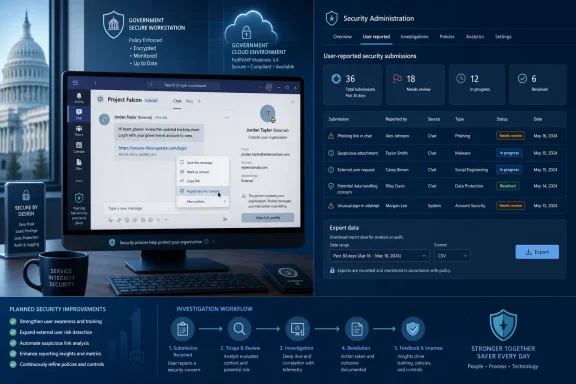
This is not a wholly new Teams security mechanism. Microsoft’s own Teams documentation, updated in late July, describes how users in supported tenants can report a particular message through the message menu, selecting a security concern. It also describes reporting an external person from an incoming external chat request or profile card while blocking that person.
Microsoft previously announced the external-user-reporting element for commercial tenants in May under Roadmap ID 560547. That Message Center notice scheduled worldwide availability for late June through early July 2026, and said the report would appear under the Teams admin center’s protection reporting area. The newly published GCC item therefore looks like a government-cloud deployment of a reporting workflow that has already been introduced elsewhere, rather than an expansion of Teams’ underlying external-access controls.
That rollout history changes how GCC administrators should read the October date. Microsoft’s product documentation now offers the operational details that the brief roadmap card omits: reported chats and channel messages can be reviewed in a “User reported security submissions” report, and external-user reports appear as a separate category. The report can be exported to CSV, which is particularly useful where a security operations team needs to correlate an abusive Teams identity or external domain with other telemetry.
The distinction between a message and a person is more meaningful than the roadmap wording suggests. Reporting a message preserves the context of a specific lure, suspicious URL, or impersonation attempt. Reporting an external user identifies the actor even when the suspicious behavior spans more than one chat or begins with an unsolicited request. Admins can use identity details in the export — including a reported user’s tenant ID, domain name, and Microsoft Resource Identifier when available — to support an external-access block decision.
The Teams admin center is only part of the workflow
Microsoft’s current documentation makes clear that the reporting feature does not operate as a simple, automatic detection-and-remediation system. It is a channel for human reports. A user must see something suspicious, choose the reporting action, and submit it; the relevant admin report gains data only after that event occurs.
For messages, the process also crosses two administration planes. In the Teams admin center, the user’s messaging policy must have Report a security concern enabled. Microsoft documents that setting as on by default, but a tenant with custom messaging policies, older policy baselines, or intentionally restricted user-reporting settings may have a different result for some or all users.
Microsoft’s Teams and Defender guidance also says that message reports need the related Teams reporting setting enabled in the Microsoft Defender portal if administrators expect them to appear correctly under Defender’s user-reported submissions view. Microsoft says that portal control is on by default for new tenants, while existing tenants need to turn it on themselves.
The practical caveat is that Microsoft currently treats the two report types differently. The Teams documentation says Defender supports user reporting of messages, but not yet reporting of external users. External-user reports are therefore valuable in the Teams admin center and its export, but administrators should not build a GCC incident workflow on the assumption that those reports will automatically create equivalent Defender submissions or flow through the same Defender triage queue.
That is the piece Microsoft’s roadmap summary leaves unsaid. An agency can switch on the client-side reporting control, train users to use it, and still discover that its SOC monitors only Defender rather than the Teams admin center. In that configuration, suspicious-message reports may have a downstream Defender path, while reports of the actual external identity require review in Teams protection reports. The data is useful only if someone owns both queues.
External reporting does not replace external-access policy
End-user reporting strengthens detection after a suspicious interaction reaches a user. It does not decide which outside organizations can contact the tenant in the first place. Teams external access configuration remains the preventive control: Microsoft’s earlier commercial rollout notice advised administrators who identify a malicious external user to block that user at the tenant level through External access settings.
For GCC organizations, that makes the October feature best understood as an investigation aid and feedback loop, rather than a substitute for an external-collaboration policy. Teams administrators should continue to review which external domains are allowed, how consumer identities are handled, and whether their help desk knows how to escalate a reported contact into a domain or tenant block when the evidence warrants it.
The report export can provide the information needed for that decision, but its completeness has limits. Microsoft notes that the reported party’s tenant ID or domain can be blank for consumer accounts, depending on privacy settings. The user-report workflow should therefore preserve the reporter’s comments and the original chat context where possible; a display name alone is weak evidence for attributing a phishing campaign or deciding that a legitimate partner domain should be blocked.
Teams also leaves reported items visible to the person who reported them, according to Microsoft’s Defender documentation. That behavior avoids silently changing a conversation from the user’s view, but it should be reflected in security-awareness material. Users should be taught that reporting is not an immediate quarantine action, and that they should not continue engaging with a suspected attacker after filing a report.
GCC administrators should prepare before the rollout window
There is no indication in Roadmap ID 569609 that action is required before October, and Microsoft has not published a deployment schedule beyond that month. But the commercial implementation provides a reasonable preparation checklist for GCC Teams and security administrators:
- Review the Teams messaging policies assigned to high-risk groups, pilot rings, contractors, and privileged users, and confirm that Report a security concern is enabled where reporting is intended.
- Identify who will review the Teams admin center’s Protection reports, including the “Chats and channels” and “User” categories, and establish an escalation path from help desk to security operations.
- Confirm whether the tenant’s Microsoft Defender configuration and licensing support the message-reporting investigation process the security team expects, rather than assuming that every Teams report appears in Defender.
- Update user guidance to distinguish reporting a malicious message from reporting an external person, and instruct users to block unsolicited contacts rather than treating a report as a blocking action.
- Test the export and evidence-retention process with a benign internal exercise once the feature appears, particularly if incident handling depends on tenant IDs, domains, or reported-message identifiers.
Microsoft’s support documentation lists Teams desktop, web, Mac, Android, and iOS as client surfaces for the existing reporting experience, while the GCC roadmap entry likewise names Android, desktop, iOS, Mac, and web. The roadmap does not provide build numbers, so agencies should avoid tying readiness plans to a particular Teams client version until Microsoft publishes a Message Center notice or government release note with a rollout status.
For now, the clearest operational conclusion is narrow: GCC tenants should plan for an October 2026 addition to Teams’ user-reporting defenses, but they should verify policy settings and reporting ownership before telling staff the feature is available. GCC High and DoD customers remain outside the announced scope, and external-user reports will still require attention in the Teams admin center even where message reports are also routed into Microsoft Defender.