
Microsoft’s redesigned Teams meeting controls have started reaching Targeted Release users, but the broad rollout is now scheduled later than early reports suggested—and it will not initially cover every Teams client. The latest Microsoft 365 Message Center update, dated July 31, puts worldwide general availability in late September through late October 2026, while GCC and GCC High follow through late November and DoD through late December.
The immediate change for end users is simple: the familiar meeting bar is being rebuilt around a fixed core of microphone, camera, share, and leave controls. Raise Hand is moving inside the React menu, less frequently used actions move to More, and Leave gets its own separated position. Microsoft says the redesign addresses a real usability problem: users have been accidentally raising hands when they meant to send reactions, and accidentally leaving meetings when they meant to start sharing.
But the more consequential part for IT departments is what Microsoft is not offering. This is a major interface change with no tenant-level off switch, and users’ custom layouts will initially remain local to each client rather than following them across devices.
Neowin reported on August 2 that the new controls would begin a staggered rollout in September 2026 and eventually reach desktop, web, government cloud, and VDI deployments. Microsoft’s current Message Center record supports the September start for worldwide general availability, but it changes the scope and the timing in important ways.
Targeted Release began in late July and is expected to finish by mid-August. Worldwide general availability is not expected to begin until late September, rather than early September, and is now projected to run into late October. Government tenants are on a separate schedule: GCC and GCC High begin in late September and run to late November, while DoD does not begin until late November and may not finish until late December.
Most notably, Microsoft’s current notice explicitly lists Teams for Windows desktop, Teams for Mac desktop, and Teams for the web as in scope. It explicitly excludes Teams consumer, iOS, Android, Teams Rooms, Linux, and VDI. That means organizations using Citrix, Azure Virtual Desktop, Windows 365, or another virtual-desktop arrangement should not plan on this interface arriving alongside the desktop and browser rollout unless Microsoft issues a separate VDI announcement.
Microsoft’s roadmap listing adds a layer of confusion. Roadmap item 560321 is marked “rolling out” and carries a July 2026 general-availability date, but the more detailed July 31 Message Center notice describes the July activity as Targeted Release and places worldwide general availability at the end of September. For deployment planning, the Message Center schedule is the better operational record: it contains platform exclusions, government-cloud dates, and the policy implications missing from the abbreviated roadmap entry.
The dates have also moved repeatedly. Microsoft’s Message Center archive shows the notice was published May 20 and subsequently revised several times, including updates on July 1, July 14, and July 31. Admins who prepared communications for a July or August broad release should revise them now rather than assuming that “rolling out” means every user is eligible.
That fix trades immediate access for error prevention. In short meetings, standups, classrooms, town halls, and moderated discussions, Raise Hand is a high-frequency action. Making it a secondary menu item may reduce false positives, but it also adds a click for users who rely on the feature often.
Microsoft is giving users a way to compensate: they can pin, unpin, and reorder many meeting controls by drag and drop. Preferences persist across meetings on the same client, and a user can return Raise Hand to the main toolbar if that better fits their work. The exception is intentional. Microphone, camera, share, and leave stay fixed so the principal meeting actions remain in a predictable location.
The limitation is easy to miss: customizations do not sync between devices at launch. A Teams user who carefully rearranges the toolbar in the Windows desktop client will not see that layout automatically reproduced in Teams for the web or on a Mac. Microsoft says cross-device synchronization is planned for a future release, but it has not published a delivery date.
That makes this less of a universal personalization system than it initially sounds. It is client-level muscle-memory management, and users who alternate between a managed desktop, a home browser session, and a MacBook will have to configure each environment separately.
The two changes should not be treated as one simultaneous deployment. Microsoft’s current schedule says redesigned meeting controls began in Targeted Release in late July, while the redesigned sharing controls begin rolling out in August. Microsoft has not committed to a single completion date for the sharing experience in the detailed notice.
For organizations that train staff on sensitive-screen sharing, that distinction matters. Help desk teams may receive questions about a new toolbar before users see the new share picker, or vice versa. Internal documentation should describe both interfaces as related but separately staged changes.
Microsoft also says the new sharing design is intended to reduce accidental shares of unintended content. That is a vendor claim, not a published measurement. The company has not disclosed the baseline rate of accidental shares, the telemetry behind its design decision, or whether the confirmation step can be configured by tenant administrators. The practical improvement is plausible; the evidence Microsoft has published is not sufficient to quantify it.
Neowin reports that users will receive prompts near the end of meetings during an initial 20-day adoption window. Microsoft’s latest Message Center post confirms that users may opt in early and temporarily return to the prior design, but it does not specify a 20-day prompt schedule. Administrators should therefore avoid promising employees a fixed trial period until Microsoft publishes that detail in its own current documentation.
Existing meeting app-pinning policies will continue to work, according to Microsoft. New meeting app-pinning policies, however, will support only two apps on the main meeting controls; additional approved apps will reside in More. That is a meaningful constraint for organizations that have built meeting workflows around several pinned applications, whether for polling, whiteboarding, note taking, compliance, or line-of-business integrations.
Microsoft’s documentation for Teams meeting reactions also confirms that reactions can be governed through meeting policy in the Teams admin center or with the
Support documentation should make clear that Raise Hand has moved under React by default, that users can pin it back to the toolbar, and that rearrangements remain tied to the individual client. Teams administrators should also inventory meeting app-pinning policies before the new two-app main-toolbar limit becomes visible to users.
The rollout is now underway for Targeted Release tenants, but most standard commercial users should not expect the redesign until late September at the earliest. For VDI, mobile, Teams Rooms, Linux, and consumer Teams users, the current answer is simpler: this rollout does not include them.
But the more consequential part for IT departments is what Microsoft is not offering. This is a major interface change with no tenant-level off switch, and users’ custom layouts will initially remain local to each client rather than following them across devices.
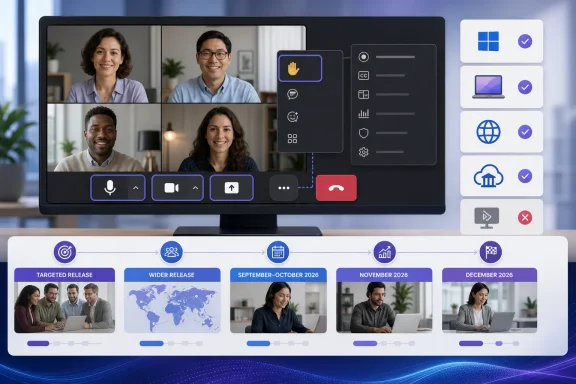 The September rollout is later—and narrower—than the first reports indicated
Neowin reported on August 2 that the new controls would begin a staggered rollout in September 2026 and eventually reach desktop, web, government cloud, and VDI deployments. Microsoft’s current Message Center record supports the September start for worldwide general availability, but it changes the scope and the timing in important ways.Targeted Release began in late July and is expected to finish by mid-August. Worldwide general availability is not expected to begin until late September, rather than early September, and is now projected to run into late October. Government tenants are on a separate schedule: GCC and GCC High begin in late September and run to late November, while DoD does not begin until late November and may not finish until late December.
Most notably, Microsoft’s current notice explicitly lists Teams for Windows desktop, Teams for Mac desktop, and Teams for the web as in scope. It explicitly excludes Teams consumer, iOS, Android, Teams Rooms, Linux, and VDI. That means organizations using Citrix, Azure Virtual Desktop, Windows 365, or another virtual-desktop arrangement should not plan on this interface arriving alongside the desktop and browser rollout unless Microsoft issues a separate VDI announcement.
Microsoft’s roadmap listing adds a layer of confusion. Roadmap item 560321 is marked “rolling out” and carries a July 2026 general-availability date, but the more detailed July 31 Message Center notice describes the July activity as Targeted Release and places worldwide general availability at the end of September. For deployment planning, the Message Center schedule is the better operational record: it contains platform exclusions, government-cloud dates, and the policy implications missing from the abbreviated roadmap entry.
The dates have also moved repeatedly. Microsoft’s Message Center archive shows the notice was published May 20 and subsequently revised several times, including updates on July 1, July 14, and July 31. Admins who prepared communications for a July or August broad release should revise them now rather than assuming that “rolling out” means every user is eligible.
Raise Hand is still there, but it is deliberately one click farther away
The most visible behavioral change is the new placement of Raise Hand. Microsoft is grouping it under React because the old side-by-side arrangement produced accidental hand raises when people intended to send an emoji reaction. Windows Central independently reported the original roadmap change in April, including Microsoft’s rationale for separating Raise Hand from reactions and isolating the Leave control.That fix trades immediate access for error prevention. In short meetings, standups, classrooms, town halls, and moderated discussions, Raise Hand is a high-frequency action. Making it a secondary menu item may reduce false positives, but it also adds a click for users who rely on the feature often.
Microsoft is giving users a way to compensate: they can pin, unpin, and reorder many meeting controls by drag and drop. Preferences persist across meetings on the same client, and a user can return Raise Hand to the main toolbar if that better fits their work. The exception is intentional. Microphone, camera, share, and leave stay fixed so the principal meeting actions remain in a predictable location.
The limitation is easy to miss: customizations do not sync between devices at launch. A Teams user who carefully rearranges the toolbar in the Windows desktop client will not see that layout automatically reproduced in Teams for the web or on a Mac. Microsoft says cross-device synchronization is planned for a future release, but it has not published a delivery date.
That makes this less of a universal personalization system than it initially sounds. It is client-level muscle-memory management, and users who alternate between a managed desktop, a home browser session, and a MacBook will have to configure each environment separately.
The redesign also changes how sharing is initiated
The toolbar overhaul is linked to a second change: a revamped sharing panel. Microsoft says the new panel can include live previews of screens and windows, a tabbed layout, and a two-step confirmation before content is shared. The objective is to prevent users from exposing the wrong display or application—an error that can have far more serious consequences than a misplaced reaction.The two changes should not be treated as one simultaneous deployment. Microsoft’s current schedule says redesigned meeting controls began in Targeted Release in late July, while the redesigned sharing controls begin rolling out in August. Microsoft has not committed to a single completion date for the sharing experience in the detailed notice.
For organizations that train staff on sensitive-screen sharing, that distinction matters. Help desk teams may receive questions about a new toolbar before users see the new share picker, or vice versa. Internal documentation should describe both interfaces as related but separately staged changes.
Microsoft also says the new sharing design is intended to reduce accidental shares of unintended content. That is a vendor claim, not a published measurement. The company has not disclosed the baseline rate of accidental shares, the telemetry behind its design decision, or whether the confirmation step can be configured by tenant administrators. The practical improvement is plausible; the evidence Microsoft has published is not sufficient to quantify it.
Admin control is limited to policies that already exist
The new meeting experience will be enabled by default, and Microsoft says administrators cannot disable it tenant-wide. During rollout, individual users may opt in early and may temporarily return to the previous interface through Teams settings, but that user-level opt-out will be removed later. Microsoft has promised advance notice in a future Message Center post before retiring the fallback.Neowin reports that users will receive prompts near the end of meetings during an initial 20-day adoption window. Microsoft’s latest Message Center post confirms that users may opt in early and temporarily return to the prior design, but it does not specify a 20-day prompt schedule. Administrators should therefore avoid promising employees a fixed trial period until Microsoft publishes that detail in its own current documentation.
Existing meeting app-pinning policies will continue to work, according to Microsoft. New meeting app-pinning policies, however, will support only two apps on the main meeting controls; additional approved apps will reside in More. That is a meaningful constraint for organizations that have built meeting workflows around several pinned applications, whether for polling, whiteboarding, note taking, compliance, or line-of-business integrations.
Microsoft’s documentation for Teams meeting reactions also confirms that reactions can be governed through meeting policy in the Teams admin center or with the
AllowMeetingReactions PowerShell setting. The company has not yet explained in the new-controls notice how a disabled reactions policy will present the React menu when Raise Hand is housed beneath it. That is the kind of edge case administrators should test in Targeted Release before publishing user guidance.Prepare support teams now, not in late September
Microsoft’s own recommendation is to notify users, help desks, and internal support teams before the change arrives. That advice is unusually important here because the product behavior is changing without an administrative deferral control. The best preparation is not a broad announcement about a “refreshed experience”; it is a short, visual guide explaining where three familiar actions went: Raise Hand, Share, and Leave.Support documentation should make clear that Raise Hand has moved under React by default, that users can pin it back to the toolbar, and that rearrangements remain tied to the individual client. Teams administrators should also inventory meeting app-pinning policies before the new two-app main-toolbar limit becomes visible to users.
The rollout is now underway for Targeted Release tenants, but most standard commercial users should not expect the redesign until late September at the earliest. For VDI, mobile, Teams Rooms, Linux, and consumer Teams users, the current answer is simpler: this rollout does not include them.
References
- Primary source: Neowin
Published: 2026-08-02T14:38:02+00:00
Loading…
www.neowin.net - Related coverage: support.microsoft.com
Loading…
support.microsoft.com - Related coverage: support.microsoft.com
Use meeting controls in Microsoft Teams | Microsoft Support
Learn how to use meeting controls like chat, apps, and more in a Microsoft Teams meeting.support.microsoft.com - Related coverage: learn.microsoft.com
Release notes for Microsoft Teams - Office release notes | Microsoft Learn
This article describes the release notes information about new admin features for Microsoft Teams and Teams admin center.learn.microsoft.com - Related coverage: techcommunity.microsoft.com
Loading…
techcommunity.microsoft.com - Related coverage: learn.microsoft.com
Loading…
learn.microsoft.com - Related coverage: cdn-dynmedia-1.microsoft.com
- Related coverage: techcommunity.microsoft.com
Microsoft Teams Licensing Updates April 2026 Customer FAQ 1
PDF documenttechcommunity.microsoft.com
- Related coverage: info.microsoft.com
Loading…
info.microsoft.com - Related coverage: info.microsoft.com
Loading…
info.microsoft.com - Related coverage: windowscentral.com
Microsoft Teams removal shows why we shouldn't get too excited about preview features | Windows Central
Microsoft has paused development on new minimized views that would have made multitasking easier.www.windowscentral.com - Related coverage: windowscentral.com
“It may feel different at first”: Microsoft Teams will stop you from leaving meetings or raising your hand accidentally | Windows Central
Small UI tweaks aim to cut down on accidental hand raises and premature exits.www.windowscentral.com - Related coverage: techradar.com
Microsoft makes major AI U-turn following user revolt — will let Teams users turn off Copilot, Facilitator and Recap | TechRadar
Microsoft Teams AI backlash leads to major changeswww.techradar.com - Related coverage: techradar.com
Microsoft Teams will now let your company add its own branded reactions, and I can't possibly foresee this going wrong at all | TechRadar
'Branded Meeting Reactions' are coming to Microsoft Teamswww.techradar.com - Related coverage: learn.g2.com
Loading…
learn.g2.com