
Microsoft Teams PowerShell 7.9.0 is now the current stable module, and its most immediate operational change is that
For Windows administrators, the important dividing line is whether a job needs a person at a desktop. Interactive
Microsoft has retained
There is a versioning detail worth clearing up. Microsoft’s June Message Center notice said WAM would arrive with Teams PowerShell 7.8.1 preview, with worldwide rollout beginning in late June 2026. Microsoft Learn’s current release notes confirm the same WAM change in the July 2026 stable 7.9.0 release, alongside the
Office 365 IT Pros reports that Microsoft released version 7.9 on July 19 and encountered continued module-loading conflicts in testing alongside Microsoft Graph PowerShell and Exchange Online Management. In its tests, using
This remains a broader Microsoft 365 PowerShell packaging problem, not proof that WAM itself is the sole cause. Still, the timing is inconvenient. Organizations that require 7.9 to gain the new governance controls may also have to revisit scripts that import Teams, Graph, Exchange Online, PnP.PowerShell, or Entra modules into a single session. Splitting work into separate PowerShell processes or using purpose-built automation identities may be more reliable than leaning on a deprecated
When
That means an administrator enabling the policy should expect delayed disruption, not a one-time cleanup event. Old partner chats can appear intact during validation, then shed participants on their next message. Help-desk teams and collaboration owners should be told in advance, especially where a tenant uses tightly scoped external-access policies for contractors, legal teams, acquisitions, or regulated business units.
The second control, mutual federation, goes further. It requires every participant in a federated group chat to have a valid federation relationship with every other participant, rather than checking only the joining user and chat initiator. In a multi-company chat, one partner that is not permitted by another participant’s domain allow/block configuration can prevent the addition or cause the removal of a participant from an active chat.
Microsoft’s July 10 Message Center notice places the two controls on different availability dates: external-access restrictions were available from July 31, while mutual federation is scheduled for September 30. As of August 4, 2026, that distinction matters. Microsoft Learn’s cmdlet documentation still marks both parameters “reserved for future use” and says values will not be retained before release, creating an obvious documentation conflict with the Message Center rollout notice.
The evidence supports a cautious implementation approach: test and monitor
The addition matters because channel governance is frequently a blend of Teams policy, Microsoft Entra B2B Direct Connect configuration, and user behavior. The new policy parameters provide another administrative layer, but they are not retroactive revocation tools. Microsoft’s documentation for channel sharing warns that an external user or team that already has access to a shared channel can retain that access even after a related sharing control is set to false.
Administrators should therefore separate two tasks: governing who can create or expand future channels, and auditing current membership and existing channel-to-team shares. Flipping the new policy controls can prevent new paths from being created; it does not automatically unwind every existing external relationship.
The synthetic-media controls need a more careful reading.
That is not a reason to ignore the settings; it is a reason not to represent them as an active deepfake defense in a risk register or executive report. Administrators can prepare policy design, inventory applicable meeting policies, and watch for a service-side availability announcement. They cannot validate protection by enabling the parameter today.
The same principle applies to
For tenants that integrated Shifts with a workforce-management provider through these cmdlets, updating the module without an inventory can turn an administrative script into a command-not-found failure. This is not an authentication issue and will not be solved by
Microsoft has supplied the removal notice but, in the 7.9 release notes, does not provide a migration path or replacement cmdlet set. Organizations still relying on that automation need to identify the supported management route with their workforce-management vendor before upgrading the module everywhere.
Teams PowerShell 7.9 is worth deploying for admins who need its channel controls, federation enforcement, and newer policy surface. But the immediate change to validate is WAM-based sign-in, the federation controls require staged and documented testing, synthetic-media detection is not active merely because its parameter exists, and Shifts Connection users have a hard compatibility break to resolve before the update reaches their automation hosts.
Connect-MicrosoftTeams uses Windows Web Account Manager, or WAM, for supported interactive sign-ins by default. Petri first highlighted the authentication shift alongside a broad set of governance additions, but Microsoft’s own release record shows that the update also removes the entire Teams Shifts Connection cmdlet family — a breaking change that deserves equal billing for organizations with workforce-management automation.
The WAM switch is not an abstract security improvement. It changes the authentication broker used by Teams PowerShell on Windows 10, Windows Server 2019, and newer supported Windows environments, placing interactive sign-in and token handling under the Windows account broker rather than the module’s previous path. Microsoft says the objective is better token protection and a consistent sign-in experience across Microsoft 365 administration tools.For Windows administrators, the important dividing line is whether a job needs a person at a desktop. Interactive
Connect-MicrosoftTeams sessions, credential-based sign-ins, and -AccountId integrated Windows authentication use WAM. Certificate-based service principals, managed identities, and sessions using pre-acquired access tokens do not. Neither do macOS and Linux clients, nor older Windows releases, which retain the prior authentication behavior.Microsoft has retained
-DisableWAM as an escape hatch, but it explicitly calls the parameter temporary and plans to remove it. Teams administrators should treat the switch as a diagnostic or short-term compatibility measure, not a durable script standard. A scheduled task that has quietly depended on an interactive credential flow is the kind of workload that needs attention now; WAM requires an interactive Windows session with UI access and is not suited to Windows services, unattended scheduled tasks, or impersonated sessions.
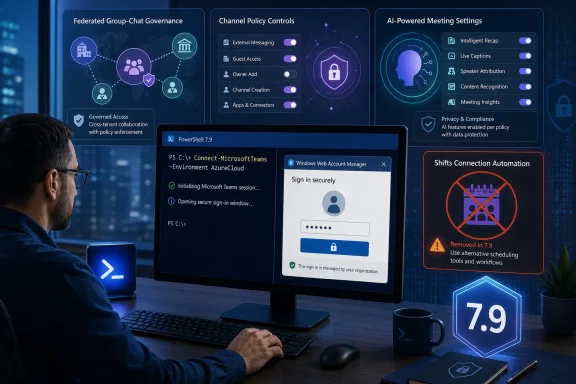 WAM arrives in 7.9 after a 7.8.1 preview rollout
There is a versioning detail worth clearing up. Microsoft’s June Message Center notice said WAM would arrive with Teams PowerShell 7.8.1 preview, with worldwide rollout beginning in late June 2026. Microsoft Learn’s current release notes confirm the same WAM change in the July 2026 stable 7.9.0 release, alongside the -DisableWAM switch. The 7.9 module is therefore not introducing an untested authentication design from scratch; it promotes a behavior that had already appeared in preview.Office 365 IT Pros reports that Microsoft released version 7.9 on July 19 and encountered continued module-loading conflicts in testing alongside Microsoft Graph PowerShell and Exchange Online Management. In its tests, using
Connect-MicrosoftTeams -DisableWAM allowed Graph PowerShell to load afterward, while Exchange Online still failed. That is one outlet’s observed result rather than a Microsoft-published compatibility matrix, but it reinforces a practical rule: test Teams 7.9 in the exact PowerShell process that runs your production automation, not merely in a clean interactive shell.This remains a broader Microsoft 365 PowerShell packaging problem, not proof that WAM itself is the sole cause. Still, the timing is inconvenient. Organizations that require 7.9 to gain the new governance controls may also have to revisit scripts that import Teams, Graph, Exchange Online, PnP.PowerShell, or Entra modules into a single session. Splitting work into separate PowerShell processes or using purpose-built automation identities may be more reliable than leaning on a deprecated
-DisableWAM workaround.
Federated group-chat restrictions close a policy gap — selectively
The strongest governance addition is not a new Teams Admin Center toggle. It is a pair of tenant federation parameters exposed throughSet-CsTenantFederationConfiguration:EnableExternalAccessRestrictionsForChatParticipantsEnableMutualFederationForChatParticipants
EnableFederationAccess disabled could still end up in an external group chat if a permitted colleague in the same tenant created it.When
EnableExternalAccessRestrictionsForChatParticipants is enabled, Teams should block those restricted users from joining group chats that include external participants and remove them from existing external group chats. Microsoft’s rollout notice adds two material limits. Removal applies immediately only to an active chat — one with a message in the preceding two hours — while inactive chats are reevaluated when someone posts again. And the person who initiated the chat is not automatically removed.That means an administrator enabling the policy should expect delayed disruption, not a one-time cleanup event. Old partner chats can appear intact during validation, then shed participants on their next message. Help-desk teams and collaboration owners should be told in advance, especially where a tenant uses tightly scoped external-access policies for contractors, legal teams, acquisitions, or regulated business units.
The second control, mutual federation, goes further. It requires every participant in a federated group chat to have a valid federation relationship with every other participant, rather than checking only the joining user and chat initiator. In a multi-company chat, one partner that is not permitted by another participant’s domain allow/block configuration can prevent the addition or cause the removal of a participant from an active chat.
Microsoft’s July 10 Message Center notice places the two controls on different availability dates: external-access restrictions were available from July 31, while mutual federation is scheduled for September 30. As of August 4, 2026, that distinction matters. Microsoft Learn’s cmdlet documentation still marks both parameters “reserved for future use” and says values will not be retained before release, creating an obvious documentation conflict with the Message Center rollout notice.
The evidence supports a cautious implementation approach: test and monitor
EnableExternalAccessRestrictionsForChatParticipants in a controlled tenant or policy cohort now, but do not assume EnableMutualFederationForChatParticipants is live simply because version 7.9 exposes its parameter. Microsoft has not yet reconciled its public cmdlet page with the staged rollout schedule.Channel policy changes make shared-channel governance more granular
Teams PowerShell 7.9 also expandsCsTeamsChannelsPolicy with controls over regular, private, and shared-channel creation; whether shared channels are created by default; and whether users and guests outside the parent team can participate in private or shared channels. It adds controls for sharing a channel with another internal team and for sharing a private channel with a team in the organization.The addition matters because channel governance is frequently a blend of Teams policy, Microsoft Entra B2B Direct Connect configuration, and user behavior. The new policy parameters provide another administrative layer, but they are not retroactive revocation tools. Microsoft’s documentation for channel sharing warns that an external user or team that already has access to a shared channel can retain that access even after a related sharing control is set to false.
Administrators should therefore separate two tasks: governing who can create or expand future channels, and auditing current membership and existing channel-to-team shares. Flipping the new policy controls can prevent new paths from being created; it does not automatically unwind every existing external relationship.
The AI and anti-phishing settings are controls before they are protections
Petri’s coverage correctly identifies new settings for synthetic-media detection, pre-meeting consent, Conditional Access attendee verification, AI agent management, meeting knowledge generation, and voice phishing detection. Microsoft’s 7.9 release notes confirm these additions, including a new-Channel parameter for Get-CsAiAgents, which lets administrators target AI-agent inventory work at the channel level.The synthetic-media controls need a more careful reading.
SyntheticMediaDetection and SyntheticMediaDetectionAppId now appear in the Teams meeting policy cmdlets, and the latter accepts the Teams app ID of a detection bot. Yet Microsoft Learn’s own parameter documentation states that synthetic-media detection has not been fully released and that changing the setting currently has no effect. The module exposes the configuration surface before Microsoft has made the capability actionable.That is not a reason to ignore the settings; it is a reason not to represent them as an active deepfake defense in a risk register or executive report. Administrators can prepare policy design, inventory applicable meeting policies, and watch for a service-side availability announcement. They cannot validate protection by enabling the parameter today.
The same principle applies to
VoicePhishingDetection in Teams calling policy. Version 7.9 adds the administrative parameter, but Microsoft’s release notes do not describe its detection method, licensing prerequisites, rollout scope, alert experience, false-positive handling, or whether the setting is yet effective for production calls. Those omissions are significant for security teams considering it as a compensating control for voice fraud. A policy knob is not a validated detection service until Microsoft publishes the operational details behind it.Shifts Connection automation is gone
The 7.9 release notes include a breaking change absent from Petri’s overview: Microsoft has removed the Teams Shifts Connection cmdlets and says they are no longer supported. The removed set includes cmdlets for connections, connection instances, team maps, batch team maps, connectors, operations, synchronization results, error reports, workforce-management teams, workforce-management users, and validation.For tenants that integrated Shifts with a workforce-management provider through these cmdlets, updating the module without an inventory can turn an administrative script into a command-not-found failure. This is not an authentication issue and will not be solved by
-DisableWAM. Before standardizing on 7.9, search runbooks, Azure Automation accounts, scheduled tasks, configuration-management repositories, and CI/CD pipelines for CsTeamsShiftsConnection.Microsoft has supplied the removal notice but, in the 7.9 release notes, does not provide a migration path or replacement cmdlet set. Organizations still relying on that automation need to identify the supported management route with their workforce-management vendor before upgrading the module everywhere.
Teams PowerShell 7.9 is worth deploying for admins who need its channel controls, federation enforcement, and newer policy surface. But the immediate change to validate is WAM-based sign-in, the federation controls require staged and documented testing, synthetic-media detection is not active merely because its parameter exists, and Shifts Connection users have a hard compatibility break to resolve before the update reaches their automation hosts.
References
- Primary source: Petri IT Knowledgebase
Published: 2026-08-04T15:23:12+00:00
Loading…
petri.com - Related coverage: learn.microsoft.com
Loading…
learn.microsoft.com - Related coverage: learn.microsoft.com
Loading…
learn.microsoft.com - Related coverage: blog.admindroid.com
Loading…
blog.admindroid.com - Related coverage: office365itpros.com
Loading…
office365itpros.com - Related coverage: techcommunity.microsoft.com
Loading…
techcommunity.microsoft.com - Related coverage: microsoft-assessment.com
- Related coverage: microsoft365compliance.de
Loading…
microsoft365compliance.de - Related coverage: audiocodes.com
Loading…
www.audiocodes.com - Related coverage: blog.icewolf.ch
Loading…
blog.icewolf.ch - Related coverage: pkg.go.dev
Loading…
pkg.go.dev - Related coverage: docs.pexip.com
Loading…
docs.pexip.com - Related coverage: scribd.com
Loading…
www.scribd.com