
For IT teams responsible for conference rooms, that matters. A meeting room can be technically online, signed in, and apparently healthy while still delivering poor audio, choppy video, confusing content sharing, or an unreliable join experience. Telemetry can identify many underlying signals; it cannot always tell administrators whether the room experience disrupted the meeting. Call quality feedback surveys for Teams Rooms on Android aim to add that missing layer of user perception.
The feature is not a replacement for Microsoft’s established quality tools. Instead, it has the potential to connect the people in the room with the operational data already available to Teams administrators, help desks, and network teams. Done well, that feedback loop could make recurring room problems easier to find, prioritize, and fix before confidence in hybrid meetings erodes.
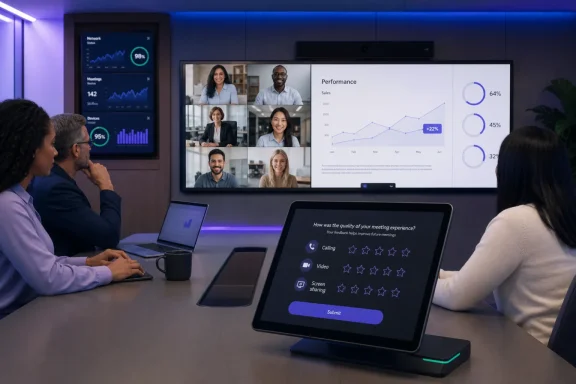 Overview: What Microsoft Is Adding to Teams Rooms on Android
The roadmap description is concise but meaningful. Users will be able to rate call and meeting quality and provide additional feedback specifically about calling, video, and screen sharing. The stated purpose is to help organizations deliver more consistent, higher-quality experiences across their meeting spaces. Microsoft’s roadmap listing identifies the release as general availability rather than a limited preview, and names Android as the principal platform.
That framing suggests the feature will be designed for the practical reality of shared spaces. A Teams Room is not a personal desktop client where one employee controls every part of the setup. It is a shared endpoint involving room cameras, speakerphones, displays, touch consoles, content ingest hardware, network connectivity, room accounts, and the varied devices used by remote attendees.
In a normal meeting, the room’s user may notice a problem long before an administrator sees a dashboard alert:
- Voices may sound distant, distorted, or intermittently cut out.
- Remote video may freeze, lag, or appear at an unexpectedly low quality.
- A presentation may be difficult to read, delayed, cropped, or not visible to remote participants.
- The room might technically connect successfully while the overall session remains frustrating to conduct.
- A problem may occur only at a specific time, in a specific room, or after a particular meeting workflow such as wireless sharing.
The planned survey mechanism creates an opportunity to capture these qualitative signals close to the point of failure. That is especially important in executive boardrooms, training spaces, and large collaboration rooms, where a single poor meeting can have a disproportionate impact.
Why Android-based rooms are a significant target
Teams Rooms on Android includes a broad class of dedicated collaboration endpoints, and Microsoft’s management model increasingly treats those devices as an integrated part of the enterprise Teams estate. Microsoft’s current documentation notes that Teams Android devices—including Teams Rooms on Android, Teams phones, panels, and SIP devices—are being brought under the Teams Rooms Pro Management Portal as device-management workflows shift away from the Teams admin center. Microsoft’s transition guidance describes that broader move.
This timing is important. Survey feedback will be more valuable if it can be evaluated alongside device inventory, software update state, health information, and network data. A room complaint without operational context can turn into an open-ended support ticket. A complaint linked to a room, time, meeting session, client version, and connectivity profile is far more actionable.
Microsoft has already documented that Teams Rooms devices may show in-product surveys, including call-quality feedback prompts, to signed-in room accounts. Microsoft’s Teams Rooms management documentation makes clear that these prompts exist within the broader product direction. Roadmap ID 543713 therefore represents a concrete upcoming expansion or formal availability milestone for this feedback experience on Teams Rooms on Android.
The Value of Combining User Sentiment With Quality Telemetry
IT departments have long used measurements such as packet loss, jitter, round-trip time, device health, and stream performance to understand Teams meeting quality. These measurements remain essential. Yet the experience of a meeting is not reducible to a single metric.
A room can have technically acceptable network readings while participants still struggle with an echoing microphone, poorly framed camera image, difficult screen-sharing workflow, or delayed switching between content and people. Conversely, a brief technical event might not materially interrupt the discussion and may not warrant the same urgency as a repeated, user-reported defect.
Microsoft’s Call Quality Dashboard (CQD) is built to give administrators an organization-wide view of call and meeting quality. CQD is designed to surface patterns across calls, clients, networks, and locations, and its near-real-time feed typically makes call records available within about 30 minutes after a call ends. Microsoft’s CQD overview explains that administrators can use the information to identify broader performance trends and optimize networks.
The new Teams Rooms survey capability should be understood as an additional evidence source, not a stand-alone scorecard.
Objective signals still matter
Operational telemetry is critical because users cannot be expected to diagnose technical root causes. A survey response such as “video quality was poor” might reflect network congestion, endpoint CPU pressure, a blocked hardware encoder, an outdated firmware component, a camera issue, or a poor remote participant connection.
Microsoft has continued to expand the data available in CQD. Its documentation records fields related to CPU throttling and blocked hardware video encoders or decoders, all of which can affect media quality. Microsoft’s CQD release information also shows that feedback-rating logic has been refined so administrators can distinguish an offered survey that received no rating from an actual submitted rating.
That evolution matters because survey data is useful only when it is interpreted carefully. A low rating is a signal to investigate; it is not, by itself, a definitive diagnosis.
User feedback catches what dashboards can miss
Microsoft’s quality-management guidance describes Rate My Call as a built-in Teams survey mechanism that captures users’ perceptions and can reveal issues that service metrics miss. Microsoft’s CQD management guidance calls it a lagging indicator, but also a useful one precisely because human experience and raw telemetry do not always tell the same story.
For Teams Rooms, this distinction may be even more important. The room experience is collective. A poor speakerphone experience may be noticed by everyone physically present but generate no individual desktop support case. A screen share that looks acceptable on the room’s front-of-room display may nevertheless be unreadable to remote participants. Conversely, an issue that looks alarming in a device health report may have had no effect on the meeting.
Feedback surveys can help organizations answer questions that device data alone cannot settle:
- Did people in the room consider the meeting usable?
- Was the issue primarily audio, video, or content sharing?
- Is a room generating recurrent frustration despite appearing healthy?
- Do complaints cluster around certain rooms, buildings, meeting times, or room types?
- Did a firmware or Teams app update improve—or worsen—the in-room experience?
The most useful outcome is not a prettier satisfaction metric. It is a more reliable way to direct scarce support and network-engineering resources toward the problems that actually disrupt work.
How the Feature Fits Microsoft’s Existing Teams Quality Toolset
Microsoft’s Teams quality tooling already follows a layered operational model. The Teams admin center can help support staff investigate individual calls and meetings, while CQD is intended to expose organization-wide trends. Microsoft also positions Quality of Service (QoS) as a way to prioritize important real-time network traffic. Microsoft’s call-quality guidance describes these three elements as complementary rather than interchangeable.
Teams Rooms call-quality feedback surveys can strengthen that model by providing a better starting point for support triage.
A likely operational workflow
The exact interface, survey timing, retention model, and administrative reporting details have not been specified in the public roadmap item. Organizations should avoid assuming that every feedback response will automatically create an incident, identify a precise failure, or be exposed in every existing Teams reporting surface.
Still, the following workflow reflects how the capability could be used effectively alongside Microsoft’s published management tools:
- A meeting concludes and a room user submits quality feedback.
The feedback points to one or more categories: call quality, video, or screen sharing. - Support identifies the affected room and meeting window.
Administrators can use room activity information and call-quality records to establish the context of the reported experience. - The team correlates sentiment with operational evidence.
CQD can reveal whether other calls at the site experienced poor quality, while per-device and per-meeting details can highlight a device-specific condition. - IT determines the scope.
A single failure may indicate a local peripheral, cabling, or room configuration issue. Similar feedback from several rooms may indicate a network, update, or service pattern. - The organization remediates and observes the results.
Fixes might involve network work, an app update, firmware remediation, replacement hardware, configuration changes, or adjustments to room deployment standards. - Subsequent feedback becomes a validation signal.
The goal is not simply to clear an alert; it is to confirm that people experienced a meaningful improvement.
Microsoft already exposes useful Teams Rooms diagnostic context. In the Teams admin center, administrators can review device health, network connectivity, sign-in status, software information, activity history, meeting attendance, and audio-quality information. For detailed meeting views, the platform can provide end-to-end diagnostics for the participant session, the Teams Room device, and the connectivity between them. Microsoft’s Teams Rooms management documentation outlines these capabilities.
That means survey feedback could make existing diagnostics more discoverable and relevant. Instead of reviewing room telemetry only after a major outage, support teams can use direct user feedback to identify the meetings worth examining first.
Why Screen-Sharing Feedback Deserves Special Attention
The specific inclusion of screen sharing is one of the more notable aspects of the roadmap item. Audio and video receive most of the attention in meeting-quality discussions because interruptions are immediately obvious. Content sharing, however, is often where hybrid meetings succeed or fail.
A meeting can have clear audio and stable video while still being ineffective if remote participants cannot follow a spreadsheet, presentation, whiteboard, application demo, or shared design. Problems can arise from resolution mismatches, display scaling, source-device configurations, wireless sharing behavior, HDMI ingest, layout changes, or simple workflow confusion.
For WindowsForum readers and IT administrators, this is a useful reminder that Teams Rooms call quality is broader than VoIP quality. It includes the entire meeting experience.
Microsoft’s published guidance on room networking notes that meeting rooms commonly handle multiple audio and video streams along with meeting content such as screen sharing. It recommends at least 1-Gbps Ethernet for meeting-room devices and emphasizes that stationary rooms have higher requirements than many ordinary endpoints. Microsoft’s quality-of-experience guidance further warns that Wi-Fi can be especially problematic for real-time media in rooms because meeting attendees’ personal devices may compete for the same access point.
A screen-sharing survey response could therefore be a valuable early warning of infrastructure shortcomings that may not present as a complete service outage. If several rooms report poor content sharing at busy times of day, the problem may be related to WLAN density, bandwidth contention, or network prioritization—not necessarily the Teams Rooms console itself.
Administration, Privacy, and Survey Governance
The benefits of user feedback do not remove the need for governance. Meeting-room surveys should be configured with the same care organizations apply to monitoring, device management, and employee feedback programs.
Microsoft states that in-product surveys and call-quality feedback can appear to signed-in Teams Rooms accounts. The company also makes an important administrative distinction: the Teams PowerShell CsTeamsFeedbackPolicy and its receiveSurveysMode setting do not control Teams Rooms in-product surveys or call-quality feedback. Organizations that want to disable them must use the Cloud Policy service for Microsoft 365. Microsoft’s Teams Rooms management guidance is explicit on that point.
This has several practical implications.
Avoid accidental policy gaps
Administrators who have previously managed desktop-client feedback through PowerShell policies should not assume those policies govern room systems. As Teams Rooms on Android surveys become more visible, policy owners should validate the actual Cloud Policy configuration before rollout.
That verification matters in regulated environments, shared conference centers, healthcare organizations, or organizations with tightly controlled user-experience prompts. The presence of an unexpected rating survey may be harmless, but it can create confusion if facilities teams, executive support teams, or room users have not been briefed.
Treat feedback data as operational data
Feedback surveys can contain subjective comments, and those comments may identify rooms, meeting circumstances, or potentially individuals. CQD documentation notes that end-user identifiable information is managed under Microsoft 365’s broader handling approach for that class of data. Microsoft’s CQD documentation nevertheless gives organizations a reason to define access controls and retention expectations before expanding who can review quality feedback.
A sensible governance model should define:
- Which support, workplace technology, and network teams can access feedback.
- How comments are triaged and when they become formal incidents.
- Whether responses are aggregated before executive reporting.
- How long detailed feedback is retained.
- How the organization distinguishes a room issue from a remote attendee’s personal endpoint problem.
- How room users are informed about the purpose of the survey.
The objective should be service improvement, not surveillance. Users are more likely to provide useful feedback when they understand that reports lead to practical improvements rather than burdensome follow-up.
The Risks: More Data Does Not Automatically Mean Better Meetings
Microsoft’s planned feedback surveys are a sensible addition to Teams Rooms on Android, but the feature also carries real implementation risks.
Survey fatigue and low-quality responses
If prompts appear too frequently, users may ignore them, dismiss them reflexively, or provide rushed ratings with little diagnostic value. The strength of a post-meeting survey depends on timing, clarity, and restraint.
Microsoft’s existing Rate My Call approach samples calls rather than prompting after every one. Its guidance describes the survey as appearing after one in every 10 calls, or 10 percent. Microsoft’s CQD quality-management guide The roadmap entry does not specify whether Teams Rooms on Android will use the same sampling pattern, so organizations should wait for detailed product documentation before setting expectations.
Attribution can be difficult
A poor meeting can involve many endpoints. The room may be functioning normally while a remote participant has a constrained home network, a failing headset, VPN interference, or a poorly configured client. The feedback may correctly report a bad experience but incorrectly imply that the room caused it.
This is why correlation matters. A meaningful operational process needs to compare feedback with call records, building context, device diagnostics, update status, and reports from other meetings. Microsoft’s guidance points to recurring causes such as insufficient bandwidth, poor Wi-Fi coverage, VPN use, out-of-date clients and drivers, unoptimized audio devices, and problematic network equipment. Microsoft’s Teams quality guidance No single survey response can identify which of these conditions is responsible.
Metrics can become targets
If a team is assessed solely on average room ratings, it may focus on suppressing prompts or closing tickets quickly rather than resolving systemic issues. The better performance measure is not merely a rising feedback score. It is a demonstrable reduction in repeat incidents, improved reliability during key meetings, and faster recovery from quality problems.
Feedback should be treated as a signal of user experience, not as an unquestionable verdict on the technical team or the room hardware.
Preparing for the September 2026 Rollout
Because the roadmap places general availability in September 2026, Teams administrators have time to make practical preparations. The rollout remains an in-development plan, but the operational groundwork is valuable regardless of the final survey interface or timing. Microsoft’s roadmap entry
1. Establish a baseline before feedback arrives
Review the rooms with the highest volume of support tickets, meeting restarts, user complaints, and recurring audio or sharing issues. Use CQD and per-meeting troubleshooting data to identify locations that already show poor patterns.
Organizations with well-maintained building and endpoint metadata can use CQD’s location-enhanced reporting to determine whether poor quality is isolated or site-wide. Microsoft’s CQD documentation That baseline will make post-rollout survey data substantially more useful.
2. Confirm Android device-management readiness
Microsoft’s transition plan for Android device management calls for Teams Rooms on Android devices to be managed through the Teams Rooms Pro Management Portal, with specific Admin Agent requirements for management readiness. Microsoft’s transition guidance Organizations should ensure their room inventory, update practices, and ownership models are current.
A room that cannot receive or report the right updates will be harder to remediate when feedback reveals a recurring problem.
3. Review network design for fixed rooms
For meeting rooms, wired networking should be the default rather than an afterthought. Microsoft’s guidance recommends at least 1-Gbps Ethernet for meeting-room devices and advises treating Wi-Fi as a temporary or carefully provisioned alternative for real-time media. Microsoft’s CQD quality-management guide
That recommendation becomes more operationally important when user feedback begins exposing intermittent issues that occur only during high-density office hours.
4. Define ownership across IT teams
The room support team, Teams administrators, network engineers, facilities staff, and AV integrators should agree on escalation paths. Feedback about “video” may involve camera hardware, USB connectivity, codecs, bandwidth, room lighting, or a remote endpoint. Feedback about “screen sharing” may require expertise spanning room AV design and network engineering.
Clear ownership prevents useful survey data from becoming another queue with no accountable resolver.
A Better Feedback Loop for Hybrid Meeting Rooms
The planned Teams Rooms on Android call quality feedback surveys represent a modest interface change with potentially broad operational consequences. Microsoft is recognizing that meeting quality should not be judged exclusively by backend telemetry, device uptime, or whether a room successfully joined a call.
The strongest outcome will come when organizations combine survey sentiment with CQD analysis, individual call diagnostics, reliable device management, disciplined update processes, and sound room-network design. That combination allows IT to distinguish a one-off complaint from a systemic issue, then validate whether the remediation actually improved the meeting experience.
For organizations that have struggled to quantify room frustration before it becomes an executive escalation, the value is straightforward. Users gain a simple channel to report what went wrong; administrators gain a more relevant signal for investigation; and Teams Rooms on Android becomes better positioned to deliver the consistent, high-quality hybrid meetings enterprises expect.
