
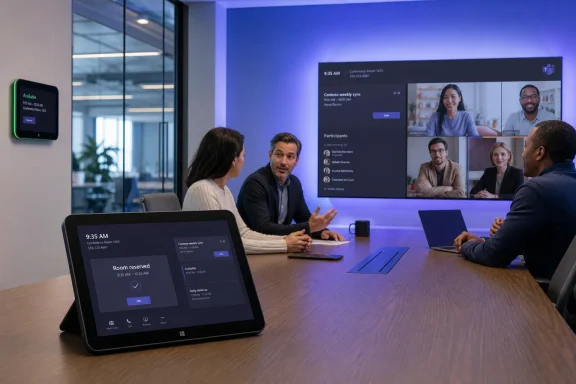
The change sounds modest, but it addresses one of the most persistent frictions in modern offices. Employees often find a vacant room, begin an impromptu discussion, and only later discover that the space has been booked in Outlook for another meeting. A reservation control built into the Teams Rooms on Windows console can make the room’s real-world status reflect its calendar status before that collision occurs.
Microsoft describes the feature as a way to quickly book a room for immediate use, reduce scheduling conflicts, and keep spontaneous meetings uninterrupted. The roadmap entry lists availability for Worldwide standard multi-tenant tenants as well as GCC, GCC High, and DoD, with a July rollout window and support across Microsoft Teams, desktop, and Teams and Surface devices. Microsoft’s roadmap definitions also clarify an important point for IT teams: “rolling out” does not mean every eligible customer has it today. It means the capability is beginning deployment and may arrive at different times across tenants and device fleets.
 Why ad-hoc room reservation matters in a Teams Rooms environment
Office collaboration has become less predictable than the old calendar-first workplace model. Teams meetings are still planned, but many productive discussions begin as hallway conversations, quick escalation calls, executive reviews, or small groups gathering around a display to solve an immediate problem.
In those situations, users rarely want to pull out a laptop, open Outlook, find the appropriate room mailbox, create a meeting, invite the room, wait for the booking to process, and then return to the physical space. That is a multi-step workflow imposed on a moment that may only last 15 or 20 minutes.
A Teams Rooms console is already the device people approach when they enter a meeting room. It controls the in-room experience, presents meeting-join options, and provides a familiar touch interface. Bringing the room-reservation action to that console aligns the workflow with the user’s physical location.
The goal is not simply convenience. It is calendar integrity.
When an impromptu meeting is formally associated with the room, employees elsewhere in the organization can see that the room is occupied. The next person looking for a quiet space, an executive briefing room, or a conference room with a certified Teams setup is less likely to walk into an active conversation believing the room is free.
This also has operational value for organizations that have invested heavily in room technology. A well-equipped Teams Room can be one of the most contested resources in a building. Its display, camera, microphones, speakers, and collaboration hardware may be needed at a moment’s notice. The ability to reserve the room at the console gives users a more direct route to protecting that resource.
The familiar problem: a room that looks empty but is not actually free
A room calendar and a room’s physical state can diverge in either direction:
- A room may be physically occupied but calendar-free because a group started an informal conversation without booking it.
- A room may be calendar-booked but empty because the organizer did not show up or ended early.
- A meeting may run over, leaving the next group with a room conflict even though the original booking appears to have ended.
- An employee may use a room for a confidential call without creating any visible reservation, making it impossible for others to know whether the space is genuinely available.
Microsoft Teams Panels have long addressed part of this problem. Microsoft’s existing documentation explains that a Teams Panel can reserve a currently available meeting space for an ad-hoc meeting and that these reservations become Teams meetings automatically. Microsoft Learn’s Teams Panels guidance describes a workflow in which users tap Reserve, select an available end time, and convert the room’s availability state to a reserved Teams meeting.
The Windows console feature matters because it extends the idea to the primary in-room Teams device rather than requiring a separate scheduling panel mounted outside the room.
What Microsoft has announced
The published roadmap description is deliberately concise: Teams Rooms on Windows consoles will let users quickly book a meeting room for immediate use. The feature is available in rooms assigned a Teams Rooms Pro license, according to the Roadmap ID 548648 listing.
Several boundaries are already clear from the roadmap metadata.
It is a Windows Teams Rooms capability
This is specifically an enhancement for Teams Rooms on Windows. Organizations using Teams Rooms on Android should not assume an identical console experience will arrive as part of this rollout.
That distinction is significant because Teams Rooms on Windows and Teams Rooms on Android often share broad product goals but do not always receive features on the same timeline, in the same user interface, or with the same controls. IT teams managing mixed room fleets should test the experience per platform rather than treat “Teams Rooms” as a single, uniform client.
It is a Teams Rooms Pro feature
The roadmap says the capability is available in Teams Rooms Pro-licensed rooms. That licensing requirement makes this more than a simple client update: successful adoption depends on the room’s resource account, license assignment, and device sign-in state being correct.
Microsoft’s setup guidance states that each Teams Rooms device resource account needs a Teams Rooms license, and administrators can purchase either Teams Rooms Basic or Teams Rooms Pro before assigning it to the resource account. Microsoft’s licensing setup documentation reinforces why room accounts deserve the same management discipline as other enterprise identities.
For organizations relying on Teams Rooms Basic, this announcement is an important reminder to validate feature entitlements before setting expectations with users. A console may be current, healthy, and otherwise functional while still not exposing a Pro-only meeting-room experience.
It is designed for immediate—not future—booking
The roadmap language centers on reserving a room for immediate use. That wording should be taken seriously. Microsoft has separate Teams Panels functionality for future booking, in which users select an available time slot, choose a start and end time, optionally enter a guest, and create a Teams meeting directly from the panel. Microsoft’s future Teams Panels booking documentation specifies that the panel experience can show availability through midnight of the following day.
The console feature should therefore be viewed as a “claim this room now” workflow, not a replacement for Outlook, Teams desktop scheduling, or advanced room booking systems.
A logical extension of Teams Panels room scheduling
The new console reservation workflow is not being introduced in a vacuum. Microsoft has gradually built room-reservation capabilities across Teams device experiences, especially through Teams Panels.
That existing documentation offers useful clues about the likely business logic behind on-console reservation. On Teams Panels, a user can reserve an available room immediately, with the reservation starting at the current time. The meeting’s end time can extend to the next scheduled booking or up to 24 hours from the current hour, whichever comes first. Microsoft Learn’s ad-hoc room reservation instructions also state that reservation times are presented in 15-minute increments and that a booking option disappears if there is insufficient time before the next meeting.
Those details may not map one-for-one to Teams Rooms on Windows consoles, and Microsoft has not published the final console interaction model in the roadmap item. Still, they illustrate the scheduling safeguards that matter:
- The room must be genuinely available before a reservation can be created.
- The system must honor the next calendar booking.
- A short buffer is necessary to prevent a new reservation from colliding with an upcoming meeting.
- The room calendar must update quickly enough that other users and booking tools see the change.
- Any reservation should create a clear status signal in the physical room and in Microsoft 365 calendars.
A robust console implementation would preserve these fundamentals even if its buttons, time controls, or cancellation rules differ from Teams Panels.
Automatic Teams meeting creation is an important precedent
Microsoft’s Teams Panels documentation says that ad-hoc reservations are automatically scheduled as Teams meetings. The panel interface then presents the room as reserved, and the in-room Teams Rooms device can join that Teams meeting. Microsoft’s documented Teams Panels workflow makes the calendar record useful for both space governance and collaboration continuity.
For the Windows console feature, the key question will be how much of that underlying meeting object is surfaced to people in the room. Microsoft’s roadmap description promises immediate room booking, but it does not yet specify whether users will add attendees, see a meeting chat, select a duration, or receive a distinct meeting invitation.
That ambiguity is not unusual for a roadmap item. Microsoft 365 Roadmap entries are intended as deployment indicators rather than complete product specifications; Microsoft notes that roadmap information is subject to change as features progress through development and rollout. Microsoft’s roadmap explanation explicitly distinguishes rolling-out features from those that have reached full availability.
Benefits for employees, facilities teams, and IT
The strongest aspect of this feature is that it can improve several overlapping workplace problems without asking users to learn a separate scheduling product.
Less friction at the point of use
The first benefit is simple: people can reserve a room where they are standing.
That eliminates the awkward gap between deciding to use a space and documenting that use in the organization’s calendar. For employees, the experience should feel closer to unlocking a shared resource than arranging a formal event.
It also favors the workflows that Teams Rooms were built to support: spontaneous collaboration, quick hybrid calls, and content sharing from the room’s display.
Fewer surprise interruptions
A calendar reservation cannot stop every interruption, but it provides a shared signal that the room is in use. A person checking the room’s availability in Outlook, Teams, a Teams Panel, or a workplace scheduling platform has a better chance of seeing the ad-hoc occupation before walking in.
In offices where rooms lack exterior panels, the console is especially valuable. It may be the only directly accessible room device capable of recording an immediate reservation without a user returning to their laptop.
Better use of premium spaces
Not every meeting room is equal. Rooms with intelligent cameras, multiple displays, certified audio, Teams Rooms Pro management, and advanced peripherals are often scarce.
The console-based reservation capability gives groups a direct way to turn a temporary need into a legitimate booking. That can reduce informal “squatting” while helping facilities and IT understand when room demand exceeds available capacity.
A more coherent Microsoft 365 record
Microsoft has already positioned Teams Panels reservations as actual Teams meetings rather than an isolated device flag. Microsoft’s panel booking documentation says a Teams meeting is automatically scheduled for each reservation, while optional guests can receive a calendar invitation in the future-booking scenario.
That calendar-centered model is preferable to a local-only occupancy switch. A local state can make a room appear occupied on one screen while leaving Outlook availability, audit trails, reporting, and cross-device scheduling unaware of the change.
Important constraints and potential risks
The feature is useful precisely because it turns a casual act—using an open room—into a formal scheduling event. That also creates governance questions that organizations should resolve before widespread deployment.
Pro licensing can create uneven user experiences
The clearest limitation is the Teams Rooms Pro requirement. Mixed deployments may produce confusing results if some rooms expose the booking action and others do not.
This is common in organizations that have a combination of:
- Teams Rooms Basic rooms for smaller spaces.
- Teams Rooms Pro rooms in executive, conference, and high-value collaboration spaces.
- Legacy room systems pending replacement.
- Teams Panels deployed selectively rather than building-wide.
- Teams Rooms on Android and Teams Rooms on Windows in the same tenant.
An employee should not have to learn the licensing tier of a room to understand why its console behaves differently. IT teams should communicate where ad-hoc reservation is supported and use consistent room naming, signage, and user guidance.
Calendar policy configuration still matters
Teams Rooms is not disconnected from Exchange Online. The room resource account, mailbox booking policies, calendar-processing settings, and permissions still influence whether a reservation can be created and how it appears.
A console button can simplify the front-end action, but it cannot overcome poorly maintained room mailboxes, conflicting resource policies, or broken calendar synchronization. Microsoft’s Teams Panels documentation notes that scheduled meetings can take up to 90 seconds to synchronize to a panel display. Microsoft’s room availability guidance shows why organizations must plan for a short consistency window rather than assume every endpoint updates instantly.
This is particularly important in high-traffic offices. If a room is claimed on the console but another employee sees a stale availability state elsewhere, a conflict can still occur. The feature reduces the likelihood of conflict; it does not eliminate the need for reliable service health and user etiquette.
Immediate reservations can be abused
Any instant-booking system can encourage accidental or intentional overuse. Someone may reserve a large room for a two-person call, choose a longer duration than necessary, or fail to release the room after leaving.
Microsoft’s Teams Panels guidance notes that, in one documented ad-hoc workflow, a room cannot be released or unreserved from the panel after reservation; an administrator of the resource account must cancel the meeting through Outlook or Teams. Microsoft’s documentation also describes a separately configurable early checkout option for panel devices, suggesting that lifecycle management of a booking is as important as the initial reservation.
Microsoft has not yet detailed the cancellation or early-release behavior for the Windows console implementation. Administrators should therefore avoid assuming that the console version will offer the same controls as a panel. Testing should cover not only booking, but also expiration, extension, cancellation, no-show handling, and interactions with the next scheduled meeting.
Privacy deserves attention
A reservation may create a meeting record, and meeting records can expose information such as titles, timing, organizers, or participants depending on tenant policy and calendar permissions.
For sensitive offices, legal teams, HR spaces, executive meeting rooms, and healthcare or government environments, organizations should confirm how ad-hoc bookings will appear on room calendars and companion displays. Microsoft’s Teams Panels documentation notes that meetings marked private are displayed as “Private meeting” rather than revealing the title on the panel. Microsoft’s Teams Panels availability documentation provides a useful example of how visibility rules can protect sensitive scheduling information.
The appropriate policy will vary by workplace. The point is to design it intentionally rather than discover privacy consequences after console booking becomes habitual.
What IT administrators should do during rollout
Because Roadmap ID 548648 is rolling out, the right response is preparation rather than a broad assumption that every console is ready.
Verify the room estate
Start with an inventory of Teams Rooms on Windows devices and their assigned licenses. Confirm that the resource account for each intended room is correctly licensed with Teams Rooms Pro, signed in, and healthy.
Microsoft’s Teams Rooms license guidance emphasizes the resource-account model: every Teams Rooms device needs a Teams Rooms license associated with the account used by that device. Microsoft’s Teams Rooms licensing setup instructions are a useful baseline for validating this prerequisite.
Check calendar and resource-account hygiene
Review room mailbox names, booking windows, conflict settings, delegates, and any custom Exchange resource policies. An immediate room reservation must have a dependable calendar destination; otherwise, the console interface may be only a superficial improvement.
Organizations should also validate how reservations surface in:
- Outlook room finder and scheduling assistant.
- Teams calendar views.
- Teams Panels, where deployed.
- Third-party room booking applications.
- Workplace analytics and facilities dashboards.
- Internal integrations that consume room-calendar events.
Pilot with different room types
A practical pilot should include more than one conference room. Test a small room, a high-demand room, an executive room, and a room with a nearby Teams Panel if possible.
Use actual operational scenarios:
- Reserve an empty room from the Windows console.
- Confirm that the booking appears in the room calendar.
- Check how quickly the state updates in Outlook and Teams.
- Verify the behavior when another meeting begins soon.
- Test a room that is already scheduled.
- Test a cancellation or early departure scenario.
- Confirm what users see on any adjacent Teams Panel.
- Document whether the console’s reservation results in a joinable Teams meeting and how that meeting is represented.
This is the kind of testing that turns a seemingly small device feature into a reliable workplace service.
Establish user expectations
The end-user guidance can remain short, but it should be explicit:
- Reserve a room only when the group is using it now.
- Select the shortest realistic duration.
- Respect upcoming calendar bookings.
- Use the approved release or checkout process when leaving early, if one is available.
- Avoid putting sensitive meeting titles into ad-hoc room reservations unless policy permits it.
Clear norms matter because a room console is a shared device. Its controls must work equally well for frequent Teams users, occasional office visitors, executives, and employees who may not understand the distinction between a room display, a console, a panel, and a calendar resource.
The broader significance for Windows-based meeting rooms
This rollout also reinforces Microsoft’s continued investment in Teams Rooms on Windows as a platform for more than one-touch meeting joins. The console is becoming a local control point for the room’s operational lifecycle: joining meetings, managing in-room collaboration, and now reserving the physical space itself.
That is strategically useful for organizations standardized on Windows-based Teams Rooms hardware. They can consolidate more of the in-room workflow on the device already deployed at the table instead of purchasing, mounting, securing, and managing an additional scheduling panel for every space.
That does not make Teams Panels redundant. Panels remain valuable because they advertise availability from outside the room, support visual wayfinding, and provide a booking surface before someone enters. Microsoft’s documented Panels experience can display room status, upcoming reservations, ad-hoc booking controls, and even future-booking options depending on configuration. Microsoft’s Teams Panels user guide makes clear that those exterior devices remain a robust part of Microsoft’s room-management strategy.
Instead, the Windows console reservation feature creates a more complete device story. The panel can help someone identify and reserve a room on approach; the console can help the people already inside formalize an impromptu meeting without leaving the space.
A practical improvement, provided deployment is deliberate
Microsoft Teams: Ad-hoc room reservation from Teams Rooms on Windows console is not a flashy collaboration feature, but it is the kind of enhancement that can have an outsized effect on day-to-day office usability. It addresses an ordinary but expensive source of friction: a room is physically open, a group needs it immediately, and the booking system is too far away from the moment of need.
For Teams Rooms Pro customers, the arriving console control has the potential to make spontaneous collaboration more orderly without making it less spontaneous. It can reduce room conflicts, improve visibility into real occupancy, and bring the physical workplace a little closer to the Microsoft 365 calendar system that already governs it.
The implementation will ultimately be judged by the details: update timing, reservation duration controls, release workflows, Exchange integration, privacy behavior, and cross-device consistency. But the direction is sound. A meeting room should not require a separate scheduling ritual before people can use it productively, and Microsoft’s new Teams Rooms on Windows reservation feature moves the experience closer to that standard.
