
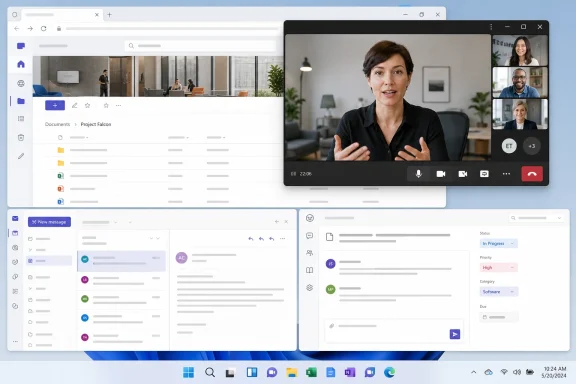
For people using Teams on the web, the change targets a familiar interruption: a meeting competes with the very browser tab needed to look up a ticket, open a SharePoint document, respond to email, or work in another web application. Microsoft’s roadmap language says the compact call window will persist “on top of other content,” allowing users to keep track of the call without leaving the page they need to use.
The important qualifier is that this is a browser and Teams PWA feature, not a newly announced change to the Windows desktop Teams client. Microsoft already offers meeting minimization and floating controls in desktop Teams; Roadmap 569206 appears intended to bring a related multitasking behavior to the web-hosted experience, where moving away from the meeting tab has historically been more disruptive.
 Roadmap 569206 closes a web-client gap
Microsoft’s existing Teams support documentation describes a minimized meeting window for the desktop application. When users minimize an active meeting, Teams can retain a small on-screen view with the active speaker, shared material or participants, along with basic microphone, camera, sharing, and hang-up controls.
Teams on the web has not had a clearly documented equivalent that survives the user moving to another browser tab or concealing the installed Teams PWA window. That limitation matters most in managed environments that rely on Teams in the browser because the desktop client cannot be installed, is not preferred, or is deliberately excluded from a virtual desktop or shared-device workflow.
Microsoft’s Teams PWA documentation says the web application can be installed through Microsoft Edge or Google Chrome and gives users a more desktop-like launch experience. But the PWA remains browser-hosted. A meeting window that stays visible outside its original app surface would reduce the practical difference between a Teams PWA call and a desktop-client call—at least for users who need to work in parallel while remaining present in a conversation.
The feature description does not say that a full Teams meeting will become an independent desktop window. Microsoft calls it a “simplified call window,” which suggests a compact companion view rather than a second complete meeting interface. IT departments should therefore avoid describing the roadmap entry as a full browser-call pop-out until Microsoft publishes interface details and support documentation.
“On top” is the useful promise—and the missing detail
The words “persist on top of other content” are the material part of Microsoft’s announcement. A floating call surface that disappears behind the next browser tab or application would not solve the multitasking problem; a persistent one would let users follow a presenter, watch an active speaker, or retain call controls while reviewing unrelated material.
Yet Microsoft has not specified what “on top” means in operational terms. The roadmap entry does not identify the supported browsers, operating systems, minimum browser versions, or whether the behavior relies on a browser-level picture-in-picture-style capability. It also does not say whether the window will include participant video, shared screen content, captions, chat indicators, or only basic call controls.
Those omissions are more than implementation trivia. A support desk needs to know whether a user can close the original Teams tab after the compact call view appears, whether the mini-window remains available after a browser restart, and what happens when multiple Teams calls or meetings are active. None of that is answered by the roadmap item.
There is also no published statement on whether the user can disable the floating view, resize it, move it between displays, or prevent it from appearing over sensitive applications. Teams already has separate desktop controls for pinning certain windows above others, but that feature should not be treated as proof of how the browser-call pop-out will work. Microsoft has announced the destination, not the detailed control model.
The change will matter most where Teams runs without the desktop client
The immediate beneficiaries are likely to be workers who spend most of the day in web applications: frontline users on locked-down devices, contractors using browser-only access, organizations operating shared PCs, and employees working from environments where the Teams client is unavailable or undesirable.
For those users, an active Teams call has often imposed a choice. They can keep the meeting tab in front and lose access to the page they need, or switch contexts and lose the immediate visual cue that the call remains active. A persistent lightweight call window can reduce that friction, especially during support sessions, incident response calls, and meetings involving live document review.
The feature may also be useful in virtual desktop deployments. Browser-based Teams access is commonly selected to simplify app lifecycle management or contain the local client footprint. The roadmap does not claim any special VDI optimization, and administrators should not infer one. Still, a smaller persistent call view could make browser-hosted Teams more usable where screen real estate and application switching are already constrained.
This is less consequential for users of the full desktop Teams client, which Microsoft’s current documentation already positions as capable of keeping a reduced meeting window on screen during multitasking. The web rollout is therefore an experience-parity improvement rather than a wholesale redesign of how Teams meetings work on Windows.
September is a rollout target, not a deployment date
Microsoft lists September 2026 as the general-availability date and the worldwide standard multi-tenant cloud as the release scope. The company’s own roadmap guidance makes clear that entries marked In development are planned features under active development, and dates can move, change scope, or disappear if a release is postponed or cancelled.
Administrators should read the September timing as the planned beginning of availability, not as a promise that every tenant and user will have the feature on September 1. The roadmap entry does not list a release ring beyond general availability, and it does not provide a phased-rollout schedule, tenant controls, or a message-center reference.
That lack of deployment detail means there is little for IT to configure today. There is no announced Teams admin policy, Microsoft 365 admin center setting, browser policy requirement, or licensing prerequisite attached to Roadmap 569206. Microsoft also has not named Teams editions or account types covered by the change, so it remains unclear whether the behavior will arrive identically for work and school tenants, guests, and consumer Teams users.
Organizations with tightly controlled browser estates should use the lead time to verify that their supported Edge and Chrome builds remain current. Microsoft’s published PWA guidance names those two Chromium-based browsers for installing Teams as a PWA, but Roadmap 569206 itself does not formally limit the new call-window feature to either one. That distinction is worth preserving until Microsoft releases implementation documentation.
What admins and users should watch for
The release will need a short validation pass once it reaches a tenant. The central test is simple: join a browser-based Teams meeting, navigate to another tab or hide the Teams PWA, and confirm that the compact call surface remains visible and that its controls behave as expected.
A sensible pilot should also check whether the feature works with screen sharing, captions, external monitors, browser profiles, and the organization’s existing Teams meeting policies. It should test accessibility behavior as well, including keyboard focus, screen-reader announcements, and whether the floating window can be dismissed and recovered without disrupting the call.
Microsoft has given web and PWA users a concrete improvement to watch for in September: the meeting should no longer be tied visually to the Teams tab that started it. Until the company documents supported browsers, window contents, controls, and tenant management, the practical advice is to treat Roadmap 569206 as a promising workflow change rather than a feature ready for deployment planning.