
For Windows power users and IT buyers, the important development is not that Lenovo has announced a new P1—it did that on March 16—but that the machine’s more unusual configurations are becoming orderable rather than remaining specifications on a launch sheet. Lenovo’s original announcement set June 2026 as the availability window for “select markets worldwide.” The company still has not published a complete country-by-country configuration and price matrix, so “international release” should not be confused with uniform availability or identical options everywhere.
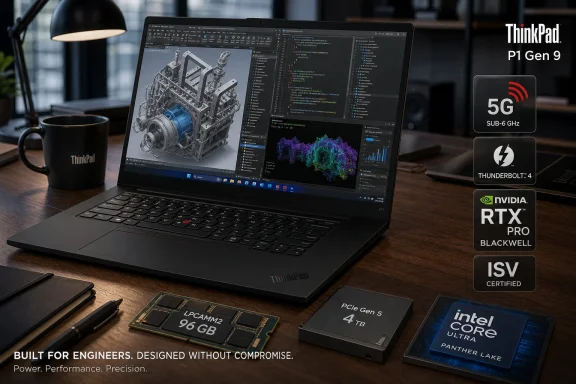
Lenovo’s own PSREF specification record confirms the P1 Gen 9 platform can take 16 GB, 32 GB, 64 GB, or 96 GB LPDDR5X-8533 LPCAMM2 modules, with one dual-channel LPCAMM2 connector. That matters because the previous 64 GB ceiling in early retail listings looked less like a hardware limit and more like a regional sales configuration. The 96 GB option is now a real platform capability that prospective buyers can look for, although its availability must still be checked at the SKU level.
 The 96 GB option changes the P1’s practical role
The P1 has long been Lenovo’s thin 16-inch mobile workstation, caught between the highly portable ThinkPad P14s and the bigger, heavier P16. Its major compromise in recent generations has been memory: high-end CPU and GPU choices were available, but traditional workstation buyers had to reconcile those parts with soldered memory or lower ceilings than a full-size mobile workstation.
LPCAMM2 changes that calculation. It uses LPDDR5X-class memory, which is associated with thin-and-light system designs, but puts that memory on a removable module rather than soldering it permanently to the motherboard. Lenovo specifies a single, customer-replaceable LPCAMM2 module in the P1 Gen 9, capable of operating in dual-channel mode.
That is a meaningful distinction from a conventional two-SO-DIMM design. Buyers cannot add a second memory module later; capacity upgrades mean replacing the single installed LPCAMM2 card. But a failed module or a future capacity upgrade does not require a motherboard replacement, which is the usual outcome with soldered LPDDR memory. For organizations keeping a workstation fleet through several Windows deployment cycles, that gives the P1 a more defensible serviceability story than most thin performance laptops.
The 96 GB figure also has a specific audience. It is excessive for ordinary Microsoft 365 work, but practical for Windows users running several virtual machines, local databases, large Adobe projects, CAD assemblies, software builds, or AI-assisted development tools alongside a browser-heavy desktop. It provides more room for the integrated Intel graphics configuration as well, since that GPU draws from system memory.
Lenovo’s public documents contain one detail worth treating carefully. Its marketing datasheet advertises “up to 96 GB” of LPCAMM2 LPDDR5X at 9600 MT/s, while the more granular PSREF says the P1 Gen 9 supports LPDDR5X-8533 at up to 8533 MT/s. The datasheet itself says supported speed can vary by configuration and directs buyers to PSREF for the full memory specifications. Until Lenovo publishes a market-specific machine-type listing that establishes 9600 MT/s operation, 8533 MT/s is the defensible expectation, not the larger number on the brochure.
The OLED upgrade is substantial, but 1,500 nits is an HDR peak
The optional display is a 3,200 × 2,000 Tandem OLED touchscreen with 100% DCI-P3 coverage, Dolby Vision support, a 40–120 Hz variable refresh range, and a claimed 1,500-nit HDR peak. It is the configuration that makes the P1 Gen 9 meaningfully different from an ordinary business laptop, especially for color-managed creative applications, review work, and high-contrast video.
The qualification matters: Lenovo rates the panel at 600 nits in SDR, while 1,500 nits is its HDR peak claim. Buyers should not expect a 1,500-nit full-screen Windows desktop, nor should they treat the figure as directly comparable to a 1,500-nit IPS panel. Peak HDR brightness describes a limited highlight under the right content and power conditions. Six hundred nits in SDR remains strong for office, field, and studio use, but it is the more relevant measurement for most Windows workloads.
The 40–120 Hz range should also help the machine behave sensibly across mixed workloads. It can lower refresh rate when a static document or IDE is on screen and increase it for scrolling, animation, interactive visualization, or video. The panel is not simply a 120 Hz display locked at maximum refresh, which is relevant to battery expectations on a workstation carrying a 90 Wh battery.
Lenovo continues to offer two IPS alternatives: a 1,920 × 1,200, 500-nit, 60 Hz, 100% sRGB panel and a 3,840 × 2,400, 800-nit, 60 Hz, 100% DCI-P3 panel. The 4K-class IPS option remains a rational choice for users who want high pixel density and wide color without OLED characteristics such as PWM dimming or the long-term image-retention considerations that remain relevant to static-interface-heavy workloads.
Panther Lake brings more choice than more GPU memory
The expanded P1 Gen 9 configuration menu includes Core Ultra 7 356H, Core Ultra 7 366H, Core Ultra 9 386H, Core Ultra X7 368H, and Core Ultra X9 388H processors. Lenovo’s PSREF lists all five as 16-core parts, composed of four performance cores, eight efficiency cores, and four low-power efficiency cores. The X7 and X9 models are distinguished partly by Intel Arc B390 integrated graphics, while the non-X configurations use lower-tier Intel integrated graphics.
For corporate management, Lenovo’s documentation is clearer than some of the retail shorthand: the Core Ultra 7 366H, Core Ultra 9 386H, Core Ultra X7 368H, and Core Ultra X9 388H are listed as Intel vPro-eligible. The base Core Ultra 7 356H is not. That makes the least expensive P1 Gen 9 a potentially awkward standardization target for businesses that require vPro fleet management features; the CPU name, not merely the ThinkPad badge, determines that capability.
Nvidia’s RTX Pro 1000 Blackwell and RTX Pro 2000 Blackwell laptop GPUs are optional in the official specification, each carrying 8 GB of GDDR7 VRAM. Lenovo positions the P1 around AI, visualization, CAD, and rendering, but 8 GB remains the firm boundary for GPU-resident workloads. That is sufficient for many professional graphics applications and modest local AI work, yet it will limit larger generative-AI models, complex GPU render scenes, and datasets that require more VRAM than system RAM can compensate for.
The processor and GPU choice is therefore more important than the “up to 672 TOPS” marketing figure. Lenovo reaches that total by combining CPU, NPU, integrated graphics, and discrete GPU performance measurements, rather than describing one accelerator available to one application. For a Windows workstation purchase, ISV certification, driver support, VRAM capacity, and the software’s actual GPU backend remain more useful selection criteria.
5G costs an SSD slot
The P1 Gen 9 has two M.2 2280 storage positions: one PCIe Gen 5 x4 slot and one PCIe Gen 4 x4 slot. Lenovo rates the system for up to 8 TB total storage using two 4 TB drives, with RAID 0 and RAID 1 support. The new retail configurations cited by Notebookcheck reach 4 TB, meaning buyers looking for the maximum 8 TB capacity may still need a later SKU or a post-purchase upgrade.
There is a less obvious limitation in Lenovo’s PSREF notes: a WWAN-equipped P1 Gen 9 uses the PCIe Gen 4 M.2 slot for the cellular module. In other words, selecting the Snapdragon X61 5G modem means the notebook supports one internal SSD rather than two. That makes the 5G option a trade-off against local capacity, RAID 1 redundancy, and a separate scratch or project drive—not a free connectivity upgrade.
The X61 modem supports sub-6 GHz 5G and embedded eSIM, rather than mmWave. Wi-Fi 7 and Bluetooth 5.4 are present across the range. The machine also retains practical workstation I/O: two Thunderbolt 5 ports, one Thunderbolt 4 port, HDMI 2.1, USB-A, and an SD Express 7.0 reader. Lenovo rates it for up to three external displays in addition to the internal panel, which will matter more to docked Windows users than the thin chassis alone.
The release is broader, but the SKU is still the product
The P1 Gen 9 starts from a relatively modest 1,920 × 1,200 IPS panel, 16 GB or 32 GB of LPCAMM2 memory, and PCIe Gen 4 SSD options in the reported entry configurations. At the other end, it can combine a Core Ultra X9 388H, 96 GB of memory, a 4 TB Gen 5 SSD, RTX Pro graphics, 5G, and the Tandem OLED display. Those are effectively different workstation classes sharing a chassis.
Lenovo includes a 90 Wh battery, 140 W USB-C PD 3.1 charging, a haptic touchpad, TrackPoint controls, a fingerprint reader integrated into the power button, and Windows 11 Pro or Home options. The listed starting weight is 1.80 kg, though a high-capacity SSD, discrete graphics, cellular hardware, and OLED panel will not necessarily match that base figure.
The practical consequence is simple: buyers should not purchase on the P1 Gen 9 name alone. The 96 GB module and 120 Hz Tandem OLED are now part of the broader release story, but both remain configuration-dependent; 5G removes the second SSD position; and vPro begins above the Core Ultra 7 356H. Lenovo has made the P1 Gen 9 far more compelling as a portable Windows workstation, but its best capabilities still arrive only when the individual SKU—not the product-family specification sheet—actually includes them.
