

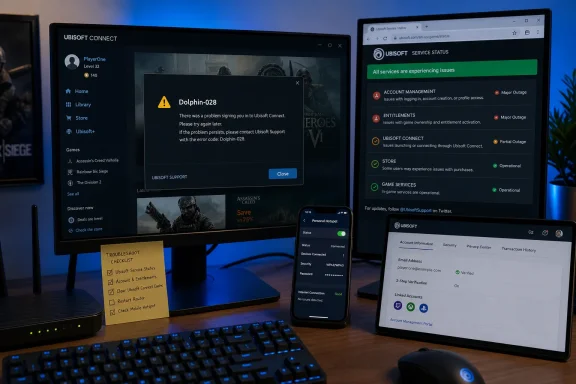
That changes how Windows users should approach the error. The article now circulating from Windows Report treats Dolphin-028 primarily as an IP, DNS, proxy, permissions, or MTU problem. Yet the indexed version of that article was originally published on February 3, 2025, despite the August 7, 2026 timestamp attached to the submitted copy. Its “countless reports in the last few days” framing therefore cannot be read as fresh evidence of the August 2026 incident.
The practical takeaway is straightforward: before resetting Windows networking, changing DNS, or reinstalling the launcher, determine whether Ubisoft’s account and entitlement services are failing more broadly. Recent reports strongly suggest that Dolphin-028 can be the launcher’s generic response when that upstream path fails.
Dolphin-028 appears when Ubisoft Connect cannot complete sign-in
The launcher presents Dolphin-028 after a login attempt with the message that there was an error during sign-in and that the client should be restarted. Ubisoft has not published a public decoder defining every condition behind the code, so claims that it specifically means a bad DNS server, an incorrect MTU, or missing administrator permissions go beyond the vendor’s documented explanation.
There is evidence that the error can involve the client’s local session state. In a December 2024 Steam support thread for Anno 1800, a Ubisoft representative posting with a developer badge recommended clearing the Ubisoft Connect cache, then releasing and renewing the PC’s IP address. By March 2025, another Ubisoft representative said the issue had been escalated for investigation and offered workarounds involving a deliberately failed password attempt or launching an installed Ubisoft game directly to trigger the login flow.
Those are meaningful support signals, but they do not establish a single root cause. A log excerpt shared in that same thread included an “Ownership connection is not set up” failure alongside Dolphin-028. In plain terms, authentication may succeed far enough for Ubisoft to recognize an account, while a subsequent ownership or entitlement check fails. That would explain why some users report that changing their password, clearing the cache, or opening a game executable appears to fix the problem temporarily: each action can force a new authentication session or client-state refresh.
It also explains why blunt network changes have such inconsistent results. Releasing and renewing an IP address may create a clean connection path for one user while doing nothing for a service-side incident affecting thousands.
The August reports point beyond individual PCs
The current run of reports is not conclusive proof of a global outage, but it is enough to reject the assumption that every affected PC has a local fault. On August 5, players in The Division 2, Rainbow Six Siege, and Assassin’s Creed communities reported Dolphin-028 alongside messages that Ubisoft services were unavailable, games could not be activated, or online services were offline. Several reported that the issue cleared without a local configuration change.
A separate August 6 report described Dolphin-028 on a different network and said access returned after repeated attempts, again without a stated repair. Community posts are anecdotal, not incident reports, but their value here is in the pattern: different games, different accounts, and different locations produced the same launcher-level failure at roughly the same time.
Third-party outage tracker StatusGator has also recorded several short Ubisoft Connect login and account-access disruptions during June and July 2026, including incidents it says Ubisoft did not publicly acknowledge. That history does not prove the cause of this week’s reports. It does show why the absence of a red alert on a public status page should not be treated as proof that the authentication path is healthy.
For PC players, the consequence is frustratingly concrete. Ubisoft’s current terms say an account, Ubisoft Connect, and an internet connection may be required to install, launch, access, or unlock some content and services. When the client cannot complete login or ownership validation, a locally installed single-player game can become inaccessible despite the files being intact.
Clear the launcher state before rebuilding Windows networking
The least disruptive local repair is to completely exit Ubisoft Connect, including its background processes, clear its cache through Ubisoft’s supported cache-reset procedure, then sign in again. Cache clearing is conspicuously absent from the supplied Windows Report sequence even though Ubisoft support representatives have specifically suggested it for Dolphin-028.
Next, test whether the problem follows the PC or the connection. Signing into the Ubisoft account through a browser and trying the launcher on a phone hotspot can separate a likely account or service problem from a router, ISP, corporate network, or filtered public Wi-Fi issue. A hotspot is a diagnostic step, not a permanent fix; if it works, return to the original connection and investigate its proxy, filtering, DNS, or firewall policy.
If the account works in a browser but the launcher continues to fail on one Windows device, the sensible escalation order is:
- Restart Ubisoft Connect after ending all of its processes in Task Manager, then try launching one installed Ubisoft game directly from its executable once.
- Clear the launcher cache and remove any explicitly configured Windows LAN proxy that is no longer required.
- Renew the DHCP lease with
ipconfig /releasefollowed byipconfig /renewfrom an elevated Command Prompt, then restart the client. - Review security software, VPNs, traffic filters, and network-bypass tools that can intercept or alter launcher traffic.
- Collect the Ubisoft Connect launcher log and contact Ubisoft Support if the failure persists after service access is confirmed elsewhere.
Changing an account password is worth considering only when there is a genuine authentication concern — an unfamiliar-login alert, a suspected compromised account, a password reset request the player did not initiate, or failed sign-in on Ubisoft’s website as well as in the launcher. It should not be the routine first-line response to a launcher error during a suspected service incident. Repeated password changes can complicate an already unstable session and make it harder to establish what actually fixed the issue.
The MTU advice is technically wrong as written
The most problematic recommendation in the supplied guide is its instruction to open a network adapter’s Advanced properties, select Jumbo Packet, and set it to 1430. That does not reliably change the Windows IP MTU.
“Jumbo Packet” is a vendor-specific Ethernet adapter setting intended to enable oversized Ethernet frames on compatible wired networks. It commonly offers values around 4,000 or 9,000 bytes, or an off/default setting. It may not exist on a Wi-Fi adapter at all. An MTU of 1430 is an IP-layer setting; configuring a network card’s Jumbo Packet control, where available, is a different operation.
For most home Windows 10 and Windows 11 systems, lowering MTU should be treated as a targeted troubleshooting measure for a known VPN, PPPoE, tunnel, or fragmentation problem — not a general Dolphin-028 cure. An arbitrary value can reduce efficiency, mask a network issue without solving it, or simply have no effect. There is no public Ubisoft documentation tying an MTU of 1430 to Dolphin-028.
The same caution applies to a full Windows network reset. That action removes and reinstalls network adapters and resets saved network-related configuration. It may be useful after a genuinely damaged Windows networking stack, but it also wipes Wi-Fi settings and can disrupt VPN, virtual switch, Hyper-V, and enterprise adapter configuration. It is disproportionate for an error that may disappear when Ubisoft’s authentication or entitlement services recover.
Running Ubisoft Connect as administrator also deserves restraint. Ubisoft’s launcher normally does not need elevated privileges to sign into an account. Elevation can be a reasonable test when Windows permissions or endpoint-security rules are specifically implicated, but it should not be made permanent merely because an intermittent login failure happened once.
Verify the service path, then change one thing at a time
Dolphin-028 should be handled as an authentication-and-connectivity symptom, not a diagnosis. The error may arise from stale client state, a changed IP lease, a network policy, a filtered VPN or proxy, an account-side session problem, or an Ubisoft-side login and ownership failure. The code itself does not tell the user which one occurred.
That distinction matters most during a clustered incident like the reports on August 5 and August 6. If other players are simultaneously seeing launcher login failures, unavailable services, or activation errors across Ubisoft titles, avoid reinstalling games, resetting the entire network stack, or rewriting adapter settings. Check Ubisoft’s service status, try the account in a browser, test one alternative connection, clear the launcher cache, and wait for the authentication path to stabilize.
For users still blocked after service access is normal elsewhere, Ubisoft Connect’s launcher logs are more useful than a generic list of DNS and MTU changes. They can show whether the failure occurs at login, session recovery, ownership verification, or game activation — the difference between a Windows repair job and an incident Ubisoft has to fix.