
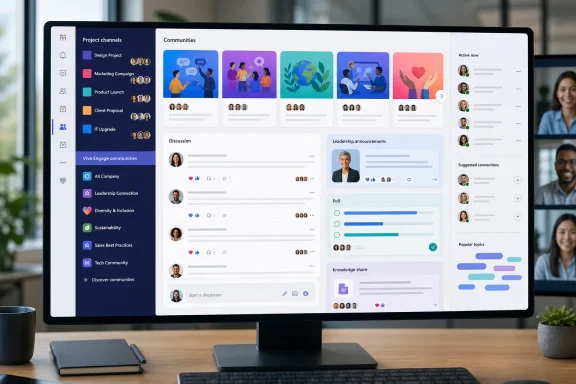
 Overview: A New Conversation Space Inside Teams
The new Engage communities in Microsoft Teams experience is not simply another tab for Viva Engage. Microsoft is positioning it as a new layer in the Teams navigation and collaboration model: a persistent place for employees to discover organization-wide conversations, participate asynchronously, follow leadership communication, and connect around shared expertise or interests. Microsoft Support
That distinction matters. Microsoft Teams has long been optimized around focused work: direct chats, recurring meetings, project teams, and channels. Viva Engage, formerly tied to Yammer’s social-networking heritage, is better suited to broader discussions that do not belong to a particular project roster or delivery deadline. Microsoft explicitly frames communities as spaces for knowledge sharing, open dialogue, shared interests, and broader organizational connection, rather than replacements for project-based channels. Microsoft Support
For Windows and Microsoft 365 administrators, the practical change is substantial. Employees no longer need to remember to launch a separate Viva Engage app, bookmark the Engage web experience, or treat social conversations as a detached communications portal. Communities now appear within the Teams environment where many users already begin and end their workday.
This is Microsoft’s latest attempt to make Teams the central interface for the Microsoft 365 productivity stack. Rather than asking employees to switch contexts for organizational news, communities, leadership posts, questions, and events, Microsoft is embedding those activities into the same client used for calls, meetings, files, and team collaboration.
Communities Are Not Teams Channels
The most important point for users and IT teams is that Viva Engage communities and Teams channels serve different purposes. They may now be visually close together, but treating them as interchangeable would create confusion—and could undermine the value of both.
Teams channels remain the project workspace
A traditional Teams channel is built around a bounded group of people doing focused work. It is the logical home for a product launch team, a help desk rotation, an engineering squad, a departmental planning process, or a customer engagement. Channel membership, files, meetings, tasks, and conversation history generally revolve around a defined operational goal.
Channels work best when employees need to answer questions such as:
- What does this project team need to complete this week?
- Which files, meetings, and decisions belong to this workstream?
- Who is accountable for the next action?
- What information should remain inside this smaller working group?
That model remains unchanged. In fact, the new Communities integration could make it more important to preserve channel discipline, because Teams now presents employees with more types of communication in one client.
Viva Engage communities broaden the audience
Communities are intended for conversations that cut across teams, functions, locations, or formal reporting lines. Microsoft describes them as generally larger and more public forums than small workgroup spaces, with conversation mechanics designed to support wide participation. Microsoft Support
A community might focus on:
- A company-wide subject such as cybersecurity awareness or sustainability.
- A professional discipline, such as software engineering, HR, accessibility, sales enablement, or data analytics.
- An employee resource group or community of practice.
- A leadership communications channel where employees can comment, react, and participate in live events.
- A knowledge-sharing hub for questions that deserve answers from across the business rather than from a single project team.
Microsoft’s model also supports deeper discussion threads, including replies to replies, rather than forcing every conversation into the flatter structure familiar to Teams channel messages. Communities can use specialized post types such as questions, polls, praise, and announcements; question posts can support upvoting, best-answer marking, and verified responses from designated community experts. Microsoft Support
That gives Viva Engage communities a more deliberate knowledge-exchange role. A Teams channel may be where a group solves a problem. A community can be where the organization records the answer, adds expert context, and makes the discussion discoverable to others later.
What Employees Will See in Teams
The core user experience places Communities in the Teams navigation, near chats and channels. Users can browse their top communities, view their full community list, and locate recommended, official, or other available communities from the Teams client. Microsoft Support
For many employees, this represents a meaningful usability improvement. The benefit is not that Teams gains another feed; it is that a conversation that once required separate mental and technical context can now be accessed in the normal flow of work.
Discoverability is the defining feature
One of the biggest limitations of project-centric collaboration is that people only see the spaces to which they have already been added. A newcomer might have no idea that a company has active groups for learning, product expertise, mentoring, accessibility, employee well-being, or frontline operational knowledge.
Viva Engage communities are designed to be discoverable. Teams users can browse communities, search for them with the Teams search bar, and filter results to communities. Microsoft also says its community search uses AI-driven Copilot support to search content throughout an organization’s Engage social network and associated resources. Microsoft Support
That can reduce a familiar enterprise problem: knowledge existing somewhere in Microsoft 365 but remaining inaccessible because employees do not know the correct team, channel, SharePoint site, or person to search for.
The caveat is that search quality depends on community quality. AI-supported search can surface a useful conversation only when posts have clear titles, useful context, accurate answers, and sensible moderation. An organization that fills communities with vague announcements or duplicate discussions will not gain much from making them easier to find.
Personal organization reduces clutter
Microsoft has included controls to keep Communities from overwhelming the Teams interface. Employees can show or hide individual communities, move and organize them, create custom sections, and sort the community list by recency or alphabetically. Existing Engage favorites are imported into the Teams left side when an administrator enables the feature, although favorites created later in Engage must be set separately in Teams. Microsoft Support
This is a sensible design decision. Teams users already face pressure from chat activity, channel mentions, meetings, calendar alerts, apps, and files. Giving people control over which communities remain visible is essential if the feature is to feel like an enhancement rather than a new source of navigation sprawl.
However, there is an important limitation: employees can hide communities, but Microsoft says there is no personal master switch to completely disable the Communities experience. Microsoft Support For organizations with a strong preference for a lean Teams interface, that may become a point of friction.
Conversations, Questions, Praise, Polls, and Announcements
Communities in Teams bring much of the familiar Viva Engage publishing experience into Teams. Users can begin discussions, ask questions, publish polls, and share images, links, and attachments. Community administrators can also send announcements to all members. Microsoft Support
This is more than a cosmetic integration. It provides communications teams with a richer engagement toolbox than standard project chat.
Questions can become reusable knowledge
The question format is particularly useful in large organizations. Rather than receiving a simple collection of reactions and loosely ordered replies, a question can be upvoted, answered by experts, and marked with a best answer. This creates a better path from casual employee query to durable organizational knowledge. Microsoft Support
For example, a Windows deployment community could become the venue for questions on Windows 11 servicing, driver compatibility, Autopilot practices, Intune policy design, accessibility configuration, or endpoint troubleshooting. A verified answer from a designated expert can prevent the same issue from being repeatedly re-litigated in disconnected chats.
The risk is governance drift. If a community becomes an informal support desk without clear service expectations, employees may assume that every post will receive a timely, authoritative response. Community owners should state clearly whether the space is for peer advice, formal support, product feedback, or a mixture of all three.
Announcements deserve a disciplined approach
Announcements receive special emphasis and generate notifications for community members. Microsoft describes an announcement as a message type that community administrators can use to notify the whole community. Microsoft Support
That is powerful, but it must be used sparingly. The most effective announcements are reserved for information that genuinely requires broad attention:
- A leadership decision or strategic update.
- A major operational change.
- A time-sensitive security or policy message.
- A scheduled live event or town hall.
- A significant service change affecting the community’s audience.
If every post is framed as an announcement, employees will tune out. A community should have a defined editorial policy, including who can publish announcements, which subjects qualify, and how often members should expect alerts.
Leadership communication becomes more visible
Leadership engagement is central to Microsoft’s pitch. Leaders can communicate through community posts, storyline content, events, and Q&A-oriented engagement. Microsoft’s Leadership corner experience also aggregates leaders’ latest posts, communities, and upcoming “Ask Me Anything” events for eligible Viva users. Microsoft Support
There is a real potential benefit here. Teams is already a daily workplace destination, so leadership messages embedded in its workflow may be more likely to receive attention than content hidden on a standalone intranet page.
Yet proximity does not equal credibility. Employees will respond better when leaders use communities for dialogue rather than broadcast-only messaging. A well-run executive community should make room for substantive questions, acknowledge difficult feedback, and show that replies can shape decisions or clarify policy. Otherwise, it risks becoming another polished communications feed that employees read but do not trust.
Notifications and the Attention Management Problem
Microsoft has integrated Viva Engage notifications into the Teams Activity feed. Users can receive alerts for community announcements, replies, and @mentions; unread community items appear in bold, and users can react or reply from the notification flow. Notification preferences can be adjusted through the Communities and storyline entry in Teams settings. Microsoft Support
This integration is arguably one of the feature’s strongest elements. It lowers the barrier to re-engagement: employees do not need to consciously check a separate app to find a reply or an announcement.
But it also creates a potential notification overload problem. Teams already acts as the notification hub for calls, chats, meetings, channels, app workflows, approvals, and mentions. Adding community activity may be useful for employees who actively participate in a few important spaces, but much less useful for those who join numerous communities.
Microsoft notes that notification settings from the older Viva Engage app do not automatically carry over because the Teams community experience and the Engage app are separate apps. Microsoft Support Administrators should treat this as a change-management issue, not a trivial technicality.
A practical rollout should include guidance on:
- Which communities employees should follow closely.
- How to configure notification preferences in Teams.
- When to use @mentions instead of broad announcements.
- How to hide low-priority communities without leaving them.
- How to avoid reacting to every post as though it were an urgent chat message.
The goal is to preserve the advantage of asynchronous conversation. Communities should not force every employee into immediate-response behavior.
Community Resources and Events Extend the Model
A Viva Engage community can be more than a message feed. Microsoft says Microsoft 365-connected communities have associated resources including a SharePoint document library and site, OneNote notebook, Planner plan, and group email account. Microsoft Support
That resource model makes communities particularly useful for ongoing organizational initiatives. A security awareness community, for example, can combine discussions with policy documents, reusable training materials, planning assets, and event information without requiring a separate project Team for every communication activity.
Communities in Teams also include an Events tab for upcoming, live, and past events. Microsoft says events open in a separate window, allowing people to keep using Teams while they participate. Microsoft Support
This can support town halls, leadership Q&As, recurring knowledge sessions, and community learning events. It also helps consolidate communication before and after a live event: the same community can host promotion, questions, reactions, follow-up resources, and ongoing discussion.
For administrators, the opportunity is to build a repeatable communication rhythm. Instead of treating a town hall as a one-time meeting followed by a lost recording, organizations can use a community as the durable home for pre-event questions, event participation, post-event summaries, and verified answers.
Administration, Moderation, and Compliance Still Matter
The arrival of communities in Teams does not remove the need for Viva Engage governance. If anything, making communities more visible in Microsoft Teams raises the stakes for moderation, ownership, naming, content lifecycle management, and internal communications policy.
Public and private communities require deliberate choices
When creating a Viva Engage community, organizations can choose public or private access. Public communities can be viewed and joined by anyone in the network, while private communities restrict content to approved members and require administrator approval for join requests. Microsoft also supports configured classifications or sensitivity labels where an organization has made them available. Microsoft Support
Public communities maximize discovery and are usually appropriate for broad knowledge sharing, employee interests, communities of practice, and general engagement. Private communities are better for subjects involving sensitive operational information, restricted employee groups, confidential initiatives, or content that needs controlled membership.
The key is avoiding accidental duplication. A private Team, private community, SharePoint communication site, and email distribution list can all look like viable homes for the same audience. Governance teams need a simple decision framework so employees understand why a particular space exists and what belongs there.
Restricted posting supports controlled communication
Microsoft also allows network administrators to enable restricted posting in key communities. Once enabled, only community administrators can start threads, while members can reply to and react to conversations. The setting applies across Viva Engage, Teams, SharePoint web parts, and Outlook. Microsoft Support
This is useful for official communications communities where leadership or corporate communications needs a controlled publishing model. It can prevent a major announcement space from becoming a noisy all-purpose discussion board.
Still, restricted posting should not be the default for every community. Overuse could turn an engagement platform into a collection of top-down message streams. The strongest community strategy will usually include a healthy mix:
- Official, restricted communities for authoritative announcements.
- Moderated open communities for knowledge exchange and employee dialogue.
- Private communities for appropriately bounded audiences.
- Project Teams and channels for execution-focused collaboration.
Moderation cannot be outsourced to features
Microsoft provides admins with tools to delete inappropriate messages or threads, restrict posting, and work with network administrators on global keyword or AI-theme monitoring. Microsoft Support
Those capabilities are useful, but technology is only one part of moderation. A successful community needs named owners, response expectations, escalation processes, content rules, and a plan for handling misinformation, harassment, confidential information, and unanswered high-value questions.
The more visible Communities becomes in Teams, the more likely employees are to assume it is an official source of information. Community owners need to be prepared for that responsibility.
Known Limitations and Areas to Watch
The Teams integration is a major step forward, but it is not feature parity with every aspect of the standalone Viva Engage experience.
Microsoft lists several current limitations:
- Drafts and scheduled posts are not supported when writing community content in Teams.
- Multi-Tenant Organization communities are not yet supported.
- The broader Engage Copilot experience is not yet available within this Teams communities experience. Microsoft Support
The draft and scheduled-post limitation is particularly relevant for corporate communications teams. Those teams often need editorial review, coordinated release times, executive approval, and contingency planning. They may still need to use the full Engage web experience for scheduled publishing workflows, even as employees consume and participate in communities from Teams.
The Multi-Tenant Organization limitation matters for enterprises that use cross-tenant collaboration structures. Those organizations should not assume that a community strategy designed for a single Microsoft 365 tenant will automatically extend to every affiliate, partner environment, or merged organization.
There is also a subtle interface limitation: Teams indicates a community with bold text when it contains new posts, but new replies alone do not change that bold/unbolded state. Microsoft Support Employees who rely only on navigation indicators may miss active reply chains, making thoughtful notification configuration even more important.
A Sensible Rollout Plan for IT and Communications Teams
Organizations should not enable or promote Communities in Teams as a generic “new feature.” The most effective approach is to establish a clear operating model before driving adoption.
Start with existing communities
First, inventory existing Viva Engage communities. Identify which are active, which have named owners, which contain current content, and which have become obsolete. Since existing favorite communities may be imported into Teams when the feature is enabled, cleanup beforehand can prevent the Teams experience from inheriting years of accumulated clutter. Microsoft Support
Define community types
Create a limited set of recognized patterns, such as:
- Official communications community
- Leadership and executive dialogue community
- Community of practice
- Employee resource group
- Peer support and knowledge community
- Event-focused community
- Private operational community
Each type should have defined ownership, membership expectations, moderation requirements, and a clear explanation of how it differs from a Teams channel.
Train employees on “where work happens”
A short internal guide can prevent a great deal of duplication. Explain that chats are for quick person-to-person coordination, channels are for team or project execution, and communities are for organization-wide conversation, discovery, and learning.
This is not merely semantics. It shapes retention, discoverability, participation, and employee expectations.
Measure quality, not only volume
Microsoft makes community analytics available from the Analytics tab, covering member activity, posts, replies, and overall engagement. Microsoft Support Those numbers can help administrators and communicators understand whether a community is active, but high post volume alone is not a success metric.
A more useful measurement model includes:
- Whether questions receive useful answers.
- How quickly experts respond to high-priority topics.
- Whether members return and participate over time.
- Whether announcements generate understanding rather than just reactions.
- Whether duplicate questions decline as knowledge becomes easier to discover.
- Whether employees report improved access to leadership and peer expertise.
The Bigger Strategic Significance
Viva Engage communities in Teams are a logical response to a long-running Microsoft 365 problem: collaboration tools are excellent at helping known groups work together, but less effective at helping employees find unfamiliar experts, ideas, and conversations across the organization.
By placing communities alongside chats and channels, Microsoft is trying to give Teams three distinct collaboration modes in one client:
- Chats for fast, direct communication.
- Channels for structured team and project work.
- Communities for open, asynchronous organizational connection.
That is a compelling framework. It acknowledges that work is not solely a sequence of meetings, tasks, and private messages. Organizations also need places where experience can circulate, leaders can engage visibly, employees can ask questions beyond their immediate team, and informal networks can become discoverable.
The success of the feature will depend less on the Teams interface than on the quality of the communities brought into it. Organizations that assign real ownership, encourage knowledgeable participation, reserve announcements for meaningful messages, and protect employees from notification overload can turn Viva Engage communities into a valuable part of the Microsoft Teams experience.
Organizations that simply expose an unmanaged backlog of dormant groups and broadcast feeds will gain another navigation category without gaining stronger communication. The integration makes the opportunity more accessible—but it also makes weak community governance much harder to hide.
