

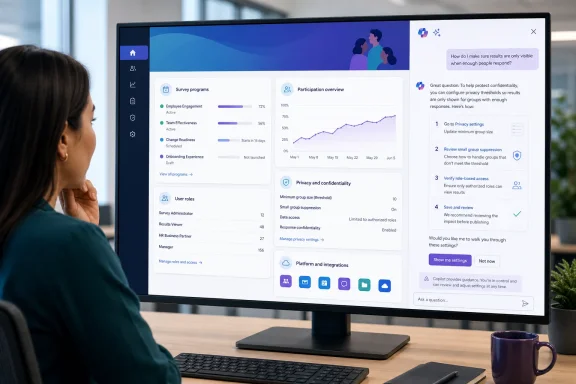
The immediate benefit is straightforward: Viva Glint’s administration surface has accumulated enough roles, settings pages, survey-program controls, data imports, and confidentiality options that knowing where to make a change can be half the job. But the August 3 roadmap entry is much thinner on the part that matters most in an employee-listening platform: what the assistant can see, what it may infer from a tenant’s configuration, and whether its guidance will distinguish a reversible navigation task from a change that can alter reporting or survey privacy behavior.
Microsoft has not yet published a supporting product post, Message Center notice, licensing clarification, or technical documentation for this specific assistant. No independent outlet appears to have reported additional implementation details. For now, the roadmap is the authoritative record for the September target and the feature’s promised behavior; everything beyond that remains unannounced.
Roadmap ID 567320 promises guidance, not autonomous administration
The wording matters. Microsoft says the Copilot-powered assistant will “answer configuration and how-to questions” and provide guided steps with deep links to configuration pages. It does not say the assistant will create survey programs, modify settings, change role assignments, update people data, or execute administrative actions itself.
That makes this an in-product navigation and procedural assistant, rather than an autonomous admin agent—at least on the current record. A Glint administrator should expect it to reduce time spent moving between product documentation and the Configuration menu, not to remove the need to review a setting before saving it.
The deep-link feature is likely to be the practical center of the release. Microsoft’s current Glint documentation sends admins through several distinct configuration areas depending on the task: General Settings for tenant-wide program behavior, User Roles for custom data access, People for administrative access, Survey Programs for program setup, and Advanced Configuration for more technical settings and bulk operations. An assistant that can turn “where do I change this?” into a direct route to the right pane could be useful to smaller HR operations teams that do not have a dedicated Glint specialist.
But deep links also make a bad answer more consequential. A generic explanation that lands an administrator on the wrong setting can still cause a real change. Microsoft’s own documentation warns that some Advanced Configuration changes can be irreversible and should be made only by trained Viva Glint users. Those settings include reporting thresholds, sensitive-comment options, historical-data imports, retroactive changes to employee data associated with closed surveys, and bulk updates to custom access.
The roadmap does not say whether the assistant will recognize those higher-risk operations, warn administrators before navigating to them, or distinguish between standard configuration and Advanced Configuration. That omission is worth watching before treating the feature as a substitute for documented change-control procedures.
“Admin permissions” is too imprecise for Viva Glint’s current role model
The roadmap says the assistant will be available only to Viva Glint users with Admin permissions. That sounds restrictive, but it is not a complete description of who will actually receive it.
Microsoft’s role documentation separates at least three relevant administrative identities. A Microsoft 365 Global Administrator can provision Glint and manage Copilot usage policies. A Viva Glint Tenant Administrator can manage Glint settings in the Microsoft 365 admin center and also manage Copilot usage policies. A Viva Glint Service Administrator—formerly called a Company Admin—works inside the Viva Glint application itself, can access Glint data, and can set up programs, surveys, distribution lists, and reporting features.
Those roles overlap, but they are not interchangeable. Microsoft says a Viva Glint Service Administrator does not automatically gain access to manage Glint settings in the Microsoft 365 admin center, while a Tenant Administrator does. Conversely, the Service Administrator has the in-product responsibility for much of the actual survey and configuration work.
That distinction becomes important because Microsoft has spent 2026 moving Viva Glint Copilot governance away from Glint-specific toggles and into Viva Feature Access Management, or VFAM, in the Microsoft 365 admin center. Microsoft’s March guidance said Copilot access would default to on at the Glint service level, with VFAM becoming the single authoritative control. Tenant-wide settings and custom Entra group policies now govern who can use existing Glint Copilot capabilities.
The September assistant is therefore arriving in a product where permission to administer Glint and permission to enable or govern Copilot are already divided across roles and control planes. The roadmap does not identify whether “Admin permissions” means Service Administrator, Tenant Administrator, Global Administrator, a granular Advanced Configuration permission, or some combination.
For administrators, that is the first deployment question Microsoft still needs to answer. An organization can have a person responsible for running an engagement survey who does not have the Microsoft 365 administrative role needed to manage Copilot availability. It would be counterproductive if that person is also excluded from the in-product assistant intended to explain Glint configuration. It would be equally problematic if a broadly assigned administrative permission grants access to guidance for sensitive configuration areas without any matching governance review.
The assistant enters a platform with high-stakes privacy settings
Viva Glint is not a conventional SaaS admin console. Its settings determine how employee survey responses are grouped, displayed, suppressed, exported, and described to participants. Configuration choices can affect whether managers see reports for small populations, how comments are surfaced, and whether staff understand that raw-data exports may make responses identifiable.
Microsoft’s General Settings documentation states that changes there apply across all survey programs in a Glint platform. That includes confidentiality and privacy statements, client time zone, communications configuration, reporting settings, feature controls, technical configuration, localization, and user-data settings. Microsoft also instructs organizations using raw-data exports to clearly explain how responses may be used.
Advanced Configuration goes further. The platform exposes settings for rated confidentiality thresholds, suppression thresholds, response-rate thresholds, comment-search thresholds, comment confidentiality thresholds, alert-report thresholds, survey state, and historical-data import. The defaults Microsoft documents can be changed, but they exist to prevent exposure of results from groups too small to protect participants’ identities.
A Copilot assistant can be valuable here if it accurately explains dependencies—such as the difference between a reporting threshold and a comment threshold, or the tenant-wide effect of a General Settings change. The risk is not that a deep link itself changes data. The risk is an administrator interpreting an AI-generated recommendation as policy guidance, then adjusting a threshold that alters what leaders can see.
Microsoft has not said whether the assistant will ground its answers in the organization’s live Glint configuration, Microsoft Learn documentation, or both. It has not described how it handles tenant-specific privacy statements, survey metadata, employee attributes, participation data, comments, or report contents. The roadmap also does not describe logging, auditing, retention, or whether prompts and responses will be available for compliance review.
Those are not academic details for Glint customers. Employee-listening programs often have established confidentiality commitments, works-council requirements, HR legal review, or internal restrictions on who may access small-team results. A general assistant can explain a screen; it should not silently become a source of policy interpretation.
Existing Copilot controls do not automatically solve assistant access
Microsoft’s current Viva Glint Copilot controls use VFAM policies scoped to all users, individual users, or Microsoft Entra groups. An organization can enable Glint Copilot for everyone who meets Glint’s applicable role requirements, disable it tenant-wide and allow only selected groups, or enable it broadly while blocking selected users or groups. A custom “Off” policy takes precedence over a custom “On” policy and over the organization-wide setting.
That policy model is relevant to the new assistant, but the roadmap does not explicitly say the feature will follow it. The entry only says the assistant is for Glint users with Admin permissions. Microsoft should clarify whether an administrator who is excluded from Viva Glint Copilot by a VFAM policy will also lose access to this assistant, and whether a Service Administrator requires a separate Copilot-enable policy in addition to their Glint role.
There is also an operational delay that helpdesks should keep in mind. Microsoft says changes to Viva Glint Copilot access policies can take up to 24 hours to apply, and warns against repeatedly changing the same policy during that period. If the new assistant uses the same control path, a just-created pilot group may not see it immediately in September. If it uses a different path, that needs equally clear documentation.
The existing license position is another useful clue, though not a confirmation of the new feature’s entitlement. Microsoft says current Copilot capabilities in Viva Glint require a Viva Glint, Viva Suite, or Viva Workplace Analytics and Employee Feedback license, but do not require a Microsoft 365 Copilot license. The roadmap does not state whether the admin assistant will follow that same licensing model, introduce a new requirement, or be included for all licensed Glint tenants.
September is a target, not a rollout plan
Roadmap ID 567320 remains marked “In development,” not rolling out. Microsoft lists general availability in September 2026 but gives no day, phased rollout window, tenant-selection mechanism, or detail on whether GCC and worldwide commercial tenants will receive the feature simultaneously.
The GCC listing is meaningful because Microsoft included it explicitly, but it is not the same as a commitment to feature parity on day one. The entry does not say whether all answer types, deep links, language coverage, or data-handling behavior will match across cloud instances. Organizations with stricter compliance boundaries should wait for the formal deployment documentation rather than assume the roadmap’s two-instance label resolves those questions.
The release does not require preemptive changes today. What Glint owners can do before September is map the people who hold Global Administrator, Viva Glint Tenant Administrator, and Viva Glint Service Administrator roles; review which admins can reach Advanced Configuration; and document the approval path for confidentiality thresholds, sensitive comments, raw-data exports, and employee-data corrections.
When Microsoft publishes the actual rollout guidance, the key test will be whether the assistant stays in its stated lane: explaining configuration and getting the right administrator to the right page, while leaving sensitive changes, tenant data, and governance decisions visibly under human control.