

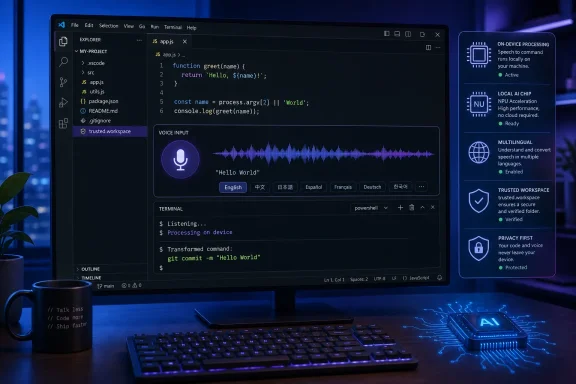
InfoWorld first highlighted the release’s dictation, integrated-browser feedback, and side-chat changes. Microsoft’s release notes confirm those features and fill in several operational details absent from the short report: the default speech model is now multilingual Nemotron 3.5; first use requires a model download; organizations with restricted networks can import an official Foundry Local model package from disk; and per-project dictation instructions can modify transcript formatting in trusted workspaces.
The bigger story is not that VS Code now has a microphone button. Built-in dictation arrived across chat, editors, and the integrated terminal only one week earlier, in VS Code 1.131 on July 29. Version 1.132 turns that initial capability into something closer to an everyday input method for multilingual teams and command-line-heavy work. It also tightens VS Code’s connection between voice input and the agent-centric development workflow Microsoft has been building into the editor.
Nemotron 3.5 changes the default transcription path
Microsoft says VS Code 1.132 now uses multilingual Nemotron 3.5 as its default on-device dictation model. The editor can follow the agents.voice.language preference, use a supported system or browser locale when automatic selection is enabled, or detect the language itself. Dictation works in chat inputs, ordinary text editors, and the integrated terminal.
That distinction is important because the previous stable release described the feature as experimental and focused largely on making dictation available throughout the workbench without requiring the separate VS Code Speech extension. The 1.131 notes also listed practical platform limits: Windows x64 and Arm64, Apple silicon Macs, and Linux x64 or Arm64 systems using glibc 2.34 or later. VS Code for the Web, Intel Macs, 32-bit devices, and Arm32 systems were excluded.
Microsoft’s 1.132 notes do not publish a replacement compatibility matrix or say that those exclusions have changed. Administrators should therefore assume the known 1.131 platform limits still apply until Microsoft documents broader support. A Windows fleet is well covered on x64 and Arm64; mixed Mac fleets are where the most obvious gap remains.
The model is downloaded on first use. That may sound routine, but it matters on managed endpoints, developer VDI images, isolated build networks, and machines with tightly controlled outbound access. Microsoft has added an import path for an official Foundry Local model package when network restrictions block the automatic download. That is a useful escape hatch for air-gapped or filtered environments, though the release notes do not specify the package size, a formal distribution mechanism for enterprise software deployment tools, or whether administrators can pre-stage the model with a documented unattended installation process.
In other words, the model is local after provisioning, but getting it there can still be an operational problem. Teams that want to standardize on dictation should test the download and import paths before presenting the feature as a zero-touch upgrade.
“Audio stays on device” is not the whole privacy picture
Microsoft states that the Nemotron transcription model keeps microphone audio on the local device. For developers prohibited from sending raw spoken audio to a cloud transcription service, that is the release’s strongest practical claim.
But on-device speech recognition is only one step in the workflow. The VS Code 1.131 documentation states that enabling the experimental LLM cleanup option sends transcript text to a language model for refinement, such as formatting and removing filler words. That is distinct from sending audio, but it can still matter when dictated material includes project names, commands, code fragments, credentials mistakenly spoken aloud, or internal incident details.
VS Code 1.132 adds another customization layer through the Voice: Configure Dictation Instructions command. Microsoft says the editor combines instructions from a user-level ~/.copilot/dictation.md file and a workspace-level .github/dictation.md file when the workspace is trusted. Those instructions supplement cleanup behavior, allowing a project to steer terminology and formatting preferences.
For a development team, that can be useful. A repository can tell dictation to preserve a product’s naming conventions, retain a particular identifier style, or treat a spoken phrase as a familiar command. It also means dictated text can be shaped by files held alongside the project. That is consistent with VS Code’s broader trusted-workspace model, but it is a reason to review voice settings as carefully as other AI and workspace-trust controls.
Microsoft does not say in the 1.132 notes whether customized cleanup always remains local, whether it is governed by the same LLM cleanup setting introduced in 1.131, or how those instructions interact with organizations’ existing Copilot data controls. The release gives a clear promise about audio locality; it does not make a blanket promise that every stage after transcription is offline.
Terminal cleanup aims at the part that actually breaks workflows
The most concrete dictation improvement in 1.132 is shell-aware cleanup in the integrated terminal. Microsoft’s example is deliberately simple: saying “git commit dash m hello world” should become git commit -m "Hello World" rather than a literal series of words.
That sounds like a small polish feature, but it addresses why general dictation often fails in shells. A terminal command is not prose. Hyphens, quotation marks, pipes, redirection operators, file paths, environment-variable syntax, and shell-specific escaping are semantic characters. A conventional speech-to-text engine can accurately transcribe the spoken words and still produce a command that is invalid, changes its meaning, or does something unexpected.
Shell-aware cleanup makes spoken commands more plausible for low-risk, repetitive tasks: creating a branch, running a test target, opening a log, or drafting a git commit message. It does not make voice a safe substitute for checking a destructive command. Developers should still inspect anything involving deletion, deployment, credentials, package publication, history rewriting, or production infrastructure before pressing Enter.
The release notes also confirm a small but welcome usability correction: selecting the active microphone button stops recording. First-run onboarding now shows a live waveform, helps users confirm their selected microphone, and exposes a device picker when more than one microphone is connected. These are basic controls, but they reduce the friction that tends to relegate built-in voice features to demos.
Side chats and browser comments make the agent session more persistent
VS Code 1.132 also adds /btw, a command that opens a side chat without interrupting an agent’s current turn. The side chat shares the primary conversation’s context and prompt cache, so a developer can ask for an explanation or clarification while the main agent continues its assigned work. Users can also select text from an agent response to ask a contextual follow-up.
There is one small but telling discrepancy in the coverage: InfoWorld’s article says the command is /bt. Microsoft’s August 5 release notes say it is /btw. Developers trying the shorter command should use the official spelling before assuming the feature is unavailable.
The feature is less about chat-window convenience than controlling interruption. VS Code agents can now work across files, subagents, browser previews, and multiple sessions. A conventional follow-up prompt may steer or interrupt a task already in progress. A side chat gives users a way to interrogate the work without changing the active agent turn, while still reusing the existing context instead of forcing them to reconstruct it in a new conversation.
The integrated browser gets a related feedback mechanism. Developers can enter a selection mode, pick individual elements on a rendered web page, attach comments, and send that feedback to the agent. That should be more precise than telling an agent that “the button on the right looks wrong,” because the feedback can travel with page-element context rather than relying on a screenshot or a vague visual description.
Microsoft is also continuing its agent-host rollout, which runs harnesses such as Copilot, Claude, and Codex in a dedicated process and permits the same agent session to be connected from multiple VS Code windows. The company describes that rollout as progressive. That language matters: side chats, browser feedback, and the agent host are being delivered in the same release, but their availability and behavior are not necessarily uniform across all installations on day one.
What Windows developers and admins should do now
VS Code 1.132 is a practical update for developers who already use Copilot chat and the integrated terminal, especially in multilingual teams. The change worth testing is terminal dictation, because it is the one feature that attempts to understand the syntax developers actually need rather than merely transcribing words.
For managed Windows environments, the immediate checklist is straightforward:
- Confirm that target devices run a supported Windows x64 or Arm64 build and can obtain the on-device model, or validate the Foundry Local import procedure in a restricted network.
- Decide whether local audio processing alone satisfies policy, or whether optional LLM-based transcript cleanup requires separate review.
- Test
.github/dictation.mdonly in repositories covered by normal workspace-trust and code-review practices. - Train users to verify any dictated shell command before execution, particularly when it affects source history, packages, secrets, or deployment targets.
The release is rolling out gradually, so an installation that does not update on August 6 is not necessarily behind or broken. Users who need 1.132 immediately can invoke VS Code’s built-in update check. The concrete change to watch after deployment is whether the local Nemotron download and shell-aware formatting behave consistently on the Windows devices and network conditions your organization actually runs.