
The announcement, detailed in Microsoft’s new VS Code Agent Host architecture documentation and first reported by Visual Studio Magazine, turns what had been a series of incremental VS Code features into an explicitly open architecture. Microsoft is calling the connection layer the Agent Host Protocol, or AHP, and has published the specification and client libraries in the open.
But “formalized” should not be read as “finished” or “on by default for every VS Code user.” Microsoft’s own documentation says both Agent Host and AHP remain under active development. Several provider integrations and relevant VS Code settings are still marked experimental, while recent release notes describe the feature as progressively rolling out. For developers and IT teams, the important news is the architectural direction and its operational consequences—not a declaration that the conventional Copilot Chat session model has disappeared.
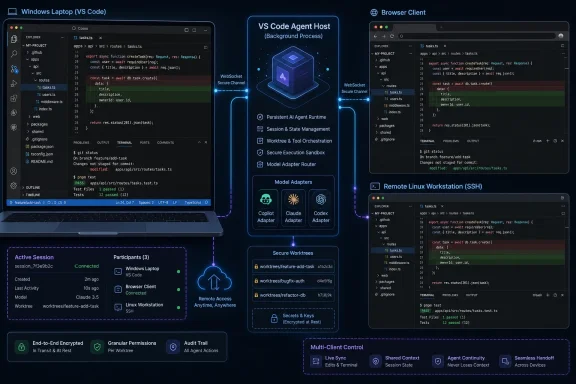 A session is becoming a service, rather than a window feature
Traditional editor-integrated AI chat is closely tied to the UI process hosting it. Close the window, disconnect from the remote environment, or lose the extension-host context, and the session’s lifecycle can be disrupted or become inaccessible. Agent Host changes the ownership model: the host process owns the session, and editor windows become clients that display and control it.
Microsoft says the host maintains the authoritative session state and distributes it to connected clients. Under AHP, those clients subscribe to resources such as sessions, chats, terminals, and changesets; they receive an initial state snapshot followed by ordered updates. If a client disconnects, it can reconnect and either replay missed actions or receive a new snapshot.
This is a real technical distinction from merely syncing chat history between applications. The host sequences actions and maintains state, so two connected clients are meant to see the same active work rather than two copies that must later be reconciled. A developer could begin an agent task in a Windows desktop VS Code window, inspect its modifications in the Agents window, and return to the same running session from a second machine.
Microsoft had already signaled this approach in VS Code 1.121, released on May 20, 2026. That release introduced preview remote agent sessions and described the remote agent host as a long-lived process that could continue working after the client disconnected. VS Code 1.130, released July 22, made the dedicated Agent Host process more explicit and said a session could be rendered from multiple VS Code windows at once.
The new documentation matters because it puts the underlying design on the record: Agent Host is no longer presented simply as an implementation detail for remote sessions. It is Microsoft’s proposed common session layer for agent work that needs to outlive a particular editor surface.
AHP solves coordination, not the underlying agent problem
Microsoft’s open Agent Host Protocol should not be confused with an AI model protocol or a universal way to make every coding agent interchangeable. AHP coordinates clients around a shared session. It does not make Copilot, Claude, Codex, or another agent runtime behave identically.
The AHP project’s own documentation draws a deliberate line between AHP and the Agent Client Protocol, or ACP. ACP is designed for a one-to-one conversation between a client and an agent: prompts, streams, permissions, tool calls, and responses. AHP sits above that layer and handles the multi-client problems: who has the authoritative state, what happens when clients reconnect, how updates are ordered, and how one client’s action is reflected to the others.
That division is central to Microsoft’s design. The Agent Host can use adapters to translate a provider-specific runtime into a common AHP session model. Microsoft’s documentation identifies adapters for Copilot, Claude, and Codex, while the host shields connected clients from many of the provider-specific details underneath.
For third-party client developers, that means AHP may remove the need to reimplement session synchronization, reconnection handling, and shared activity views. It does not remove the need to account for each harness’s authentication method, model availability, tool behavior, permission model, or feature support. A client that can monitor a Copilot-backed session is not automatically entitled to invoke every provider-specific capability.
Microsoft has published SDKs for Rust, TypeScript, Kotlin, Go, and Swift, plus a reference server implementation in the VS Code codebase. That is a meaningful commitment to external implementation rather than an API described only in a product blog. Still, the reference implementation remains closely tied to VS Code’s agent work, and Microsoft has not announced a separate cross-platform hosted AHP service, compatibility certification program, or a stable protocol version guarantee for enterprise deployments.
The remote-host model keeps compute next to source code
For developers who work across Windows PCs, build servers, Linux development boxes, or Mac hardware, the immediate value is not that an AI agent can be viewed from elsewhere. It is that the agent can run where the repository, compiler, test environment, and credentials already live.
Microsoft says a local Agent Host uses local interprocess communication, while a remote host exposes AHP through JSON-RPC over WebSocket. The agent process runs alongside the workspace, so file edits and terminal commands happen on the remote system while the UI remains on the client. Remote connections can be made through SSH or a development tunnel.
This follows the broad logic of VS Code Remote Development, but it moves the persistent unit from an editor connection to an agent session. A Windows laptop can become the control surface for a task running against a repository on a MacBook, Linux workstation, remote VM, or server-class build machine. The browser-based Agents window extends that model further, letting a user inspect work without a full local VS Code installation.
There is an important practical caveat. A local session is independent of a window, not independent of the VS Code process itself. Microsoft’s documentation says the host must remain running for the agent to continue. A remote standalone host can survive the departure of its client, but it still depends on the remote machine, workspace, credentials, network path, and host process remaining available.
In other words, Agent Host offers continuity of control, not magic durability. A laptop sleep event, a terminated remote process, an expired token, a failed tunnel, or a stopped VM will still interrupt work. Teams should treat remote agent sessions as long-running processes with operational dependencies, not as durable cloud jobs.
Extension tools and configuration do not move cleanly with the session
The largest constraint hidden beneath the “portable session” pitch is the distinction between tools that belong to the host and tools that are supplied by a connected client.
Microsoft says the Agent Host has baseline workspace capabilities and can run without an editor client. But VS Code and installed extensions can also contribute tools, which the host then exposes to the active session and routes back to the client that supplied them. That is useful for browser tools and extension functionality, but it means an agent’s usable toolset can still depend on a particular editor client being connected and running.
Microsoft’s documentation is explicit: tools from extensions are only available in chats in an editor window where that extension is running. An agent session may therefore remain visible and continue its core work after a window closes, while a tool that was provided by that window is no longer available. That is a crucial distinction for anyone building workflows around custom extensions, internal developer tools, or interactive integrations.
Configuration also has a split path. Agent Host uses harness-agnostic configuration locations such as ~/.copilot and ~/.claude, while legacy profile-only VS Code configuration is not automatically the source of truth for all agent-hosted sessions. For MCP servers, the Agent Host reads workspace .mcp.json and user-level Copilot configuration, but it does not directly consume .vscode/mcp.json; VS Code can forward configured servers, except configurations requiring interactive input variables.
That creates a migration problem for managed developer environments. A setup that works in a familiar VS Code chat panel may not behave identically after moving the same agent to Agent Host. Teams should test custom MCP servers, extension-provided tools, approval flows, and credential prompts before assuming that a session can be detached from one workstation and safely controlled elsewhere.
The security boundary is broader than a chat panel
A persistent host running beside source code has more power than an ephemeral chat UI. It may access the workspace, execute commands, produce edits directly in a session folder or worktree, connect to MCP servers, and expose a remote control path through SSH or a tunnel. That changes the review and administration questions.
Microsoft distinguishes Agent Host edit behavior from extension-host sessions. Agent Host sessions apply edits directly to the session folder or worktree, with the developer expected to inspect diffs and then commit, merge, or discard the results. Extension-host sessions, by contrast, can retain edits as pending changes until the user keeps or undoes them.
For a solo developer, direct application can make agent work feel faster. For a team, it means Git hygiene and workspace isolation matter more. Running an agent in a disposable worktree or a branch-specific checkout is safer than allowing a long-lived host to operate against a shared working directory with unrelated local modifications.
Administrators should also note a policy change that arrived in VS Code 1.132. Microsoft removed the ChatAgentHostEnabled policy, meaning organizations can no longer centrally disable Agent Host through that specific policy. Individual users can still choose whether agents run in the separate process through the chat.agentHost.enabled setting, but the removed policy reduces an enterprise administrator’s direct control over this architectural choice.
Microsoft has not paired that policy removal with a broad, consolidated enterprise hardening guide for Agent Host deployments. The documentation describes localhost token protection for a standalone code agent host instance and a --tunnel option for remote exposure, but organizations should not mistake that for a complete governance model. They will need to define their own rules for tunnel access, SSH authentication, workstation posture, secrets in repositories, MCP server trust, audit logging, and whether unattended agent turns are permitted on sensitive codebases.
The immediate payoff is continuity, not universal interoperability
Microsoft’s most credible claim for Agent Host is straightforward: it can make a long-running AI coding session survive the loss of its original editor window and let multiple clients see the same work in progress. That is useful today for developers who shift between machines or need to leave resource-heavy tasks running beside a remote workspace.
The broader “open architecture” claim is promising, but its value will depend on adoption outside VS Code and on whether the protocol settles into a stable enough target for independent clients and hosts. Microsoft has made the specification public, shipped libraries in several languages, and documented the reference implementation. It has not yet demonstrated a broad independent AHP client ecosystem.
For now, teams should enable Agent Host deliberately, test it with their actual harnesses and tools, and keep agent work isolated in reviewable branches or worktrees. The immediate consequence of Microsoft’s announcement is that persistent AI sessions are becoming a first-class VS Code execution model—and the responsibility for securing, supervising, and reviewing those sessions is moving with them.
