

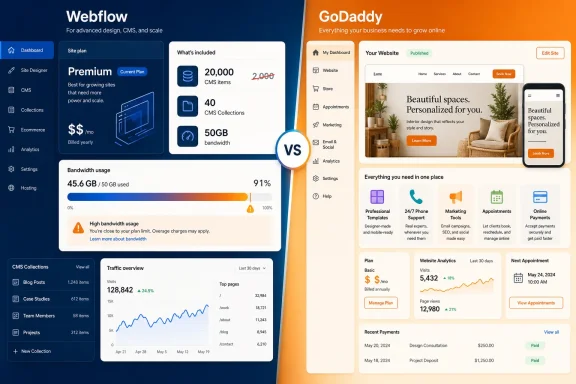
The difference is not a minor footnote. A CMS item in Webflow can be a blog post, product, portfolio entry, staff profile, event, or other repeated content record. A tenfold change in that ceiling materially changes the value calculation for organizations that need a genuinely managed content site rather than a handful of manually updated pages.
PCMag is right to separate the two services by their intended customer. GoDaddy is the faster path to a conventional small-business site with marketing features already attached. Webflow is more expensive and asks more of the person building the site, but it is also built around a CMS, reusable design system, and richer publishing workflow. Calling GoDaddy the blanket winner based on the old Webflow entitlement leaves readers comparing a simple site builder with a partially outdated picture of a professional web platform.
Webflow’s May pricing reset changes the CMS comparison
Webflow announced its revised Site plans on May 13, 2026, merging its former CMS and Business Site plans into a single Premium plan. The new Premium tier costs $25 per month when billed annually or $39 month to month—the same price PCMag lists—but Webflow’s own Help Center says it includes 20,000 CMS items and 40 CMS Collections.
PCMag’s comparison instead assigns the plan 2,000 CMS items. That was the former CMS-plan allocation before the May restructuring, not the current Premium plan’s ceiling. Webflow says existing CMS-plan customers move to Premium at their next renewal or billable change, with the expanded limits included rather than sold as a CMS-item add-on.
That correction does not make Webflow cheaper than GoDaddy for every buyer. It does make the claim that Webflow is “less generous” substantially less defensible for publishing-heavy sites. A local contractor with five service pages will likely never use either 2,000 or 20,000 CMS entries. A company operating a knowledge base, partner directory, multi-author publication, product catalog, or regional landing-page program may find the larger allowance central to its decision.
There is another cost-comparison trap in the article’s plan table. Webflow Basic, at $15 monthly on annual billing, is explicitly for static sites without CMS or ecommerce. Webflow’s documentation says the Basic plan cannot be purchased for a site that already uses CMS content. In practical terms, a Webflow customer who wants a dynamic blog, portfolio, directory, or structured content library starts at Premium—not Basic.
GoDaddy’s lower entry cost is therefore a real advantage for a basic business web presence. But the like-for-like comparison is not GoDaddy Basic against Webflow Basic if the requirement includes an actively maintained blog or any repeated, database-style content. It is GoDaddy’s business-oriented plan against Webflow Premium, with the buyer deciding whether Webflow’s CMS model and design control justify the higher recurring cost.
The bandwidth warning is valid, and more specific than the comparison shows
PCMag’s caution over Webflow overage costs is well founded, especially following the May transition. Webflow reduced the bandwidth included with former Business sites from 100GB to 50GB when moving them to Premium. Customers whose recent usage exceeds the new limit can need paid bandwidth add-ons to preserve their operating headroom.
Webflow’s own migration examples show why the lower base price can be misleading. An annually billed Business-plan customer using 150GB of bandwidth had paid $59 per month under the former structure: $39 for the plan plus a $20 bandwidth add-on. Under Premium, the base plan becomes $25, but the customer requires 100GB of added capacity for $40, bringing the bill to $65 per month.
That is the real hidden-cost story: Webflow made CMS capacity dramatically more generous while making bandwidth a more visible meter for sites with significant traffic or heavy media. The reporting needs both sides. It is not accurate to portray the updated Premium plan as broadly stingy on content capacity, but it is accurate to warn that high-traffic sites can pay more than the advertised $25 annual-billing price.
The add-on pricing also depends on billing frequency. Webflow lists its first 50GB bandwidth add-on at $20 per month on annual billing and $30 per month on monthly billing. PCMag’s $30 figure is therefore the monthly-billing rate, not a universal starting price. The same distinction applies throughout Webflow’s pricing: the low headline price is a commitment price, while month-to-month operation costs more.
Existing users need to pay special attention to the effective date. Webflow says the revised plans began applying to most existing sites on June 29, 2026, at renewal or when a customer makes a billable change such as switching billing cycles or changing plan level. Sites in Freelancer or Agency Workspaces, along with legacy-priced sites, have until November 16, 2026, before the changes take effect at renewal or a billable change. That creates a split market: two Webflow customers can see different limits and bills today even when they appear to be using the same named plan.
For an IT administrator, the action is straightforward: check the Workspace type, the Site plan, the last two months of bandwidth, and whether a planned billing change would trigger the new terms. Treat the Webflow dashboard’s usage figures as a budgeting input, not an after-the-fact operational statistic.
GoDaddy wins where the work is getting online quickly
PCMag’s case for GoDaddy is strongest when the website is part of a small-business operating package rather than a design or content-engineering project. GoDaddy combines templates, custom-domain options, basic SEO, marketing, social posting, online payments, customer support, and a simple editor in one product. Its own current material continues to position Websites + Marketing around that all-in-one workflow, with entry pricing around $9.99 monthly on annual billing, Premium around $15.99, and Commerce around $20.99 in the U.S. figures it publishes.
Those prices can vary with geography, sales promotions, billing duration, and renewal terms, so readers should not treat any comparison article’s dollar amount as a quote that will survive checkout. PCMag’s source page is published through its Australian edition while presenting dollar figures without fully resolving which local pricing and tax conditions apply. That omission matters more than usual when the article awards the price category outright.
GoDaddy’s generous storage and transfer language is useful for a small site, but it should not be read as a promise that every other resource is unlimited. Page-builder platforms still impose practical boundaries through plan features, media tools, commerce capabilities, acceptable-use rules, and the editor itself. The more relevant question is whether a business needs a site that can be maintained in the included editor without a designer or developer.
For a restaurant, consultant, local service business, club, or early-stage retailer, the answer may be yes. A user can launch quickly, collect leads, post updates, and take payments without first learning CMS modeling, layout systems, or component architecture. The PCMag review also gives GoDaddy the customer-service category because it offers 24/7 phone support alongside chat and its knowledge base; Webflow’s support model is more documentation- and ticket-oriented, with no phone support.
The cost of that convenience is less direct control. PCMag notes limitations around editing layouts and mobile presentation. That is the trade: GoDaddy prevents a great deal of accidental complexity by constraining the builder. Webflow exposes more of the design system and content structure, which requires more skill but gives an organization a better foundation when its site has outgrown pre-arranged sections.
AI is an allowance, not an unlimited capability
The article treats GoDaddy Airo and Webflow’s AI tools as a tie and advises against letting AI replace human creativity. The broader warning is sensible, but the current Webflow implementation deserves a more operational explanation than “AI included.”
Webflow now assigns AI credits at the Workspace level. Its free Starter Workspace includes 200 credits per month; Core and Freelancer plans include 300; Growth and Agency plans include 400. Credits are pooled across the Workspace, reset monthly on self-service tiers, and do not roll over. Customers who exhaust them can buy 2,000-credit add-ons, and Webflow says certain capabilities—including copy generation, CMS-item generation, SEO and AEO improvement, code-component generation, and its AEO agents—consume credits.
This means “AI tools on the free subscription” does not mean unlimited AI production. Webflow’s AI site builder and some design functions have different rules, while AI copy generation requires a paid Workspace or Site plan. The distinction will matter to agencies and teams that use AI-assisted content production across several client sites: their constraint is not simply the Site plan, but the shared Workspace credit pool.
GoDaddy’s Airo is more aligned with the service’s overall proposition: prompt-driven site setup and marketing material for a business that wants an immediate web presence. Webflow’s AI features fit a more complex environment where the output can become CMS content or a generated component inside a structured site. Neither removes the need to check branding, accessibility, factual claims, search metadata, and the actual behavior of generated code.
Choose the platform based on the site that will exist a year from now
GoDaddy remains the stronger recommendation when the priority is a low-friction, low-cost site run by the business owner, with built-in marketing and someone reachable by phone when the editor becomes a problem. PCMag’s overall preference is defensible on those terms.
But Webflow should not be ruled out on the premise that $25 per month buys only 2,000 CMS items. That is no longer Webflow’s published Premium entitlement. Its actual tradeoff is clearer: $25 annually billed for a content-capable site with 20,000 CMS items and 50GB of bandwidth, followed by potentially meaningful charges as traffic rises.
For new Webflow buyers, that makes the decision less about a template contest and more about a forecast. Estimate content volume, measure likely traffic, decide who will maintain the site, and price the Premium tier with the bandwidth it will really need. For existing Webflow Business customers, the next renewal date can now be a bill-changing event.