
The rollout is real but not a clean, universally available Mac update. WABetaInfo, which first reported the live deployment on July 18, says the redesign is appearing for only some WhatsApp for Mac accounts in stages. Apple’s Mac App Store listing confirms that WhatsApp has continued shipping builds through late July, but its public version history offers only generic “bug fixes and performance” notes. Meta has not issued a corresponding product announcement, detailed release note, rollout calendar, supported-macOS list, or explanation of what triggers eligibility.
That makes this another server-controlled WhatsApp rollout: installing the current client is necessary, but it may not be sufficient to make the new interface appear. For Mac users and support teams, the important instruction is to update normally, then wait; repeated reinstalls or sideloading older packages are unlikely to force an account-level feature flag.
 The Mac app was the last Apple client to catch up
Apple released iOS 26, iPadOS 26, and macOS Tahoe 26 on September 15, 2025, introducing Liquid Glass across its own platforms. The visual language uses translucent, layered controls intended to let the background show through while retaining contrast and focus. WhatsApp began experimenting with an iPhone implementation in October 2025, then widened that iOS rollout during 2026 before moving the treatment to iPad.
So “nearly a year” is slightly imprecise but directionally fair: the Mac rollout began about 10 months after Apple’s operating-system release, and roughly nine months after WhatsApp’s first reported iPhone test. More telling is that Meta had already put the interface on iPhone and iPad before its desktop client, despite macOS Tahoe using the same design language from day one.
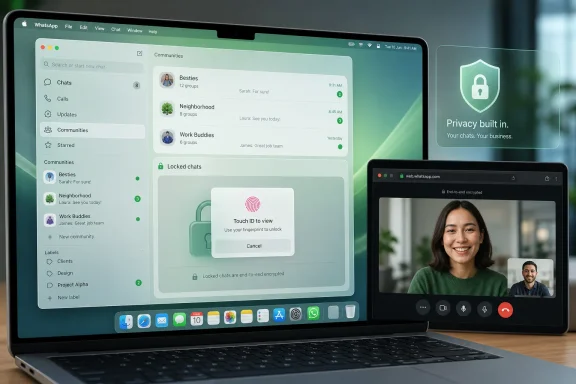
WABetaInfo’s screenshots and description point to three visible changes. The sidebar gains text labels alongside section icons; the chat entry field and attachment picker adopt the frosted, translucent style; and Communities receive a dedicated destination instead of being found through the full chat list. Those are usability changes, especially for users who handle a large number of conversations or groups, but they remain narrowly scoped to the Mac application.
The update does not indicate a new messaging protocol, a change to WhatsApp’s end-to-end encryption design, or a capability uplift for the Windows client. It is primarily an Apple-platform UI alignment exercise, with one consequential privacy adjustment.
Locked Chats are the part that changes day-to-day handling
The biggest functional claim is the new Locked Chats entry point. According to WABetaInfo, WhatsApp for Mac previously displayed locked conversations in the main chat list and did not require a separate authentication event to reveal them. The new sidebar section is said to isolate those conversations and require authentication before they can be opened.
If that behavior is confirmed across the rollout, it closes an awkward gap between the Mac app and WhatsApp on iPhone. A feature called Locked Chats is of limited value on a shared or briefly unattended computer if the chats remain visibly mixed among routine conversations. Moving them to a dedicated, protected area makes the desktop behavior more closely match the feature’s privacy purpose.
There is an important correction to the broad reporting around this point. Several summaries have stated that Mac users will unlock the section with “Face ID or a passcode,” borrowing language from the iPhone implementation. Macs do not have Face ID hardware. Apple documents Touch ID and the Mac account password as the local authentication mechanisms on supported Macs, while a Mac can also use an iPhone’s Face ID in certain cross-device passkey flows. WABetaInfo says only that authentication is required on Mac; it does not establish whether WhatsApp uses Touch ID, the macOS password, a WhatsApp secret code, or another method in every configuration.
Users should therefore not assume that a MacBook webcam can authenticate Locked Chats with Face ID. The actual prompt will depend on what Meta enables and on the Mac’s available authentication hardware.
The reporting also leaves unanswered questions that matter in managed environments. Meta has not said whether Locked Chats remain concealed in notifications, Spotlight suggestions, backups, recent-item lists, or macOS screen-sharing scenarios once this interface is enabled. A protected sidebar category limits casual access inside WhatsApp; it is not a complete data-loss-prevention control for a shared Mac account.
The version number does not provide a reliable deployment target
WABetaInfo identified WhatsApp for Mac 26.27.73 as the compatible build it tested. Apple’s currently visible Mac App Store history, however, lists 26.27.72 and then 26.27.74 around the same period, without a public entry for 26.27.73. That may reflect regional App Store variations, a short-lived build, or a versioning discrepancy, but it means administrators cannot use the reported number as a dependable compliance target.
More broadly, the App Store’s notes do not mention Liquid Glass, Locked Chats, or Communities. Meta’s silent release process separates code delivery from feature activation, making a familiar IT problem worse: two users can show the same app version yet receive different interfaces and different navigation paths.
For support desks, this means screenshots and user reports are more useful than version numbers alone. A Mac user who cannot see the redesign after updating has not necessarily failed to update; they may simply be outside the gradual account rollout. Conversely, a user who receives it should be told where Locked Chats and Communities moved, because the sidebar’s new labels and sections alter established navigation.
This is also a reminder to avoid treating visual parity as platform parity. WhatsApp’s Mac client is a native Apple application that can adopt macOS-specific UI conventions. The Windows app will not gain Liquid Glass because it is not an Apple design framework, and Meta has announced no equivalent redesign for Windows 11.
WhatsApp Web calling is the Windows-relevant change — and it is separate
The submitted report also links the Mac makeover to browser-based calling, but these are separate deployments with different evidence behind them. Meta officially announced WhatsApp Web calling on July 28, 2026: users can make and receive individual and group voice or video calls directly from WhatsApp Web, without installing a desktop client.
For Windows users, that is the more consequential change. It gives people on locked-down work PCs, shared machines, virtual desktop sessions, or personal devices without local installation rights a route to WhatsApp calls in a browser. Meta says the web experience includes screen sharing, reactions, a Calls tab, call history, and favorites; it also says web calls retain end-to-end encryption.
Meta additionally announced call transfer between mobile, Web, and desktop clients, a group-call waiting room controlled by an approval setting, QuickHD video at call start, and background noise suppression. Those features are also rolling out gradually, so the same caution applies: availability can lag behind the announcement.
The browser option should not be confused with an enterprise-ready replacement for a managed communications client. It creates dependency on browser permission policy, webcam and microphone access, network rules, and local session hygiene. On a shared Windows PC, signing out of WhatsApp Web and clearing the session remains essential. On a corporate endpoint, an administrator who blocks web-based calling or media permissions may still prevent the feature from working even though no application installation is required.
What Mac and Windows users should do now
Mac users can update WhatsApp through the Mac App Store and check the sidebar for labeled navigation, a Communities section, and a separately protected Locked Chats section. If those controls do not appear, there is no published setting that reliably enables them; the evidence points to a phased server-side release.
Users handling sensitive conversations should test the new Locked Chats flow before relying on it. Verify what credential WhatsApp requests on that specific Mac, confirm whether notifications expose message content, and remember that local macOS account security remains the first line of defense.
Windows users do not need the Mac redesign at all. They should watch for the Calls tab in WhatsApp Web and validate browser camera, microphone, and screen-sharing permissions before a meeting rather than discovering a policy block when a call begins. Meta’s browser calling release is the cross-platform feature with immediate practical reach; the Liquid Glass rollout is a delayed Mac interface cleanup whose privacy improvement will matter only once it reaches the account.
