

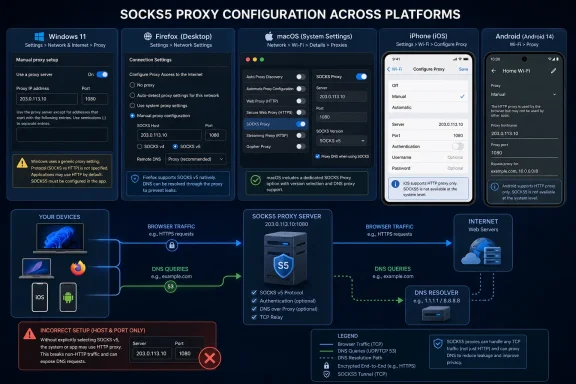
That distinction explains the familiar “internet stopped working” outcome described in the guide. A SOCKS server expects a SOCKS version 5 greeting and authentication negotiation; an HTTP proxy expects an HTTP request or CONNECT tunnel. Send the wrong one to the same address and port, and neither side can proceed.
AIMultiple published the guide on August 5, 2026, after modifying it on August 4. Its useful advice is buried beneath platform instructions that mix up operating-system proxy interfaces, browser proxy interfaces, and mobile Wi-Fi HTTP proxy settings. Those are related settings, but they are not interchangeable.
Windows Settings Does Not Provide a SOCKS5 Selector
Microsoft’s current Windows support documentation tells users to go to Settings > Network & internet > Proxy, enable Manual proxy setup, and provide a proxy IP address and port. That procedure configures a generic system proxy endpoint. It does not expose a protocol selector, a SOCKS version selector, or SOCKS username-and-password fields.
AIMultiple’s Windows section tells readers to paste a SOCKS5 server address and port into that interface. For many consumer SOCKS5 services, that is insufficient. A SOCKS server cannot infer that a Windows client meant SOCKS5 merely because it is listening on port 1080, 1081, or any other familiar port. Port numbers are conventions, not protocol declarations.
Microsoft’s Edge proxy documentation is unusually clear on the underlying behavior. It says that proxy schemes are assumed from context when a configuration supplies only an address. Its examples show that an explicit SOCKS5 endpoint requires a form such as socks5://server:port, including when a proxy map assigns the endpoint to the “other proxies” category. In the same documentation, Microsoft notes that an unspecified proxy in the SOCKS map is understood as SOCKS4, not SOCKS5.
For Windows users who need SOCKS5, there are three defensible paths:
- Configure the application that will use the proxy and verify that it explicitly supports SOCKS5.
- Use a browser extension or browser launch policy that sets the proxy scheme to SOCKS5 rather than relying on the basic Windows Settings screen.
- Use an organization-managed PAC file or browser policy that declares SOCKS5 correctly and includes appropriate bypass rules.
Firefox is the least ambiguous option for browser-only use. Its Network Settings dialog supports a SOCKS Host field and lets the user select SOCKS v5. That configuration applies to Firefox rather than silently changing the network path for every application that happens to honor Windows proxy settings.
Microsoft Edge and Chromium-based browsers can also use SOCKS5, but the configuration has to be expressed as SOCKS5. Chrome’s extension API explicitly supports socks5 in a fixed-server proxy rule, and ZeroOmega is a real Manifest V3 extension available in the Chrome Web Store. The important caveat is that an extension is managing the browser’s proxy behavior; it is not making Windows itself into a universal SOCKS5 client.
That scope is especially relevant for IT teams. WinINet-aware desktop applications, WinHTTP-based applications, services, Store apps, Electron applications, command-line tools, and third-party updaters do not all consume proxy settings the same way. A browser test succeeding does not prove that a deployment agent, package manager, Remote Desktop client, or line-of-business application is using the same route.
macOS Has the Native Control the Windows Guide Assumes
On macOS, AIMultiple’s intended procedure is substantially correct but uses outdated interface names. Apple’s current documentation for macOS directs users to Apple menu > System Settings > Network > select the active service > Details > Proxies. From there, macOS exposes a specific SOCKS proxy option, a server address, a port, and an optional “Proxy server requires password” setting.
That is what a native SOCKS configuration looks like: the operating system knows which protocol it is being asked to speak. The guide’s references to “System Preferences,” “Network in the sidebar,” and an “Advanced” button will still resemble older macOS releases, but they are not the current navigation Apple documents.
Even on a Mac, however, “system proxy” should not be read as a guarantee that every packet from every app is proxied. Applications need to honor the system’s proxy configuration, and some software uses its own networking stack, its own proxy settings, or a direct connection by design. Developers and administrators should verify the actual client process, destination, DNS resolution behavior, and failure mode rather than treating the macOS toggle as a kill switch.
The bypass list also deserves more attention than the guide gives it. Apple exposes exclusions for simple hostnames plus named hosts and domains. A company that needs internal services to remain reachable while external web traffic is proxied should deliberately define those exclusions. Leaving them to defaults can create a support problem where intranet names, device-management endpoints, or local administrative interfaces fail as soon as the SOCKS setting is enabled.
iPhone and Android Wi-Fi Menus Are HTTP Proxy Menus
The guide correctly warns that iOS and Android do not offer a dependable native SOCKS5 setup in their ordinary Wi-Fi settings. It then muddies the conclusion by suggesting provider “Auto-Config Profiles” without establishing what those profiles configure, how they are installed, or whether they deliver SOCKS5 rather than HTTP proxy rules.
Apple’s own device-management documentation calls the relevant payload Global HTTP Proxy. Apple’s iPhone setup documentation similarly labels the Wi-Fi option “Set up an HTTP proxy.” Those labels are not cosmetic. An iPhone’s normal Wi-Fi proxy fields are designed around HTTP proxy configuration, including a host, port, optional credentials, or a PAC file—not a general-purpose SOCKS5 client configuration.
Android’s platform APIs use the same language: the network object is a ProxyInfo HTTP proxy configuration. Android device makers may present the menu differently, and some third-party apps can build their own tunnel or local VPN path, but a handset’s Wi-Fi proxy field should not be assumed to support a SOCKS5 service simply because it accepts a server address and port.
The workable mobile solution depends on the traffic that needs routing:
- A browser-only requirement calls for a browser or client app with documented SOCKS5 support.
- A particular app’s traffic requires that app to offer proxy support or use a compatible local tunnel.
- A device-wide requirement generally calls for a VPN-style client or managed network configuration designed for the job, rather than treating the Wi-Fi HTTP proxy field as a SOCKS control.
There is a second operational limitation: Wi-Fi proxy settings are tied to a network. They do not automatically cover cellular data, and mobile apps vary in whether they honor the configured Wi-Fi proxy. That is why a phone can appear to work in Safari on one access point while another app, a background service, or the same app on 5G connects directly.
SOCKS5 Is Flexible, but It Is Not Encryption or a Speed Upgrade
AIMultiple describes SOCKS5 as “faster and more adaptable” than older proxy types and places it at “Layer 5.” The useful technical point is flexibility: the SOCKS5 specification supports TCP connection requests and a UDP-association command, supports domain names and IPv6 addresses, and provides a framework for authentication methods. It is a relay protocol that can carry more than browser traffic.
But the IETF’s SOCKS5 specification does not promise better speed, privacy, or universal UDP availability. Performance depends on the proxy provider’s capacity, IP type, routing distance, congestion, throttling, target service behavior, and the client’s implementation. AIMultiple’s own SOCKS5 benchmark reports UDP errors and port restrictions across several providers, illustrating why “SOCKS5 supports UDP” is not the same proposition as “this paid SOCKS5 endpoint will relay your UDP workload.”
SOCKS5 also does not automatically encrypt traffic between a client and the proxy. The IETF specification says security depends on the authentication and encapsulation methods selected by the implementation. HTTPS still encrypts the web session to a compatible site, but the proxy service remains a party users must trust with connection metadata and, for non-encrypted traffic, potentially the traffic itself.
For Windows users, the immediate security implication is more mundane: do not enter credentials into random browser extensions or copy a provider endpoint into every application without first verifying the extension’s provenance, the application’s credential handling, and whether remote DNS resolution is available. A proxy configuration that exposes DNS requests locally may defeat part of the privacy objective even when web traffic is relayed.
Proxyman’s MCP Feature Is a Debugging Interface, Not a Bot-Detection Bypass
The guide’s final section makes the largest leap. It says AI agents can connect “directly to your SOCKS5 environment” through Proxyman’s Model Context Protocol server and then claims this lets agents bypass bot detection through residential SOCKS5 IPs.
Proxyman did introduce MCP support in version 6.4.0. Its release notes describe Claude Code and Cursor interacting with Proxyman to query and manipulate Proxyman data—an integration aimed at inspecting and working with captured traffic. That is meaningfully different from a documented guarantee that an AI agent’s browser or HTTP client will be routed through a residential SOCKS5 service, and different again from bypassing anti-bot controls.
No proxy vendor, local debugging proxy, or MCP server can legitimately promise that a target site’s anti-automation systems will be bypassed. Those systems evaluate far more than source IP address: request patterns, account behavior, browser and device signals, session history, challenge responses, rate limits, and service-specific rules all matter. Automating access in violation of a service’s terms can also lead to blocked accounts, revoked credentials, or legal exposure.
The reliable takeaway is narrower. Configure SOCKS5 at the layer that will actually make the connection, choose SOCKS5 explicitly rather than assuming a port implies it, test DNS and application scope, and treat mobile Wi-Fi proxy fields as HTTP settings unless the vendor documents a real SOCKS5-capable client.