
That difference is more than a documentation footnote. Point-in-time restore can roll back local files, installed applications, settings, passwords, certificates and keys to a recent snapshot, whereas traditional System Restore is intended chiefly to restore system files and settings. A user who assumes the new option is present on a Windows 10 machine may discover, only after a boot failure, that the recovery menu does not contain it.
Microsoft has not published an explanation reconciling the two scopes. For now, administrators should treat point-in-time restore as a Windows 11 recovery capability, verify its presence on their deployed builds, and keep using established Windows 10 recovery planning rather than assuming the Support page means feature parity.
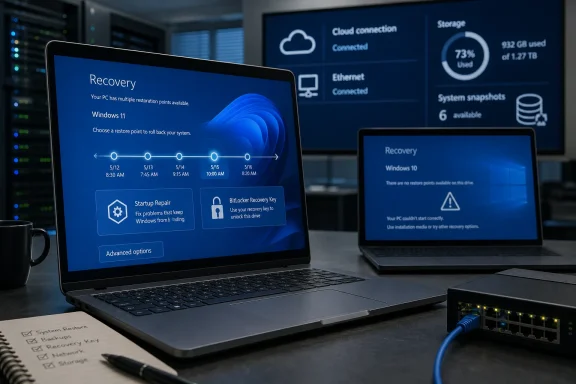 Windows RE is becoming the recovery control plane
The updated Microsoft Support page is nominally a primer on entering Windows RE: let Automatic Repair trigger after repeated failed boots, use Settings > System > Recovery > Advanced startup, hold Shift while selecting Restart, or boot from recovery or installation media. Those routes are familiar to experienced Windows users, but the list of tools inside the environment has changed substantially.
Windows RE is no longer limited to a last-resort collection of offline repair utilities. It has become the entry point for Microsoft’s newer recovery work, including Quick Machine Recovery and point-in-time restore. Microsoft Learn describes Quick Machine Recovery as a connected recovery feature that can check Windows Update for a remediation when a PC cannot start, building on the existing Startup Repair foundation.
That positioning matters during an outage. A machine that cannot boot cannot download an ordinary cumulative update, receive an Intune policy refresh, or depend on a help desk technician remoting into Windows. Recovery has to begin in the pre-boot environment, before the normal operating system and its management stack are available.
The practical result is that organizations should no longer treat WinRE as an invisible partition that only appears when something has already gone badly wrong. It is becoming part of the Windows servicing and resilience path. A recovery environment that is disabled, stale, missing necessary storage space, or inaccessible because its BitLocker recovery process has not been tested can turn an otherwise recoverable incident into a rebuild.
Point-in-time restore has a short memory—and a wide blast radius
Microsoft’s support guidance tells users to choose point-in-time restore before System Restore when it is available, unless they need to go back more than three days. That advice follows the design of the new tool: its restore points are captured locally, retained for up to 72 hours, and designed to restore a broad system state rather than merely selected Windows components.
The benefit is obvious after a bad driver, application deployment, configuration change, or problematic update. A device can be returned to a known recent state without first trying to isolate the precise component that broke startup. Windows Central reported that the feature began arriving with Windows 11’s July 2026 security update, while Microsoft’s technical documentation says it can restore the whole OS state from snapshots made through Volume Shadow Copy Service.
But the same scope makes this a recovery function that needs clear user expectations. Microsoft’s Support documentation states that any changes after the selected restore point are lost, including new local files, applications, settings changes and passwords. OneDrive-hosted files are not affected, but that is not a substitute for a backup strategy: files stored outside synced cloud locations, recent local work, and changes to credentials or certificates can be rolled back.
The retention limit is equally important. This is not an archival restore mechanism and not a replacement for system-image backups. Restore points older than 72 hours are removed, and Microsoft says they can disappear earlier under storage pressure. The technical documentation also says a device needs at least as much free disk space to perform the restoration as the combined size of its restore points. A nearly full device may therefore lose rollback history when it is needed most—or fail to complete a rollback that initially appears available.
For Windows 11 fleets, the sensible operational use is narrow: point-in-time restore is a fast local escape hatch for recent changes. It should sit between normal troubleshooting and a destructive reset or reinstall, not replace tested backups, recovery drives, installation media, or file-protection controls.
Windows 10’s inclusion creates an expectation Microsoft has not met
Microsoft’s August Support page prominently says that Windows 10 support ended on October 14, 2025, then lists Windows 10 and Windows 11 under “Applies To.” In the same page, Microsoft describes point-in-time restore as a Windows RE tool and directs users to System Restore only if the new option is unavailable or the needed rollback is older than three days.
The related point-in-time restore Support page repeats the Windows 10 and Windows 11 applicability label. Yet the Microsoft Learn page for the feature lists Windows 11 alone, and its rollout language specifically refers to Windows 11, version 26H2 for enterprise-managed devices. It says unmanaged Windows Home and eligible unmanaged Windows Pro devices have the feature enabled by default, while managed devices remain off by default until Windows 11 26H2.
Microsoft’s current public record therefore supports a conservative reading: Windows 10 still has Windows RE, System Restore, Startup Repair, Reset this PC, update removal and other established recovery paths, but it should not be assumed to receive the newer point-in-time restore experience simply because a general consumer Support page includes Windows 10 in its applicability banner.
That is especially relevant for businesses using paid Windows 10 Extended Security Updates or organizations retaining specialized Windows 10 hardware. Those devices may remain supported for security updates under their applicable program, but an ESU arrangement does not by itself establish access to every Windows 11 recovery feature. Administrators should inventory actual recovery-menu options on representative devices rather than deriving capabilities from a broad Support label.
Networking in recovery remains a preview-era dependency
The most operationally important addition to the Support page is not the static tool list; it is the acknowledgment that Windows RE can use networking for recovery options that need internet access. Microsoft names Quick Machine Recovery as an example and says Windows RE can use Ethernet, saved Wi-Fi networks and manually selected Wi-Fi networks when a recovery flow needs connectivity.
However, Microsoft also places a clear limitation directly above that description: networking in Windows RE is currently available only within the Windows Insider Program. The Recovery configuration service provider documentation reinforces that limitation, listing WinRE Wi-Fi policy settings as applicable to Windows Insider Preview builds.
This distinction prevents a dangerous assumption. Quick Machine Recovery itself is documented by Microsoft as available on Windows 11 24H2 build 26100.4700 and later, with cloud remediation enabled by default for unmanaged systems. But the fuller model of WinRE seamlessly reusing saved Wi-Fi connections remains in preview documentation. Whether a failed device can reach Microsoft’s recovery service can still depend on the network driver included in its recovery image, the type of Wi-Fi authentication in use, enterprise policy, and whether Ethernet is available.
For managed environments, Ethernet should remain the recovery network baseline. Wi-Fi in a normal Windows session is not proof that Wi-Fi will be usable in WinRE. Microsoft’s older Windows PE documentation has long warned that Windows PE and Windows RE do not provide general-purpose wireless networking in the same way as the full operating system. The new work is intended to close that gap for recovery, but it has not erased the need to validate the actual pre-boot experience on the hardware and networks an organization deploys.
BitLocker recovery keys are still the gatekeeper
The Support article correctly warns that encrypted devices may require a BitLocker recovery key before certain Windows RE tools can be used. That warning deserves more prominence in corporate recovery procedures than it typically receives.
Microsoft’s BitLocker documentation says Windows RE can unlock protected volumes automatically in some automatic-repair scenarios when the TPM can verify that WinRE is trusted. But a manually launched recovery environment, a modified recovery environment, or particular recovery tasks can require the 48-digit recovery key. Point-in-time restore explicitly requires the key on encrypted systems, according to Microsoft’s own recovery instructions.
That means a recovery plan cannot stop at “enable BitLocker.” Help desks need a tested route to retrieve recovery keys from the organization’s chosen directory and management systems, and users need to know where personal-device keys are held before a boot failure. A key stored only on the inaccessible PC is no recovery plan at all.
The immediate action is straightforward: on Windows 11 devices, confirm Windows RE is enabled, verify that BitLocker recovery keys are escrowed and retrievable, check whether point-in-time restore is actually offered in the recovery menu, and test Quick Machine Recovery with the network conditions available during a real outage. Windows RE is becoming more capable, but Microsoft’s own documentation shows that its newest recovery paths still depend on edition, build, management state, disk space, encryption readiness and—where cloud repair is involved—connectivity that may not exist when Windows will not start.
