
Windows Latest reported that Microsoft had begun testing both Windows 11 26H2 ISO files and the Media Creation Tool. Microsoft’s own August 27 announcement confirms a narrower point: Insider ISOs are due “in the near term.” It does not say that the Media Creation Tool has been updated for 26H2, nor does it announce a public 26H2 ISO or a release date for either. For administrators and technicians planning refreshes, that distinction matters: an expected deployment asset is not yet a downloadable production tool.
Microsoft’s Release Preview post also confirms that 26H2 is opt-in for eligible Insiders through the Windows Update seeker flow. Commercial organizations enrolled in the Windows Insider Program for Business can begin validation through Windows Update client policies or WSUS, with an Azure Marketplace image also promised.
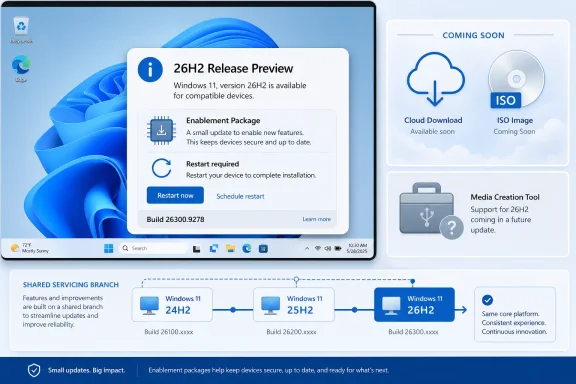 Windows 11 26H2 is a switch, not an OS replacement
Microsoft is describing Windows 11 26H2 as this year’s annual feature update, but its mechanics closely resemble Windows 11 23H2 and 25H2. Versions 24H2, 25H2, and 26H2 sit on the same Germanium servicing branch. That shared code base lets Microsoft ship an enablement package, or eKB, that activates code and features already delivered dormant through prior cumulative updates.
For a fully patched 24H2 or 25H2 machine, the change should therefore be small, quick, and require one restart. Microsoft’s shared-servicing documentation says the versions share source code, monthly security and non-security fixes, and the compatibility testing performed before release. The meaningful difference is the set of features turned on in the newer version.
That does not mean every deployment route is tiny. Microsoft’s own servicing guidance draws a clear line between an eKB upgrade and a full installation image. A 24H2 or 25H2 device can use the eKB; a system coming from an older branch, such as Windows 11 23H2, needs a full feature update or installation media because it never received the monthly packages containing 26H2’s disabled payload.
This is why ISO availability remains important despite the modest in-place upgrade. IT departments need media for bare-metal deployments, repair benches, virtual machines, lab images, and devices that are not already current on the Germanium branch. The eKB is an efficient servicing mechanism, not a replacement for full installation media.
Microsoft’s published example for the previous shared-branch transition illustrates the scale difference: its enablement package was 174 KB, versus roughly 6.5 GB for a full feature update serving an older branch. 26H2 will not necessarily use those exact sizes, but the operational divide is the same.
The Media Creation Tool claim is ahead of Microsoft’s record
The strongest correction to Windows Latest’s report concerns the Media Creation Tool. Microsoft’s Release Preview announcement specifically says Windows 11 26H2 ISOs will appear on the Windows Insider ISO download page “in the near term.” It makes no comparable commitment about a 26H2 Media Creation Tool.
Microsoft’s current Insider download page requires Insider membership and sign-in, and its public-facing content does not identify a 26H2 Media Creation Tool. Independent guidance published before this Release Preview flight likewise described the tool as unavailable while 26H2 remained in preview. No second outlet located in reporting has independently documented a Microsoft test release of a 26H2-specific Media Creation Tool.
The practical conclusion is straightforward: do not build a deployment plan around a 26H2 Media Creation Tool yet. Insiders may soon receive official ISO access, but enterprises should continue using their established image-management workflow and wait for Microsoft to publish production media, servicing documentation, and the final feature update through normal channels.
This is more than terminology. Microsoft’s Media Creation Tool is generally aimed at consumer and small-scale USB or ISO creation. Larger environments commonly depend on ISO servicing, Windows Update for Business deployment policies, WSUS, Configuration Manager, Intune, or Azure-hosted images. Microsoft has already explicitly identified the business validation routes for Release Preview; it has not said that the tool is part of this preview rollout.
26H2 creates a support reset for the Germanium line
Windows Latest correctly identifies lifecycle as a central reason for the release, but the exact support dates for 26H2 are not yet on Microsoft’s public Windows 11 release-information table. Microsoft currently lists Windows 11 25H2 as supported through October 12, 2027 for Home and Pro editions and through October 10, 2028 for Enterprise and Education. Windows 11 24H2 reaches end of updates on October 13, 2026 for Home and Pro, and October 12, 2027 for Enterprise and Education.
Microsoft’s policy says second-half annual Windows 11 feature updates receive 24 months of support for Home and Pro-family editions, and 36 months for Enterprise and Education. If 26H2 reaches general availability in the usual September-to-October window, that policy points to support ending in autumn 2028 for consumer and Pro editions and autumn 2029 for Enterprise and Education. Those are policy-based expectations, however, not dates Microsoft has formally published for 26H2.
That leaves a planning gap administrators should recognize. A new version number will provide a fresh servicing window, but it will not automatically solve an organization’s application-validation, driver, or hardware-readiness problems. The shared branch reduces the likelihood that the upgrade itself introduces a new compatibility break, yet businesses still need to validate the particular policies and features 26H2 enables for commercial devices.
There is also an unusual split in Microsoft’s 2026 Windows lineup. Windows 11 26H1, released on February 10, 2026 for new devices, sits on a separate platform branch and is not offered as an in-place update from 24H2 or 25H2. Windows Central reports that the reverse is also true: 26H2 will not be offered as an update to 26H1 machines because 26H2 remains on Germanium while 26H1 uses the newer Bromine platform. Microsoft has said it intends to reunify those paths in a later release, but has not provided the operational details in the 26H2 Release Preview announcement.
Commercial defaults are the actual behavior change
Consumers moving from a patched 24H2 or 25H2 installation should not expect 26H2 to suddenly deliver an exclusive new desktop. Microsoft says the three releases share continuous-innovation features, meaning many visible changes have already arrived through monthly updates.
The exceptions Microsoft highlights are aimed at commercial devices. It says 26H2 will enable Windows settings backup, app-specific actions from the taskbar, and some File Explorer enhancements that had previously existed but were not enabled by default for commercial customers.
The backup change deserves the closest review. Microsoft’s Windows IT Pro team says Windows settings backup and restore—formerly called Windows Backup for Organizations—will default to backup on eligible managed devices whose related policy is left in the “Not Configured” state. The service captures a recoverable list of Windows settings and Microsoft Store apps.
Restore is not being enabled by default. Administrators still must explicitly configure restoration, and an existing policy that already enables or disables backup takes precedence over the new default. That means the immediate task is policy review, not simply accepting a new version number. Organizations that do not want settings and Microsoft Store app inventories backed up by default should set an explicit policy before 26H2 reaches their production rings.
Microsoft defines a commercial device broadly for this purpose: one that is not running Windows 11 Home and is IT-managed, volume-licensed, assigned a commercial ID, or domain-joined. Teams that have treated “Not Configured” as an intentional neutral position should revisit that assumption before testing 26H2.
Release Preview is for validation, not a consumer upgrade race
Microsoft has not announced a general-availability date beyond the second half of 2026. Windows Central expects a September or October release based on Microsoft’s prior annual cadence, while Windows Latest projects late September or early October. Those dates remain informed forecasts rather than Microsoft commitments.
Release Preview is a useful final-validation ring for organizations already using the Windows Insider Program for Business. It gives IT staff time to test the enablement package, backup-policy behavior, taskbar integrations, File Explorer changes, line-of-business apps, VPN and security agents, and provisioning or recovery workflows under a near-production build.
For ordinary users on a healthy 24H2 or 25H2 PC, there is little reason to join the Insider program solely to change the winver label from 26200 or 26100 to 26300. The current Release Preview build can be installed through Settings by an eligible Insider who chooses to seek it, but the core code and most consumer-facing changes are already shared with the existing releases.
The near-term action is clearer for IT than for enthusiasts: validate 26H2 as a fast servicing transition, explicitly decide the Windows settings backup policy, and wait for Microsoft—not speculation—for production ISO and Media Creation Tool availability.