
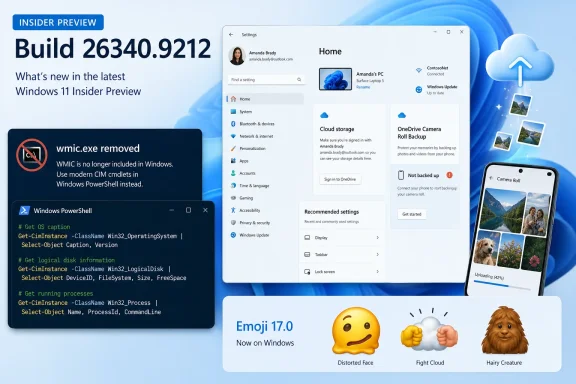
WinCentral first highlighted the camera backup addition, alongside WMIC removal and Emoji 17.0 support. Microsoft’s own release notes add the important qualifier: Build 26340.9212 is an Experimental-channel flight of Windows 11 version 26H2, delivered through an enablement package, and the changes are under Controlled Feature Rollout. Some eligible Insiders therefore will not see the new Settings entries immediately.
The distinction is worth making before users assume Windows has acquired a new phone-transfer system. Microsoft’s OneDrive apps already offer camera backup on Android and iOS. The Windows 11 change brings that setup path and status signal into the PC’s Settings app, putting Microsoft’s cloud service in front of users who may never have opened the OneDrive mobile app’s own Camera Backup controls.
 A Windows Settings shortcut into OneDrive storage
Microsoft says the added Home and Accounts-page entry points help users configure automatic uploads of photos and videos from a mobile device to OneDrive. A screenshot in the release notes shows the feature under Cloud storage with a “Not backed up” status and a prompt to begin the backup process.
That framing suggests the PC is acting as the management surface, while the phone and OneDrive app remain responsible for collecting and uploading the actual media. Microsoft has not said that Build 26340.9212 can import a camera roll over USB, bypass mobile-app permissions, or back up photos to a local folder on the PC. It also has not published phone-platform requirements for the new Windows Settings flow.
For users already signed into the same personal Microsoft account on a PC and phone, the convenience is straightforward. A newly visible status indicator can expose an unprotected camera roll before the user loses a phone or replaces it. Once files land in OneDrive, they are available through File Explorer’s OneDrive folder and Microsoft’s photo experiences on Windows.
But calling this a backup should not obscure the storage trade-off. Camera Roll uploads consume the Microsoft account’s OneDrive storage allowance, alongside other OneDrive files and Outlook.com mail attachments. Microsoft’s support documentation says that once an account exceeds its storage quota, it cannot upload, edit, or sync new content—including Camera Roll files. The new Settings entry may make protection more discoverable, but it does not create additional capacity or separate photo storage.
There is another limitation that users should understand. Microsoft describes Android Camera Backup as a one-way upload to OneDrive, rather than a two-way sync that mirrors deletions or edits back to the handset. That can be beneficial when a phone is lost or a local photo is deleted, but it also means the phone library and cloud library need not remain identical. Users who rely on a second photo service, such as Google Photos or iCloud Photos, should decide which service is their primary archive rather than assuming the new Windows prompt consolidates them.
Experimental does not mean broadly available
Build 26340.9212 is dated August 17, 2026, and Microsoft labels it an Experimental Preview build rather than a retail Windows update. The company explicitly warns that features in these flights can change, be replaced, be removed, or never ship outside the Insider program.
That caveat is especially relevant here because the company is testing a placement in Settings, not announcing a finished backup product with a defined rollout date. Microsoft has not said when the Camera Roll Backup entry points will reach Windows 11 26H2 more broadly, whether they will land in 25H2 or 24H2, or whether they will be available for work and school OneDrive accounts.
The release notes also say the feature rollout is gradual. An Insider on Build 26340.9212 who does not see Camera Roll Backup in Settings > Home or Accounts is not necessarily missing the build or misconfigured; their device may simply be outside the current rollout group. That is the ordinary behavior of Controlled Feature Rollout, but it makes screenshots and reports from early testers unreliable as a guide to what every Insider should expect.
For administrators, the feature is less significant than it looks. Microsoft has not documented a new policy, Mobile Device Management control, tenant setting, audit surface, or retention behavior tied specifically to the Windows Settings links. Until it does, organizations should treat this as a consumer-oriented onboarding surface for OneDrive, not as a replacement for managed mobile backup or a newly announced enterprise data-protection control.
WMIC removal is the operational change to act on
The consequential part of Build 26340.9212 for IT teams is Microsoft’s confirmation that WMIC is removed in this release. WMIC, the Windows Management Instrumentation Command-line utility, has long been used in batch files, deployment logic, support runbooks, inventory scripts, and older third-party tools.
Crucially, Microsoft is removing wmic.exe, not WMI itself. The underlying Windows Management Instrumentation service and APIs remain part of Windows. Scripts that already use PowerShell’s CIM cmdlets, .NET’s System.Management, COM interfaces, or other programmatic WMI access are not broken merely because the WMIC wrapper disappears.
Microsoft’s WMIC removal guidance establishes the broader timeline. The utility was deprecated in Windows 10 version 21H1, became optional on newer Windows 11 releases, and was removed on upgrade to Windows 11 version 25H2 while remaining reinstallable as a Feature on Demand. Microsoft’s stated 2026 plan is full removal in the next Windows feature update, with no Feature on Demand route to restore it.
Build 26340.9212 therefore is not an isolated Insider cleanup; it is a preview of the end state administrators should be preparing for. The immediate work is to search script repositories, logon scripts, imaging task sequences, software packaging rules, and vendor agents for direct invocations of wmic.
A basic replacement is usually simple. For example, Microsoft recommends replacing a process query such as wmic path win32_process get Name with PowerShell’s Get-CimInstance Win32_Process | Select-Object Name. The difficult cases will be older batch scripts that parse WMIC’s fixed-width text output, depend on its alias syntax, or invoke it indirectly through a vendor utility. Those need testing before the next feature update turns a missing executable into a production failure.
Emoji 17.0 arrives ahead of many platforms
The same Experimental build also adds Emoji 17.0 support to the Windows emoji panel, accessed with Windows key + Period. Microsoft specifically calls out distorted face, fight cloud, and hairy creature, and says it has adjusted several existing designs—including saluting face, face with peeking eye, goose, lotus, and kissing cat—to improve cross-platform consistency.
Unicode’s Emoji 17.0 materials independently confirm the new names and code points, including U+1FAEA for distorted face, U+1FAEF for fight cloud, and U+1FAC8 for hairy creature. That means Windows can now render and insert the new characters, although what a recipient sees still depends on whether their device and messaging service support Emoji 17.0.
The visual adjustments may matter more than the new icons in mixed-device messaging. Cross-platform emoji differences are usually cosmetic, but inconsistent designs can change the tone of a message or make a symbol harder to recognize. Microsoft is trying to reduce that mismatch, though it cannot control how Apple, Google, or third-party chat clients draw the same Unicode character.
Build 26340.9212’s camera-roll entry points are a useful cleanup for people already using OneDrive, but they do not change the underlying service’s permissions, storage limits, or mobile-app requirement. The release’s action item belongs to administrators: remove WMIC dependencies now, while the Experimental channel is showing what Windows 11’s next feature-update baseline will no longer include.
