
wmic.exe command-line utility, putting scripts, management agents, and deployment routines that still invoke WMIC on notice before the change reaches broader Windows releases.TheWinCentral correctly identified the two build numbers and their August 17 release, but its report treated the 26H1 flight as a conventional look ahead at the next Windows feature update. Microsoft’s own Flight Hub and support documentation describe something narrower: Windows 11 26H1 is a separate, silicon-specific Windows core, aimed at select new hardware rather than an in-place upgrade for PCs already running Windows 11 24H2 or 25H2.
For most Beta testers, Build 26220.9202 is the relevant update. It remains based on Windows 11 version 25H2 through an enablement package. Build 28020.2731 is for the distinct 26H1 Beta population, whose devices are on the 28000-series core. The matching numbers do not mean the two builds are interchangeable, and a typical existing Windows 11 PC should not expect Windows Update to offer 26H1 merely by joining the Insider Program.
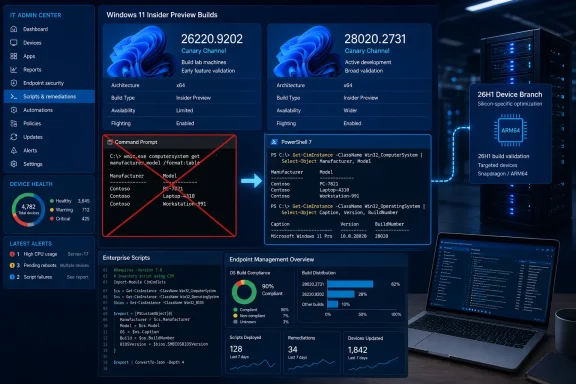 WMIC Is Now Gone in Both Beta Tracks
Microsoft’s release notes for Build 26220.9202 and Build 28020.2731 say the Windows Management Instrumentation Command-line utility has been removed. This is the practical headline for IT administrators: any workflow calling wmic can now fail outright on these preview builds.
WMIC has been deprecated since Windows 10 version 21H1, so the removal is not a surprise. The distinction now is operational. Deprecation can be ignored by an organization that still has old scripts functioning; removal turns that technical debt into an endpoint-management issue.
Common examples include inventory scripts that collect chassis, BIOS, disk, process, or product information with commands such as wmic bios get serialnumber, wmic computersystem get model, or wmic process. Those calls may be buried in logon scripts, software installers, remote-support tools, imaging task sequences, monitoring collectors, and vendor utilities rather than in a clearly owned PowerShell repository.
Microsoft’s recommended direction is PowerShell’s CIM cmdlets, particularly Get-CimInstance, Invoke-CimMethod, and related commands. The underlying WMI infrastructure has not been removed by this preview update; it is the aging WMIC command-line interface that is disappearing. That means a replacement normally requires refactoring command parsing and output handling, not rebuilding management logic from scratch.
For example, a script that extracts a serial number with WMIC should be rewritten to use a CIM query and explicitly select the required property. Organizations should also use this moment to identify older PowerShell scripts relying on Get-WmiObject, which Microsoft has separately discouraged in favor of the CIM cmdlets.
The release does not establish a retail removal date for WMIC. Microsoft’s Insider documentation is authoritative for these builds, but it does not say when the same removal will become unavoidable on every supported Windows 11 servicing branch. Administrators should therefore treat the Beta flight as an early compatibility deadline rather than assume the retirement remains theoretical.
The Two Builds Serve Different Windows Bases
Microsoft’s Flight Hub lists Build 26220.9202 under the Windows 11 version 25H2 Beta channel and Build 28020.2731 under Beta (26H1). That division matters more than the similar release date.
Build 26220.9202 is an enablement-package build layered on the 26200, or Windows 11 25H2, baseline. It is part of the Beta path for the familiar Windows client core that also underpins Microsoft’s 2026 annual feature update work. Microsoft describes this channel as the lower-risk preview route relative to Experimental builds.
Build 28020.2731, by contrast, is delivered to devices on the 28000-series 26H1 baseline. Microsoft says 26H1 contains the same user-facing features as Windows 11 25H2 and exists to support a new generation of silicon and hardware innovation. The first devices were associated with Qualcomm Snapdragon X2-series processors, and Microsoft says 26H1 is not offered as an in-place update from Windows 11 24H2 or 25H2.
That makes 26H1 a poor proxy for the next feature release on an existing fleet. An IT department can use the 28020.2731 build to validate software on an eligible 26H1 device, but it should not interpret its presence as a migration route for ordinary 25H2 systems.
Microsoft has also warned that devices on 26H1 cannot move to the annual feature update planned for the second half of 2026 because that release uses a different Windows core. Those devices are expected to receive a path forward in a later Windows release. The consequence is straightforward: hardware teams should keep 26H1-specific validation separate from general 25H2 and 26H2 rollout planning.
Drag Tray Has Been Withdrawn
Both Beta builds also remove the Drag Tray experience after Insider feedback. Microsoft has not offered a detailed postmortem or said when a successor will arrive; it only says it is exploring a future replacement.
The decision is a useful reminder of what Beta still represents under Microsoft’s revised Insider program. Features in a preview build are candidates, not commitments. An interface can be tested, changed, delayed, or removed even after Microsoft has made it visible to a relatively broad group of testers.
The 25H2-based Build 26220.9202 includes additional refinements that do not appear in the leaner 26H1 note set. Microsoft says File Explorer Home should launch faster and respond more quickly, and the Recommended area now supports touch scrolling. The build also raises the Search box height by four pixels, improves system-tray loading reliability on non-touch PCs, reduces potential Japanese IME hangs and deadlocks, and fixes an xtajit64.dll crash affecting some Arm64 systems.
Build 28020.2731 has a shorter changelog. Aside from WMIC and Drag Tray, Microsoft lists a fix for a Settings crash triggered through System > Notifications, plus a Magnifier launch fix. That relative lack of consumer-facing change reinforces the point: 26H1 testing is primarily about a device-specific platform branch, not a stream of headline UI additions.
A WinRE Feature Was Moved Out of the Beta Build
Microsoft’s Build 26220.9202 page carries an unusually revealing update note dated August 17: a Windows Recovery Environment enhancement originally announced for the build was removed from the Beta release and moved into Experimental Build 26340.9212.
The feature would have allowed WinRE to reuse saved Wi-Fi profile information when recovery workflows such as Quick Machine Recovery or Cloud Rebuild required connectivity. Microsoft said it would be enabled by default and controllable by IT administrators. On paper, it could reduce one of the awkward failure points in remote or unattended recovery: a machine may boot successfully into recovery but lack network access needed to obtain an image, remediation data, or management instructions.
The published Beta release notes no longer list it as a Build 26220.9202 feature. That is a significant correction to the generic “latest changes and improvements” framing in TheWinCentral’s item. Testers who install 26220.9202 should not assume their Beta machines are receiving the saved-Wi-Fi WinRE behavior; Microsoft has moved that work to the more volatile Experimental channel.
For admins, the move is sensible. Recovery networking crosses security, device configuration, driver availability, and enterprise Wi-Fi authentication constraints. Microsoft’s WinRE documentation notes that recovery networking is enabled only when needed and that some Wi-Fi hardware, drivers, certificate providers, and enterprise authentication configurations may not be available in the recovery environment. This needs deliberate lab validation, not a blind expectation that a saved office Wi-Fi profile will solve every recovery scenario.
What Beta Testers Should Do Now
The immediate action is to install the appropriate preview only on systems intended for Insider validation, then verify the resulting build with winver or the desktop watermark. A device on the normal Beta track should see 26220.9202; a device enrolled in Beta (26H1) should see 28020.2731.
Administrators with either build in a test ring should inventory WMIC use before expanding deployment:
- Search scripts, scheduled tasks, deployment packages, monitoring rules, and vendor documentation for
wmic.exeor commands beginning withwmic. - Test CIM-based PowerShell replacements against the same local and remote endpoint scenarios, including any remoting, permissions, and output-parsing assumptions.
- Keep 26H1 testing on eligible hardware distinct from annual feature-update testing for the 25H2/26H2 core.
- Do not count on the saved-Wi-Fi WinRE change in the Beta build, because Microsoft has moved it to Experimental Build 26340.9212.
The two August 17 Beta flights are therefore less about previewing a sweeping Windows 11 redesign than enforcing a long-announced management-tool transition while keeping a specialized 26H1 hardware branch serviced. The next failure most organizations find will not be a visible taskbar bug; it will be an overlooked automation job that still expects wmic.exe to exist.
