
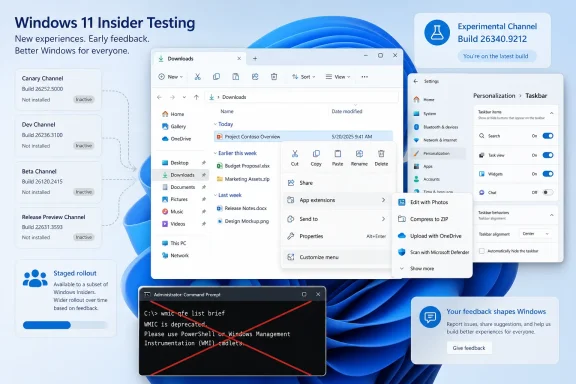
Microsoft’s Windows Insider Blog says the new right-click experience is in the Experimental channel and is being gradually rolled out, meaning even a PC on Build 26340.9212 may not receive it immediately. The other four flights—Beta Build 26220.9202, Beta 26H1 Build 28020.2731, Experimental 26H1 Build 28120.2738, and Experimental Future Platforms Build 29648.1000—have their own changes, but their release notes do not list the new File Explorer menu.
That distinction matters for testers and IT staff maintaining Insider rings. Installing a 26H1 build, or moving to the regular Beta channel, is not a path to the menu preview. The only documented testing path today is the Experimental channel running 26340.9212, subject to Microsoft’s staged feature rollout.
 The new right-click menu is a controlled preview
Microsoft describes the revised File Explorer context menu as faster to open, less cluttered at the top level, and more customizable. The company says it has reduced the work needed when installed applications add their own context-menu extensions, a long-running source of slow or overloaded right-click menus on Windows machines with large software stacks.
The significant functional change is a new “Customize menu” entry at the bottom of File Explorer’s context menu. It opens a new Settings page under Personalization, giving users controls that Windows 11’s first-generation context menu largely withheld.
Those controls include the ability to enable or disable built-in commands such as Send to and Create shortcut. Microsoft says Print, which was absent from the standard Windows 11 context menu, can be turned on there as well. Users can also choose whether application extensions appear in the primary menu or a submenu, and can hide that submenu.
Microsoft is also offering an accommodation for people who preferred the older text-heavy command layout. Cut, Copy, Paste, Rename, Delete, and Share can be displayed inline as text commands instead of the icon row that Windows 11 introduced. Properties can be placed at the bottom of the menu.
This is a meaningful concession, but it is not a full restoration of the Windows 10 right-click menu. Microsoft’s published documentation describes a configurable modern menu, while a File Explorer team member clarified in a public Windows Insider discussion that the new settings do not make the legacy menu open by default. The familiar “Show more options” route remains part of the design.
Build 26340.9212 carries the File Explorer work
Experimental Preview Build 26340.9212 is based on Windows 11 version 26H2, according to Microsoft Learn. Beyond the new context menu, it includes several File Explorer fixes and refinements:
- File Explorer preview images should no longer display an unexpected thick band across their middle.
- The release includes broader File Explorer reliability work, including fixes affecting third-party input methods and Windows on Arm systems.
- Microsoft says File Explorer’s future improvement work also covers responsiveness, navigation, cloud-sync interactions, details panes, and tab behavior, though those broader changes are not all newly introduced in this one build.
The File Explorer team’s separate August 17 blog post promises faster launches, fewer hangs and flashes during browsing and renaming, and better behavior when files are synchronized in the background. It also says File Explorer now supports more Address Bar path formats, preserves collapsed and expanded Home sections, and better expresses file sizes in KB, MB, and GB.
Those are broad product claims from Microsoft, rather than published benchmark results. The company has not supplied before-and-after measurements for context-menu latency, Explorer startup time, memory use, or the effect of third-party extensions. Insiders should therefore treat the speed claims as a test target, not an established performance result.
Microsoft specifically asks for reports through Feedback Hub under Files, Folders, and Online Storage > File Explorer. That is the appropriate channel for problems involving missing commands, slow right-click behavior, broken shell extensions, or a menu configuration that does not persist.
The other four flights have different priorities
The regular Beta Channel’s Build 26220.9202 is based on Windows 11 version 25H2. Its File Explorer-related changes are more modest: faster and more responsive loading for Home, touch scrolling in Home’s Recommended carousel, and the preview-image band fix. It also introduces a more consequential recovery feature for managed Windows deployments.
Build 26220.9202 lets Windows Recovery Environment, or WinRE, automatically reuse eligible Wi-Fi profiles stored in the main Windows installation, including supported certificate-based enterprise Wi-Fi networks. Previously, WinRE could automatically use wired unauthenticated Ethernet or Wi-Fi specifically configured for recovery; other Wi-Fi connections generally required manual credentials.
For organizations that use cloud rebuild, quick machine recovery, or other network-dependent recovery workflows, this could remove a common failure point: a device reaching recovery but being unable to reach the network that recovery requires. Microsoft says the capability is enabled by default but can be disabled by IT administrators. It needs real-world validation, particularly on networks with certificate, driver, or authentication components that may not be available inside WinRE.
The two 26H1 flights, Beta Build 28020.2731 and Experimental Build 28120.2738, have a much shorter shared changelog. They remove the Drag Tray feature after Insider feedback, remove the deprecated Windows Management Instrumentation Command-line tool, or WMIC, and include fixes for Settings notifications and Magnifier startup.
Build 28120.2738 also has a named compatibility safeguard: Microsoft says some Insiders may be unable to launch PUBG: BATTLEGROUNDS after installing it. The company says it is working with the game’s developer on a fix. Anyone using an Insider machine for that title should avoid this specific Experimental 26H1 build until Microsoft removes the block or publishes a resolution.
Experimental Future Platforms Build 29648.1000 likewise does not carry the File Explorer context-menu preview. Its headline addition is minor Windows Security interface work, including an Enterprise-device indicator at the top of Virus & threat protection when Microsoft Defender for Endpoint is enabled. Microsoft also lists unresolved mouse-cursor blinking and update error 0x80070005 issues in this channel.
WMIC removal is the common operational change
One change appears in all five August 17 build families: Microsoft has removed WMIC. The command-line utility has been deprecated for years, but its actual absence in current preview flights is a practical warning for administrators, deployment engineers, and script owners who still rely on commands such as wmic bios, wmic diskdrive, or wmic product.
Microsoft’s release notes point organizations toward modern Windows Management Instrumentation interfaces, chiefly PowerShell cmdlets and CIM-based queries. In practice, that means testing older logon scripts, inventory jobs, compliance checks, help-desk tools, and task-sequence steps before this removal reaches a broadly deployed Windows release.
The immediate risk is less about the WMI management infrastructure itself than scripts that invoke the wmic.exe wrapper. Scripts using PowerShell’s Get-CimInstance, the WMI APIs, or management platforms that query WMI directly may continue to function; hard-coded calls to the legacy executable will not.
Microsoft has not attached a retail-release date to WMIC’s removal in these Insider builds. The company also warns that features in Experimental channels may be changed, removed, or never reach a production Windows version. Administrators should use this as a migration signal, rather than assuming the exact schedule is settled.
Renewed Insider certificates make updating more urgent
Microsoft’s aggregate Insider announcement also says all five new builds contain renewed flight certificates, replacing certificates that expired on August 11, 2026. The company warns that devices left on older Insider builds can encounter software compatibility problems, including with anti-cheat applications.
That warning gives the multi-channel release a second purpose beyond feature testing. Insiders running older flights should check Windows Update and move to a current supported build, particularly on test PCs expected to run games or software that validates Windows build certificates.
The File Explorer redesign is the visible change, but it should be tested in the correct place: Experimental Build 26340.9212. The wider five-build release is more accurately a coordinated maintenance and platform transition flight—one that advances WinRE Wi-Fi recovery, retires WMIC, removes Drag Tray after feedback, renews flight certificates, and exposes a known game-compatibility risk before it reaches more users.
