
As reported by WinCentral, the File Explorer change is the most immediately visible part of Microsoft’s latest Experimental-channel flight. Microsoft’s August 21 release notes confirm the feature, along with support for Microsoft Store purchases in elevated packaged WinUI 3 apps and a fix for Taskbar animations that could stop after initially working.
The material detail omitted from the initial report is the build and its status. This is Windows 11 Experimental Build 26340.9233, a 26H2 preview delivered through an enablement package on top of Windows 11 version 25H2. It is neither a normal monthly update nor evidence that the feature is headed to all Windows 11 PCs on a defined timetable.
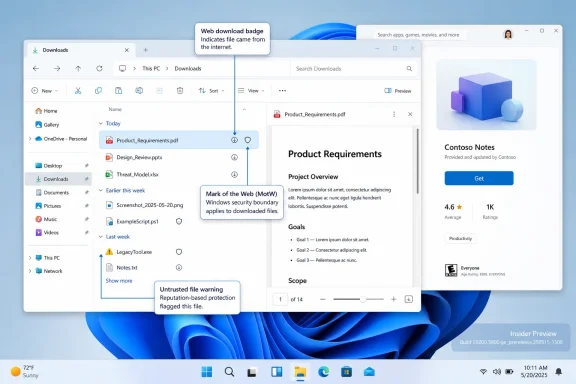 File Explorer’s preview change meets a security boundary
The Preview pane has always been a quick way to inspect the contents of supported files without launching their associated applications. In the new Experimental build, Microsoft says PDFs and “non-HTML files” downloaded from the web can now be previewed automatically there.
That sounds straightforward until it is placed beside Microsoft’s own security policy from late 2025. Beginning with Windows security updates released on or after October 14, 2025, Microsoft intentionally disabled File Explorer previews for files downloaded from the internet or accessed through Internet Zone file shares. The company said the restriction applied to files carrying Mark of the Web, the zone identifier Windows uses to signal that content came from an untrusted source.
The warning was deliberate, not a File Explorer regression. Preview handlers render file contents when a user merely selects a file; they do not require a double-click. Microsoft’s security documentation acknowledges that Explorer Preview Pane rendering has historically been an attack surface, while BleepingComputer reported that the 2025 restriction was intended to reduce credential-theft risks from malicious documents.
Microsoft’s current Build 26340.9233 notes do not explain how its new automatic-preview behavior interacts with that protection. They do not say whether a file must first be unblocked, whether the feature applies only to formats and handlers considered safe, whether it has different behavior for locally downloaded files versus files on network shares, or whether the Mark of the Web restriction has been narrowed for this build.
That omission is the practical story. A reader should not assume that all downloaded files will suddenly preview, or that Windows has stopped treating internet-originated documents cautiously. The most likely near-term outcome is a more selective preview experience, but Microsoft has not published enough technical detail to establish precisely which files will qualify.
For organizations that hardened Explorer behavior after the 2025 change, the sensible approach is to leave existing attachment, browser-download, and zone-mapping controls intact. Test a representative mix of PDFs, Office documents, archives, scripts, image files, and files received via collaboration platforms before treating this as an operational change. The preview pane may be convenient, but its safety depends on the preview handler, the file’s origin metadata, and the policies that classify a location as trusted or untrusted.
“Non-HTML” is a broad label, not a supported-format list
Microsoft’s language is also notably imprecise. “PDF and non-HTML files” is not a list of extensions, MIME types, or preview handlers. It does not establish that every document format, every PDF creator, or every third-party application previewer will work.
That distinction matters for a common Windows support problem: File Explorer itself does not necessarily render every format. It normally relies on Windows components or preview handlers installed by applications. A PDF may preview through a handler supplied by Microsoft Edge, Adobe Acrobat, or another installed program; the result can vary by machine configuration. The fact that Explorer will attempt to enable automatic previewing for certain downloaded files does not guarantee a visually complete or safe preview for every file type.
The change also does not remove the need for users to recognize potentially dangerous content. A preview is not a trust signal. It is a rendering operation that lets someone inspect a file without launching its normal application, and that is useful when sorting similarly named invoices, scanned documents, downloads, or reports. It does not validate the sender, verify a signature, scan a document’s claims for accuracy, or make a suspicious download safe to execute.
For consumer users, the immediate test is simple: enable the Preview pane in File Explorer and select a newly downloaded PDF or supported document after the Experimental build is installed. If Explorer still displays the familiar warning that the file could harm the computer, do not bypass it merely to restore convenience. Microsoft’s existing guidance remains to unblock a file only when both the file and its source are trusted.
Store purchases in elevated WinUI 3 apps close a narrower gap
Build 26340.9233 also changes a long-standing limitation around Microsoft Store commerce. Microsoft says the update supports in-app purchases in packaged WinUI 3 applications that require elevation, allowing those apps to offer purchases through the company’s integrated commerce platform.
The qualification is important. This does not mean every elevated Windows application, every classic Win32 installer, or every legacy Store API now supports purchases while running with administrator rights. It applies to packaged WinUI 3 apps, a category typically distributed as MSIX packages and built with the Windows App SDK.
Microsoft’s broader Store purchase documentation has long warned that in-app purchase functionality is unsupported in elevated applications. That documentation still exists, which means developers should not treat the Experimental build note as a blanket reversal. Instead, it appears to be a targeted capability expansion for modern packaged WinUI 3 applications.
The practical consequence is that a developer who previously separated privileged functions from Store monetization may be able to simplify that design. But the feature is still in an Experimental Windows build, and Microsoft has not yet published corresponding implementation guidance, API requirements, minimum SDK versions, certification conditions, or a list of restrictions around elevation prompts and purchase flows.
Developers should therefore verify the behavior with a test package and Microsoft Store sandbox before redesigning a production entitlement system. In particular, they should validate what happens when a user declines elevation, whether the purchase UI can return cleanly to an elevated process, how license state is recovered after an update or reinstall, and whether Store certification treats the app’s privileged operations differently from ordinary packaged apps.
The Taskbar fix is routine, but it confirms the build’s purpose
Microsoft also fixed an issue in recent Experimental builds where Taskbar animations would work briefly and then stop. This is a small quality fix, yet it reinforces why Experimental channel software should not be installed on a machine that needs predictable daily behavior.
The same build includes several changes not mentioned in WinCentral’s report: a redesigned WinUI-based AutoPlay dialog, an accessibility option that opens applications maximized by default, per-app camera, microphone, and location controls for desktop apps, a correction for an invisible mouse cursor in some applications, and a repair for an empty Feature Flags list in Insider settings.
Those additions make Build 26340.9233 more than a narrowly focused File Explorer update. Microsoft is using the Experimental channel to test shell modernization, desktop-app privacy controls, accessibility behavior, and developer platform changes together. Such builds can contain useful capabilities, but Microsoft explicitly warns that features can change, be removed, or never ship beyond the Insider program.
The immediate payoff is clear for Insiders willing to test it: downloaded-file triage in File Explorer may become faster, while elevated modern apps gain a potentially meaningful commerce path. The unresolved issue is more important than the marketing shorthand: until Microsoft explains the Mark of the Web behavior in this build, administrators should treat File Explorer’s improved previews as an experimental usability change operating beside a still-relevant security control.