
WindowsReport first highlighted the PUBG warning alongside the new build’s smaller set of fixes and removals. Microsoft’s release notes say it has placed a safeguard around the problem while it works with the game’s developer, intended to avoid stability issues. For affected Insider PCs, that wording offers little relief: the practical result is that the game may simply fail to start after the update.
The issue is limited to the Experimental (26H1) Insider branch. It is not a warning for ordinary Windows 11 24H2 or 25H2 installations, nor has Microsoft said that the problem affects the separate Beta (26H1) build 28020.2731 released at the same time.
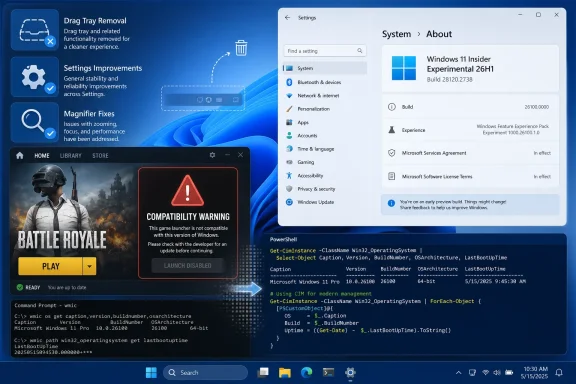 The PUBG block has now persisted across at least two flights
Microsoft’s July 31 notes for build 28120.2630 included the same warning: PUBG players might be unable to launch the game after installing the build. Build 28120.2738, released on August 17, repeats it without a meaningful status update beyond Microsoft’s statement that it is working with the developer.
That matters because a known issue that survives into a subsequent preview build is different from a one-flight regression awaiting a quick servicing fix. The company has not said whether the failure is caused by Windows kernel, graphics, anti-cheat, process-mitigation, or game-client changes. It also has not said whether the safeguard stops all PUBG players from receiving the build automatically, blocks only a particular device configuration, or merely documents the risk after installation.
The word “safeguard” normally suggests that Microsoft is attempting to contain rollout exposure. Yet its release notes specifically say Insiders might be prevented from launching PUBG after installing the build. Anyone already on the Experimental 26H1 path should therefore treat this as an active application-compatibility problem, not a hypothetical warning.
For a test device that must keep PUBG working, the safest choice is to pause before taking build 28120.2738 or to move to the Beta (26H1) experience if Microsoft still offers that in-place channel switch to the particular Insider device. Do not assume that reinstalling PUBG will solve a compatibility issue Microsoft is tracking at the operating-system level. Microsoft has not published a supported workaround, and it has not advised users to modify anti-cheat, game files, drivers, or Windows security settings.
Experimental 26H1 is a specialized branch, not the general Windows 11 preview track
Microsoft describes Windows 11 version 26H1 as a targeted release meant to support specific new silicon, including Qualcomm Snapdragon X2 Series hardware. Its Flight Hub documentation says 26H1 is not a conventional feature update for Windows 11 25H2 and contains platform changes for that hardware effort.
The Experimental (26H1) channel uses the 28120 build series, while the parallel Beta (26H1) channel uses the 28020 series. Microsoft introduced that split in June so Insiders could switch between the two 26H1 development experiences without a clean install. Experimental builds are inherently the less conservative option: Microsoft explicitly warns that they can be unstable, have limited documentation, and expose features through staged Controlled Feature Rollouts.
This context puts the PUBG problem in proportion. A game launch regression on an Experimental build is serious for the people affected, particularly if the PC doubles as a gaming machine, but it is not evidence that retail Windows 11 is about to break PUBG. Microsoft has made no such statement, and its public warning is tied specifically to this pre-release branch.
The immediate lesson for enthusiasts is straightforward: do not enroll the only PC used for competitive games, streaming, or other reliability-sensitive work in the Experimental channel. A preview branch can be useful for testing hardware and Windows changes, but the price of that access is accepting compatibility failures that can remain open for multiple flights.
WMIC removal is the build’s bigger IT consequence
PUBG is the consumer-facing warning, but build 28120.2738’s removal of the Windows Management Instrumentation Command-line utility, WMIC, carries the more lasting implication for administrators and developers.
Microsoft has deprecated WMIC for years and says the retirement affects the wmic.exe command-line utility, not Windows Management Instrumentation itself. WMI remains part of Windows; what is disappearing is the older shell tool that countless batch files, inventory scripts, installers, activation checks, and support procedures still invoke.
Microsoft’s Windows client deprecation documentation identifies PowerShell as WMIC’s successor. In practical terms, organizations should inventory scripts and third-party tools for calls such as:
wmic os get Caption
wmic bios get serialnumber
wmic process get Name,ProcessId
Those examples need testing with PowerShell and CIM-based replacements, such as Get-CimInstance Win32_OperatingSystem, Get-CimInstance Win32_BIOS, and Get-CimInstance Win32_Process. A command-for-command swap is not always enough. Output formatting, remote-authentication behavior, error handling, encoding, and dependencies in legacy CMD or VBScript wrappers can all change when a workflow moves from WMIC to PowerShell.
The removal in an Experimental 26H1 build is a warning for IT teams rather than an instruction to panic about every supported Windows installation. But it eliminates one more opportunity to defer migration. Microsoft’s public lifecycle material says WMIC was already deprecated and would be removed in a future Windows release; 28120.2738 shows that removal being exercised in a live preview branch.
Administrators should use that preview signal to find dependencies before a production rollout makes the answer obvious. Endpoint-management detection rules, imaging task sequences, asset-discovery scripts, login scripts, vendor troubleshooting tools, and in-house utilities are especially likely to contain unmaintained WMIC calls.
Drag Tray also disappears after Insider feedback
Microsoft is also removing Drag Tray from build 28120.2738 after receiving Insider feedback. The feature appeared when users dragged a file toward the top of the display, presenting a small tray of suggested apps to receive the file.
Microsoft says it is exploring improvements and intends to discuss a future replacement later. There is no replacement available in this build, no date for its return, and no indication that an alternative is enabled behind a feature flag. For now, the removal restores the familiar drag-and-drop behavior without the extra destination tray.
The change is notable mostly because it shows the Experimental channel operating as intended: Microsoft can introduce an interaction experiment, collect feedback, and remove it without promising that every test graduates into a shipping Windows feature. Users who built a workflow around the tray should not expect it to be restored by a setting in 28120.2738.
Two smaller fixes do not offset the compatibility risk
Build 28120.2738 fixes a Settings crash triggered by interacting with System > Notifications in the prior flight. It also resolves an issue that stopped Magnifier from launching for some Insiders. Both are worthwhile reliability fixes, particularly the Magnifier repair, but neither alters the decision for a PUBG player deciding whether to update.
Microsoft has not announced a date for the PUBG fix or said whether it will arrive through Windows Update, a PUBG update, an anti-cheat component update, or some combination of those. Until that changes, the safe operational position is clear: keep build 28120.2738 off any Experimental 26H1 PC where PUBG availability matters, and use the build as an opportunity to remove WMIC from automation before its retirement reaches broader Windows releases.
