
For Windows administrators, the immediate consequence is that endpoint policy cannot solve a Microsoft 365 data-governance problem by itself. Microsoft 365 Copilot can retrieve material through Microsoft Graph that a signed-in user is already permitted to reach; Copilot Studio agents can call approved tools and connectors; and the Windows client is chiefly an entry point. An Intune configuration or AppLocker rule may control the application on the device, but it will not repair an overly broad SharePoint permission, an “Anyone” sharing link, or a poorly scoped agent connection.
Microsoft’s own current Windows guidance makes the split clear. On Windows 11, the legacy Copilot sidebar has been replaced by a Microsoft 365 Copilot experience for commercial users and a separate consumer Copilot app. That distinction is operationally important: a user authenticating with a Microsoft Entra work account belongs in the Microsoft 365 Copilot path, with Microsoft’s enterprise data-protection commitments, while the consumer app is a different application and policy target.
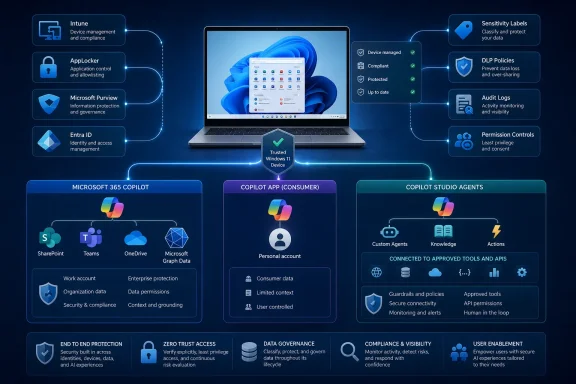 The Windows endpoint is the entry point, not the authorization engine
Microsoft 365 Copilot answers are grounded in data returned under the user’s existing Microsoft 365 permissions. The basic protection is therefore sound but limited: Copilot should not reveal a SharePoint file, Teams chat, mailbox item, or OneDrive document to someone who lacks permission to read it.
The dangerous word is “already.” Organizations frequently accumulated broad memberships, stale sharing links, ownerless sites, and inherited permissions long before generative AI arrived. Those conditions did not become safe merely because people had to manually browse to a document or remember the name of a SharePoint site. Natural-language search reduces the effort needed to find relevant material, which turns latent oversharing into a much more visible operational risk.
TechTarget correctly identifies this as the central governance issue. The meaningful change is not that Copilot invents a new access-control layer; it makes the existing layer easier to query. A sales employee who can already access an old board-preparation folder may be able to obtain a useful summary without knowing that folder exists. Microsoft’s documentation repeatedly frames its Copilot readiness guidance around exactly this problem: identify broad access, control discovery, reduce inactive and ownerless content, and apply durable information-protection controls.
That also means endpoint teams should resist the tempting but incomplete response of blocking the Copilot client and declaring the problem solved. The same user can reach Microsoft 365 Copilot through supported web and Microsoft 365 application experiences. Conversely, a company that has repaired its permissions, labels, and sharing defaults can make a more defensible decision to enable Copilot on managed Windows devices.
Windows administrators need to separate commercial and consumer Copilot
Microsoft says Windows 11 version 22H2 and later moved managed PCs away from the old Copilot in Windows experience beginning with updates released in late 2024. The Microsoft 365 Copilot app is automatically enabled after those Windows updates unless an organization had already used policy to prevent the Copilot installation. The consumer Microsoft Copilot app remains separately controllable.
For an enterprise, that produces a practical inventory problem. Security and endpoint-management teams should identify:
- Whether the Microsoft 365 Copilot app is available to the signed-in workforce and whether the users have licenses that permit the intended services.
- Whether the consumer Microsoft Copilot app is present on corporate devices, particularly in environments where staff could accidentally use a personal account for work-adjacent prompts.
- Whether the organization has configured AppLocker or equivalent application-control policy to prevent installation or launch of the consumer app where that is the required posture.
- Whether the Copilot hardware key or the Win+C experience has been remapped or disabled according to the organization’s user-support and security model.
Microsoft’s documented AppLocker control can block the consumer Copilot package from installing or launching. That is a credible endpoint guardrail, but it has a narrow purpose. It prevents a particular consumer application path; it does not enforce Microsoft Purview policies, limit Microsoft Graph permissions, or govern what a licensed user can ask Microsoft 365 Copilot in a browser.
This is where a clean division of responsibility matters. Intune, Configuration Manager, Group Policy, AppLocker, Defender for Endpoint, and Conditional Access govern device state and permitted app access. SharePoint administration, Microsoft Purview, Entra ID, and Power Platform administration govern the data, identities, and actions that make an AI interaction consequential.
Restricted Content Discovery is a containment tool, not a permission cleanup
Microsoft offers SharePoint Advanced Management reports to flag risky sites, including sites with broad sharing, complex broken inheritance, weak protection, inactive ownership, or sensitive content exposed to large groups. Those reports are useful triage tools because they help administrators find places where years of permissive collaboration settings have become a Copilot exposure problem.
Restricted Content Discovery can stop a selected SharePoint site from appearing in organization-wide search and Copilot experiences without changing the site’s underlying permissions. This is valuable when a site must remain accessible to a defined group but should not be broadly discoverable during cleanup. It is also a rapid response option when a sensitive site is found before a full permission redesign is complete.
It is not an access-control substitute. Microsoft documents exceptions for users who own or have recently interacted with content on a restricted site, and the feature intentionally leaves access unchanged. If a user should not be able to retrieve a document at all, the durable fix is to remove the access path with SharePoint permissions, Restricted Access Control, group cleanup, and safer sharing defaults.
Administrators should also avoid relying on the older Restricted SharePoint Search approach as a permanent Copilot gate. Microsoft has positioned it as a temporary, non-scalable allow-list measure and has stopped new enablement as of July 31, 2026. The replacement direction is more granular: assess actual exposure, repair access, then use Restricted Content Discovery and Microsoft Purview controls where they fit.
Sensitivity labels matter because they travel with the document rather than depending on a user remembering where the document is stored. Microsoft’s architecture guidance says Copilot honors applicable identity, permission, sensitivity-label, retention, and administrative controls. Auto-labeling and default labels at creation are therefore more valuable than a one-time pre-rollout scan. They protect newly created content after the cleanup team has moved on.
Microsoft’s default DLP policy may only be watching
One of the most important implementation details missing from many Copilot rollout plans is Microsoft Purview’s default DLP policy for Microsoft 365 Copilot interactions. Microsoft provides a default policy intended to detect sensitive information in prompts, but its initial mode is simulation. In that state, it logs the event and can show policy tips; it does not block prompt processing.
That default is sensible for avoiding immediate disruption and false positives, yet it creates a governance trap. An organization can see the policy in Purview, assume its users are protected, and still be operating a detection-only control. Microsoft explicitly recommends that organizations at least enable incident reporting and add security recipients. Teams that intend to prevent sensitive prompts from being processed must move through testing and turn the policy to enforcement.
Purview DLP can also restrict Copilot’s processing of sensitive files and emails, including material selected through sensitivity labels. This is stronger than relying on user training because it addresses the grounding data used to formulate answers. Microsoft distinguishes prompt controls from file controls: one can stop or constrain prompts containing designated sensitive information, while another can prevent selected protected content from being used in the interaction.
Audit is the other half of that control. Microsoft says Copilot prompts, responses, and referenced content can be retained and investigated through Microsoft 365 and Purview capabilities. Endpoint teams should make sure the security operations, compliance, and eDiscovery teams know where that evidence lives before an incident—not after someone asks whether an employee prompted Copilot with regulated information.
Copilot Studio agents require an identity review before publication
The story becomes more serious when an organization moves from a user asking Copilot for a summary to an agent performing actions through a connector, flow, knowledge source, or external service. Copilot Studio puts agent creation within reach of business teams, which is useful, but it changes the review object from a prompt to an application-like workload.
TechTarget is right to describe agents as identities requiring lifecycle management, though the implementation needs more precision than “the agent acts as its creator.” Microsoft’s newer Entra Agent ID model is intended to give published agents their own visible identity and attach connector API permissions to that identity. That gives Entra and Microsoft 365 administrators a clearer way to inspect what an agent is allowed to do without relying solely on the Power Platform admin portal.
The governance test should be specific: identify the agent owner, user audience, authentication setting, environment, knowledge sources, connectors, API permissions, data classifications, publishing channels, and shutdown process. A custom agent that can read SharePoint and send email should be treated closer to a business application than a harmless chat assistant.
Authentication deserves special attention. Microsoft says new Copilot Studio agents default to “Authenticate with Microsoft,” but an agent maker can choose “No authentication” unless an administrator prevents it. An unauthenticated agent can be used by anyone with its link, subject to the resources it is configured to access. Microsoft’s documented countermeasure is to block the Chat without Microsoft Entra ID authentication connector in a Power Platform data policy.
Central data-loss-prevention policies can also block risky knowledge sources, HTTP requests, specific publishing channels such as Direct Line or Facebook, Power Platform connectors used as tools, skills, and event triggers. Those controls should be established before broad maker access is granted. Retrofitting them after dozens of agents are published produces a cleanup exercise that looks uncomfortably like the SharePoint oversharing problem Copilot exposed in the first place.
Microsoft’s new agent-identity capabilities are an improvement, but they do not remove the need for least privilege. Each connector should have the narrowest possible permission set, service-to-service credentials should be governed separately from a maker’s personal account, and every agent needs an accountable owner who can attest to its continuing purpose.
The first rollout milestone should be evidence, not adoption
A defensible Copilot deployment on Windows should begin with a limited group of managed devices and licensed users, but the pilot’s success criteria should not be the number of prompts or generated documents. The evidence to collect is whether DLP runs in enforcement where needed, whether high-risk SharePoint sites have been identified and remediated, whether audit records are accessible, and whether every active agent has a reviewed identity and connector inventory.
The key endpoint decision is simpler once that evidence exists. Enable the Microsoft 365 Copilot experience where the organization can govern the tenant data behind it; separately control the consumer Copilot app where personal-account use is unacceptable; and treat every published Copilot Studio agent as a managed workload with an owner, permissions, monitoring, and an expiry path.
Copilot’s arrival on the Windows desktop does not replace conventional endpoint governance. It exposes whether the organization’s existing identity, data, and application-governance practices were strong enough to survive a much easier way to ask for information.