Background
Windows has always walked a narrow path between feature richness and predictability. For years, File Explorer represented a place where Microsoft deliberately minimized surprises: fast, deterministic, and familiar. The current wave of AI integrations — branded under the Copilot umbrella — changes that calculus by introducing generative capabilities directly into system surfaces.
- Microsoft’s platform strategy now bundles Copilot across many layers: taskbar, search, Settings, File Explorer, and Microsoft 365 apps. Microsoft has also produced admin‑level documentuidance for the Microsoft 365 Copilot app and how it is distributed to devices.
- In parallel, Windows Insider Dev builds (notably Build 26300.7674, announced January 27, 2026) are being used to test and gate these changes before wider rollout. Controlled feature rollouts mean that what Insiders see today may change when features reach Beta and Release channels.
This background explains why we’re seeing both rapid feature expansion and intense user feedback: Microsoft is shipping experiments in preview channels while also creating deployment mechanics that will make Copilot visible on many production devices.
What’s changing: Copilot moves into File Explorer
AI actions in the context menu
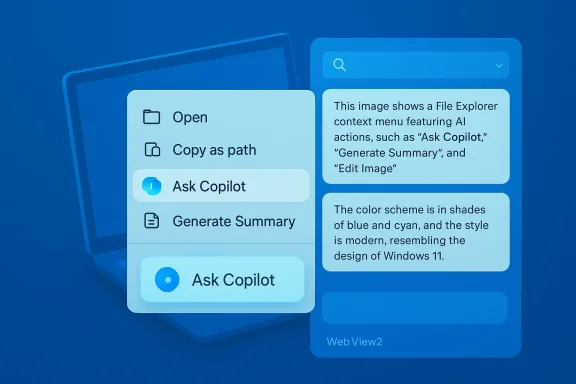
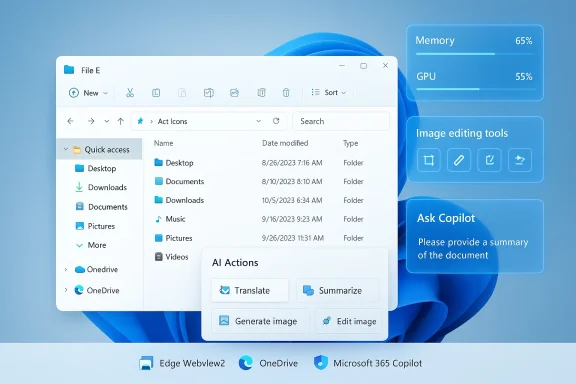
One of the headline changes is the addition of AI actions to File Explorer’s right‑click menu. These actions can:
- Generate summaries and previews of documents and folders.
- Offer editing tools for images (background removal, blurring) and content transformation.
- Surface an “Ask Copilot” option to query document contents in natural language.
Microsoft positions these as time‑savers — imagine right‑clicking a 20‑page report and getting a concise executive summary in seconds. Early hands‑on reviews and the company’s test notes confirm experiments with image‑editing shortcuts and semantic summaries in OneDrive and SharePoint contexts, gated initially by licensing for Microsoft 365 Copilot in commercial tenants.
Why Microsoft thinks this helps
The company’s public messaging and engineering direction emphasize three productivity gains:
- Reduced context switching — keep you inside Explorer while extracting insights.
- Faster information retrieval — natural language queries over local content, not just keyword search.
- Discoverability — users who never opened a separate Copilot app will now find generative tools in places they already use.
Those advantages are real for many use cases — legal teams scanning contracts, researchers digesting bundles of reports, or designers doing quick image edits — but the consumer experience is uneven and highly dependent on device capability and licensing.
Verified facts and deployment mechanics
Before we analyze, let’s verify the load‑bearing claims:
- Microsoft documented that Windows devices with Microsoft 365 desktop apps will automatically install the Microsoft 365 Copilot app (background install) beginning in Fall 2025 for eligible channels, with an EEA exclusion by default and an admin opt‑out path in the Microsoft 365 Apps admin center. That admin opt‑out and deployment guidance is explicitly documented in Microsoft’s deployment FAQ and deployment overview.
- The Windows Insider release notes confirm the Dev channel jump to the 26300 series and warn Insiders about the switch and enablement packaging used to surface platform changes. The specific Dev build announcement was published January 27, 2026.
- Independent coverage and IT community write‑ups documented the automatic install timeline, admin blocking steps, and the EEA carve‑out — all consistent with Microsoft’s published guidance ng.
These cross‑references establish the key distribution and rollout mechanics as verifiable facts: automatic instaln opt‑outs are provided for managed tenants, and preview channel builds are actively carrying feature experiments.
User reaction: why the backlash is persistent
Themes in the complaints
Community posts, forum threads, and multiple independent write‑ups have converged on a set of recurring grievances:
- Intrusiveness and UI clutter — Copilot elements are appearing in taskbar, Start, Explorer panes and app toolbars; some users report tmoval.
- Performance and memory concerns — users and technicians report Copilot and its supporting processes sometimes consuming hundreds of megabytes, with peaks into the gigabytes on some systems; the memory picture varies by Copilot build, workload, and system configuration.
- Lack of straightforward opt‑out for personal devices — while enterprise tenants can opt out centrally, individual users on unmanaged devices often have to resort to manual uninstall, Group Policy, or registry edits.
- Accuracy and “AI slop” — when generative outputs are incorrect or superficial, they add friction rather than help. Users have mocked the phenomenon and compared it to an unwanted return of Clippy.
These are notthey are persistent across platforms and manifest both in tech press coverage and community channels. The intensity of reaction is increased because File Explorer has historically been stable and predictable — when that surface becomes a proving ground for generative UI, reactions are amplified.
Memory and performance: the technical reality
Measured memory use and performance impact are the most tangible, testable claims. The available reports show divergence:
- Some early tests of newer Copilot builds suggested a smaller footprint when rebuilt with native WinUI/XAML elements.
- Other tests and wide‑scale user reports show substantial memory and process proliferation, in part because Copilot surfaces still depend on Edge’s WebView2 runtime and background Edge components that can multiply memory consumption across processes.
The reconciliation: “it depends” — on Copilot version, whether features are running locally or via cloud services, whether on‑device NPU/ML offload is available, and individual machine configurations. That variability means simple headline numbers are brittle; administrators should test on representative hardware before enabling Copilot features broadly.
The business and governance angle
Microsoft’s rationale
Microsoft is making a platform bet: integrating Copilot widely improves discovery, standardizes AI affordances across productivity apps, and upsells enterprise customers to Copilot licensing tiers with deeper features. The company has also responded to regulatory nuance — notably the EEA carve‑out for automatic installs — and provided admin controls for managed environments. Microsoft’s deployment documentation and admin opt‑out guidance are direct evidence of a considered enterprise rollout approach, even if that approach feels heavy‑handed on consumer devices.
Enterprise controls and reality on the ground
Administrators have several lever points:
- Tenant opt‑out in the Microsoft 365 Apps admin center to prevent future automatic installs.
- App deployment and removal using Intune, Group Policy, AppLocker, or PowerShell for remediation.
- Policies to limit Copilot’s access to sensitive repositories or to block uploads from managed machines.
Yet practical limitations remain: tenant opt‑outs prevent future installs but do not retroactively remove apps already pushed, and local users without centralized management still face manual remediation. That gap is a real operations problem for mixed environments and underscores why admins are urging staged pilots and clear rollback plans.
Strengths: where Copilot can add real value
- Fewer context switches — Summarization and draft generation inside Explorer can speed workflows for knowledge workers who routinely extract information from many files.
- *Enhanced search semanticsueries and cross‑file context (especially when paired with OneDrive/SharePoint agents) can reduce the time spent hunting for relevant content.
- Democratizes AI features — putting generative tools where casual users already operate reduces the discovery gap for people who don’t install or seek out new productivity apps.
- Platform synergy — Copilot’s integration across Windows and Microsoft 365 can enable workflows that cross local files, cloud stores, and productivity apps without manual context juggling.
These are not theoretical benefits. When the tech works, it genuinely reduces friction on repetitive, context‑heavy tasks.
Risks and tradeoffs: what users and IT teams must weigh
- Performance cost on constrained hardware. Copilot’s WebView2 dependencies and generative compute can increase memory and GPU usage; on older laptops this can be the difference between a responsive session and a sluggish one. Independent reports and community tests show sustained peaks that admins should plan for.
- Privacy and telemetry ambiguity. Generative analysis of files raises questions about upload boundaries and local versus cloud processing; Microsoft documents permissions and guidance, but privacy‑sensitive organizations should verify behavior in test deployments.
- Feature creep and UI clutter. Adding branded AI affordances across surfaces risks diluting the core experience of tools that users expect to be minimal and fast.
- Regulatory and compliance exposure. Automatic installs and generative processing in regulated industries could trigger compliance reviews; organizations in tightly regulated sectors should treat Copilot as a governance decision, not a default setting.
- Perception and trust. Even when Copilot is opt‑out capable via admin tools, the perception that Microsoft shipped a default‑on pathway on consumer devices has reputational consequences.
These tradeoffs mean the technology is not a one‑size‑fits‑all win; it demands careful rollout planning and a clear governance posture.
Practical guidance — what users and admins should do now
For home users and power users
- Treat Copilot features as optional experiments. If you value a lean File Explorer, disable or uninstall Microsoft 365 Copilot components on personal machines or use local policy edits to hide Copilot UI elements.
- If you suspect memory/CPU regressions after an update, use Task Manager to identify Copilot/Edge‑related processes and test disabling the feature set to verify impact.
For IT admins and security teams
- Inventory endpoints to identify devices with eligible Microsoft 365 desktop apps.
- Use the Microsoft 365 Apps admin center to prevent automatic installs for managed tenants if you are not ready. The specific control is under Customization → Device Configuration → Modern App Settings.
- Pilot on representative hardware. Validate memory and GPU impact across common workloads. Document removal and remediation scripts for devices where the app was pushed.
- Update governance policies: clarify telemetry boundaries, data residency expectations, and acceptable use for generative tools in collaboration and file management workflows.
- Communicate changes to users. Clear messaging reduces confusion and helps set expectations when new Copilot surfaces appear in Explorer or the taskbar.
These steps will minimize operational surprises and reduce the risk of user complaints turning into broader productivity or compliance incidents.
What Microsoft could do (and should consider)
- Default to opt‑in for consumer devices. Make Copilot features discoverable but not pre‑installed on unmanaged consumer systems, or at minimum make the uninstallation path less burdensome.
- Provide transparency dashboards. A clear privacy/processing dashboard that shows when a file was processed locally versus sent to a cloud model would reduce uncertainty.
- Performance profiles and a lightweight mode. Offer an explicit “low resource” Copilot mode that disables heavy previewing and image editing by default on devices without hardware acceleration.
- Faster and clearer rollback tools. Tenant‑level removal commands and guaranteed removal policies for devices where a tenant later opts out would reduce administrative friction.
These moves would preserve Microsoft’s ability to innovate while addressing the core pain points voiced by users and administrators.
The bigger picture: platform strategy vs. product experience
Microsoft’s Copilot strategy is consistent with a broader trend: large platform vendors see AI as a fundamental layer that should be embedded everywhere. That strategy makes sense from a product and monetization standpoint: integrated AI sells premium subscriptions, drives cloud usage, and keeps Microsoft central to end‑user workflows.
But the approach carries a user experience risk. Embedding generative features into a core system surface like File Explorer changes expectations about stability, privacy, and control. If the integration produces repeated misfires — hallucinated summaries, slowdowns, or invasive defaults — the result is not adoption but backlash and workarounds.
This friction has already become cultural shorthand in some corners of the web, where users coalesce around nicknames and memes to express broader trust erosion. The social response matters: repeated trust failures are expensive to repair and difficult to fully mitigate with later policy changes.
Final assessment and conclusion
Microsoft’s decision to push Copilot deeper into Windows 11 — including the File Explorer right‑click AI actions and the automatic installation mechanism for the Microsoft 365 Copilot app — is a deliberate strategic play with clear productivity upside for specific workflows and real operational costs for system administrators and privacy‑sensitive users. The rollout mechanics are documented and verifiable: tenant opt‑outs exist, preview builds carry the experiments, and Microsoft has publicly described the enablement and distribution pathways.
What remains unresolved is how Microsoft will balance the three competing problems it has created for itself: performance on constrained hardware, the perception of forced installs, and the need for clear privacy guarantees. The path to wider acceptance requires Microsoft to give users more explicit choice, better telemetry transparency, and lighter modes for devices that cannot absorb the overhead of constant generative processing. Community reporting and forum analysis show users are not anti‑AI — they are anti‑intrusion. Meeting that halfway is the pragmatic course.
In short: Microsoft can and should continue to innovate with Copilot, but it must also listen and act on the practical feedback from power users and IT administrators. Otherwise, the company risks turning what should be a productivity feature into persistent friction — a classic product design failure dressed up as platform progress.