
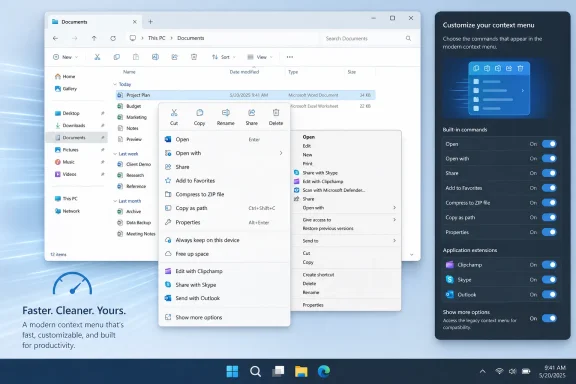
Windows Latest first reported the clarification after Microsoft’s August 17 Windows Insider post on a redesigned File Explorer context menu. Microsoft’s own announcement confirms that the new menu is rolling to Windows Insiders and will add a Settings page that controls built-in commands, layout preferences, and where application extensions appear. It does not announce a retirement date for the legacy menu, nor does it identify an Insider build number or a timetable for general availability.
 The legacy menu survives because Windows still depends on it
The Windows 11 context menu introduced in 2021 was meant to curb the accumulation of third-party commands that had made the old Explorer menu sprawling and unreliable. The basic problem was architectural as much as aesthetic: traditional shell extensions can load code into File Explorer while Windows is assembling a menu. One badly behaved extension can delay the whole interaction or destabilize Explorer.
Microsoft’s current developer guidance makes the company’s position unusually clear. Developers are told to use Show more options to inspect legacy context-menu extensions, while commands registered through the newer Windows 11 model appear in the main menu. Microsoft Support still says extensions unavailable in Windows 11’s streamlined menu remain available through Show more options.
That is a compatibility guarantee in practice, even if Microsoft has avoided phrasing it as a permanent platform promise. A large Windows estate can include document-management clients, version-control tools, archive utilities, PDF packages, security products, backup agents, line-of-business software, and internal tools whose Explorer commands were written around the old shell-extension interfaces. Removing the legacy route would not merely provoke complaints about familiar UI; it could make commands disappear from workflows that have been in production for years.
Windows Latest’s report goes further, saying Microsoft intends for Show more options to be disabled by default in the new configuration unless legacy extensions make it relevant, with a Settings control available for users who need it. Microsoft has not yet published the exact rules Explorer will use to decide when that entry is shown. That missing detail matters. An administrator needs to know whether the behavior is determined per PC, per user, per selected file type, or simply by a manual setting.
Microsoft’s new setting is not a return to the Windows 10 default
The most important correction to the early reaction is that Microsoft is not adding a supported switch that makes the classic Windows 10 menu the first menu shown on every right-click.
Xander Fiss, a Microsoft File Explorer product manager, told users discussing the announcement that the new Settings option controls whether Show more options appears in the Windows 11 menu; it does not make the legacy menu open by default. That lines up with Microsoft’s blog post, which describes controls for putting app extensions in the primary menu or a submenu, hiding the submenu, changing which built-in commands appear, displaying Cut, Copy, Paste, Rename, Delete, and Share as text rather than icons, and moving Properties to the bottom.
The distinction shuts down one common assumption. The updated experience is a configurable Windows 11 menu with selected Windows commands and approved modern extensions. It is not a supported restoration of the old all-in-one menu. Users who rely on the old menu for a specific action—such as a legacy archive command, a security scanning verb, or an in-house document-system action—will still need Show more options until that application changes its Explorer integration.
For users, the practical benefit is that commands such as Print, Send to, and Create shortcut can become visible in the modern menu without forcing every older extension onto the first level. For Microsoft, that is a way to answer legitimate muscle-memory complaints without reopening the uncontrolled loading model that the Windows 11 redesign was intended to replace.
The speed claim rests on reducing work before the menu appears
Microsoft has now openly acknowledged that Windows 11’s first-generation context menu became “cluttered and sluggish.” Its August 17 post says the redesigned menu opens faster partly because of internal engineering work and partly because a cleaner default requires fewer apps to do work as Explorer builds the menu.
That is a more credible explanation than treating right-click latency as a rendering issue. A context menu is assembled at the moment of interaction, and extensions often must determine whether their command applies to the selected file, folder, or background. In the older model, those checks can happen in Explorer’s menu-construction path. If an extension probes a network location, initializes a library, consults a service, or simply performs inefficient work, the user feels it as a slow right-click.
Microsoft’s new developer documentation is explicit on the responsibility it expects from application makers: implementations of methods that supply a command’s title, icon, and enabled state must remain fast, and expensive work should happen only after the user invokes the command. The company is therefore attempting to make the main menu both technically constrained and operationally predictable.
Windows Latest reported benchmark improvements in the pre-release menu, but Microsoft itself has not published measured latency figures, test hardware, or a comparison with Windows 10. Readers should treat “faster” as a credible design goal and an Insider-stage observation, not as a universal performance guarantee. A PC with a broken or slow legacy extension can still suffer when the user explicitly opens the classic compatibility menu.
Developers have a migration route, but it is not free
For developers, the new policy is a clear signal: commands that need to remain one click away in File Explorer should migrate to the Windows 11 context-menu framework.
Microsoft’s documented route uses the IExplorerCommand interface and a windows.fileExplorerContextMenus package registration. Packaged desktop apps can register this directly. Traditional unpackaged Win32 applications can use a sparse package, which gives the application package identity without moving its binaries wholesale into an MSIX package.
That is technically significant for commercial and enterprise software. The old IContextMenu approach offered broad flexibility and decades of examples; the newer model imposes packaging, registration, and behavioral requirements. Some extension designs will need more than a manifest update, especially if they depend on deep nested menus, dynamic command trees, or legacy installation practices.
Administrators should not interpret the new Settings page as proof that every installed application will suddenly appear in the main menu. The application vendor must implement the modern extension mechanism, and the app’s declared command must match the selected item type. Microsoft’s guidance specifically separates ordinary file associations from general-purpose context-menu commands: appearing under Open with is not the same thing as adding an Explorer command for arbitrary files, folders, or folder backgrounds.
For IT teams, the sensible preparation is straightforward:
- Inventory software that adds File Explorer context-menu entries, especially older document-management, backup, security, compression, and developer tools.
- Test the Insider redesign against representative file types and managed-device policies before treating the new Settings controls as user-ready.
- Ask vendors whether their Explorer command uses the Windows 11
IExplorerCommandmodel or remains dependent on the legacy menu. - Avoid removing Show more options from standard configurations until the applications that require it have been verified.
Microsoft has announced direction, not deployment details
Microsoft says the redesigned menu is rolling to Windows Insiders, and Fiss identified the Experimental ring in his public discussion with users. The company has not supplied a build number, a precise channel-by-channel rollout plan, or a date for Windows 11 general availability. Its broader July quality update said File Explorer improvements would begin reaching more Windows 11 PCs in the fall, but that is a seasonal target rather than a servicing commitment for this particular feature.
The missing build and rollout detail is not trivial. File Explorer is a high-dependency Windows component, and context-menu behavior is especially sensitive to third-party software. An enterprise cannot meaningfully validate a policy or help-desk workflow from a promotional image of a Settings page; it needs the build, the enablement state, and a defined way to test legacy extension behavior.
Microsoft’s real change is therefore more disciplined than a revival of the Windows 10 menu. The primary right-click surface is becoming customizable, faster, and more selective. The old menu remains in place for compatibility, but the route to a first-class Explorer command now runs through Microsoft’s newer extension framework.
