
Neowin highlighted the newly accessible toggle this week, but Microsoft’s own update history shows this was not a simple one-time release. The company first disclosed the change in the January 29, 2026 preview update, KB5074105, then removed the feature from that update’s documentation in February. It returned in the March 26 preview release, KB5079391, where Microsoft said the ability to turn Smart App Control on or off without a clean installation was beginning its rollout.
For users who have the feature, the setting lives at Settings > Windows Security > App & browser control > Smart App Control settings. The important practical shift is that turning SAC off to install a blocked tool is no longer necessarily a permanent decision that ends with a reset or reinstall if the user wants protection back.
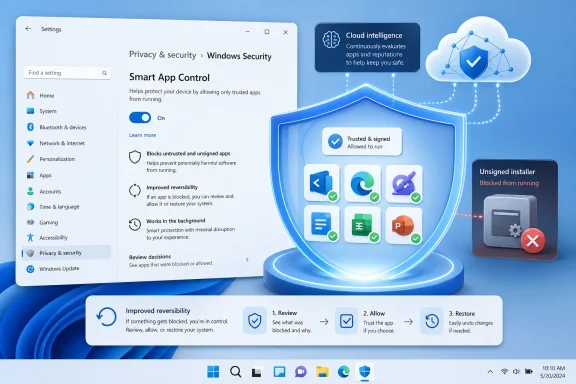 The actual rollout is narrower than “Windows 11 22H2 or later”
The original Smart App Control feature arrived with Windows 11 version 22H2, which is likely why descriptions of the new toggle commonly frame it as available to all Windows 11 systems from that release onward. Microsoft’s documented rollout record tells a more specific story.
KB5079391 applied to Windows 11 versions 24H2 and 25H2, carrying builds 26100.8116 and 26200.8116 respectively. Microsoft’s November 2025 Insider announcement also placed the work in Dev and Beta builds leading toward those newer Windows branches. That does not establish that a still-supported 22H2 or 23H2 installation has received the new behavior merely because SAC itself once existed there.
The distinction matters for IT staff supporting machines on different servicing tracks. A Windows Security page with SAC present but no usable On control may be a version or rollout issue, rather than a local configuration fault. Microsoft describes this as a gradual rollout, so fully patched 24H2 and 25H2 PCs may still not all expose it at precisely the same time.
Microsoft’s current Smart App Control FAQ has been updated to say that recent Windows updates permit enablement without a clean installation. Yet an older Microsoft Learn overview still says SAC can only be enabled after a clean install. That page is now stale on the central question readers care about. Administrators and support desks should rely on the current Windows Security interface and the newer support documentation, rather than treating the older clean-install statement as present-day policy.
Why the clean-install rule was such a serious barrier
Smart App Control is an application control feature. When an executable is launched, Windows consults Microsoft’s cloud-backed intelligence to decide whether it is likely safe. If that service cannot make a confident safety determination, the code may still be permitted when it carries a valid signature from a certificate authority in Microsoft’s Trusted Root Program. Unknown, unsigned, or invalidly signed code is normally blocked.
That approach is deliberately stricter than waiting to identify a known malicious file. Microsoft’s enterprise documentation describes the broader App Control model as changing the default from allowing code unless antivirus recognizes it as bad, to allowing it only when policy or reputation supports trust. Smart App Control is the consumer-oriented version of that model, built on technology that Microsoft also exposes through App Control for Business.
The cost of the old design was usability. SAC began in an evaluation mode, watching whether the machine’s software habits were likely to create repeated blocks. If it judged a device unsuitable, or if the owner deliberately turned SAC off, Windows previously treated that as a largely irreversible state. Re-enabling it meant resetting or reinstalling Windows so the system could begin from a known baseline.
That was a disproportionate penalty for a feature likely to encounter friction. Users who need a one-off unsigned installer, a niche hardware utility, a custom-built tool, a game modding utility, or an installer containing an unsigned transform file could be forced to choose between completing a legitimate task and retaining SAC. The absence of an individual “allow anyway” path made the decision especially blunt.
The new toggle changes that. It does not make every block less disruptive, but it turns a previous all-or-nothing choice into a setting that can be revisited after the specific compatibility issue is resolved.
The exceptions that still force a reset
Microsoft has removed the blanket clean-install requirement, but it has not made Smart App Control universally available or guaranteed that any PC can activate it immediately. Its current FAQ retains a meaningful set of exceptions.
Optional diagnostic data is the most important one for privacy-conscious users. Microsoft says that if optional diagnostic data is disabled, users who want SAC enabled must still reset the PC or reinstall Windows and select the optional-data setting during setup. In other words, the new switch does not override the telemetry prerequisite in that condition.
SAC also remains disabled when Windows detects that it is the wrong tool for the device’s role. Microsoft lists enterprise management and Developer Mode among the reasons the feature can be unavailable. Windows in S mode is another special case: users must leave S mode and then reset the PC to enter SAC’s evaluation process.
Those are not arbitrary footnotes. SAC has no per-application allow list for home users, so it is poorly suited to environments that routinely run internally compiled, unsigned, privately distributed, or rapidly changing software. Microsoft explicitly directs organizations toward App Control for Business, which can use the same underlying trust model while adding policies for line-of-business applications and managed installers.
For a corporate endpoint, the correct response is therefore not to find a way to force on the consumer toggle. A managed device needs managed application control with audit data, defined trust rules, an approved software inventory, and a deployment plan. SAC’s new reversibility is useful for a home PC or lightly managed machine; it does not substitute for enterprise policy.
The “performance boost” claim needs a reality check
Microsoft markets Smart App Control as having a lighter performance impact than a traditional antivirus product because it can stop questionable programs before they execute. Its consumer guidance still describes that lower overhead as an advantage. The basic reasoning is plausible: preventing unknown code from launching is different from continuously detecting and responding after programs are active.
But users should not read that as a promise of more frames per second, faster compilation, or a transformed low-end PC. Microsoft publishes no universal benchmark in the rollout notes showing a specific performance gain from enabling SAC on an existing installation. The performance benefit is conditional and workload-dependent, and may be imperceptible on many machines.
More importantly, SAC is designed to work alongside antivirus. Microsoft’s FAQ says it complements Microsoft Defender or third-party antivirus tools; it does not replace them. Enabling it will not remove Defender’s real-time protection, eliminate scans, or automatically reduce the system resources used by the rest of a security stack.
The more accurate way to describe SAC is as a proactive execution gate. Its benefit is reducing the chance that unknown or unwanted code gets a chance to run at all. For a user who frequently downloads free utilities, installer bundles, or files from unverified sources, that can be useful protection. For a user who regularly works with unsigned tools and development builds, the resulting blocks may outweigh the benefit.
What home users should do before turning it on
The first step is to check whether the PC is on Windows 11 24H2 or 25H2 and fully updated, then open the Smart App Control settings page rather than assuming the control will be available. If the On option is missing or greyed out, verify whether the device is enrolled in workplace management, has Developer Mode enabled, uses S mode, or has optional diagnostic data disabled.
Users should also inventory the software they depend on before flipping the switch. SAC can block legitimate software when Microsoft’s cloud service lacks a confident reputation verdict and the file is unsigned or has an invalid signature. Microsoft says there is still no supported per-app bypass. The practical remedies are to use a signed version from the publisher, ask the developer to sign its code, or turn SAC off temporarily.
That last option is now less punishing on eligible, updated consumer systems. The change fixes a design flaw that made experimenting with Windows 11’s application-control protection needlessly permanent. It does not change the underlying trade-off: Smart App Control favors a curated, signed, reputable software environment over maximum flexibility, and Microsoft’s own requirements still reserve reset-and-reinstall territory for several important cases.