

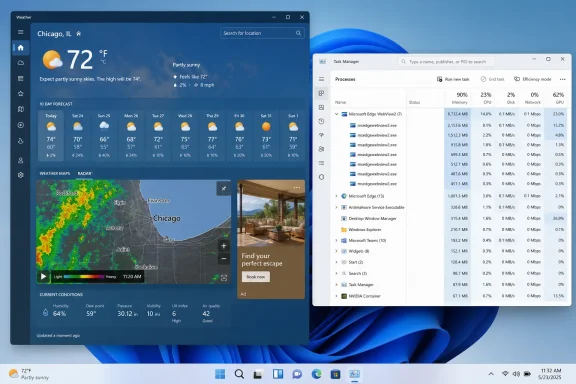
The more defensible finding is still embarrassing for Microsoft: the Windows Weather experience is delivered through Microsoft Edge WebView2, which gives a simple forecast utility the operating overhead of a browser-based application. Microsoft’s own WebView2 documentation says each control uses Edge’s multi-process architecture, including a browser process, one or more renderer processes, and helper processes such as GPU, network, and audio services. Nine Chromium-derived processes in Task Manager are therefore not, by themselves, evidence of a runaway app. They are evidence that Weather is using a browser engine to render weather pages.
That design also explains why users can encounter advertising in an app that looks and launches like a Windows inbox utility.
The 1.2GB reading needs a reproducible test
XDA attributes the memory figures to Windows Latest, which says it opened the Weather app during a rainstorm, saw 1.2GB in Task Manager, and found nine Chromium processes associated with the application. It then compared that total with 246.7MB reported for Apple Weather on a Mac. Neither outlet provides the Windows 11 release, Weather app version, Edge WebView2 Runtime version, PC specifications, macOS version, test duration, screen size, selected location, or a process-by-process memory breakdown.
Those omissions matter. A weather page can vary substantially by location and session: animated radar, forecast maps, news modules, advertising calls, cached imagery, a logged-in profile, and embedded third-party content can all change the amount of work a web renderer is doing. A cold launch, immediately after opening the app, is also a different measurement from an idle app after its content settles. The difference is especially significant with WebView2 because its browser, GPU, renderer, utility, and networking processes are separated by design.
The report also calls the measurement “RAM” without identifying whether it is private working set, committed memory, total process working sets, or the aggregate that Task Manager displayed for the app group. Those are useful diagnostics, but they are not interchangeable, particularly when shared browser-engine components and graphics allocations are involved. A single snapshot can identify a real problem worth investigating; it cannot establish a stable average or prove a platform-wide fivefold gap.
No independent report located for this story reproduces the specific 1.2GB-versus-246.7MB result. The exact figures should therefore be read as a single observed result reported by Windows Latest, rather than a benchmark of Windows 11 Weather against macOS Weather.
The gap remains large enough to warrant Microsoft’s attention even under that limitation. A weather forecast should not require users to ask whether an app group has quietly become one of the larger consumers in Task Manager.
Nine WebView2 processes are expected; 1.2GB is not automatically expected
Microsoft documents WebView2 as a way for a native Windows host application to embed HTML, CSS, JavaScript, and the Edge browser runtime. Its process model follows Chromium’s security and stability architecture: there is a browser process, renderer processes that can be split by site isolation, and separate helper processes. Microsoft explicitly warns developers that WebView2 adds memory and startup overhead, and recommends sharing environments and avoiding redundant controls where possible.
That means the process count XDA and Windows Latest observed has a straightforward explanation. If Weather loads first-party MSN content alongside advertising, analytics, maps, and other separately hosted resources, multiple renderer or utility processes can be normal. The process model is designed to isolate web content rather than pack it into one monolithic executable.
But “normal for WebView2” does not mean “appropriate for Weather.” Microsoft’s own performance guidance says not to use WebView2 for lightweight initial interfaces because of startup cost and resource contention. A full weather dashboard with radar imagery has more demands than a clock or calculator, but the first-screen job remains simple: show the current conditions and forecast promptly, without consuming memory on the scale associated with a full browser session.
There is also a distinction missing from the calls to “port Weather to WinUI 3.” WinUI 3 is a native Windows UI framework, but an app can use WinUI 3 for its shell while continuing to render its main content in WebView2. That would improve the chrome around the page, not necessarily its memory footprint or advertising model. A meaningful change would require Microsoft to replace the browser-rendered MSN weather surface — or substantially reduce what it loads — rather than simply place the same web content in a different window framework.
The ads are the longer-running problem
The advertising component is not new. Windows Latest reported in June 2024 that MSN Weather had begun showing multiple pinned advertisements in Windows 11 through a server-side change. Notebookcheck independently reported at the time that the ads appeared across Weather pages and were not removable through a conventional app rollback, describing the app as an Edge WebView container that loaded MSN weather content.
Microsoft’s own support material still presents MSN Weather as a service tied to the MSN website and apps across Windows, iOS, Android, and browsers. That cross-device service model is convenient for account synchronization and rapid content updates, but it also gives Microsoft the ability to change content and monetization outside the normal cadence of a Store app update.
For IT administrators, that distinction is practical. A native packaged app is generally evaluated as a versioned artifact: test the release, deploy or block it, and know what code is running. A WebView-delivered experience can change its visible content, advertising inventory, layout, and remote resources while the installed package remains untouched. The application’s behavior is partly determined by the web service it loads that day.
The report’s most consequential point is therefore not that an ad appeared next to a forecast. It is that the same architecture links three user complaints that otherwise look separate: browser-like process trees, potentially high memory use, and ads embedded in what users perceive as a local Windows app.
Microsoft has not explained the current resource use
Microsoft has published general WebView2 performance guidance, including instructions to reuse controls, share a WebView2 environment where appropriate, keep the runtime current, and profile real-world scenarios. It has not publicly addressed the 1.2GB Weather observation cited by XDA, nor has it published a memory target for MSN Weather or a technical explanation for the app’s current process footprint.
That leaves several important questions unanswered:
- Microsoft has not said whether Weather intentionally uses separate WebView2 environments or renderer processes for advertisements, maps, forecast content, and related MSN modules.
- Microsoft has not said whether the reported 1.2GB figure reflects a transient allocation, a cache-growth issue, a particular ad payload, or a reproducible steady-state condition.
- Microsoft has not said whether users can disable advertising in Weather without reducing the app window, changing content filters at the network layer, or avoiding the app altogether.
- Microsoft has not announced a plan to replace the Weather app’s browser-rendered experience with native forecast views.
The absence of a public response is important because the report arrives after Microsoft has increasingly emphasized performance, responsiveness, and quality in Windows 11. Small inbox utilities are where that promise is most visible. Users will forgive a memory-heavy browser tab displaying animated maps and live video; they are much less likely to accept the same footprint from a forecast shortcut.
What Windows 11 users should take from the report
The immediate action is not to assume a memory leak from the number of msedgewebview2.exe processes alone. That is how WebView2 works. Instead, check the combined memory use for the Weather app group after it has been open for several minutes, then close it and see whether the associated processes exit and memory is released. Persistent growth across repeated openings or unusually high idle use is the more useful symptom to document through Feedback Hub.
For managed Windows environments, the app is not likely to be a first-order capacity problem on well-provisioned desktops. It becomes more relevant on 4GB or 8GB systems, shared virtual desktops, and low-cost laptops where background browser-engine processes compete with business applications. An app that is trivial in isolation can still worsen the day-to-day experience when it is one of many WebView2-based Windows surfaces running at once.
Microsoft does not need to eliminate WebView2 from Windows to fix this. It needs to treat Weather as the lightweight utility users think it is: keep the forecast surface lean, limit the remote content loaded at startup, account clearly for the memory budget, and stop tying a basic weather check to a monetized web page. Until it does, the 1.2GB report may be only one unreplicated measurement — but it is a credible warning sign about the design choice behind it.
Update: Separate testing reportedly shows Weather can reach 1.6GB during basic use (August 9, 2026)
Notebookcheck reports that Wccftech observed similarly elevated memory use in Windows 11’s Weather app, adding a second reported set of measurements beyond the original 1.2GB snapshot. According to Notebookcheck’s account, usage began around 1GB, settled near 500MB to 600MB when idle, and rose to roughly 1.5GB to 1.6GB during ordinary actions such as zooming or navigating the interface.
If those observations are reproducible, they weaken the possibility that the original 1.2GB reading was solely a one-off transient state. They still do not establish a controlled benchmark: the reporting does not provide a full process-level breakdown, Windows and WebView2 versions, system specifications, or a standardized test method.
The reported idle reduction is also significant. It suggests that loaded maps, animated content, or other active page elements may drive much of the peak footprint, rather than Weather holding a fixed 1GB-plus baseline at all times. For systems with 8GB of RAM, however, even a 500MB-to-600MB idle footprint remains disproportionate for a forecast utility, while 1.5GB peaks could materially increase memory pressure alongside normal workloads.
Update: Independent test reports roughly 900MB Weather memory use on 8GB laptop (August 10, 2026)
OMG! Ubuntu reports a separate check of Windows 11 Weather on a low-power Chuwi laptop with 8GB of RAM found the app using more than 900MB across nine subprocesses. The outlet says its figure was averaged across three active-use runs and that Weather’s consumption fluctuated depending on loaded content and focus state.
That result is below the previously reported 1.2GB-to-1.6GB peaks, but it provides another independently observed reading in the same general range. OMG! Ubuntu also cautions that its cross-platform comparison was not a controlled benchmark, since Windows, Linux, and macOS account for memory differently and the weather apps offer different features.
For lower-memory Windows 11 PCs, the practical concern remains memory pressure rather than the precise comparison with Linux alternatives: a forecast app approaching 1GB can compete noticeably with browsers and productivity software on an 8GB device.
Update: TechRadar reports 800MB-to-1GB Weather use in its own check (August 10, 2026)
TechRadar reports a further independent observation of Windows 11 Weather’s resource use: in its testing, the app reportedly peaked at about 1GB of memory and commonly sat near 800MB. That is lower than the earlier 1.2GB-to-1.6GB reports, but remains substantial for a default forecast utility.
The outlet also confirms that advertising appeared alongside forecast content, describing commercial promotions rather than only Microsoft cross-promotions. Its report attributes the browser-like footprint to Weather’s Chromium-based web-app architecture and observed multiple related processes.
This additional result strengthens the pattern that Weather’s memory use can remain unusually high even below the largest reported peaks. As with the prior tests, TechRadar does not publish a full standardized methodology, process-level memory accounting, or complete device and software-version details, so the figures should not yet be treated as a formal benchmark.