
Microsoft began rolling Xbox mode out to Windows 11 desktops, laptops, tablets, and handhelds in select markets on April 30, 2026, after initially concentrating its Full Screen Experience work on gaming handhelds. XDA tested the feature on a conventional PC after enabling it with ViveTool, then spent two weeks comparing it with a Playnite-first startup setup. The report’s practical finding is sound: a unified launcher is more useful than a controller-friendly shell when the game collection is scattered across PC storefronts.
But the test also exposes where Microsoft’s pitch and the day-to-day reality of a Windows gaming PC diverge. Xbox mode can suppress much of the desktop friction, yet it does not turn Windows into an Xbox console OS, nor does it remove the launcher, login, driver, update, and compatibility layers underneath.
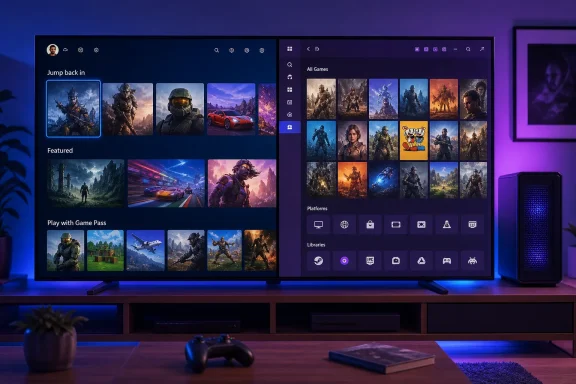 Xbox Mode Is an Interface Layer, Not a New Operating System
Microsoft describes Xbox mode as a controller-optimized experience that launches a chosen gaming home app, puts games into full screen, and offers a way to enter that experience automatically after a user signs in. That last condition is significant. Xbox mode is designed to start after Windows authentication; it is not an appliance-style boot sequence that safely replaces the Windows sign-in process.
XDA’s author found that the Xbox interface was convincing when used from a TV with a controller. The desktop remained out of sight, the Xbox app became the visual center of the system, and the PC went from power-on to a game-oriented screen without the normal ritual of minimizing windows and opening individual launchers.
For a PC limited to Game Pass, Steam, and a relatively clean set of installed games, that may be enough. Microsoft says Xbox mode includes an aggregated game library covering Game Pass and installed games from major PC stores, but the word aggregated should not be mistaken for universal compatibility. PC storefronts use different authentication systems, launch behavior, overlays, entitlement checks, anti-cheat components, and custom URI handlers. A front end can list a game without being able to make every launch path behave consistently from a couch.
That is where XDA’s account becomes more useful than Microsoft’s product description. The author reported trouble with games outside Game Pass, Steam, and Epic, including a GOG title added to Steam as a non-Steam game that did not import as expected. This is an experience report, not a general compatibility matrix, but it illustrates the practical limit of Microsoft’s approach: Xbox mode can present Windows more cleanly without resolving the fragmentation of Windows PC gaming.
Playnite Solves the Library Problem Microsoft Has Not
Playnite’s central proposition is simpler than Microsoft’s: import libraries from multiple services and present them in one database. Its open-source project supports integrations for Steam, Epic, GOG, EA App, Battle.net, and other third-party libraries, along with emulation support. It also lets users add manually installed games, then apply metadata and artwork so those entries do not sit beside commercial-launcher titles as anonymous executable files.
That is the reason XDA found Playnite more satisfying as a console-like home screen. A GOG game, an emulated title, an Epic installation, and a standalone PC game can all occupy the same visual library. The value is not cosmetic, although consistent cover art makes a TV interface dramatically easier to browse. It is that Playnite does not require a user to adopt one storefront’s view of the PC.
Microsoft’s Xbox mode and Playnite therefore address different parts of the problem:
- Xbox mode changes how Windows enters and presents a gaming session.
- Playnite changes how games from incompatible PC ecosystems are cataloged, displayed, and launched.
- Neither product eliminates the individual launchers’ account checks, update agents, overlays, or game-specific requirements.
The last point is why a Playnite setup can feel more complete even though it is less integrated with Windows. Playnite is deliberately a layer above the launchers, whereas Xbox mode is tied to Microsoft’s gaming-home model and Xbox app behavior. The former is more flexible; the latter is more polished when the supported path works.
There is a further wrinkle that XDA’s experiment only partly captures. Microsoft’s own Windows Gaming documentation says Xbox mode can be configured around supported gaming home apps. A separate community-developed tool, Playnite FSE Launcher, exists specifically because Playnite has not always been a default Xbox Full Screen Experience dashboard choice. It bypasses restrictions to replace the default Xbox dashboard with Playnite. That distinction matters for anyone attempting to reproduce the experiment: starting Playnite with Windows is straightforward, but making it the native Xbox-mode home app can require unsupported third-party tooling.
The DualSense Claim Needs a Qualification
XDA says the author needed DS4Windows because Playnite “expects XInput” while a DualSense exposes DirectInput. DS4Windows is a sensible tool in many Windows gaming configurations, particularly when a game or launcher only recognizes an Xbox-compatible virtual controller. It can translate a PlayStation controller into an XInput device and make controller handling more predictable across older games.
However, Playnite’s own documentation says its Fullscreen Mode uses the SDL input library, which supports a broad range of both XInput and DirectInput controllers. In other words, DS4Windows is not a blanket Playnite requirement for every DualSense owner. If a DualSense fails to navigate Playnite Fullscreen Mode, users should first check that controller support is enabled in Playnite’s Fullscreen input settings and that the controller has not been disabled there.
That does not mean the XDA setup was wrong. Bluetooth pairing state, controller firmware, Steam Input, another remapping utility, a particular Windows device profile, or a game-specific controller requirement can all produce a situation where DS4Windows is the pragmatic fix. It does mean readers should avoid treating an extra controller-emulation layer as mandatory before testing native support. Every input translation layer adds another startup dependency to a supposedly simple console replacement.
Removing Windows Hello Is the Wrong Convenience Trade-Off
The most consequential recommendation in the XDA walkthrough is also the one readers should not copy casually: removing Windows Hello so Playnite can appear automatically. The author is right that stopping at a Windows sign-in screen interrupts the illusion of a dedicated console. But the solution trades away one of the PC’s most important protections.
Windows Hello exists to protect the user account, browser sessions, saved passwords, cloud storage access, game-store wallets, and any administrator rights available from that account. A PC attached to a television can still be a general-purpose computer, especially if it remains signed in to Discord, webmail, payment services, or remote-access tools. Disabling Windows Hello to enable unattended access changes the security model, not merely the startup animation.
Microsoft’s supported Xbox-mode design is more conservative: select the gaming home app and optionally enter Xbox mode on startup after sign-in. That preserves account authentication even if it makes the setup less console-like. For a shared family-room PC, the safer compromise is to keep Windows Hello enabled and use a wireless keyboard, a supported fingerprint reader, or another secure sign-in method when the machine restarts. If someone chooses automatic sign-in anyway, that should be understood as a deliberate reduction in local security, not a required Playnite setting.
Multi-Monitor Use Is an Early Test for Xbox Mode
XDA also reported that Xbox mode blanked the secondary monitor while Playnite allowed that display to remain useful for Discord, WhatsApp, and a browser. Microsoft’s design goal is immersion and reduced desktop clutter, so a single-display focus is not surprising. On a handheld or a TV-only system, that can be a feature.
On a desktop gaming PC, it can be a regression. Multi-monitor users routinely keep voice chat, monitoring tools, game guides, streaming controls, music applications, or a browser on a second screen. A full-screen gaming interface that treats every additional display as unwanted background clutter is optimized for the handheld model Microsoft started with, rather than for the conventional Windows desktop that Xbox mode now targets.
Playnite wins this comparison because it makes fewer promises. It is a full-screen application, not a Windows environment attempting to manage the entire gaming session. That leaves the normal desktop multi-monitor model intact, for better and for worse.
Xbox mode remains a meaningful Windows 11 improvement for controller-first gaming, especially for PCs built around Game Pass and a television. But XDA’s test shows why it should be judged as Microsoft’s gaming shell, not as a replacement for a mature cross-store library manager. Playnite can make a heterogeneous PC collection feel like one console library; Xbox mode currently cannot guarantee that same result without keeping users inside the paths Microsoft supports most cleanly.
