 Background / Overview
For decades Microsoft’s strategic advantage with Windows has been simple and repeatable: turn the operating system into a predictable, widely adopted platform and let third‑party developers build on top of it. That playbook — famously described in the early 1990s as a move that was “like bringing a Porsche into a world of Model Ts” — is now being reused to shepherd a new class of software: AI agents that plan, act, and persist state across sessions. The concrete elements Microsoft has introduced in preview include:
- Agent Launchers — a developer registration and discovery framework that lets apps declare interactive agents to the OS so agents become discoverable system‑wide (Ask Copilot, Start, Search, taskbar).
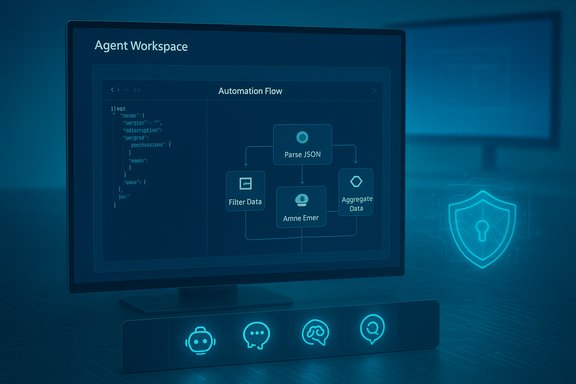
- Agent Workspace — a contained, sandboxed desktop instance where agents can run UI automation and multi‑step workflows under a separate, low‑privilege agent account. This is designed to isolate agent activity from the primary user session while still letting an agent manipulate apps and files when authorized.
- Copilot Actions — the first user‑facing automation experience that translates a natural‑language outcome into a plan of UI actions and tool calls, executed inside the agent workspace. Microsoft has begun rolling Copilot Actions to Windows Insiders as an experimental feature.
- On‑Device Registry (ODR) & Manifests — agents register via a small JSON manifest and the odr.exe tool; Windows surfaces registered agents to the OS UI. This makes agent discovery declarative and consistent for developers.
These pieces together represent a strategic bet: embedding agents in the OS — visible on the taskbar, discoverable via the Ask Copilot composer, and governed by Windows’ access controls — will deliver a different user experience than agents that merely run as isolated services or web apps. If Microsoft succeeds, tasks like preparing a meeting briefing, consolidating research, or restructuring a folder of PDFs could become simple, delegated workflows started from the taskbar and monitored without heavy context switching.
How Agent Launchers and Agent Workspaces actually work
Agent Launchers: manifest, App Actions, and the On‑Device Registry
Agent Launchers are intentionally straightforward for developers. The platform requires:
- An App Action that accepts at minimum two entities —
agentNameandprompt— so the OS can invoke the agent and pass user input. - An agent definition JSON included in the app package manifest (static registration) or registered dynamically at runtime with
odr.exe add-app-agent. - Exposure to system surfaces via the On‑Device Registry so agents appear in Ask Copilot, Start, and Search when the user queries or the OS chooses to surface them.
This approach mirrors long‑familiar OS patterns: declare capabilities, publish them in a registry, and let the shell expose them consistently. The critical behavioral contract Microsoft enforces is that an Agent Launcher must open an interactive surface — agents are meant to be visible and controllable, not silent background daemons.
Agent Workspace: containment, identity, and lifecycle
The Agent Workspace is a contained desktop session that runs in parallel with the user’s main session. Important attributes documented in preview:
- Separate agent accounts — each agent runs under a distinct, non‑administrator Windows account so actions are auditable and policy‑enforceable.
- Scoped file access — by default, agents request access only to common user “known folders” such as Documents, Downloads, Desktop, Pictures, Music, and Videos. Broader access requires explicit authorization.
- Runtime visibility — Copilot Actions and other agents show progress, step lists, and make it possible for users to pause, stop, or take over mid‑run. Agents also surface as taskbar icons with hover cards showing status and required user interactions.
Microsoft positions Agent Workspace as a middle ground: lighter and faster than a full virtual machine but stronger than in‑process automation. That tradeoff is intentional — to let agents act with speed while keeping control surfaces and audit trails intact.
Why Microsoft thinks embedding agents in Windows matters
The company’s play is pragmatic: put agents where users already look (the taskbar and the search/composer slot) and make it trivial for developers to register intelligent assistants that interoperate across apps. This has three practical benefits:
- Discoverability — a single catalog of agents makes it easier for users to find a specialist assistant (e.g., Researcher, Analyst) without navigating siloed in‑app assistants.
- Interoperability — the Model Context Protocol (MCP) and the agent registration model give agents a standard way to discover and call tools and connectors, reducing brittle screen scraping and making integrations more auditable.
- Governance at scale — treating agents as principals (with accounts, ACLs, and logs) makes them manageable with familiar enterprise tooling like MDM/Intune and Entra. That’s a necessary precondition for widespread enterprise adoption.
Microsoft is explicit about the larger aim: to move AI from tool to partner in the enterprise. In its “7 trends for 2026” framing, Microsoft leadership — including Aparna Chennapragada, chief product officer for AI experiences — frames the coming phase of AI as one of amplification and collaboration, not replacement. That message provides the product rationale for investing Windows with agentic primitives.
The security calculus: containment is necessary but not sufficient
Microsoft’s documentation and support materials are unusually candid about new attack surfaces. The company warns that agents introduce a class of threats — notably cross‑prompt injection (XPIA) — where adversarial content embedded in documents, rendered HTML, or images (via OCR) could change an agent’s plan and cause real actions such as data exfiltration or downloading and running malicious binaries. Key mitigations Microsoft has built into the preview:
- Opt‑in and admin gating — experimental agentic features are off by default and can only be enabled by an administrator; enabling provisions agent accounts and workspaces for the device.
- Identity separation — agent actions occur under a separate agent account to keep audit trails distinct from human users.
- Scoped access and per‑task consent — agents start limited to known folders and must request additional access; sensitive operations require explicit confirmation.
- Operational checks: signed agents, revocation, and telemetry — Microsoft expects agent binaries and connectors to be signed so administrators can revoke or block misbehaving agents.
Those are meaningful defenses, but they don’t eliminate the novel problem that formerly harmless inputs (a PDF, a web page, or an email preview) can now be instructions that lead to persistent or multi‑step actions. Security experts warn that:
- Prompt and cross‑prompt injection can turn seemingly benign content into exploit vectors.
- UI automation is brittle; layout or localization differences can cause an agent’s clicks to land on the wrong control.
- A compromised connector or signed agent is a high‑value target because it can be used to mobilize automation across many endpoints.
In short: containment and least‑privilege reduce risk; they do not erase a fundamentally new attack surface.
Privacy and data handling: what Microsoft says — and what remains conditional
A central concern is whether agent activity — especially when agents access local files — becomes fodder for model training. Microsoft’s public stance, and the product controls it documents, make an important distinction:
- For enterprise and tenant scenarios, Microsoft documents that prompts, responses, and data accessed through Microsoft Graph or Microsoft 365 Copilot are not used to train foundation models without explicit tenant consent. That non‑training default for organizational customers is a contractual and architectural commitment.
- For consumer scenarios, and for some optional connected experiences, data usage rules differ: Microsoft has stated that consumer data may be used for model improvement unless users opt out or settings restrict training. That nuance has been the source of much concern and public scrutiny.
Microsoft’s public materials assert that Copilot features running on Copilot+ PCs or in enterprise tenant contexts do not train the core models with customer data by default; however, granular behaviors can vary by feature and by whether a user has chosen to share data for product improvement. For cautious security and privacy posture, organizations should treat agentic features as a data‑governance surface that needs explicit policy definitions and audits. Caveat and verification note: Microsoft’s non‑training claims are well documented for enterprise offerings and contractual products, but several public incidents (for example, scrutiny around Gaming Copilot and other consumer features) show that feature‑level behaviors and telemetry can be surprising; organizations should verify behavior in their own tenant and test environments before broad deployment.
The hardware angle: Copilot+ PCs and on‑device inference
Microsoft ties richer, lower‑latency agent experiences to a hardware tier called Copilot+ PCs — laptops with NPUs that can run 40+ TOPS of inference locally. The practical impact:
- On‑device inference reduces latency and keeps sensitive inputs on the device for certain tasks. Microsoft’s Copilot+ specification lists NPUs capable of more than 40 trillion operations per second as a defining trait.
- A class of advanced experiences (e.g., continuous low‑latency translation, richer vision models, faster local summarization) may be gated or perform significantly better on Copilot+ hardware.
This creates a practical — and political — two‑tier landscape: premium machines will be able to offer stronger on‑device privacy and responsiveness, while ordinary devices will still rely on cloud inference for many agent tasks. The hardware requirement is verifiable: Microsoft’s documentation and partner guidance mention the 40+ TOPS NPU threshold and list OEMs and silicon partners working toward that performance envelope.
Developer implications and the third‑party ecosystem
Agent Launchers standardize how agents are declared and invoked, lowering integration friction for developers. The practical steps for a developer are:
- Implement an App Action that accepts
agentNameandprompt(and optionallyattachedFile). - Add a com.microsoft.windows.ai.appAgent extension to the package manifest or register dynamically with
odr.exe. - Test invocation via
odr list-app-agentsand the App Action testing tools.
The upside for developers is clear: greater discoverability across Windows surfaces with a single integration. But the downsides are operational and legal: once your agent is discoverable system‑wide, it inherits OS‑level expectations for identity, signing, telemetry, and enterprise governance. Developers who build agents must design for attack surface minimization (e.g., sanitize inputs, avoid automatic escalation, require explicit confirmations for destructive actions) and for auditability (comprehensive logs, signed binaries, clear revocation paths).
What could go wrong — practical worst‑case scenarios
- A maliciously crafted PDF or email preview uses cross‑prompt injection to make an agent fetch, unpack, and run a signed binary — leading to large‑scale compromise if many endpoints trust that agent.
- A legitimate third‑party agent with extensive connector privileges is compromised upstream; because the agent can act across user files and services, the compromise enables lateral movement and data exfiltration.
- Users or admins enable the experimental toggle on shared devices without tailored policies; agent accounts created on the device then become a governance headache across multi‑user endpoints.
These scenarios are not theoretical: Microsoft itself warns about them and frames XPIA as a new category of risk that the platform must address. The question for enterprise security teams is not whether to accept this new risk but how to operationalize detection, policy, and incident response for agentic endpoints.
Practical guidance for IT and power users right now
- Treat the experimental agentic toggle as a privileged, device‑wide setting — do not enable it broadly until you have a tested policy and telemetry pipeline. Follow the documented activation path: Settings → System → AI components → Experimental agentic features.
- Pilot in controlled rings: test a small fleet with real workflows (document assembly, scheduled research tasks) and verify audit logs, ACL behavior, and connector flows.
- Require signed agents, maintain an allowlist, and configure revocation procedures; instrument endpoint detection to surface unusual agent‑initiated network activity.
- Establish data governance rules for local agent activity; explicitly decide whether Copilot/agent interactions may be shared back to Microsoft for product improvement in your tenant. Verify settings empirically.
A short checklist for pilot readiness:
- Enable agentic features only on test devices under an IT admin account.
- Confirm agent accounts are provisioned and logs routed to SIEM.
- Validate that known‑folder scoping behaves as expected.
- Run adversarial document tests to evaluate prompt‑injection mitigation.
- Verify revocation of an agent package and confirm it is blocked in the registry and UI.
The long view: agents as partners — opportunity and responsibility
Microsoft’s vision — repeated across product blogs and executive commentary — is that 2026 and beyond will be less about answering questions and more about working with agents to get things done. That is a compelling productivity promise: agents that can compile data from multiple apps, negotiate scheduling conflicts, and prepare briefings for meetings could reorder knowledge work for small teams. But delivering that promise at scale demands operational changes across security, privacy, and software supply chains. Two final realities will shape outcomes:
- Trust engineering at scale — platform vendors, agent authors, and enterprises must invest in controls that treat agents like human staff: identities, least privilege, background checks (code signing and provenance), monitoring, and incident response. Microsoft has started this work, but it will be an ongoing program, not a single release.
- User education and UX clarity — visible affordances (taskbar status, hover cards, step lists) matter. If users cannot easily distinguish agent actions from their own, the risk of mistaken approvals or misattributed behavior increases. The UI choices Microsoft ships will influence whether agents are helpful collaborators or confusing black boxes.
Conclusion
Microsoft’s Agent Launchers, Agent Workspace, and Copilot Actions mark a deliberate and well‑architected push to make Windows the home for a new class of AI software: agents that act. The technical primitives are in place — manifests and ODR for discovery, separate agent accounts and contained workspaces for isolation, and MCP for tool interoperability — and Microsoft’s enterprise‑first behaviors (admin gating, signed agents, known‑folder scoping) show the company understands the scale of the trust problem it must solve. At the same time, these features create new, real risks: prompt injection turned into actionable exploits, supply‑chain compromises of agent packages and connectors, and subtle privacy questions around what data is processed and where. For organizations and careful users, the sensible path today is cautious, staged adoption: pilot, verify, instrument, and only scale once governance and detection are proven in production. If Microsoft pulls this off, Windows could once again be the platform that redefines what personal and team productivity looks like — not by selling a single magic feature, but by offering a trusted, discoverable place where developers ship helpers, admins can manage risk, and people get reliable assistance that amplifies their work. If it fails to harden the supply chain and the UX, it risks making the desktop a vector for a new taxonomy of attacks. The next year of previews and enterprise pilots will tell which of those futures becomes reality.