
That distinction matters. Windows Hello for Business is not simply “face login.” It is a passwordless authentication architecture in which a PIN or biometric gesture authorizes use of a cryptographic key associated with a particular device. Microsoft’s own technical documentation describes the model as a combination of a device-bound key or certificate plus either something the user knows, such as a PIN, or something the user is, such as a fingerprint or facial biometric. Microsoft’s Windows Hello for Business architecture documentation
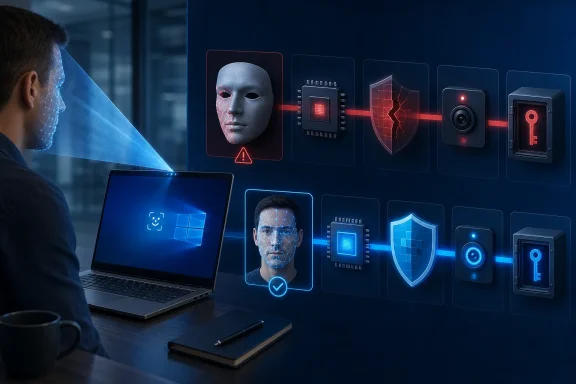
The new analysis does not erase the central security benefits of that model. It does, however, underline a practical truth that Windows administrators should already recognize: the security of Windows Hello biometric authentication depends on the full chain of trust, not merely on the presence of a TPM or an infrared camera.
For enterprise IT teams, the findings should prompt a more precise question than “Do we have Windows Hello enabled?” The better question is: Which Windows Hello security boundary is actually active on our endpoints, which sensors participate in it, and how is enrollment controlled?
 Background: Why Windows Hello for Business Is Still a Major Security Upgrade
Traditional passwords are portable secrets. A user can type the same password into a phishing page, reuse it across services, disclose it in a social-engineering incident, or have it captured and replayed elsewhere. Windows Hello for Business was designed around a different premise: the private credential should remain on the device, while the identity provider receives cryptographic proof that the device possesses the corresponding private key.
During provisioning, Windows creates a public/private key pair, registers the public component with the identity provider, and keeps the private component locally protected—preferably by the Trusted Platform Module (TPM). Microsoft says that the private key cannot be exported when TPM protection is in use, while the public key is associated with the enterprise identity in Microsoft Entra ID, Active Directory, or an applicable identity system. Microsoft’s explanation of Windows Hello for Business provisioning and key protection
This design delivers several meaningful advantages:
- No reusable password is transmitted to an identity provider during ordinary Windows Hello authentication.
- The PIN is device-specific, rather than a general-purpose enterprise password.
- The private key is tied to the endpoint, limiting the value of credential theft from a different machine.
- Biometric templates are stored locally, rather than being uploaded as a centralized biometric database.
- Phishing resistance improves, because a remote attacker cannot simply replay a user’s Windows Hello gesture from another system.
Microsoft explicitly positions Windows Hello for Business as a phishing-resistant authentication approach with device attestation, certificate options, Conditional Access integration, and support for FIDO/WebAuthn scenarios. Microsoft’s Windows Hello for Business overview
It is crucial not to lose sight of those strengths. A TPM-backed Windows Hello for Business deployment is generally far more resistant to remote credential replay than a conventional username-and-password workflow. The BSI analysis is not an argument for returning to passwords. Rather, it is evidence that strong cryptographic key protection and strong biometric authorization are related but separate security problems.
That difference becomes especially important once an attacker is no longer remote.
What the BSI Analysis Examined
The BSI’s work focused on Windows 10 Enterprise LTSC 2021 and the facial-recognition component of Windows Hello for Business. ERNW reportedly used debugging and reverse-engineering techniques to reconstruct internal behavior, including the relationship between the Windows biometric subsystem, local template storage, user identity mapping, and the release of enterprise authentication credentials. The reported scope and methodology of the BSI-commissioned ERNW research
That scope is important for interpreting the findings correctly.
The study is not a blanket claim that every version of Windows, every Windows Hello camera, every fingerprint reader, and every Windows Hello deployment shares an identical risk profile. It examined a specific Windows release and authentication modality under specific test conditions. The findings are nevertheless highly relevant because many enterprises still operate mixed fleets where Windows 10 LTSC, older Windows 11 hardware, standard Windows Hello-compatible sensors, and newer ESS-capable devices coexist.
The report highlights two broad categories of concern:
- Post-compromise local attacks against biometric enrollment records, templates, matching logic, or the mapping between a biometric match and a Windows account.
- Presentation and enrollment-quality attacks in which the facial-recognition workflow accepts artificial or insufficiently distinctive biometric input.
These are separate problems. The first concerns what a highly privileged attacker may be able to change after gaining meaningful control of the endpoint. The second concerns whether the sensor and recognition workflow adequately reject a false face or prevent a poor enrollment from becoming a permissive identity template.
Both issues challenge the simplistic idea that a TPM alone makes every stage of biometric sign-in tamper-proof.
The Critical Separation: Protecting a Key Versus Protecting the Decision to Use It
A TPM is exceptionally useful, but it is not magic. Its role in Windows Hello for Business is to protect cryptographic material and, depending on deployment policy, help ensure that sensitive keys are generated and retained in hardware. Microsoft notes that organizations can require a hardware security device for provisioning, preventing Windows Hello for Business enrollment on systems without a usable TPM. Microsoft’s Windows Hello for Business policy guidance for requiring TPM-backed security devices
However, a TPM-protected private key answers only one security question: Can an attacker extract and reuse the private key elsewhere? It does not automatically answer another: Can an attacker manipulate the local software path that determines whether a biometric event is valid and which identity it represents?
According to the reported BSI analysis, conventional non-ESS configurations protect facial templates through local database access controls and encryption, but the information required to access the protected database is available on the same system. This creates an architectural distinction between the key’s hardware-backed protection and the operating-system-level components involved in authorizing use of that key. The BSI analysis as reported by Biometric Update
Microsoft’s own Windows Hello for Business documentation confirms the broad storage model: biometric data is local to the device, with a biometric database file per sensor under C:\WINDOWS\System32\WinBioDatabase; templates are encrypted with a per-database key. Microsoft’s documentation on Windows Hello biometric template storage
Local-only storage is a genuine privacy and breach-containment advantage. There is no obvious centralized repository containing every employee’s face template for an attacker to steal in one incident. But local-only should not be confused with immune to a sufficiently privileged compromise of the endpoint. Once an attacker has administrative or kernel-level control, operating-system-managed stores and processes need stronger isolation if they are to remain meaningful security boundaries.
Why the SID Mapping Matters
The analysis reportedly identified the association between an enrolled biometric record and a Windows security identifier (SID) as a sensitive point. The SID is the identifier that allows Windows to associate a successful biometric match with a particular local or domain-linked user identity. If an attacker can alter that relationship, the system may potentially accept one person’s biometric presentation while returning another user identity. The reported discussion of biometric template-to-SID association
This is a more subtle threat than key theft. An attacker does not necessarily need to export a TPM-protected enterprise private key. Instead, the goal could be to corrupt the authorization decision—to cause Windows to release the legitimate user’s protected key after a match against attacker-controlled biometric data or an altered template association.
That is why the report’s threat model needs careful framing. The concern is primarily about an adversary who has already obtained substantial local control of a Windows device. It does not mean that an internet-based attacker can point a camera at an employee and immediately claim their corporate identity from anywhere in the world.
Still, endpoint compromise is not an edge case in enterprise security. Malware with administrative privileges, malicious insiders, physical attackers with extended access, insecure shared workstations, and poorly governed local administrator accounts all make the post-compromise threat model relevant.
Enhanced Sign-in Security Changes the Boundary
Enhanced Sign-in Security is Microsoft’s answer to precisely this class of concern. ESS is not merely a marketing badge for a better webcam. It changes where sensitive biometric operations occur and how they are connected to the credential-release process.
Microsoft describes ESS as using Virtualization-based Security (VBS), TPM 2.0, compatible biometric hardware, and protected communication paths to isolate biometric data and operations from the normal Windows environment. Microsoft’s technical overview of Windows Hello Enhanced Sign-in Security
For face recognition, Microsoft says the face algorithm runs in a VBS-protected environment. The hypervisor restricts access to protected memory regions, while the camera feeds face data through an isolated pathway to the matching process. Face templates are generated in VBS and encrypted using keys generated and accessible only within VBS. Microsoft’s ESS face-recognition isolation model
For fingerprints, ESS depends on match-on-sensor hardware. Such readers include onboard processing and memory capable of isolating matching and template storage inside the sensor hardware itself. Microsoft further requires supported ESS fingerprint sensors to have manufacturer-provisioned certificates that enable secure sessions with biometric components running in VBS. Microsoft’s requirements for ESS-capable fingerprint recognition
The final piece is credential authorization. In an ESS architecture, Windows biometric components operating in VBS establish a secure channel to the TPM. A successful biometric match can then authorize Windows Hello key use through that protected channel, rather than relying on ordinary operating-system processes to make every critical decision. Microsoft’s description of ESS biometric-to-TPM credential authorization
This is the architectural shift the BSI findings bring into focus:
| Security property | Standard Windows Hello biometric path | Windows Hello with ESS |
|---|---|---|
| Private enterprise key | Can be TPM-protected | Can be TPM-protected |
| Template and matching isolation | Depends more heavily on the normal OS environment | Isolated through VBS and supported hardware |
| Sensor-to-matcher data path | More exposed to the endpoint’s normal software boundary | Protected channel for compatible hardware |
| Resistance to local tampering | Limited after major local compromise | Improved by a separate isolation boundary |
| Hardware requirements | Broad Windows Hello compatibility | Requires compatible sensor, drivers, firmware, and platform support |
The practical takeaway is simple: TPM-backed Windows Hello is valuable; TPM-backed Windows Hello with ESS is a stronger end-to-end design for biometrics.
The Facial Mask Finding Is a Different Warning
The BSI analysis did not stop at post-compromise tampering. It also examined what Windows Hello facial recognition would accept during enrollment and subsequent authentication.
Researchers reportedly enrolled a facial mask rather than a live human face, then used a different mask depicting the same identity to authenticate successfully. The study classified this as a presentation attack: an artificial representation was accepted during setup and later treated as a valid biometric match. The reported facial-mask presentation attack observation
This is a significant finding, but it needs an equally significant caveat: it should not be overgeneralized into a claim that every Windows Hello camera can be bypassed by every mask. Presentation-attack resilience varies by camera, infrared implementation, firmware, anti-spoofing capabilities, Windows configuration, and the precise physical characteristics of the attack artifact.
Microsoft has long described Windows Hello facial recognition as relying on infrared cameras and software intended to differentiate a photograph or scan from a living person. Microsoft’s overview of Windows Hello biometric sign-in technologies The BSI result illustrates why that claim must be evaluated at the specific device and configuration level, rather than treated as a universal assurance across all compliant hardware.
Enrollment Quality Can Become an Identity Weakness
The researchers also found that degraded enrollment conditions affected matching behavior. In the reported experiment, an individual enrolled while wearing a scarf, glasses, and a hood; another person wearing the same accessory combination was then able to authenticate. When enrollment was repeated without the reduced facial visibility, the researchers could no longer reproduce the incorrect acceptance. The reported degraded-enrollment experiment and its outcome
The security lesson is broader than this one test. Enrollment is a security event, not simply a usability step.
When a user registers a biometric, the system establishes the reference data that future authentication will trust. If enrollment captures too little stable facial information, accepts a non-live artifact, or occurs in an environment where administrators cannot verify the participant, an otherwise sophisticated cryptographic credential can inherit a weak biometric gate.
This has operational implications:
- Enrollment should occur in a controlled, well-lit setting.
- Users should present their full, unobscured face unless an approved accommodation or policy requires otherwise.
- Organizations should consider requiring enhanced anti-spoofing where supported.
- Help desks and identity teams should treat biometric reset or re-enrollment as privileged identity operations.
- Shared or high-value systems should use stronger enrollment controls than ordinary office laptops.
Microsoft provides a Configure enhanced anti-spoofing policy for Windows Hello face authentication. When enabled, Windows requires enhanced anti-spoofing support, and face authentication is disabled on hardware that does not meet that requirement. Microsoft’s Windows Hello for Business enhanced anti-spoofing policy documentation
That trade-off may be worthwhile for higher-risk users, even if it narrows hardware compatibility.
What IT Administrators Should Do Now
The correct response is not to disable Windows Hello for Business broadly. Doing so would often push users back toward passwords—the very credentials most vulnerable to phishing, reuse, and remote theft. The better response is to make Windows Hello deployment posture measurable, enforceable, and proportionate to risk.
1. Inventory the Actual Biometric Security Posture
Do not assume that a PC has ESS merely because it has a Windows Hello camera or fingerprint reader. ESS requires compatible hardware, drivers, firmware, TPM 2.0, and VBS support; facial ESS also requires appropriate Secure Devices (SDEV) firmware configuration. Microsoft’s ESS hardware and firmware requirements
Administrators can check the Windows Enhanced sign-in security status in Settings. Microsoft also documents an Event Viewer method: under Applications and Services Logs > Microsoft > Windows > Biometrics > Operational, Event ID 1108 identifies whether a sensor is isolated in a Virtual Secure Mode process or a standard System process. Microsoft’s ESS verification guidance using Event Viewer
That should become an endpoint-management reporting field, not an occasional troubleshooting exercise.
2. Standardize on ESS-Capable Hardware for Sensitive Roles
A mixed hardware estate creates mixed authentication assurance. An executive laptop with ESS-capable face recognition is not equivalent to an older device using a conventional sensor path, even if both display the same “Windows Hello Face” sign-in option.
Prioritize ESS-capable endpoints for:
- Privileged administrators
- Security operations personnel
- Finance and payroll teams
- Developers with production access
- Executives and high-value targets
- Employees handling sensitive intellectual property
- Shared devices in controlled environments
Microsoft warns that when ESS is enabled, non-ESS biometric sensors cannot participate in the Windows Biometric Framework. This can affect external cameras and older peripherals, but it is an intentional security boundary rather than a defect. Microsoft’s documentation on ESS limitations for non-capable sensors and external cameras
3. Require TPM-Backed Provisioning
Organizations should configure Windows Hello for Business to require a usable hardware security device rather than allowing fallback to software-backed keys. Microsoft’s policy documentation states that, without the requirement, Windows may provision using software if a TPM is unavailable or nonfunctional. Microsoft’s policy reference for requiring a hardware security device
That setting does not substitute for ESS, but it maintains the key-protection half of the security model. In high-assurance environments, both should be treated as baseline requirements.
4. Lock Down Local Administrative Access
The BSI analysis reinforces a familiar endpoint-security principle: an attacker with privileged local control can challenge protections designed only for the normal operating-system boundary.
Reducing that exposure requires layered controls:
- Eliminate standing local administrator rights for standard users.
- Use privileged access management for support personnel.
- Enforce device encryption, Secure Boot, and virtualization-based protections.
- Monitor for credential-access tools, unsigned drivers, and tampering attempts.
- Limit physical exposure of unattended corporate devices.
- Keep firmware, Windows, biometric drivers, and camera firmware current through managed update channels.
The goal is not simply to keep the TPM intact. It is to prevent an attacker from gaining enough control of the endpoint to influence the surrounding authentication workflow.
5. Treat Biometric Enrollment as High Assurance
Enrollment deserves explicit policy, auditability, and user guidance. A rushed self-service enrollment in poor lighting, with facial coverings, or with accessories that hide core facial features can reduce the value of biometric authentication.
A strong enterprise policy should require:
- A clear, unobscured face for facial enrollment.
- Verification that the intended employee is physically present.
- Re-enrollment after sensor replacement or suspicious device events.
- Higher assurance for privileged accounts, potentially including supervised enrollment.
- A secure PIN fallback, because Windows Hello for Business still requires a PIN gesture as the recovery and failure path for biometrics. Microsoft’s policy documentation on PIN requirements and biometric use
The Bigger Lesson for Passwordless Windows Security
The BSI findings are best understood as a maturity test for passwordless authentication. Moving from passwords to device-bound keys solves major problems, especially phishing and remote credential reuse. But biometrics introduce a distinct set of questions around sensor integrity, presentation-attack detection, template storage, matching isolation, identity binding, and enrollment quality.
A face is not a cryptographic key. It is a human characteristic interpreted by hardware and software. That interpretation must be protected with the same rigor applied to the TPM-held credential it unlocks.
Windows Hello for Business remains a strategically sound platform for enterprise passwordless authentication, particularly when it uses hardware-backed keys and modern identity controls. Yet the BSI analysis demonstrates that a deployment’s real assurance level is determined by its least-protected stage: a mutable local biometric database, an insufficiently isolated matching process, a non-ESS sensor, or a weak enrollment procedure can all undercut the confidence created by a TPM-protected key.
The strongest Windows Hello for Business deployments will therefore be those that pair TPM-backed credentials, ESS-capable hardware, VBS isolation, enhanced anti-spoofing, disciplined enrollment, and tight local-admin controls. In that configuration, biometric convenience can support—not dilute—the security promise of passwordless Windows sign-in.
