
The distinction is important for organizations deciding whether an upgrade belongs in this fiscal year’s infrastructure plan. A Windows Server 2022 machine does not become unpatched, unlicensed, or suddenly unsupported for security defects on October 14. It moves from mainstream support into extended support, where Microsoft’s normal expectation is security servicing rather than product evolution, feature work, and regular non-security fixes.
There is, however, a concrete correction to Techzine’s upgrade case: its account of paid hotpatching is out of date. Microsoft ended the per-core charge for Azure Arc-enabled Windows Server 2025 hotpatching on May 19, 2026. The previously announced $1.50-per-core, per-month model no longer applies, removing what could have been a meaningful operating cost for on-premises and multicloud deployments.
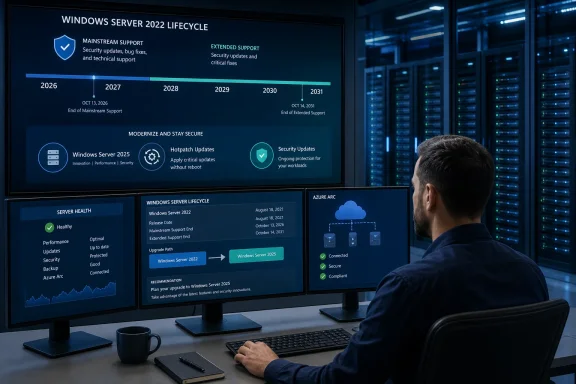 October 13 changes the servicing contract, not the security baseline
Microsoft lists Windows Server 2022 under its Fixed Lifecycle Policy, with mainstream support ending on October 13, 2026 and extended support ending on October 14, 2031. The product’s roughly ten-year lifecycle was established at launch; this is not an emergency retirement notice and it does not require the paid Extended Security Updates program familiar from products that have reached their final end-of-support date.
For the next five years, Windows Server 2022 remains a supported operating system in the sense most relevant to incident response: eligible systems will receive monthly security updates. Microsoft’s Windows Server release-information page continues to include Windows Server 2022 in the LTSC servicing table alongside Windows Server 2025, and its lifecycle page explicitly says containers released with Server 2022 share the host product’s lifecycle dates.
The practical loss is the ability to expect ordinary product maintenance. Mainstream support is where customers receive feature changes and non-security fixes under Microsoft’s normal servicing model. Once extended support begins, a stubborn compatibility problem, a quality issue not judged to be security-relevant, or a feature request will have a much narrower path to a vendor fix.
For a stable file server, domain controller, application host, or Hyper-V estate that is already performing as intended, that may be acceptable. For a platform supporting a software vendor that requires current mainstream support, it may not be. The date changes the answer to a procurement and application-support question more than it changes the Tuesday patching routine.
The real deadline may come from software running on the server
The most consequential calendar date for many Server 2022 environments is not necessarily Microsoft’s October 2031 extended-support end date. It is the earliest date at which a line-of-business vendor, backup provider, monitoring product, security agent, database platform, or Microsoft workload stops supporting Server 2022 as its host OS.
Microsoft’s own support matrix makes that issue visible for Microsoft 365 Apps. The company says it will provide security updates for Microsoft 365 desktop apps running on Windows Server 2022 through October 10, 2028—not through the server operating system’s October 2031 end date. An organization using Remote Desktop Services to publish Microsoft 365 Apps therefore has a separate lifecycle problem arriving three years before Server 2022 itself reaches end of support.
That is why “security updates until 2031” should not become shorthand for “no migration work until 2031.” Security servicing covers the operating system. It does not extend an ISV’s certification, create compatibility fixes for a newer database client, or preserve support for agents that increasingly assume Windows Server 2025 capabilities.
Administrators should inventory the role and workload before setting a migration date. A Server 2022 VM hosting a self-contained legacy application with a long vendor commitment deserves a different plan from a Session Host, an identity server, a server running Microsoft 365 Apps, or a host tied to a hardware vendor’s current driver stack.
Windows Server 2025 is an option, not an automatic remedy
Windows Server 2025 is Microsoft’s current LTSC release, with mainstream support through November 13, 2029 and extended support through November 14, 2034. Moving from Server 2022 to Server 2025 therefore restores a longer runway, but it does not turn October 2026 into a hard upgrade deadline for every estate.
There are valid reasons to plan the move now. Server 2025 changes default and available security behavior in ways that can affect new Active Directory deployments and older clients. Microsoft says new AD deployments require LDAP signing after SASL bind by default, while LDAP over TLS can use TLS 1.3. These are worthwhile improvements, but they also make pre-production testing essential where appliances, older applications, or scripts use legacy LDAP patterns.
Microsoft also documents NVMe-storage optimizations in Server 2025 and continues to improve the platform’s security and virtualization features. Those gains can justify an upgrade when hardware refresh, consolidation, an AD modernization project, or a move to Azure Local is already in scope. They are not, by themselves, evidence that a healthy Server 2022 workload must be replaced in the next eight weeks.
The upgrade conversation also needs to include deprecated dependencies. Microsoft lists Windows Internet Name Service, or WINS, as no longer in development and recommends DNS as the replacement. WINS still ships and remains supported in Server 2025 during that version’s lifecycle, but it is marked for removal in a future Windows Server release. Organizations relying on NetBIOS name resolution should document and retire that dependency during a migration rather than carry it into another decade-long platform cycle.
Hotpatching is no longer a paid differentiator
Techzine correctly identifies hotpatching as a feature worth examining, but its pricing details no longer reflect Microsoft’s current policy. In 2025, Microsoft announced that organizations using Windows Server 2025 Standard or Datacenter outside Azure would need Azure Arc and would be billed $1.50 per CPU core each month to use hotpatching. A 16-core server would indeed have cost $288 annually under that plan.
Microsoft’s current Azure Arc hotpatch documentation says that, as of May 19, 2026, Windows Server 2025 Standard and Datacenter hotpatching on Azure Arc-enabled machines is available at no additional cost. Microsoft says billing stopped for previously enrolled machines and new enrollments carry no hotpatch charge, whether the server runs on premises, in VMware, Hyper-V, AWS, Google Cloud, or another supported environment.
The technical requirements remain. A Server 2025 machine needs Azure Arc connectivity, a supported edition, and hardware or virtual-hardware support for virtualization-based security. Microsoft documents UEFI and Secure Boot as baseline requirements, and Hyper-V VMs need to be Generation 2. The feature is not a universal “never reboot” switch either: hotpatching starts from a cumulative-update baseline and that baseline refreshes quarterly, so planned restarts remain part of the servicing rhythm.
The value is reduced reboot frequency, not eliminated maintenance. Drivers, firmware, .NET updates, non-Windows components, and periodic baseline updates can still demand change windows. But removing the separate fee means hotpatching is now a stronger operational reason to evaluate Server 2025 for uptime-sensitive workloads—without using a per-core surcharge as the budgetary argument against it.
Server 2022 Azure Edition gets a limited exception
There is one detail that complicates a simple October 2026 cutoff. Microsoft’s general lifecycle page still describes hotpatch support for Windows Server 2022 Datacenter: Azure Edition Core as lasting through the end of mainstream support. Yet Microsoft’s Windows Server 2022 release-health page, updated in July, says hotpatch-update support for Windows Server 2022 Datacenter: Azure Edition has been extended through October 2027.
That extension applies to enrolled Azure Edition systems, not conventional Server 2022 Standard or Datacenter installations. Microsoft says those devices will continue to receive monthly security updates without requiring a restart. The difference between the broad lifecycle note and the newer release-health notification is worth recording in operational documentation; the release-health notice is the more recent, specific statement for the affected Azure Edition population.
It should not be read as a general extension of Server 2022 mainstream support. The product lifecycle date remains October 13, 2026. The exception is a servicing accommodation for a particular hotpatch-capable edition.
Build the plan around support dependencies
The immediate task is to classify each Server 2022 deployment: retain through extended support, upgrade in place, migrate to a new Server 2025 instance, or retire the workload. That assessment should capture installed roles, applications and their support statements, hardware and virtual-machine compatibility, backup and disaster-recovery agents, security tooling, authentication dependencies, and reboot tolerance.
A useful first pass should include:
- Confirm whether each application vendor supports Windows Server 2022 after October 13, 2026 and obtain that position in writing where the workload is business-critical.
- Identify Remote Desktop Services hosts running Microsoft 365 Apps, since their application-security-update timeline ends on October 10, 2028.
- Test Server 2025 LDAP and authentication behavior with older clients before upgrading domain controllers or deploying new domains.
- Identify WINS usage, SMB dependencies, legacy service accounts, and devices that may be sensitive to stronger LDAP defaults.
- Determine whether Azure Arc-enabled Server 2025 hotpatching can reduce maintenance disruption for systems where restart windows are expensive.
Windows Server 2022 has not reached end of life, and there is no security-update cliff in October. But the remaining 57 days of mainstream support are a sensible final trigger for organizations that have allowed their Server 2022 inventory to become invisible. The systems can remain secure through October 2031; the question is whether the applications and operational assumptions attached to them will remain supportable for that long.
