
That distinction does not make the anniversary any less meaningful. It clarifies what is being remembered: the moment Windows XP build 2600 stopped being a development project and became the foundation for an extraordinary number of home and business PCs. As Neowin noted in its anniversary retrospective, XP became synonymous with the PC for a generation. Microsoft’s own 2001 launch material described it as a Windows release built on the Windows 2000 engine, while contemporaneous reporting from Computerworld recorded the RTM-to-retail path that followed.
What XP’s longevity obscures is that the version people remember most fondly was not quite the version Microsoft finished 25 years ago. The familiar, durable XP era was forged over the following years—especially after a security reckoning forced Microsoft to change how Windows was built, deployed, and defended.
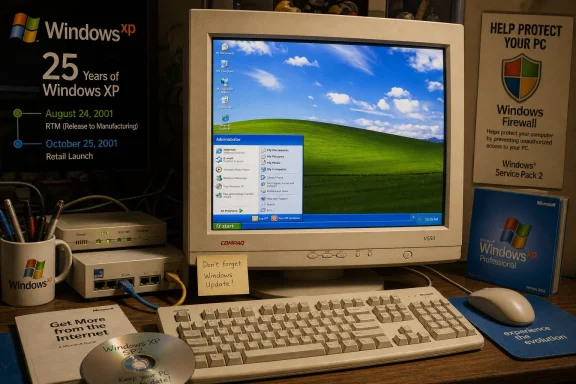 August 24 was the manufacturing milestone, not the store launch
RTM is a term from the boxed-software era that has become easy to blur with “release.” It signaled that Microsoft had completed the code intended for duplication and delivery to original equipment manufacturers. Dell, HP, Compaq, and the rest of the PC industry then had to integrate it into systems, validate hardware drivers, prepare recovery media, and begin selling machines with XP preinstalled.
Microsoft had already announced in May 2001 that Windows XP Home Edition and Windows XP Professional would arrive on October 25. Computerworld reported at the time that retail copies would go on sale that day, while PC makers were preparing their systems in the intervening weeks. So there are two legitimate anniversaries: August 24 for the completed manufacturer build, and October 25 for the day ordinary buyers could walk into a store and purchase XP.
The distinction is more than calendar trivia. It explains why XP is associated with the fall of 2001 even though its finished code dates to August. For most users, the operating system arrived as part of a new beige tower, a laptop with an impossibly bright LCD, or an upgrade disc bought long after launch—not as an RTM milestone at Microsoft headquarters.
XP ended the consumer Windows split
Windows XP’s central technical achievement was not the blue taskbar or the green hill. It was the broad consumer migration to the Windows NT codebase.
Before XP, Microsoft effectively maintained two desktop Windows families. Windows 95, Windows 98, and Windows Me were consumer-oriented systems descended from DOS and the Windows 9x line. Windows NT and Windows 2000 were the more robust, business-focused branch, with a different architecture and a reputation for better stability but less compatibility with the games, drivers, and consumer hardware that defined home PCs.
XP brought the two audiences together under NT. Windows XP Home Edition gave consumer PCs an NT-based foundation; Windows XP Professional carried the business-oriented features, including domain support and more advanced administrative capabilities. Microsoft explicitly framed the product as an enhanced Windows 2000 engine, and Steve Ballmer described the launch as a convergence point for reliability and compatibility.
That is why XP’s historical role is larger than its visual identity. It made the NT family the normal Windows experience for households as well as offices. Modern Windows versions remain descendants of that decision. Windows 11 may look remote from XP’s Luna interface, but its architectural lineage runs through the same NT family XP normalized for the mass market.
The consumer-facing design mattered because it made that technical transition feel inviting rather than institutional. XP replaced the gray, compact controls associated with Windows 2000 and earlier versions with bright color, large icons, rounded visual styles, and task-based navigation. The default “Bliss” wallpaper became one of computing’s most recognizable images precisely because it was everywhere: on family PCs, school labs, workplace desktops, and the machines running early broadband internet.
The XP people remember was shaped by Service Pack 2
There is a temptation to treat XP’s service packs as the older equivalent of today’s routine cumulative updates. They were not routine. The service packs changed XP’s security posture, hardware support, and practical usability so substantially that the experience of running the original 2001 release was materially different from running the system most people kept through the late 2000s.
The most important was Windows XP Service Pack 2, released in 2004. Computerworld argued at XP’s 10-year mark that SP2, rather than the 2001 RTM build, was the version many users truly came to know. That assessment holds up. Microsoft’s documentation records that SP2 introduced the Windows Firewall architecture and enabled the firewall by default, while its security guidance describes SP2 and later as including a stateful host firewall to shield machines from unsolicited inbound traffic.
This was not cosmetic hardening. The early XP years coincided with major internet worm outbreaks and an era when many home PCs were directly exposed through always-on broadband connections. A system that was easy to use but routinely connected to the internet without a properly configured firewall was no longer good enough. SP2 pushed Windows toward a more defensive default configuration, even if the resulting compatibility prompts and blocked network applications irritated users and administrators.
The service-pack era also helps explain the warm memory of XP’s reliability. By the time many households received XP through replacement PCs, hand-me-down systems, or workplace refresh cycles, the operating system had accumulated years of driver work, application fixes, and security changes. Windows XP Service Pack 3, released in 2008, became the final broadly deployed client baseline. It is this mature version—not the original gold code—that powered the machines people used for schoolwork, early social networks, digital cameras, MP3 libraries, and the first wave of practical home Wi-Fi.
Long support did not mean XP remained safe
XP’s official support life was unusually long by the standards people associate with consumer operating systems. Microsoft ended support for Windows XP Service Pack 3 on April 8, 2014, nearly 13 years after the RTM date and more than 12 years after retail availability. Its lifecycle record lists that end date plainly, and Microsoft warned customers in advance that XP would no longer receive security updates, non-security hotfixes, assisted support, or updated online technical content.
The fact that XP stayed in use well beyond 2014 is often retold as proof that it was simply better than what followed. There is a more practical explanation: organizations had expensive line-of-business applications, specialized peripherals, industrial equipment, and established workflows tied to XP. Home users also delayed upgrades because an old PC that could browse the web, print documents, and run familiar software did not necessarily feel obsolete.
But support longevity should not be confused with present-day suitability. A consumer XP machine connected directly to the modern internet has been outside Microsoft’s regular security-update program for more than 12 years. Its stock browser stack, cryptographic support, driver assumptions, and application compatibility belong to a different web and threat environment. The operating system remains appropriate for preservation, retro software, isolated testing, and period-correct hardware projects; it is a poor choice for ordinary online banking, email, work access, or any role handling current credentials and sensitive data.
For administrators, the anniversary is also a reminder that “legacy” is not a vague category. If XP remains in an environment because an application or device depends on it, it should be identified, segmented, restricted from general internet access, and treated as an exception with a retirement plan—not as a normal endpoint that happens to have lasted.
Windows XP’s 25-year RTM anniversary is worth marking because it captures a genuine turning point: the moment Microsoft made NT-based Windows the standard PC platform for both homes and businesses. But the celebrated version was the product of years of repairs, security changes, and accumulated familiarity.
The blue taskbar, the Start menu, and the green hill endure because XP was present for a long stretch of personal computing history. The practical lesson from that history is less sentimental: great interface memories can outlast an operating system’s safe operating life by decades.