
WUView 0.8.0 has not yet removed its 32-bit build. Instead, the free Windows Update history utility’s August 2 release is the developer’s stated last planned release to include x86 packages, meaning Windows 11 users are unaffected today and Windows 10 users on 32-bit installations have one final supported version to preserve.
That distinction is more important than the headline suggests. Neowin correctly identified the developer’s plan to end x86 support, but WUView 0.8.0 still ships both a self-contained 32-bit installer and portable archive alongside x64 packages. The change takes effect only when a future version arrives—and the project has not published a version number, release date, or migration plan for that cutoff.
WUView is not a Windows Update replacement or a tool for blocking patches. It is a compact diagnostic viewer that turns Windows Update history and related Event Log entries into a single searchable list. For administrators and support technicians working backwards from “the machine broke after updates,” that can be materially more useful than Windows Settings’ fragmented update screens.
In the v0.8.0 release notes, WUView maintainer Tim Kennedy says future releases will focus on x64 because maintaining two architectures adds work and most users are already on 64-bit systems. The wording is prospective rather than absolute: the developer calls this the “last release” planned to include x86, while inviting users who rely on 32-bit support to respond through the project discussion.
The actual release assets back up the narrower reading. Version 0.8.0 includes:
The immediate consequence is therefore modest: do not treat v0.8.0 as a forced removal event. For a 32-bit machine that already uses WUView, this is the version to download, test, and retain internally if the tool is part of a support workflow.
Windows 11 is outside the blast radius because Microsoft’s Windows 11 hardware requirements mandate a compatible 64-bit processor or system-on-chip. There is no supported 32-bit Windows 11 edition for WUView to leave behind.
Those dates do not prove that every remaining LTSC device is 32-bit. They do show why “Windows 10 is over” is an incomplete answer for IT departments. Older endpoint fleets, laboratory systems, kiosks, industrial equipment, and embedded deployments often survive on servicing channels and hardware refresh schedules that bear little resemblance to consumer PCs.
WUView’s value in those environments is narrow but real. When Windows Update has installed several cumulative patches, Defender definitions, drivers, and servicing components over time, the built-in history display can be awkward to search and correlate. WUView places available entries in one list, permits permanent exclusions and temporary filters, and can export the result to text or CSV.
For a support team, that means a technician can suppress recurring Defender definition entries, isolate the date around a regression, and hand off a compact history record rather than rely on screenshots from Settings. Softpedia’s review independently describes the same practical use: inspecting update status, event details, KB references, and error codes while troubleshooting a problem that emerged after an update.
But WUView has a hard limit that should keep anyone from treating it as an authoritative patch inventory system. Its own documentation says it reads data exposed through the Windows Update Agent API and correlates Event Log records to updates by KB number. If an update has no KB number, or does not present one in a consistent format, WUView will not show associated Event Log data. It is a viewer and correlation aid, not a replacement for WSUS, Microsoft Configuration Manager, Intune reporting, endpoint telemetry, or a forensic collection process.
Those are reasonable improvements, but the most operationally relevant detail is WUView’s architecture-aware packaging. It offers both conventional installers and portable archives, plus framework-dependent and self-contained variants. The framework-dependent packages require .NET 10 already to be installed; the self-contained packages bundle what they need.
That gives technicians a choice, but it also creates a deployment trap. The v0.8.0 notes explicitly warn users to uninstall a prior installation before switching install types—for example, moving from a standard x64 installer to the self-contained x64 installer. The developer says failing to do that can produce unpredictable results. Portable users are told to replace the entire application folder rather than copy only selected files over an existing deployment.
That warning should be taken literally in managed environments. A portable diagnostic utility is often copied to a toolkit share, USB drive, or remote-support repository and then casually overwritten in place. WUView’s release notes say that is not the supported upgrade method. Preserve the previous folder as a rollback copy, replace the package as a whole, and validate the new executable on a non-production endpoint before standardizing it.
For the shrinking but still relevant 32-bit group, the sensible move is to treat v0.8.0 as a frozen dependency:
For Windows 11 users, the announcement is housekeeping. For the few teams maintaining 32-bit Windows endpoints, it is a reminder to archive the final x86 release now—before the next WUView update turns that optional diagnostic tool into one more unmaintained dependency.
WUView is not a Windows Update replacement or a tool for blocking patches. It is a compact diagnostic viewer that turns Windows Update history and related Event Log entries into a single searchable list. For administrators and support technicians working backwards from “the machine broke after updates,” that can be materially more useful than Windows Settings’ fragmented update screens.
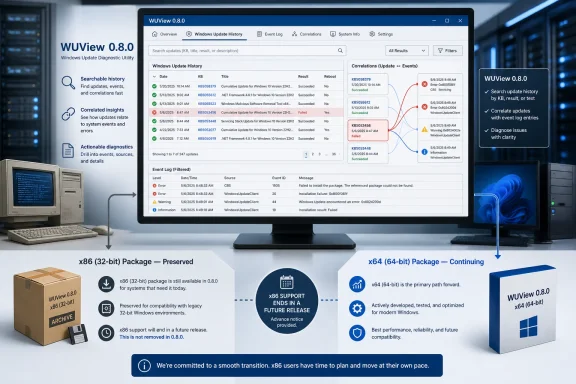 WUView 0.8.0 is the final x86 release—for now
In the v0.8.0 release notes, WUView maintainer Tim Kennedy says future releases will focus on x64 because maintaining two architectures adds work and most users are already on 64-bit systems. The wording is prospective rather than absolute: the developer calls this the “last release” planned to include x86, while inviting users who rely on 32-bit support to respond through the project discussion.The actual release assets back up the narrower reading. Version 0.8.0 includes:
- A framework-dependent installer and portable package labelled
x64x86, which require the .NET 10 runtime. - Self-contained x64 installer and portable packages that include their runtime.
- Self-contained x86 installer and portable packages that include their runtime.
The immediate consequence is therefore modest: do not treat v0.8.0 as a forced removal event. For a 32-bit machine that already uses WUView, this is the version to download, test, and retain internally if the tool is part of a support workflow.
Windows 11 is outside the blast radius because Microsoft’s Windows 11 hardware requirements mandate a compatible 64-bit processor or system-on-chip. There is no supported 32-bit Windows 11 edition for WUView to leave behind.
The overlooked audience is old Windows, not Windows 11
The developer’s decision is sensible for a small open-source utility, but it does not make 32-bit Windows disappear overnight. General Windows 10 support ended on October 14, 2025, and its consumer Extended Security Updates path has a finite life. Yet Windows 10 persists in specialized deployments, and Microsoft’s LTSC servicing records still list Windows 10 Enterprise LTSC 2021 as supported through January 12, 2027. Windows 10 IoT Enterprise LTSC 2021 extends further, through January 13, 2032.Those dates do not prove that every remaining LTSC device is 32-bit. They do show why “Windows 10 is over” is an incomplete answer for IT departments. Older endpoint fleets, laboratory systems, kiosks, industrial equipment, and embedded deployments often survive on servicing channels and hardware refresh schedules that bear little resemblance to consumer PCs.
WUView’s value in those environments is narrow but real. When Windows Update has installed several cumulative patches, Defender definitions, drivers, and servicing components over time, the built-in history display can be awkward to search and correlate. WUView places available entries in one list, permits permanent exclusions and temporary filters, and can export the result to text or CSV.
For a support team, that means a technician can suppress recurring Defender definition entries, isolate the date around a regression, and hand off a compact history record rather than rely on screenshots from Settings. Softpedia’s review independently describes the same practical use: inspecting update status, event details, KB references, and error codes while troubleshooting a problem that emerged after an update.
But WUView has a hard limit that should keep anyone from treating it as an authoritative patch inventory system. Its own documentation says it reads data exposed through the Windows Update Agent API and correlates Event Log records to updates by KB number. If an update has no KB number, or does not present one in a consistent format, WUView will not show associated Event Log data. It is a viewer and correlation aid, not a replacement for WSUS, Microsoft Configuration Manager, Intune reporting, endpoint telemetry, or a forensic collection process.
The important feature is correlation, not the new theme
Most of WUView 0.8.0 is a maintenance and usability release. The visible changes include a new light theme called Pale Graphite and an option, when the application follows the system theme, to select separate themes for light and dark modes. The release also updates installer localization, date parsing, profile-path handling, logging, and the About page, while moving NLog to version 6.1.4.Those are reasonable improvements, but the most operationally relevant detail is WUView’s architecture-aware packaging. It offers both conventional installers and portable archives, plus framework-dependent and self-contained variants. The framework-dependent packages require .NET 10 already to be installed; the self-contained packages bundle what they need.
That gives technicians a choice, but it also creates a deployment trap. The v0.8.0 notes explicitly warn users to uninstall a prior installation before switching install types—for example, moving from a standard x64 installer to the self-contained x64 installer. The developer says failing to do that can produce unpredictable results. Portable users are told to replace the entire application folder rather than copy only selected files over an existing deployment.
That warning should be taken literally in managed environments. A portable diagnostic utility is often copied to a toolkit share, USB drive, or remote-support repository and then casually overwritten in place. WUView’s release notes say that is not the supported upgrade method. Preserve the previous folder as a rollback copy, replace the package as a whole, and validate the new executable on a non-production endpoint before standardizing it.
What 32-bit WUView users should do before the next release
There is no emergency action required for x64 systems. Organizations using WUView on Windows 11 or 64-bit Windows 10 can move to version 0.8.0 normally, choosing either the .NET-dependent package or the self-contained package according to their software-management policy.For the shrinking but still relevant 32-bit group, the sensible move is to treat v0.8.0 as a frozen dependency:
- Download and securely retain the v0.8.0 self-contained x86 installer or portable archive, rather than assuming a later release will keep it available.
- Record where WUView is used in support procedures, particularly on older Windows 10 devices that cannot move to a 64-bit operating system without hardware replacement.
- Verify whether the tool is simply convenient or embedded in an actual incident-response, repair, or validation workflow.
- Export any update-history records needed for change management separately, because the application is a local viewer and its data depends on what Windows still exposes through the Update Agent API and logs.
For Windows 11 users, the announcement is housekeeping. For the few teams maintaining 32-bit Windows endpoints, it is a reminder to archive the final x86 release now—before the next WUView update turns that optional diagnostic tool into one more unmaintained dependency.
References
- Primary source: neowin.net
Published: 2026-08-04T09:10:01+00:00
Loading…
www.neowin.net - Related coverage: chip.de
Loading…
www.chip.de - Related coverage: deskmodder.de
Loading…
www.deskmodder.de - Related coverage: learn.microsoft.com
Windows 11 requirements | Microsoft Learn
Hardware requirements to deploy Windows 11.learn.microsoft.com - Related coverage: support.microsoft.com
Windows 11 System Requirements | Microsoft Support
Learn about Windows 11 minimum system requirements and how to assess your upgrade eligibility.support.microsoft.com - Related coverage: microsoft.com
Loading…
www.microsoft.com - Related coverage: microsoft.com
Loading…
www.microsoft.com - Related coverage: learn.microsoft.com
Loading…
learn.microsoft.com