
A new comparison published by PC Tech Mag puts Peak PTT, Zello, Microsoft Teams Walkie Talkie, and Motorola Solutions WAVE PTX in the same four-app shortlist for Android and iOS crews. The useful conclusion is narrower than the guide suggests: all four can deliver push-to-talk over Wi-Fi or cellular data, but they are four very different operating models—and treating them as interchangeable can leave a dispatch desk without the controls, radio interop, or mobile-data resilience it expected.
The guide gets the broad direction right. Push-to-talk over cellular, commonly called PoC, is expanding because it lets organizations use smartphones and purpose-built LTE devices beyond the geographic limits of a conventional radio repeater. A market forecast sold by The Business Research Company places the global PoC market at $5.37 billion in 2026 and forecasts $6.8 billion by 2030. Those figures are estimates from a commercial market-research publisher, not independently auditable deployment counts, and they should not be read as proof that a particular platform is gaining users.
More importantly, the guide’s two adoption claims—that 64 percent of logistics and field-service companies deployed PTT platforms during 2025, and that PoC accounts for nearly 58 percent of new deployments—are presented without a named study, methodology, survey size, or definition of “deployment.” Those numbers cannot be independently checked from the material supplied. For an IT buyer, they add little to a purchasing decision.
The decision is less about market momentum than about what happens when a worker presses the button: who receives the call, whether a supervisor can monitor it, whether messages are retained, whether an existing radio system joins the conversation, and what happens at a site with poor cellular coverage.
None of these products turns a phone into a conventional radio in the technical sense. A smartphone running Peak PTT, Zello, Teams, or WAVE PTX needs usable Wi-Fi or cellular data. If the phone cannot reach an IP network—inside a shielded structure, a remote canyon, a basement, or an overloaded cellular sector—the PTT app has no independent radio path.
That is a critical distinction for security, utilities, construction, warehousing, and emergency-adjacent operations. Traditional licensed land-mobile radio can be designed around local repeaters, direct mode, and dedicated spectrum. PoC buys reach where commercial connectivity exists; it does not create coverage where none exists.
The practical procurement question is therefore not whether an app says “nationwide.” It is whether the organization has tested the actual carriers, Wi-Fi roaming, device hardware, Bluetooth accessories, and building coverage at the locations where people work. A service advertised as carrier-agnostic still depends on the carrier chosen by the handset or SIM and the data plan behind it.
For Windows administrators, this also changes the meaning of “PC dispatch.” The mobile experience may be simple, but deployment is not necessarily consumer-grade. Dispatch stations need browsers or clients, headset and microphone configuration, user provisioning, network-policy exceptions, location permissions, and a workable plan for shared devices.
That makes Peak PTT a reasonable candidate for small and midsize fleets that want a vendor-packaged deployment rather than building an application policy around a broader collaboration suite. Its GPS portal and dispatch-focused product positioning are more aligned with drivers, guards, and field crews than with office teams that occasionally need voice channels.
But the guide’s claim of a $19.95 activation fee is not shown on Peak PTT’s currently indexed public pricing page. Buyers should obtain a written quote that states activation charges, dispatch-seat fees, hardware purchases or leases, SIM and data arrangements, accessory costs, and whether location history is retained at the needed interval. Peak PTT advertises 60-second GPS tracking for K2 devices; that is useful for fleet visibility but is not the same as continuous or real-time location telemetry.
There is another operational detail worth checking before a rollout: Peak’s iOS app is listed in Apple’s App Store as a companion to the Peak PTT K2 system, not as a standalone walkie-talkie service intended for ad hoc public use. That is expected for a managed business service, but it means the evaluation should include provisioning, account activation, and dispatch configuration—not simply installing an app on a few phones.
For a business deployment, the relevant product is Zello Work. Zello lists its Core plan at $8 per user per month when billed monthly, or $6.80 on annual billing. The Plus plan is listed at $15 monthly or $12.75 annually. Core includes private-network management, location tracking, unlimited channels, and access across iOS, Android, Windows, and macOS. Plus adds communication retention through Message Vault, panic buttons, transcriptions, translations, historical location information, and more extensive metadata access.
That pricing adjustment matters. The guide describes Zello as “freemium,” which is technically true at the consumer level, but that framing can cause a small business to pilot the wrong product and discover later that it lacks governance or is being used outside the vendor’s permitted terms. The paid Work offering is where the management console, dispatch workflow, retention, and private organizational network live.
Zello’s strongest differentiator is not merely replayable voice. Many teams can benefit from replay, but the real value is the combination of stored communications, desktop Dispatch Hub, and browser-based administration without tying the organization to a single phone maker or a specific radio fleet. Zello says its Work product supports Windows and macOS dispatch applications as well as mobile users, which may be especially useful for a dispatch desk standardized on Windows PCs.
The caveat is data use and retention planning. Zello says a typical user with automatic voice quality can consume roughly 70 MB to 100 MB of mobile data per month, though actual use varies. Audio archives, location history, translations, and transcripts also raise policy questions: who can access them, how long they are retained, and whether that retention conflicts with labor, privacy, or industry-specific requirements.
The guide is right that this avoids a second identity system. A worker already provisioned in Microsoft Entra ID and Teams can use the same organization, membership, policies, and mobile app they use for chat, Shifts, Tasks, and other frontline workflows. Microsoft also lets administrators control availability through the Teams admin center, app permission policies, and app-pinning rules.
That integration has a less convenient side. Microsoft documents a three-step deployment process: enable the app for the organization, assign an app permission policy that allows it, and pin the app or use the frontline experience so workers can actually find it. A Teams tenant that has not completed those steps can have appropriately licensed users who still do not see Walkie Talkie.
Teams is the cleanest choice for retail, hospitality, healthcare, and enterprise frontline groups already committed to Microsoft 365 governance. It is less compelling for a dispatch-centered fleet that needs rich PC radio-console functions, specialized emergency workflows, direct integration to land-mobile radio, or operations that cannot afford the overhead of Teams mobile sign-in and policy management.
The article’s suggestion that Teams offers “zero incremental licensing cost” also needs qualification. The Walkie Talkie feature may not require a separate add-on, but it is only included with paid Teams licensing. Organizations that would otherwise use inexpensive shared devices or no Microsoft 365 frontline plan at all should compare the total licensing and device-management cost rather than call it free.
Its important differentiator is interoperability. Motorola documents ways to connect WAVE PTX broadband users to MOTOTRBO and other land-mobile radio systems, allowing a smartphone user and a radio user to join the same operating conversation. That can preserve investments in installed radio systems while giving supervisors, contractors, or travelling personnel access through broadband devices.
The supplied guide overstates one point: WAVE PTX does not universally offer LMR-to-broadband interoperability “without gateways you must maintain yourself.” Motorola’s own current materials describe wireless gateways and WAVE PTX Radio Gateway options for connecting LMR and broadband systems. Some deployments can use Motorola-managed or multi-tenant arrangements, but the integration still has gateway architecture, compatible radio-system requirements, provisioning, capacity limits, and cost implications. It is not a checkbox that automatically turns any existing radio channel into a smartphone talkgroup.
Motorola does not publish a simple universal mobile-app price on its main WAVE PTX product page; it directs buyers to request pricing. That is unsurprising because subscriptions, dedicated devices, dispatch seats, interoperability, and radio-system integration can all affect the quote. It also means WAVE PTX should be evaluated as an engineered communications deployment, not compared solely against a per-user app subscription.
For organizations retiring older TLK hardware, Motorola has also said that new TLK 100 orders in North America ended after December 31, 2025 or when supply ran out. Existing active TLK 100 subscriptions continue, with full technical, software, and replacement support promised through March 31, 2029. That is relevant for buyers inheriting a WAVE PTX fleet: support continuity exists, but new purchases should be planned around the TLK 110 or TLK 25 rather than the discontinued model.
The first pilot should use a real shift, actual coverage dead zones, the intended accessories, and a dispatcher who will have to manage an incident rather than a demonstration. Test call setup time, missed-message handling, location accuracy, emergency escalation, onboarding and offboarding, and service behavior when Wi-Fi or cellular coverage drops. Those results—not untraceable market-adoption percentages—will determine whether the chosen PTT service saves seconds when a crew actually needs them.
More importantly, the guide’s two adoption claims—that 64 percent of logistics and field-service companies deployed PTT platforms during 2025, and that PoC accounts for nearly 58 percent of new deployments—are presented without a named study, methodology, survey size, or definition of “deployment.” Those numbers cannot be independently checked from the material supplied. For an IT buyer, they add little to a purchasing decision.
The decision is less about market momentum than about what happens when a worker presses the button: who receives the call, whether a supervisor can monitor it, whether messages are retained, whether an existing radio system joins the conversation, and what happens at a site with poor cellular coverage.
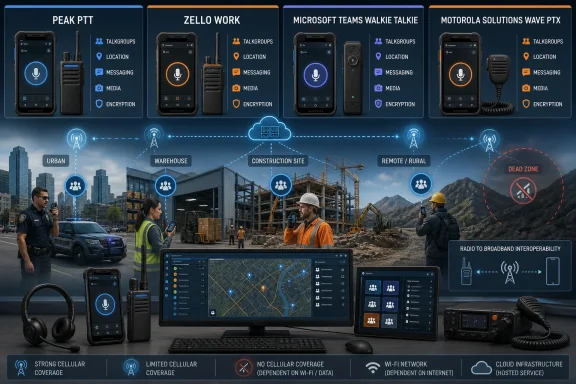 The “nationwide” promise still depends on the network underneath
None of these products turns a phone into a conventional radio in the technical sense. A smartphone running Peak PTT, Zello, Teams, or WAVE PTX needs usable Wi-Fi or cellular data. If the phone cannot reach an IP network—inside a shielded structure, a remote canyon, a basement, or an overloaded cellular sector—the PTT app has no independent radio path.That is a critical distinction for security, utilities, construction, warehousing, and emergency-adjacent operations. Traditional licensed land-mobile radio can be designed around local repeaters, direct mode, and dedicated spectrum. PoC buys reach where commercial connectivity exists; it does not create coverage where none exists.
The practical procurement question is therefore not whether an app says “nationwide.” It is whether the organization has tested the actual carriers, Wi-Fi roaming, device hardware, Bluetooth accessories, and building coverage at the locations where people work. A service advertised as carrier-agnostic still depends on the carrier chosen by the handset or SIM and the data plan behind it.
For Windows administrators, this also changes the meaning of “PC dispatch.” The mobile experience may be simple, but deployment is not necessarily consumer-grade. Dispatch stations need browsers or clients, headset and microphone configuration, user provisioning, network-policy exceptions, location permissions, and a workable plan for shared devices.
Peak PTT is a managed service, but its quoted entry price omits costs
Peak PTT’s K2 platform does support Android and iOS apps alongside dedicated LTE radios and PC dispatch tooling. Peak PTT says its K2 offering includes GPS location updates, geofencing, talkgroups, month-to-month service, and a 45-day guarantee. Its current public service-plan page lists the Boop To Talk app at $9.95 per device per month, a K2 radio service plan at $24.95 per radio per month, and PC Dispatch at $12 per seat per month.That makes Peak PTT a reasonable candidate for small and midsize fleets that want a vendor-packaged deployment rather than building an application policy around a broader collaboration suite. Its GPS portal and dispatch-focused product positioning are more aligned with drivers, guards, and field crews than with office teams that occasionally need voice channels.
But the guide’s claim of a $19.95 activation fee is not shown on Peak PTT’s currently indexed public pricing page. Buyers should obtain a written quote that states activation charges, dispatch-seat fees, hardware purchases or leases, SIM and data arrangements, accessory costs, and whether location history is retained at the needed interval. Peak PTT advertises 60-second GPS tracking for K2 devices; that is useful for fleet visibility but is not the same as continuous or real-time location telemetry.
There is another operational detail worth checking before a rollout: Peak’s iOS app is listed in Apple’s App Store as a companion to the Peak PTT K2 system, not as a standalone walkie-talkie service intended for ad hoc public use. That is expected for a managed business service, but it means the evaluation should include provisioning, account activation, and dispatch configuration—not simply installing an app on a few phones.
Zello’s free app is not the business plan
Zello is the closest thing in this group to a low-friction trial because its free Friends & Family app can get a channel running quickly. But Zello’s own current documentation draws a bright line that the comparison only partly captures: using the free Zello Friends & Family service for commercial purposes violates Zello’s terms of service.For a business deployment, the relevant product is Zello Work. Zello lists its Core plan at $8 per user per month when billed monthly, or $6.80 on annual billing. The Plus plan is listed at $15 monthly or $12.75 annually. Core includes private-network management, location tracking, unlimited channels, and access across iOS, Android, Windows, and macOS. Plus adds communication retention through Message Vault, panic buttons, transcriptions, translations, historical location information, and more extensive metadata access.
That pricing adjustment matters. The guide describes Zello as “freemium,” which is technically true at the consumer level, but that framing can cause a small business to pilot the wrong product and discover later that it lacks governance or is being used outside the vendor’s permitted terms. The paid Work offering is where the management console, dispatch workflow, retention, and private organizational network live.
Zello’s strongest differentiator is not merely replayable voice. Many teams can benefit from replay, but the real value is the combination of stored communications, desktop Dispatch Hub, and browser-based administration without tying the organization to a single phone maker or a specific radio fleet. Zello says its Work product supports Windows and macOS dispatch applications as well as mobile users, which may be especially useful for a dispatch desk standardized on Windows PCs.
The caveat is data use and retention planning. Zello says a typical user with automatic voice quality can consume roughly 70 MB to 100 MB of mobile data per month, though actual use varies. Audio archives, location history, translations, and transcripts also raise policy questions: who can access them, how long they are retained, and whether that retention conflicts with labor, privacy, or industry-specific requirements.
Teams Walkie Talkie is an extension of Teams administration, not a radio replacement
Microsoft Teams Walkie Talkie has the lowest incremental software cost for organizations that already assign paid Teams licenses. Microsoft’s current Teams documentation says Walkie Talkie is included with all paid Teams licenses and works on Android devices with Google Mobile Services and on iOS. It uses existing Teams standard and private channels; shared channels are not supported.The guide is right that this avoids a second identity system. A worker already provisioned in Microsoft Entra ID and Teams can use the same organization, membership, policies, and mobile app they use for chat, Shifts, Tasks, and other frontline workflows. Microsoft also lets administrators control availability through the Teams admin center, app permission policies, and app-pinning rules.
That integration has a less convenient side. Microsoft documents a three-step deployment process: enable the app for the organization, assign an app permission policy that allows it, and pin the app or use the frontline experience so workers can actually find it. A Teams tenant that has not completed those steps can have appropriately licensed users who still do not see Walkie Talkie.
Teams is the cleanest choice for retail, hospitality, healthcare, and enterprise frontline groups already committed to Microsoft 365 governance. It is less compelling for a dispatch-centered fleet that needs rich PC radio-console functions, specialized emergency workflows, direct integration to land-mobile radio, or operations that cannot afford the overhead of Teams mobile sign-in and policy management.
The article’s suggestion that Teams offers “zero incremental licensing cost” also needs qualification. The Walkie Talkie feature may not require a separate add-on, but it is only included with paid Teams licensing. Organizations that would otherwise use inexpensive shared devices or no Microsoft 365 frontline plan at all should compare the total licensing and device-management cost rather than call it free.
WAVE PTX is the radio-interoperability option, with a major architecture caveat
Motorola Solutions WAVE PTX is the most natural fit when a mobile PTT rollout must coexist with a radio fleet rather than replace it. Motorola says the WAVE PTX mobile app works on Android and iOS, WAVE PTX Dispatch runs in a web browser, and the service supports voice, multimedia messaging, mapping, and location functions. It also works with Motorola’s TLK broadband devices, including newer hardware such as the TLK 25 and TLK 110.Its important differentiator is interoperability. Motorola documents ways to connect WAVE PTX broadband users to MOTOTRBO and other land-mobile radio systems, allowing a smartphone user and a radio user to join the same operating conversation. That can preserve investments in installed radio systems while giving supervisors, contractors, or travelling personnel access through broadband devices.
The supplied guide overstates one point: WAVE PTX does not universally offer LMR-to-broadband interoperability “without gateways you must maintain yourself.” Motorola’s own current materials describe wireless gateways and WAVE PTX Radio Gateway options for connecting LMR and broadband systems. Some deployments can use Motorola-managed or multi-tenant arrangements, but the integration still has gateway architecture, compatible radio-system requirements, provisioning, capacity limits, and cost implications. It is not a checkbox that automatically turns any existing radio channel into a smartphone talkgroup.
Motorola does not publish a simple universal mobile-app price on its main WAVE PTX product page; it directs buyers to request pricing. That is unsurprising because subscriptions, dedicated devices, dispatch seats, interoperability, and radio-system integration can all affect the quote. It also means WAVE PTX should be evaluated as an engineered communications deployment, not compared solely against a per-user app subscription.
For organizations retiring older TLK hardware, Motorola has also said that new TLK 100 orders in North America ended after December 31, 2025 or when supply ran out. Existing active TLK 100 subscriptions continue, with full technical, software, and replacement support promised through March 31, 2029. That is relevant for buyers inheriting a WAVE PTX fleet: support continuity exists, but new purchases should be planned around the TLK 110 or TLK 25 rather than the discontinued model.
Pick the operational model before picking the app
Peak PTT is the straightforward managed option for teams that want LTE radios, phones, location visibility, and a dispatch-oriented vendor package. Zello Work is the flexible cross-platform choice for organizations that want a private voice network and desktop dispatch without a proprietary device program. Teams Walkie Talkie is the sensible addition for Microsoft 365 frontline users, provided the organization accepts Teams’ licensing and administration model. WAVE PTX deserves the shortlist when LMR interoperability or Motorola’s dedicated TLK hardware is part of the requirement.The first pilot should use a real shift, actual coverage dead zones, the intended accessories, and a dispatcher who will have to manage an incident rather than a demonstration. Test call setup time, missed-message handling, location accuracy, emergency escalation, onboarding and offboarding, and service behavior when Wi-Fi or cellular coverage drops. Those results—not untraceable market-adoption percentages—will determine whether the chosen PTT service saves seconds when a crew actually needs them.
References
- Primary source: PC Tech Magazine
Published: August 7, 2026 at 8:05 AM UTC
Loading…
pctechmag.com - Related coverage: learn.microsoft.com
Loading…
learn.microsoft.com - Related coverage: peakptt.com
Loading…
www.peakptt.com - Related coverage: peakptt.com
Loading…
www.peakptt.com - Related coverage: apps.apple.com
Loading…
apps.apple.com - Related coverage: learn.microsoft.com
Loading…
learn.microsoft.com - Related coverage: researchandmarkets.com
Loading…
www.researchandmarkets.com - Related coverage: thebusinessresearchcompany.com
Loading…
www.thebusinessresearchcompany.com - Related coverage: motorolasolutions.com
Loading…
www.motorolasolutions.com - Related coverage: motorolasolutions.com
Loading…
www.motorolasolutions.com