zabberwan
Extraordinary Member
Member details
- Joined
- Mar 26, 2011
- Messages
- 52
Hi wizards,
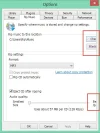
Have you also noticed a problem in Windows 8.. when you open some settings option windows of various not only windows programs, Windows 8 crops or chops off the content by opening a smaller window not large enough to display complete contents. Please see. attachment.
This not only happens in Windows Media Player, but also in many other programs like the Preference settings in Dreamweaver etc. In Windows 8.1, this does not happen, but only in my Windows 8.
I remember there a way in XP to control the size of these applets or settings-windows, but am unable to find these in Windows 8 or any solutions on the net.
Do you know a fix?
Have you also noticed a problem in Windows 8.. when you open some settings option windows of various not only windows programs, Windows 8 crops or chops off the content by opening a smaller window not large enough to display complete contents. Please see. attachment.
This not only happens in Windows Media Player, but also in many other programs like the Preference settings in Dreamweaver etc. In Windows 8.1, this does not happen, but only in my Windows 8.
I remember there a way in XP to control the size of these applets or settings-windows, but am unable to find these in Windows 8 or any solutions on the net.
Do you know a fix?