
 So... Is the Right Click menu open for customization? Like removing commands you don't want/need? Because always when I save pics to my HDD I click on Send Image... instead of Save As...
Solution
This is related to Firefox, not Windows so not sure why you're asking here but whatever. To get rid of certain menu entries (context menu or main menu) within Firefox, you need to download this add-on. Deselect the entries you want to be taken out and that is all there is to it
Menu Editor
Link Removed due to 404 Error
Menu Editor
Link Removed due to 404 Error

reghakr
Essential Member
- Joined
- Jan 26, 2009
- Messages
- 14,186
Yes, hang on............
ShellExView v1.45
Description
Shell Extensions are in-process COM objects which extends the abilities of Windows operating system. Most shell extensions are automatically installed by the operating system, but there are also many other applications that install additional shell extension components. For example: If you install WinZip on your computer, you'll see a special WinZip menu when you right-click on a Zip file. This menu is created by adding a shell extension to the system.
The ShellExView utility displays the details of shell extensions installed on your computer, and allows you to easily disable and enable each shell extension.
ShellExView can be used for solving context-menu problems in Explorer environment. For more information, read the following article: Link Removed - Invalid URL
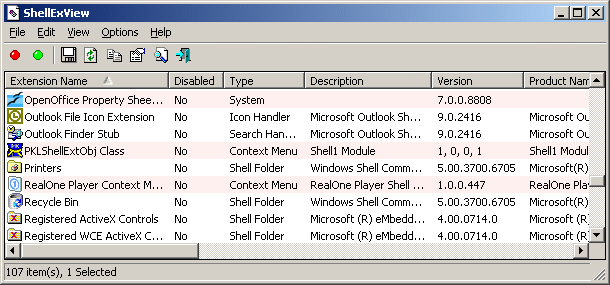
ShellExView v1.45
Description
Shell Extensions are in-process COM objects which extends the abilities of Windows operating system. Most shell extensions are automatically installed by the operating system, but there are also many other applications that install additional shell extension components. For example: If you install WinZip on your computer, you'll see a special WinZip menu when you right-click on a Zip file. This menu is created by adding a shell extension to the system.
The ShellExView utility displays the details of shell extensions installed on your computer, and allows you to easily disable and enable each shell extension.
ShellExView can be used for solving context-menu problems in Explorer environment. For more information, read the following article: Link Removed - Invalid URL
reghakr
Essential Member
- Joined
- Jan 26, 2009
- Messages
- 14,186
So I disabled the entries that didn't pop a warning
What do you mean by that?
Was some context menu giving you a warning?
Similar threads

- Article
- Replies
- 2
- Views
- 1K
- Article
- Replies
- 0
- Views
- 553
- Article
- Replies
- 0
- Views
- 2K
- Article
- Replies
- 0
- Views
- 860
- Replies
- 0
- Views
- 2K