📎 AI Summary:
The thread discusses customizing Windows 10 with a white theme, with the original poster sharing their experience of using Windows 10 Insider Build 1903 to achieve a fully white interface, including disabling live tiles and customizing transparency. Subsequent users show interest, with one expressing a willingness to try and others complimenting the aesthetic, notably sharing and requesting background images. Overall, the discussion is positive, focusing on the visual appeal of the white-themed Windows 10 setup.

Joey1394

Well-Known Member
Joined
Nov 12, 2018
Messages
55
Thread Author #1
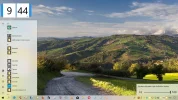
I am running the White theme in Windows 10. Mind you inside the 1903 build, which is possible with the Insider Program. I was tired of trying to get all things white. I became a Insider.

I have been stripping the menu from all the tiles for some time. Also, disable live-tiles too. The taskbar is slightly translucent, which can be done with Winaero or Translucent-TB.
 

Attachments

  • 2019-03-21.webp
    2019-03-21.webp
    288.5 KB · Views: 480

merin

New Member
Joined
Jun 6, 2019
Messages
1
Not my cup of tea. But I'll try it though.
 

Agent48

Well-Known Member
Joined
Apr 17, 2017
Messages
16
I like your back ground share please
 

Joey1394

Well-Known Member
Joined
Nov 12, 2018
Messages
55
Thread Author #4
I like your back ground share please

It's a 3840x1080 pic. You can crop off the first half...
 

Attachments

  • country road.webp
    country road.webp
    869.8 KB · Views: 432

Freya009

New Member
Joined
Feb 17, 2020
Messages
10
The White theme in Windows 10 looks very beautiful. I like it.